



















New product announcement email templates
Nine new product announcement emails and chat messages for manufacturers and distributors: launch note, sample offer, price list update and a reply to interest.
 By the PromptLab team24 October 20265 min read
A new product is a reason to write to your buyers, but only if the message is about them. A launch email that lists features and nothing else gets deleted. One that says "this grade replaces the one you buy every month, and here is how it differs" gets read.
These templates are written for reps who tell specific accounts about a new grade, pack or range. Each one is personal, one-to-one, and ends with a small next step such as a sample or a call. They are not mass mailings. Pick the accounts the product really fits, then write to them. Before you start, the new product launch checklist covers what to prepare, and how to turn samples into orders covers what comes after.
Announcing the product
Subject: New: [Product], a [Short benefit] alternative to [Current product]
Hi [First name],

You've been buying [Current product] from us since [Year], so I wanted you to hear about this first. We've just launched [New product]. Compared with [Current product], it [Main difference, for example cures faster / has a lower VOC content / comes in a 20 kg pack].

I've attached the technical data sheet. If you'd like to try it, I can send a [Sample size] sample this week, free of charge. Should I add your address to a sample request?

[Your name]
Use it for accounts that already buy a related product. Name the product they buy, so the note is clearly meant for them.
Subject: [Product] for [Application]
Hi [First name],

We've launched [New product], made for [Application, for example outdoor timber coatings]. The reason I'm writing to you is [Reason, for example you mentioned wanting a faster-drying finish at our last call].

Key points: [Point one], [Point two], [Point three]. The data sheet is attached. If it looks relevant, I can arrange a short call with our technical team on [Day].

[Your name]
Use it where the product fits something the buyer told you before. Quote their own words.
Hi [First name], [Your name] from [Company]. We've just launched [New product], a [Short description] that could replace [Current product] for you. It [One benefit]. Shall I send the data sheet and a sample?
Use it for buyers who already chat with you on WhatsApp. One benefit, one question.
Hello [First name], one more thing while we're talking about [Topic]: we've launched [New product], which [One benefit]. If it's of interest I'll send the data sheet here. Would you like a sample too?
Use it as a reply when a buyer has already messaged your company bot. Telegram needs the buyer to write first, so treat it as a reply, not a first message.
Supporting the launch
Subject: A sample of [Product] for your trial
Hi [First name],

As promised, I'd like to send you a sample of [New product]: [Quantity] in [Packaging]. To arrange it, I need your delivery address and the application you'll test it in, so I can include the right handling notes.

Once it arrives, I'll check in after [Number] days to hear how the trial is going.

[Your name]
Use it when a buyer shows interest. Log the sample request straight away, so the follow-up is not forgotten.
Subject: [Product]: pricing and availability from [Date]
Hi [First name],

[Product] is available to order from [Date]. Standard pack: [Pack size], minimum order [MOQ], lead time [Lead time].

Your price is [Price] per [Unit], based on your current price list. I'll add it to your list so it appears on your next quote. Want me to send a quote for your usual quantity of [Quantity]?

[Your name]
Use it once the product is orderable. Use the buyer's own price level, not a general launch price. Read what is MOQ if your minimums need explaining.
After the announcement
Subject: Re: [Product]
Hi [First name],

I wanted to check you saw my note about [New product]. If it's not relevant right now, that's fine. Tell me and I'll stop mentioning it.

If it might be, the quickest next step is a sample. It takes one reply from you.

[Your name]
Use it about a week later. Give them an easy way to say no.
Subject: Re: [Product], your questions
Hi [First name],

Thanks for asking. Here are the answers:

- [Question one]: [Answer]
- [Question two]: [Answer]
- [Question three]: [Answer]

The full data sheet is attached. If it helps, I can set up a call with our technical team on [Day] to go through your application.

[Your name]
Use it when interest turns into questions. Answer every question in the order they asked it.
Subject: Re: [Product]
Hi [First name],

Understood, and thanks for letting me know. [Current product] is clearly doing the job.

I'll leave it there. If your needs change, or you ever want a second option for supply security, [New product] will still be available and I'm glad to send a sample.

[Your name]
Use it when the answer is no. Leave the door open and make a note on the account.
How to choose who gets which message
- Start with accounts that already buy something close. They know your quality and have a reason to read.
- Use what you know. An account that asked for a faster cure last quarter is the right first email for a faster-curing grade.
- Write one at a time. This is one-to-one selling. Change the first line for every buyer.
- Keep the ask small. A sample or a data sheet is a better first step than a call or an order.
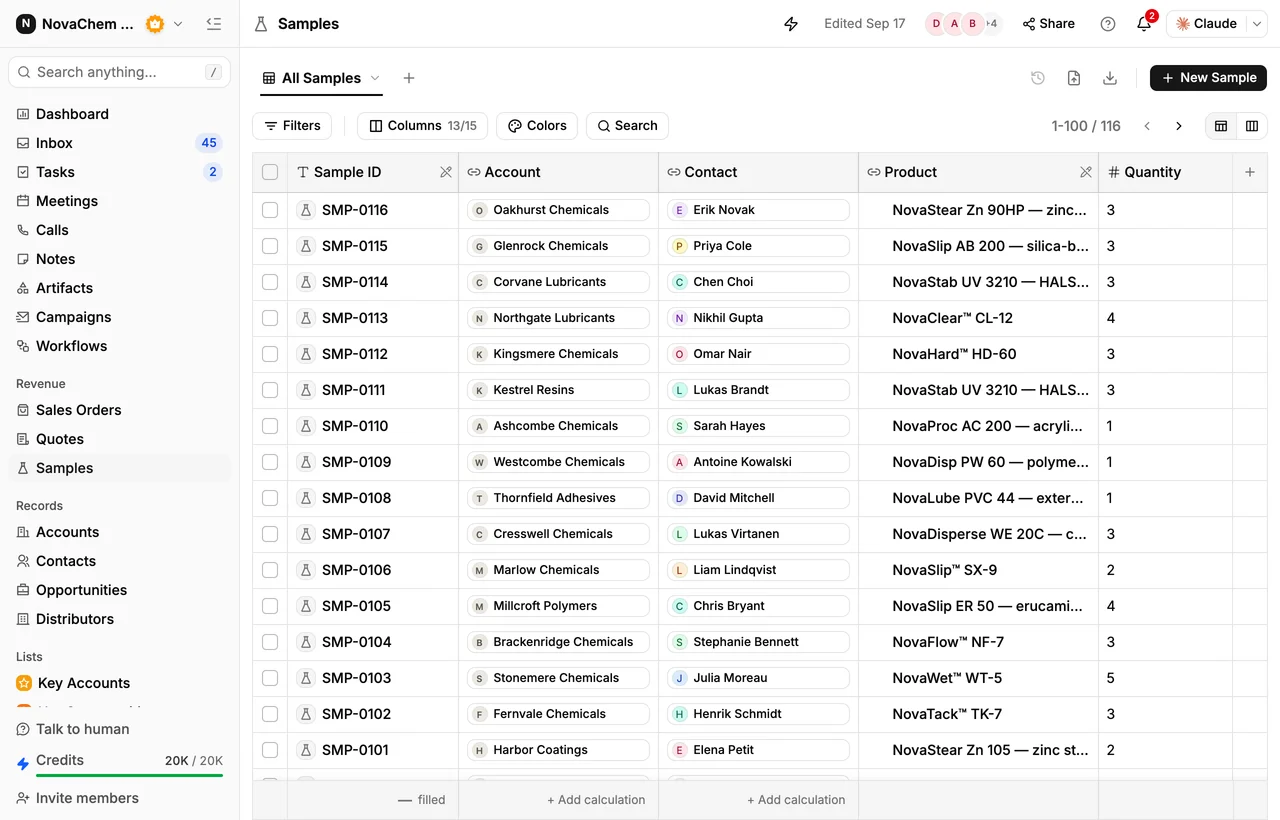
Send them from your CRM
Announcements work when you remember who asked for what. A note from a meeting last spring, a sample that was good but a bit slow, a buyer who wanted a smaller pack: all of that is in your history if your CRM keeps it.
Frequently asked questions
How do I announce a new product to existing customers?
Write to the accounts that buy something close to it, not to everyone. Say how it compares with what they buy now, attach the data sheet, and offer a sample as the next step.
Should I send a new product announcement by email or WhatsApp?
Use whichever channel the buyer already uses with you. Email suits a data sheet and detail. WhatsApp suits a short note and a quick question. Many reps send a short message on WhatsApp and the data sheet by email.
What should a new product announcement include?
What the product is, who it is for, how it differs from what the buyer uses now, one or two numbers that matter (pack, MOQ, lead time), the data sheet, and one clear next step.
How many follow-ups should I send?
One reminder about a week after the first note is enough. If there is still no reply, leave it and come back when you have something new, such as a trial result or a price break.
Should I offer a sample with a new product?
Yes, to the accounts the product fits. A sample turns interest into a test the buyer runs on their own process. Log each one as a sample request, so the follow-up and the result stay on the account.