



















CRM Autofill: let AI fill a column for every record
Add a field to any table, describe in plain words what it should contain, and PromptLab fills it for every row — and for every new record from then on.
CRM Autofill turns a column into something the AI maintains. You add a field to Accounts, Contacts, Opportunities or any other table, write instructions for what it should hold, and PromptLab computes it for each record from the data already in your workspace. The work that used to be a research task per account — what industry is this, which region does it sell into, what's the one-line summary of where we stand — becomes a column that fills itself.
How CRM Autofill works
An autofilled field is an ordinary field with AI attached. You choose the field type as usual, then describe what the AI should compute for each row and which data it should use. PromptLab runs those instructions per record, writes the answer into the column, and can re-run them whenever you ask.
Autofill reads what your workspace already holds — the record's own fields, its contacts, its meetings, notes and activity — so the quality of the result follows the quality of the instructions and the data behind them.
Add an autofilled field
Open the table
Go to the table you want the column on — Accounts, Contacts, Opportunities, or any custom object — and scroll the grid to the + at the end of the column headers.
Configure the field
Choose Configure, give the field a Label, and pick its Field Type. Text and Long Text suit summaries; Select and Status suit classifications; Number and Currency suit anything you want to sum or chart later.
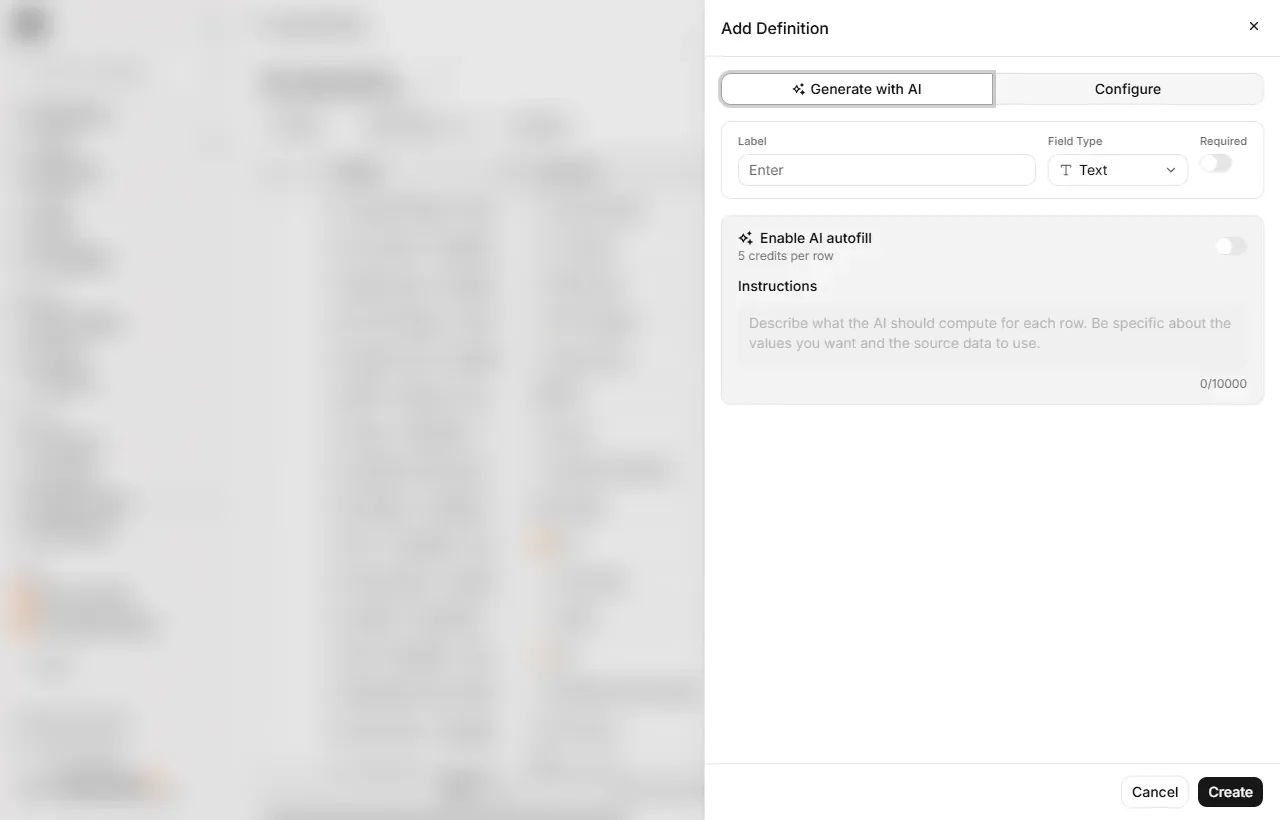
Turn on AI autofill and write the instructions
Switch on Enable AI autofill and write the Instructions. Be specific about both the value you want and the source data to use — "classify this account's primary market as Coatings, Polymers, Rubber or Other, based on its industry and website" beats "what market is this".
Fill the existing rows
From the column's menu, run Autofill all rows to compute every record, or Autofill empty rows to fill only the gaps. The run reports how many rows it processed, and you can cancel it while it's going.
Keep new records filled
Turn on Autofill on new records and any record created from then on runs the instructions for that column on its own.
Autofill spends credits per row — the field editor shows the rate before you run anything, and your remaining balance sits in the top bar. Filling a large table is a real cost, so it's worth testing your instructions on the empty rows first.
Not sure how to structure the fields at all? The Generate with AI tab takes a description of what you want to track and proposes the field definitions for you.
What it's good for
| Column | Instructions along the lines of |
|---|---|
| Primary market | Classify the account into one of your segments from its industry and website |
| Account summary | One paragraph on who this customer is and what they buy |
| Region | Derive the sales region from the country on the record |
| Relationship status | Summarise where things stand from the latest meetings and notes |
Autofill writes into the column every time it runs, so anything typed there by hand can be overwritten. Keep manual notes in their own field, separate from the one AI maintains.
Syncing with an external CRM
If your team also runs Salesforce, HubSpot or Acumatica, connect it under Settings → Apps → CRM & ERP to bring those accounts, contacts and deals into PromptLab. Apollo connects there too, for enriching contacts with your own API key.
Custom integrations with other CRMs or an internal ERP require the Business plan. Contact your PromptLab account manager to scope the integration and set up a secure data sync.