



















Quote checklist: what to check before you send
A quote checklist for B2B product sales: customer details, grades, units, price list, margin, validity, Incoterm, lead time, payment terms and sign-off.
 By the PromptLab team16 October 20265 min read
A quote is a promise in writing. Once the buyer says yes to it, you are held to the price, the grade, the quantity and the delivery date on the page. A wrong unit or an expired price list costs more than the minute it takes to check, and the cost usually lands on your margin.
Use this checklist in the last two minutes before you press send. It suits anyone who quotes physical products: a coatings rep, a chemical distributor, a packaging manufacturer. For how to build the quote itself, read how to write a sales quote. For the wording of the covering email, see our quotation email templates.
Check who the quote is for
Start with the boring part. Most embarrassing quotes go to the wrong entity or carry the wrong address.
Customer details
Check what you are selling
This is where quantity and unit errors hide. A price per kilogram quoted against a quantity in tonnes is a classic.
Products, grades and quantities
Check the price and the margin
Do this against the customer's agreed terms, not against what you remember.
Price and margin
Check the terms
Terms are where a good price turns into a bad deal. Say them plainly, in the same place on every quote.
Validity, delivery and payment
Check it before it goes out
The last group is about sign-off and follow-up, because a quote with no next step goes quiet.
Approval and sending
How PromptLab helps
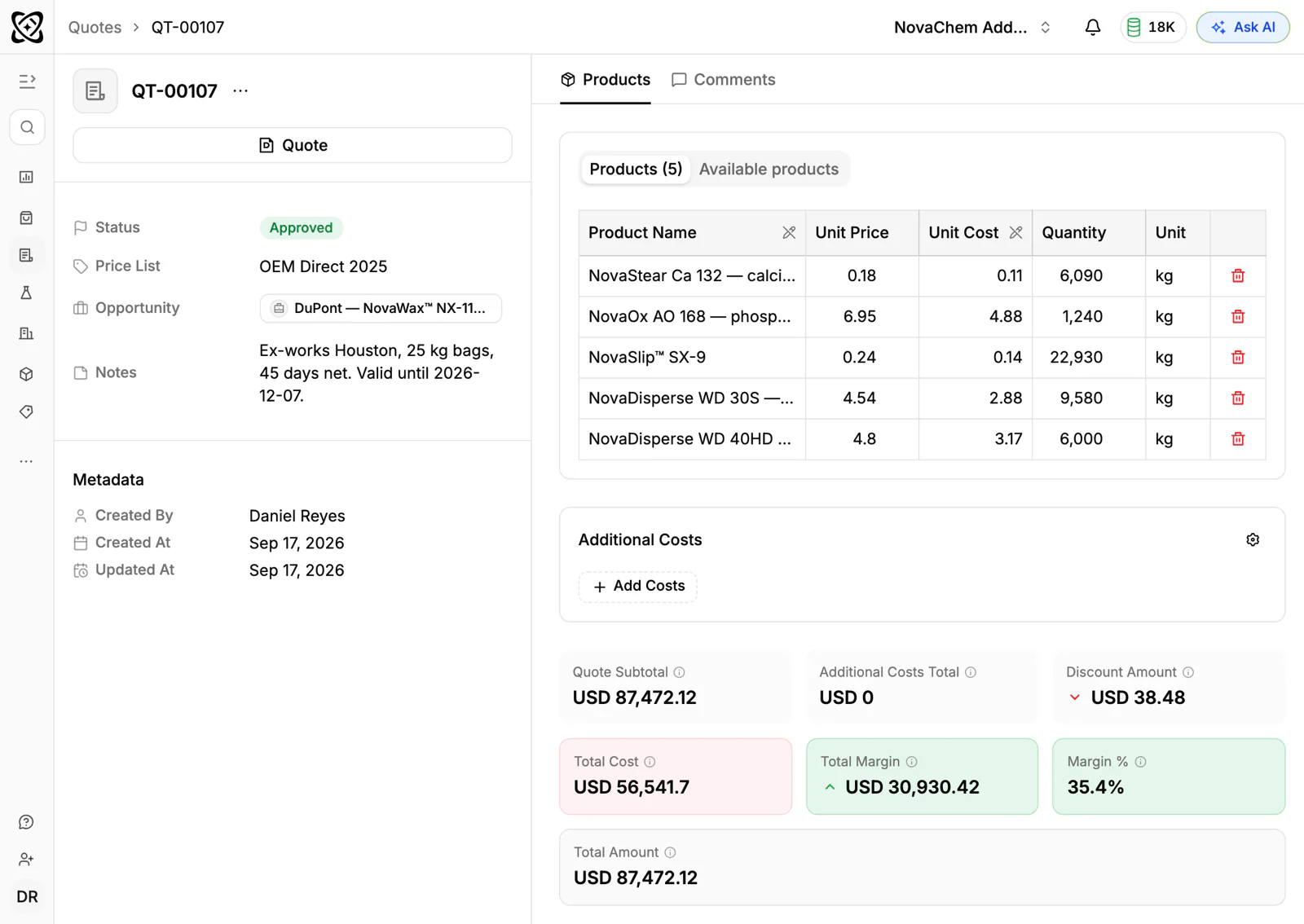
Most of this checklist is about not trusting memory. In PromptLab you build the quote on the deal. When it is linked to the customer's price list, it takes that list's prices, so nobody retypes a number from an old email. Each line shows its margin, which makes a thin line obvious before the buyer sees it.
Quotes move through statuses (Draft, Pending, Approved) and attach to the deal automatically. A workflow can create a task or post to Slack when a quote changes status, which covers the follow-up item above. Read more on the quotes and samples page.
The items people skip
- The validity date. An open-ended quote becomes a free option for the buyer while your costs move.
- The Incoterm. "Delivered" can mean three different things to two different people. Name the term and the place.
- Unit conversions. If the buyer thinks in tonnes and you price in kilograms, show both.
- Margin per line. A healthy total can hide one line sold at a loss.
- The follow-up task. The quote is not finished until the next step has a date.
Frequently asked questions
What should be on a sales quote?
Customer details, a quote number and date, each product with grade, quantity, unit and price, the currency, a validity date, delivery terms with the Incoterm, lead time, payment terms and any documents you will supply. Our guide on how to write a sales quote goes through each part.
How long should a quote be valid for?
Long enough for the buyer to decide, short enough that your costs will not have moved. Many teams use 14 or 30 days, but the right answer depends on how fast your input prices change. Whatever you choose, put the date on the quote.
Should the quote show my margin to the customer?
No. The margin is for your team, so check what your quote document prints before you send it. In PromptLab you see the margin on each line while you build the quote.
Who should approve a quote before it is sent?
Agree a rule before you need one, such as any quote over a set value or under a set margin. Whoever owns pricing signs off, and the status on the quote shows that it has been done.
How soon should I follow up on a quote?
Within two or three working days, unless the buyer gave a date. Our quote follow-up email templates have wording for each stage.