



















Connect PromptLab to email, calendar, and ERP tools
Connect PromptLab to your email, calendar, messaging, productivity, and ERP tools to capture every customer interaction automatically.
PromptLab connects to the tools your sales team already uses — email, video conferencing, messaging apps, spreadsheets, and ERP systems. When you set up these integrations, PromptLab captures your conversations and data automatically, so your CRM stays up to date without manual entry.
All integrations are managed from Settings → Apps. Salesforce and HubSpot connect from the same place. Workflow webhooks require the Professional plan or above; MCP access for your AI tools is included on every plan. See Webhooks, workflows & MCP.
What you can connect
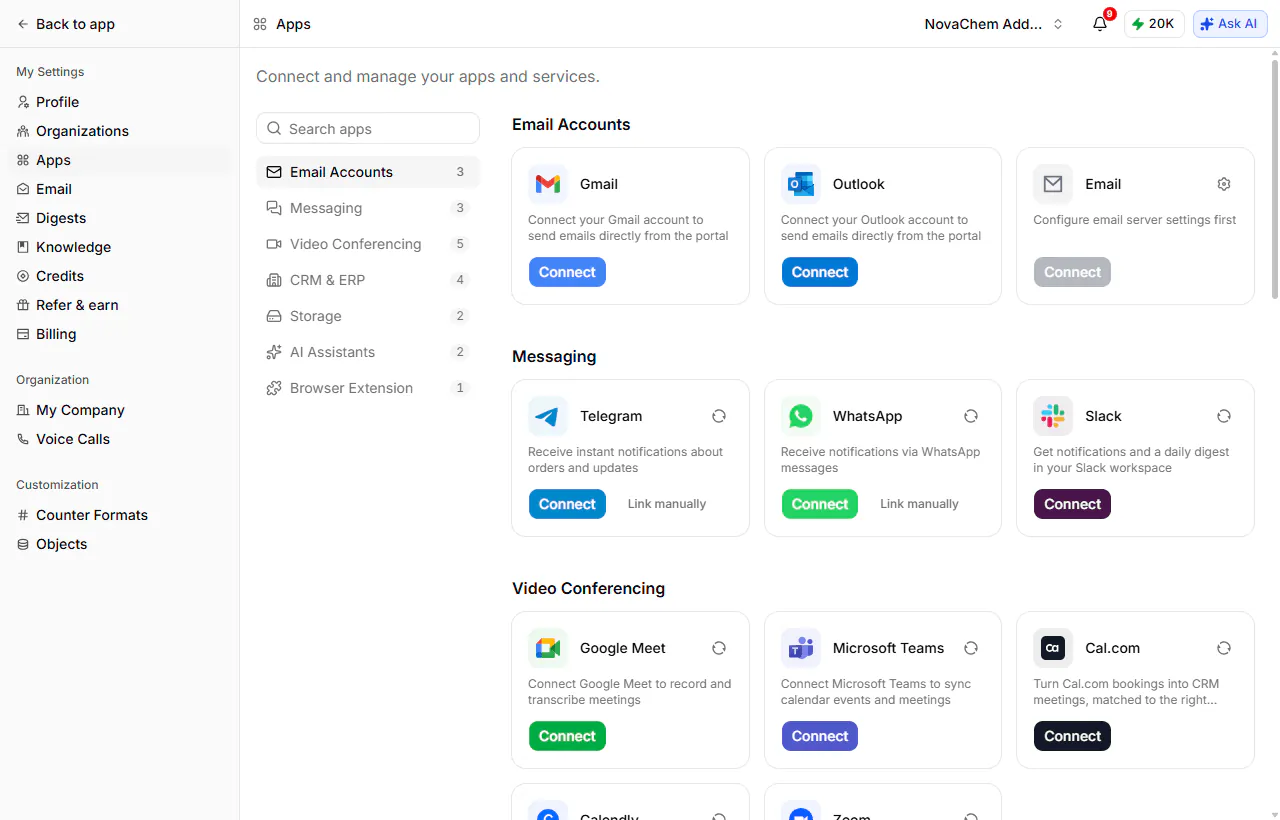
Everything lives under Settings → Apps, grouped the same way it is here.
Email accounts
Gmail
Connect your Google account to send email from PromptLab and capture the threads against the right account and opportunity.
Outlook
Connect your Microsoft 365 mailbox to send and capture email the same way. Pairs with Microsoft Teams.
Any other mailbox
Configure your own mail server and connect a mailbox that isn't Gmail or Outlook.
Video conferencing
Google Meet
Records and transcribes Meet calls, then writes the summary, objections and next actions into the conversation record.
Zoom
Records Zoom meetings and produces the transcript and AI summary automatically.
Microsoft Teams
Syncs your Teams calendar events and meetings, and captures the calls.
Cal.com and Calendly
Turns bookings into CRM meetings, matched to the right contact — so an inbound booking arrives as a record, not an email.
Messaging
Messaging apps carry notifications out of PromptLab: order updates, alerts, and a daily digest.
Slack
Notifications and a daily digest in the channel your team already watches.
Telegram
Instant notifications about orders and updates.
The same notifications over WhatsApp, for teams who live on mobile.
CRM and ERP
Salesforce
Syncs your Salesforce accounts, contacts, leads and opportunities into PromptLab.
HubSpot
Brings HubSpot companies, contacts and deals into the same pipeline.
Acumatica
Syncs Acumatica customers, contacts, leads and opportunities.
Apollo
Enriches contacts using your own Apollo.io API key. Keys are stored encrypted.
Storage, AI assistants, and the browser
Google Drive and OneDrive
Attach files straight from your Drive or OneDrive instead of downloading and re-uploading them.
Claude and ChatGPT
Use your PromptLab data inside your AI assistant over MCP. See Webhooks, workflows & MCP.
PromptLab for Chrome
Save LinkedIn leads and run outreach without leaving the page.
Running an ERP that isn't listed? The Business plan includes custom CRM and ERP integrations with dedicated migration support. Contact us to discuss your setup.
Setting up integrations
All integrations are configured from a single location in your account settings.
Open Apps settings
Log in to PromptLab and navigate to Settings → Apps. The categories down the left — Email Accounts, Messaging, Video Conferencing, CRM & ERP, Storage, AI Assistants, Browser Extension — each hold their own cards.
Connect your first integration
Click Connect next to the integration you want to enable. For OAuth-based tools like Gmail, Outlook, and Google Meet, you'll be redirected to the provider's authorization page. Sign in with the account you use for work and grant the requested permissions.
Configure what gets captured
A connected card shows a settings control where the integration has options — which mailbox to sync, or how meetings are recorded. Messaging apps can also be linked manually if you'd rather not run the OAuth flow.
Repeat for your team
Each team member needs to connect their own integrations. Share these steps with your team after you've invited them to the workspace.