



















CRM for plumbing supplies distributors
How plumbing supplies distribution sells, from trade counters and installers to housebuilders and project quotes, and a CRM setup for accounts and price lists.
 By the PromptLab team24 October 20267 min read
A plumbing supplies distributor needs a CRM that handles a plumber who pops in every morning and a housebuilder who quotes a hundred bathrooms in the same week. The first wants the right fitting at the right price while the van is outside. The second wants a complete quote, a delivery plan and a supplier who will still be there in a year.
In PromptLab, each plumber, installer or builder is an account with its own price list, project quotes sit on deals, and sales orders show what was actually bought. The wider distributor view is on the distributors page.
How does a plumbing supplies distributor actually sell?
The customer list is mixed. Plumbers and heating engineers are the daily trade, often sole traders or small firms. Installers and contractors work on larger jobs. Housebuilders and developers buy for new developments, often by specification. Maintenance and facilities teams keep buildings running. Some distributors also sell bathroom ranges to showrooms and retail customers.
Trade customers expect a counter, a phone line and often a delivery van. They compare you with the merchant down the road on three things: do you have it, what does it cost me and how quickly can I get it. Rep visits matter for the bigger accounts, who want a face and a contact when something goes wrong on site.
Projects behave differently. A builder or contractor sends a bill of quantities, and you price it. The quote may be revised several times, and the order is released in phases as the build progresses.
Why are customer price lists the core of the business?
Plumbing supplies run on trade discounts. The same copper fitting, valve or boiler spare can carry a different price for a large contractor, a regular plumber, a new account and a retail counter customer. Brand and product group often decide the discount, so one account may have several discount levels at once.
Hold these in a customer price list for each account or customer type. A rep quoting from memory will give away margin or lose the job. See how to manage customer price lists.
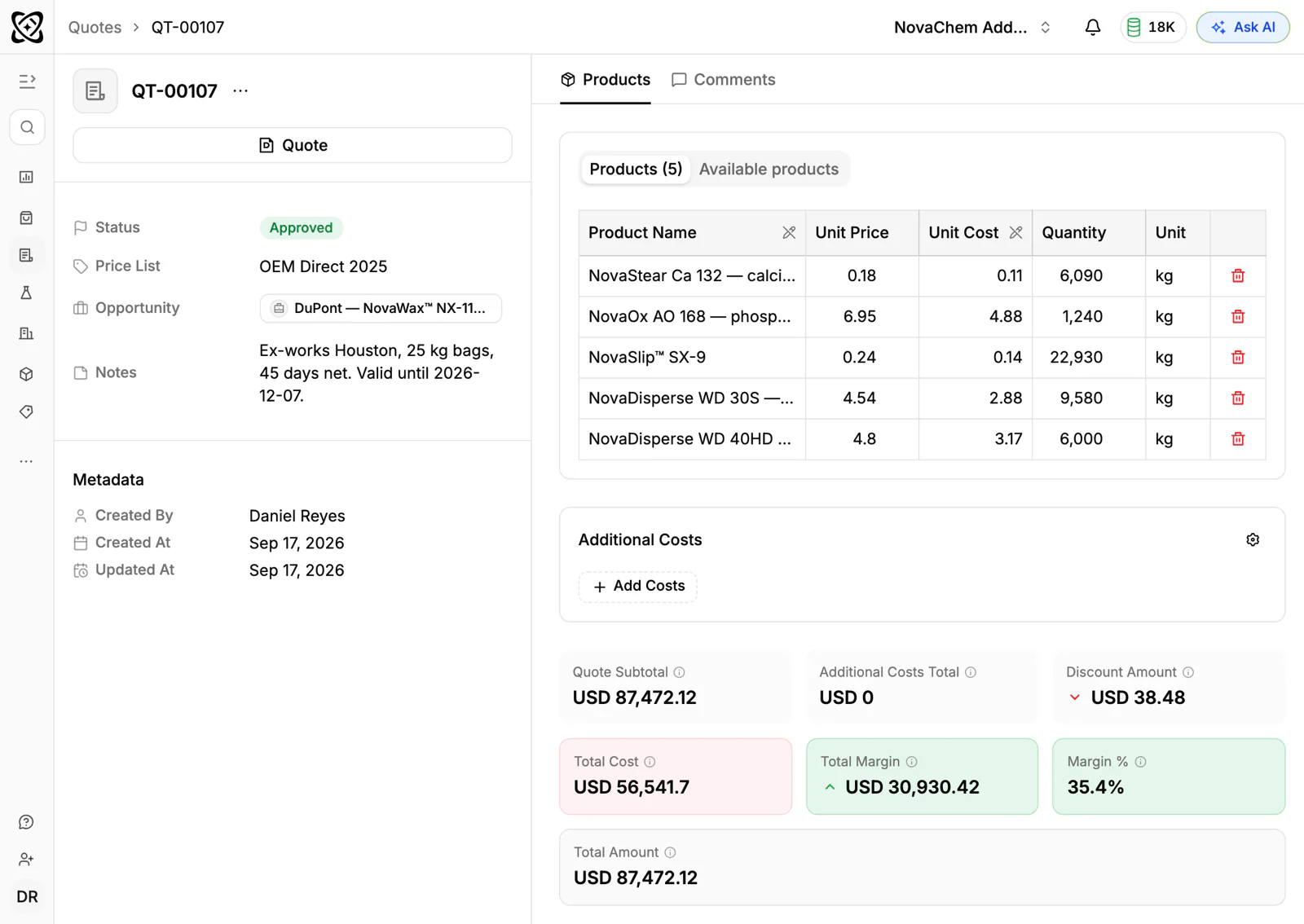
Raw material costs move, and manufacturers change their lists. A price update is a project of its own: new list prices come in, account discounts are applied, and customers on contracts need notice. Keep the update dates and the customers affected in notes on the account. In PromptLab, put the new prices in a new price list and switch the old one to inactive, because editing a list's prices reprices every quote linked to it.
How do approvals and specifications come into it?
Plumbing products sit in regulated systems. Water fittings, gas appliances and heating products usually have to meet the rules of the market they are sold in, and the products carry markings or approvals that show it. A contractor or specifier on a bigger job may ask for the approval documents, data sheets and installation instructions before they will accept a product.
A distributor keeps those documents for the ranges it sells. In the CRM, the useful thing is to record what you sent to which specifier, and which products a builder has specified on a development. When a builder has specified your product for a development, the order is much more likely to come to you. See what is a technical data sheet.
How do projects, phased orders and returns work?
A housebuilder's project is not a single order. It is a quote, then call-offs: first fix, second fix, bathroom suites, heating. Each release is a delivery to site. The agreed prices cover the lot, and the rep has to keep the site manager on your account for every phase.
Returns are part of the trade. Unused fittings go back, wrong sizes are swapped, and damaged goods are claimed. A customer with many returns may be ordering in a hurry from the wrong catalogue, and a rep can help. Note open returns and disputes on the account.
Stock matters in a way a CRM can't solve. If the item is not on the shelf, the plumber goes next door. What the CRM can do is show a rep which accounts are most exposed to a stock-out, because they buy that range every week.
What pipeline stages fit plumbing supplies?
PromptLab has one deal pipeline with stages you set. Trade account openings and project quotes are different jobs, so use a deal field for the type and save a view for each. Counter sales don't need a deal. They are sales orders on the account.
| Stage | Entry condition |
|---|---|
| Lead | A plumber, contractor or builder has been identified |
| Account opened | Terms, credit limit and a price list are agreed |
| First orders | The customer has placed orders |
| Project enquiry | A builder or contractor has sent a bill of quantities |
| Project quote | A quote is with the customer |
| Specified | The customer has named your products on the project |
| Approved | The quote is marked Approved |
| Call-offs | Phased orders are being released |
When a project is lost, pick the loss reason. Price, Timing and Competitor tell you different things about where to improve, and a note on the deal can add the detail, such as the boiler range or delivery to site.
What must the CRM track?
- A price list per account, by brand and product group, with the discount level.
- Credit terms and limits, as account fields.
- Projects, each as a deal with its quote revisions, the site, the contact and the phases.
- Specified products, so a rep knows which developments name your range.
- Documents sent, such as data sheets and approval papers, with the date.
- Order history by product group, to see which ranges an account buys and stopped buying.
How do you set this up in PromptLab?
- 1
Add the stages and a deal-type field
Put the stages above in your pipeline and add a deal field for trade account or project. Save a view for each so counter reps and project reps see their own deals.
- 2
Build price lists by customer type
Create customer price lists for contractors, regular plumbers, new accounts and counter customers, then pick the right one when you build each quote. Give large accounts a list of their own with their agreed prices.
- 3
Quote projects from the price list
Build each project quote from your products and the customer's list, with line discounts, and send the PDF or the public link. Write the validity and the delivery assumptions in the Notes field, since there is no expiry field.
- 4
Create sales orders for each call-off
Create a sales order as its own record for each release, so the account shows what has gone out so far. Invoices are created from the sales order.
- 5
Automate the next step
Build a workflow: when a quote changes status, create a task for the rep, and when a deal moves to Specified, create a task for the deal owner to confirm the first call-off date.
- 6
Put every message on the account
Plumbers often send a photo of a part on WhatsApp. Connect your WhatsApp Business number and your company Telegram bot, so the thread sits on the account in the shared Inbox.
How does PromptLab compare for plumbing supplies sales?
Swipe the table sideways to see every CRM →
| Checked on 30 September 2026 | PromptLab |  Zoho CRM Zoho CRM |  Pipedrive Pipedrive |  Dynamics 365 Dynamics 365 |
|---|---|---|---|---|
| Pricing | ||||
| Paid plans, a month | $11.99 – $99per seat | $14 – $52per seat | $14 – $79per seat | $65 – $150per seat |
| Number of plans | 3 | 4 | 4 | 3 |
| Free trial | ||||
| Billing | Billed monthly | Billed annually | Billed annually | Billed annually |
| Import from CSV and Excel | ||||
| Sales management | ||||
| Deal pipelines | ||||
| Quotes | From$23/month | From$59/month | ||
| Sales orders | From$23/month | |||
| Sample tracking | ||||
| Price lists | From$23/month | |||
| Meetings and calls | ||||
| Meeting recording and transcripts | Via marketplace | From$105/month | ||
| AI meeting summaries | From$105/month | |||
| AI follow-up email drafts | From$23/month | From$59/month | From$105/month | |
| Meeting scheduler and call dialer | From$23.99/month | Via marketplace | From$39/month | From$105/month |
| AI and automation | ||||
| CRM fields filled in from calls | From$40/month | From$150/month | ||
| Connect Claude or ChatGPT (MCP) | From$150/month | |||
| Workflow automation | From$39/month | |||
| API and webhooks | From$23.99/month | |||
| Conversations | ||||
| Gmail and Outlook email sync | From$39/month | |||
| WhatsApp conversations | From$39/month | Add-on | ||
| Telegram conversations | ||||
| Save LinkedIn profiles | From$23/month | Via marketplace | Add-on | |
| Privacy and security | ||||
| Single sign-on (SSO) | From$99/month | From$40/month |
Zoho CRM is the value pick, with paid plans from $14 a user a month, billed annually, and quotes, orders and price books from $23, which covers the trade side well. It doesn't model samples. Pipedrive has a pipeline a field rep learns quickly, from $14 a seat a month, billed annually, but it has no price list per customer, and quotes wait for Premium at $59.
Dynamics 365 Sales suits a Microsoft shop, with quotes, price lists and orders built in from Professional at $65 a user a month, billed annually. Meeting recording starts on Enterprise at $105, and it has no sample tracking. See the Zoho CRM and Dynamics 365 Sales comparisons.
Frequently asked questions
What should a CRM for a plumbing supplies distributor include?
It should hold a price list per customer, quotes, sales orders and the contacts at each firm and site, with chat channels in one inbox. PromptLab includes these on every plan, from $11.99 per user per month.
Can the CRM handle trade discounts by product group?
Yes. Keep a customer price list for each account or customer type with its discount levels, and quote from it. Line discounts can be added on top for a specific job.
How do I manage a phased housebuilder project?
Make the project a deal with the quote attached, then create a sales order for each call-off. The account shows what has been delivered, and invoices are created from each sales order.
Does it replace my stock and counter system?
No. Live stock, counter sales and branch inventory stay in your own system. The CRM holds the customer side: prices, quotes, orders, contacts and conversations.
Is there a free trial?
Basic and Professional come with a 14-day free trial. There is no free plan.