













How to manage customer-specific price lists
How to set up, update and review customer-specific price lists for B2B product sales, so every quote uses the agreed price and protects your margin.
 By the PromptLab team6 October 20265 min read
To manage customer price lists, keep one list per customer or segment, store it where quotes are built, give each list an owner and a review date, and quote only from the list. That is the whole discipline. When prices live in a shared spreadsheet and a rep's memory, they drift, and every drift costs you margin or an argument.
If you sell chemicals, plastics, packaging, ingredients or industrial supplies, you probably have customers on different prices for the same product: volume agreements, distributor terms, contract rates. This guide shows how to organise them so a quote is right the first time.
What a customer price list is
A customer price list is the set of products and prices you have agreed with a specific customer or group of customers. It differs from your catalogue, which holds your standard list prices. The customer price list glossary entry has the short definition.
A good list holds, per product: the code, the unit, the price, the currency and the validity dates. It may also hold volume breaks, such as a lower price above 5 tonnes.
Why price lists go wrong
Three things happen again and again:
- Old prices survive. A raw material rises, the catalogue is updated, but the contract price is still in a rep's old quote.
- Reps guess. With no list at hand, they copy the last quote, which may have carried a one-off discount.
- Nobody owns it. Every update is "someone's job", so it is nobody's.
The cost is quiet. You discover it when a customer quotes your own old price back to you.
Step by step: set up price lists
- 1
Decide how you group customers
Per customer is the most precise. Per segment, such as "distributors", "key accounts" and "spot buyers", is easier to maintain. Many teams start with three or four segment lists and add customer-specific ones only for big contracts.
- 2
Pull prices from your real agreements
Use the signed contract or the last accepted quote, not memory. Record the product code, unit, price, currency and valid-from date.
- 3
Set the price from cost plus a target margin
Know the unit cost of each product. Say a resin costs you $1.50 a kg and your target margin for key accounts is 15% of the price. The list price is then $1.50 divided by 0.85, about $1.76 a kg.
- 4
Give every list an owner and a review date
One person is responsible for each list, and each has a date when it is reviewed, often quarterly or when a major input price changes.
- 5
Quote from the list every time
Name each list after its customer or segment so reps pick the right one, and link it to every quote for that customer. Quote only from the list, and make a discount outside it a deliberate decision.
- 6
Record changes with a reason
When a price moves, note why: a raw material change, a volume commitment, a renewal. A year later, you will want to know.
Updating prices without losing customers
Price rises are the hardest moment for a list. Give notice, put the new price and the effective date in writing, and quote the new list for any order after that date. The price increase letter templates cover the wording.
Keep a record of which customers have been notified. A customer who learns of a rise on the quote, rather than in a letter, may feel ambushed, even if the quote is clear.
Protect your margin
A price list is also a margin control. Check each list against current unit costs at least every quarter. If a cost has risen and the list has not, the margin on every future order is quietly lower.
Look at the lowest-margin lines first. If a customer is on a price near your cost, decide whether the volume justifies it. The margin and markup calculator helps you test prices before they go on a list.
Price list hygiene
How PromptLab helps
In PromptLab you create a price list and link it to the quote. Available products then lists only what that price list allows, at the prices you set, so reps quote from the products the customer is entitled to. Unit cost sits beside unit price on every line, and the summary shows your margin before you send.
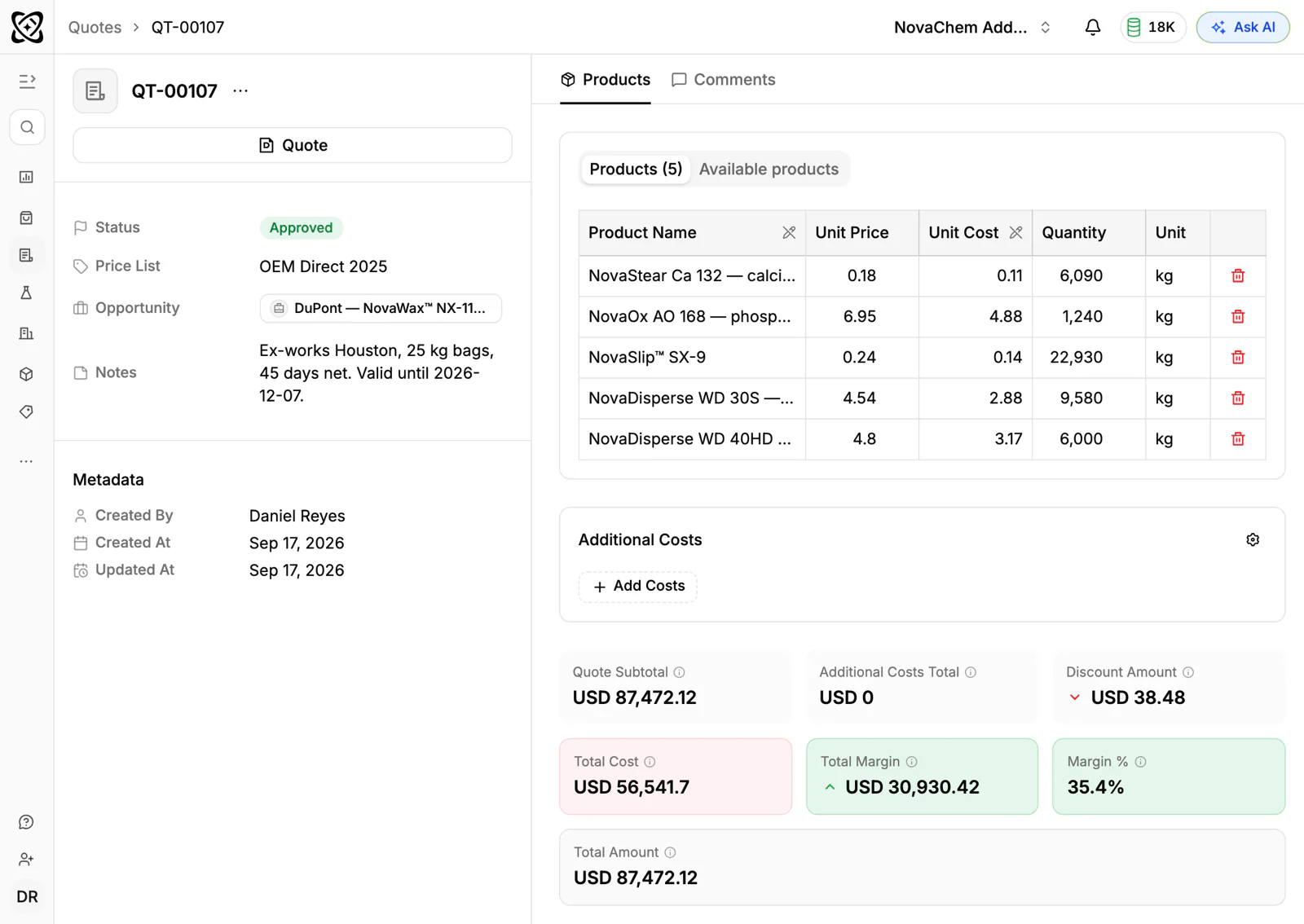
Because each quote attaches to its deal, you can see what you quoted before without hunting through emails. Start new customers on the nearest segment list. Customer price lists, quotes and sales orders are on every plan, so a small team does not need a separate pricing tool.
If you need your data in, import from CSV or Excel. See how to write a sales quote for what goes around the prices, and the quotes and samples page for the whole flow. Plans are on the pricing page.
Frequently asked questions
What is a customer-specific price list?
It is a list of products and agreed prices for one customer or segment, separate from your standard catalogue. It records what you promised, so every quote for that customer uses the same prices.
How many price lists should we have?
Start with three or four segment lists, such as distributors, key accounts and spot buyers. Add customer-specific lists only where a contract needs them. More lists mean more review work.
How often should price lists be reviewed?
Quarterly is a common rhythm, and sooner when a key raw material changes in price. Set a review date on each list so the task is visible.
How do I change prices without upsetting customers?
Give written notice, state the new price and the date it takes effect, and explain the reason. Honour the old price on orders already quoted within their validity date.
How do I move existing price lists out of spreadsheets?
Clean them up first: one row per product with its code, unit, price, currency and valid-from date, and product codes that match your catalogue. PromptLab imports from CSV and Excel, or a file you pick from Google Drive, so a tidy sheet is the right starting point.