













CRM for industrial distributors
How industrial distribution sells, from branch reps and account pricing to reorders and quotes in hours, and a CRM setup that keeps up with a long catalogue.
 By the PromptLab team6 October 20265 min read
An industrial distributor needs a CRM that can quote fast from account-specific prices, remember what each customer reorders and give every branch rep the same view of the account. The catalogue may run to tens of thousands of SKUs, but the sale is usually decided by who answers the enquiry first.
In PromptLab, each customer's price list feeds the quote, the approved quote becomes the sales order, and WhatsApp enquiries land on an account every branch can see. The short version is on the distributors page.
How does an industrial distributor actually sell?
A maintenance buyer at a plant needs bearings, seals, fasteners or safety gear. Often it is urgent, and the buyer will message two or three suppliers at once. The first complete answer usually gets the order.
Business arrives through several channels at the same time:
- Counter and phone orders at the branch, from regulars who know the part number.
- Email and WhatsApp enquiries with a photo of a worn part or a list of items.
- Outside reps who visit plants, walk the stores and agree account terms.
- Tenders and annual supply agreements with larger sites, priced for a set period.
The same customer can use all four, which is how information gets lost between the branch, the outside rep and head office.
Why do account pricing and reorders matter most?
Industrial distributors rarely sell at list price. A plant on an annual agreement gets one discount structure, a small workshop another, and a contractor a third. If a rep quotes from a spreadsheet, the wrong price goes out sooner or later.
Reorders are the other half. A good share of the revenue comes from the same items bought again, and the risk is a customer who quietly moves one product line to a competitor. A rep who can see "this account bought 200 filters every quarter and has not for two quarters" can pick up the phone before the loss is complete.
What pipeline stages fit a distributor?
Distributors run two motions: winning new accounts and growing existing ones. Use a pipeline for each.
New account pipeline
| Stage | Entry condition |
|---|---|
| Lead | A plant or workshop is worth a visit |
| First visit or call | Contact made with a buyer or maintenance lead |
| Account set up | Credit terms and a price list agreed |
| First order | A quote became a sales order |
| Growing | A second product line has been added |
Quote pipeline for existing accounts
| Stage | Entry condition |
|---|---|
| Enquiry received | A request arrived by email, WhatsApp or phone |
| Quote sent | Priced from the account's list |
| Chased | A follow-up task was done |
| Won or lost | An order was placed, or the reason is noted |
The quote pipeline is where hours matter, so give it a task for every quote not answered within a day.
What must a distributor CRM track?
- Account price lists, with a list for each customer.
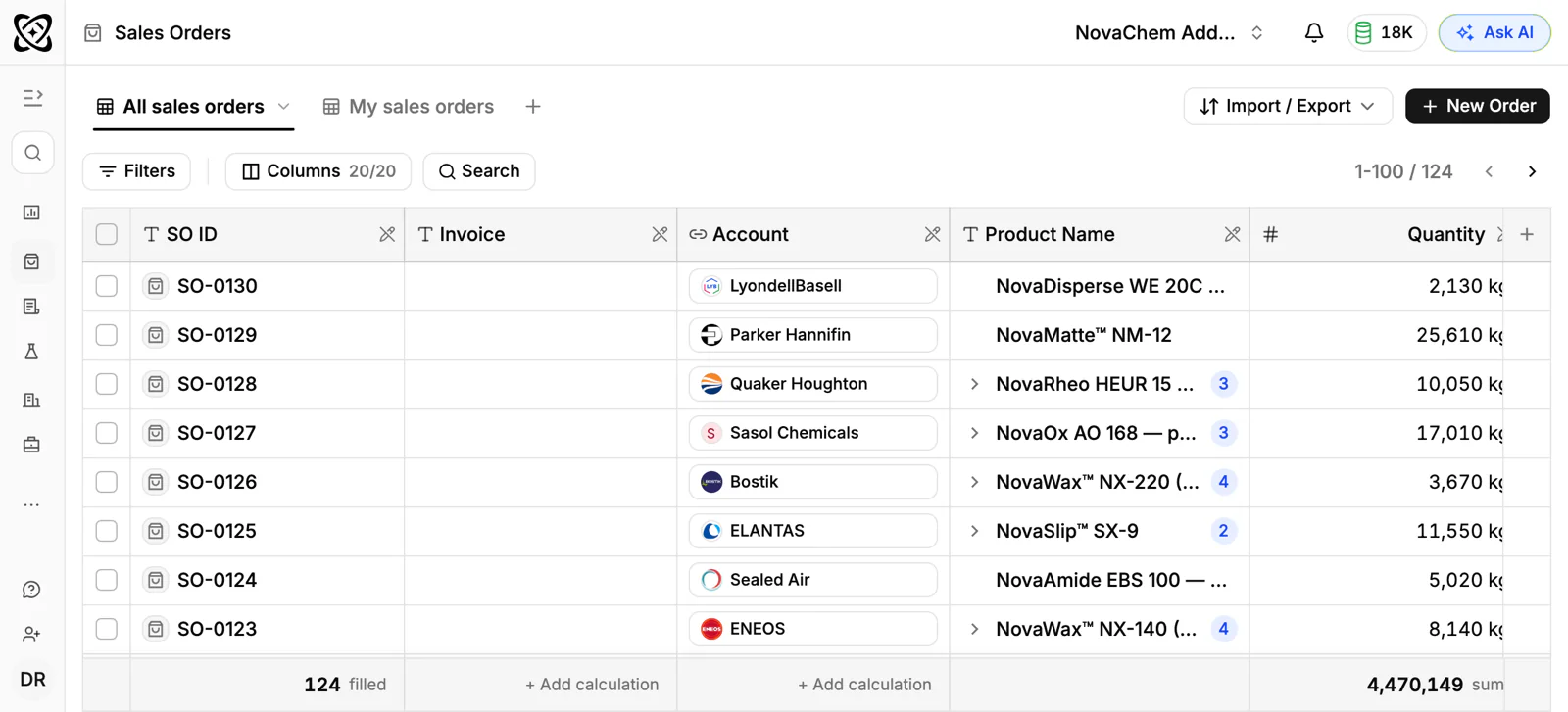
- Quotes that turn into sales orders without retyping the lines.
- Order history by product, so a rep sees what the account buys and what it stopped buying.
- Branch and rep ownership, with a clear owner for each account.
- Contacts by role: buyer, maintenance lead, accounts payable.
- Every channel: email, WhatsApp and Telegram in one thread view on the account.
How do you set this up in PromptLab?
- 1
Import your accounts
Import customers and contacts from CSV or Excel, or pick a file from Google Drive. If your team also uses Salesforce or HubSpot, the two-way sync lets you run both while you switch.
- 2
Create the two pipelines
Build a new-account pipeline and a quote pipeline with the stages above. Assign an owner to every account, so a branch rep and an outside rep never both think someone else called.
- 3
Load customer price lists
Create a list for each customer, starting with the accounts that quote most often. Quoting from the list means a junior rep and the sales manager send the same price. See how to manage customer-specific price lists.
- 4
Quote fast, convert to order
Build the quote from the price list, send it and track its status. When it is approved, it becomes the sales order with the same lines. The guide to speeding up quote-to-order covers the routine.
- 5
Automate the chase
Set a workflow: when a quote's status changes or a deal changes stage, create a task or post to Slack. A quote marked as sent then puts a follow-up task on the rep's list, so no enquiry waits for someone to remember it.
- 6
Put WhatsApp and email in one Inbox
Connect your WhatsApp Business number, your Telegram bot and your mail. A WhatsApp enquiry about a worn part lands on the account, and any branch can see the thread.
How does PromptLab compare for distributors?
Swipe the table sideways to see every CRM →
| Checked on 30 September 2026 | PromptLab |  Zoho CRM Zoho CRM |  Dynamics 365 Dynamics 365 |  Salesforce Salesforce |
|---|---|---|---|---|
| Pricing | ||||
| Paid plans, a month | $11.99 – $99per seat | $14 – $52per seat | $65 – $150per seat | $25 – $550per seat |
| Number of plans | 3 | 4 | 3 | 5 |
| Free trial | ||||
| Billing | Billed monthly | Billed annually | Billed annually | Billed annually |
| Import from CSV and Excel | ||||
| Sales management | ||||
| Deal pipelines | ||||
| Quotes | From$23/month | From$100/month | ||
| Sales orders | From$23/month | From$100/month | ||
| Sample tracking | ||||
| Price lists | From$23/month | From$100/month | ||
| Meetings and calls | ||||
| Meeting recording and transcripts | Via marketplace | From$105/month | Add-on | |
| AI meeting summaries | From$105/month | Add-on | ||
| AI follow-up email drafts | From$23/month | From$105/month | Add-on | |
| Meeting scheduler and call dialer | From$23.99/month | Via marketplace | From$105/month | Add-on |
| AI and automation | ||||
| CRM fields filled in from calls | From$40/month | From$150/month | From$195/month | |
| Connect Claude or ChatGPT (MCP) | From$150/month | From$195/month | ||
| Workflow automation | ||||
| API and webhooks | From$23.99/month | From$195/month | ||
| Conversations | ||||
| Gmail and Outlook email sync | ||||
| WhatsApp conversations | Add-on | Add-on | ||
| Telegram conversations | ||||
| Save LinkedIn profiles | From$23/month | Add-on | Via marketplace | |
| Privacy and security | ||||
| Single sign-on (SSO) | From$99/month | From$40/month |
Zoho CRM is the cheapest way in: free for three users, then from $14 a user a month, billed annually, with quotes, sales orders and price books from $23. Its suite of more than 50 apps includes accounting, if you want that from the same vendor. Calls are recorded only through marketplace telephony apps, and Telegram isn't supported.
Dynamics 365 Sales has quotes, price lists and orders on every plan from $65 a user a month, billed annually, and pairs naturally with a Dynamics ERP. Meeting recording waits for Enterprise at $105, and setup often involves a Microsoft partner. Salesforce can model almost any branch structure and sales process, but quotes and price lists start on Pro Suite at $100 a user a month, billed annually, and the build usually takes an admin or a partner. The Dynamics 365 Sales comparison goes through it line by line.
Frequently asked questions
What CRM features does an industrial distributor need?
Account-specific price lists, quotes that convert to sales orders, order history per account and a shared inbox for email and messaging. PromptLab has all four on every plan.
Can a CRM handle thousands of SKUs?
A CRM doesn't need your whole catalogue to quote well. Put the lines each customer actually buys on their price list first, starting with the accounts that quote most often, and extend from there. Keep stock and the full catalogue in your ERP.
How do I stop reps quoting the wrong price?
Quote from the customer's price list, not from memory. With PromptLab the quote reads the list, so every rep sends the same agreed price.
Does PromptLab replace my ERP?
No. PromptLab is the sales side: accounts, quotes, orders and conversations. If you run Acumatica, it brings in customers, contacts, leads and opportunities. From any other ERP, import customers from a CSV or Excel export.
Can branch reps use WhatsApp with customers?
Yes. Connect your WhatsApp Business number to the shared Inbox, and each message lands on the account so any rep can pick up the thread.
Sources
Prices and features of other CRMs come from each vendor's own pages, on the dates below.
- Zoho CRM, checked on 30 September 2026: Pricing, Features, WhatsApp integration, MCP
- Dynamics 365, checked on 30 September 2026: Sales pricing, Conversation intelligence FAQ, Sales MCP server
- Salesforce, checked on 30 September 2026: Sales Cloud pricing, Sales Engagement pricing, Agentforce MCP support