



















CRM for adhesives and sealants manufacturers
How adhesives and sealants sales works, from technical data sheets and bond trials to distributors and reorders, and a CRM setup that tracks it.
 By the PromptLab team16 October 20267 min read
An adhesives or sealants manufacturer needs a CRM that keeps trials, technical data sheets and distributor accounts on the account record. The sale rarely turns on price per cartridge. It turns on whether your product bonds the customer's substrates, cures in their cycle time and survives their test.
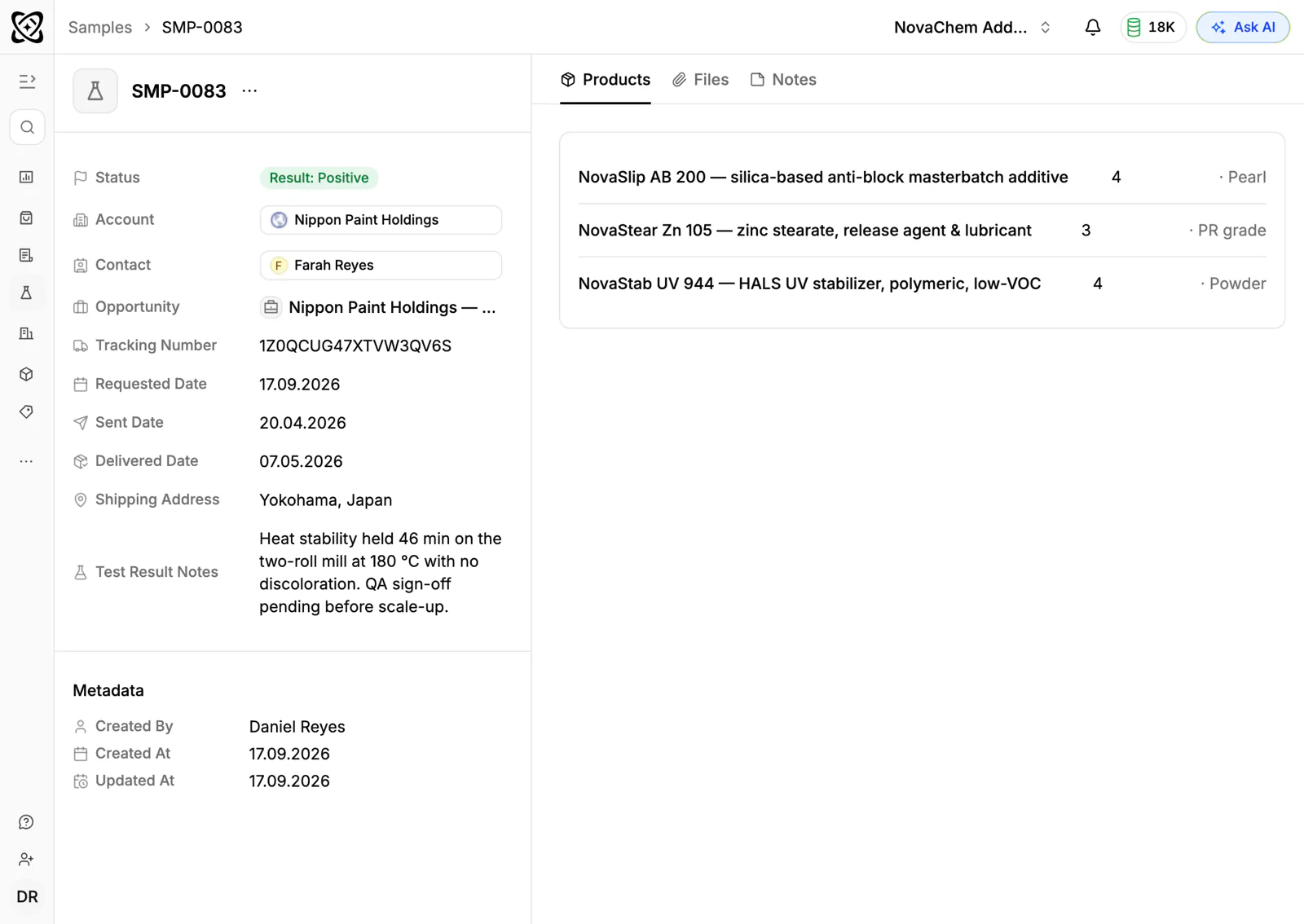
In PromptLab, trial samples go in as sample records with feedback, each customer gets a price list, and direct and distributor deals share one pipeline, told apart by a field on the deal. The wider factory view is on the manufacturers page.
How does an adhesives and sealants sale actually work?
Most adhesive and sealant makers sell through two routes at once. Direct accounts are industrial users: a window fabricator, a packaging line, a vehicle body shop, a construction products plant. Indirect accounts are distributors and trade counters that stock your range and sell it on to contractors.
On the direct side, a technical sales rep visits and asks about the substrates, the open time, the cure conditions and the load the joint must carry. They then propose a product. The customer's production or quality engineer wants to try it on their own materials before anything else happens.
On the indirect side, the distributor cares about margin, pack sizes that move and whether your rep will turn up when a contractor reports a failed joint. One distributor can bring you dozens of small buyers you will never meet.
What are data sheets, trials and approvals?
Every adhesive or sealant comes with a technical data sheet (TDS) describing what it is and how to use it, and a safety data sheet (SDS) covering handling and storage. Buyers ask for both early, often before they will agree to a trial. Keeping the current version of each on the product, and a note of which version you sent, saves a lot of awkward emails.
A bond trial is a small run of your product on the customer's real substrates, often with your technician on site. A bench test is the same in a lab, with the customer's samples sent to you. Either way, the loop is: sample out, test, feedback, adjustment, retest.
Then comes approval. Many industrial buyers have a written specification or an approved-supplier process, and a change of adhesive can mean requalifying the whole product. That is why winning the spec is worth so much: once you are approved, the customer reorders for years, and a competitor has to repeat the same trial to displace you.
Why do reorders and distributors matter so much?
An adhesive is a consumable. Once a line runs on your product, it uses it every week, so the long-term value of a won account is in the repeat orders, not the first drum.
That makes two things worth watching. First, the customer who quietly stops reordering, usually because someone qualified a second supplier. A rep who can see "this account took a pallet every month and has not for two months" can ring before the loss is complete. Second, the distributor's stock. A distributor who runs out of your cartridges will sell someone else's that afternoon.
What pipeline stages fit adhesives and sealants?
Direct and distributor deals behave differently. PromptLab has one deal pipeline with stages you set, so give it the stages both routes need, mark each deal's route with a field and save a view for each. The two routes look like this:
Direct accounts
| Stage | Entry condition |
|---|---|
| Enquiry | A customer has described a substrate or a bonding problem |
| Data sheets sent | TDS and SDS are logged as sent, with the version |
| Trial sample out | A sample is logged with a date and a test plan |
| Trial result | The customer's feedback is recorded on the sample |
| Approved | The product is in their spec or approved list |
| First order | A sales order is created for the approved quote |
| Repeat supply | Reorders are expected on a schedule |
Distributor accounts
| Stage | Entry condition |
|---|---|
| Introduced | A merchant has agreed to a first meeting |
| Range review | Samples and a price list are with them |
| Terms agreed | Account pricing is signed off |
| Stocking | A first stocking order has shipped |
| Active | They reorder without being chased |
What must the CRM track?
- Samples and trials, each with a ship date, the product, the substrates, the test and the result.
- Documents sent, such as the data sheet, so the next rep knows what the buyer already has.
- Approvals, with the specification, the date and the approving contact.
- Price lists per account. A distributor, a fabricator and a trade customer pay different prices for the same pack.
- Pack sizes. The same product as a cartridge, a pail and a drum is three lines on a quote.
- Order history by product, so a rep sees what an account buys and what it stopped buying.
How do you set this up in PromptLab?
- 1
Set up stages and views
Add the stages above to your pipeline and a deal field for direct or distributor. Save a view for each route, so each team sees only its own deals, and let a deal skip the stages its route doesn't use.
- 2
Log every trial as a sample
Record each trial sample on the account with the product, the contact, the substrates and the test plan. Put the customer's verdict in the sample's feedback. How to track product samples covers the routine.
- 3
Attach the documents
Store the data sheets and any approval letters as documents on the account, so a rep opening the account sees what has been sent.
- 4
Build a price list per account
Create customer price lists for each distributor and key industrial account, by product and pack size. Quotes use them, and the margin shows on each line. See how to manage customer-specific price lists.
- 5
Add approval fields
Add fields for approved specification, approval date and approving contact on the account, so anyone can see which accounts hold a spec you have to protect.
- 6
Put the shop floor in the Inbox
Production engineers and distributor owners often prefer WhatsApp to email. Connect your WhatsApp Business number and your company Telegram bot, and the thread about a failed joint lands on the account, not on one rep's phone.
How does PromptLab compare for adhesives and sealants sales?
Swipe the table sideways to see every CRM →
| Checked on 30 September 2026 | PromptLab |  Pipedrive Pipedrive |  Zoho CRM Zoho CRM |  HubSpot HubSpot |
|---|---|---|---|---|
| Pricing | ||||
| Paid plans, a month | $11.99 – $99per seat | $14 – $79per seat | $14 – $52per seat | $7 – $150per seat |
| Number of plans | 3 | 4 | 4 | 4 |
| Free trial | ||||
| Billing | Billed monthly | Billed annually | Billed annually | Billed annually, plus a $1,500–$3,500 onboarding fee |
| Import from CSV and Excel | ||||
| Sales management | ||||
| Deal pipelines | ||||
| Quotes | From$59/month | From$23/month | Add-on | |
| Sales orders | From$23/month | |||
| Sample tracking | ||||
| Price lists | From$23/month | |||
| Meetings and calls | ||||
| Meeting recording and transcripts | Via marketplace | From$90/month | ||
| AI meeting summaries | ||||
| AI follow-up email drafts | From$59/month | From$23/month | From$90/month | |
| Meeting scheduler and call dialer | From$23.99/month | From$39/month | Via marketplace | |
| AI and automation | ||||
| CRM fields filled in from calls | From$40/month | From$90/month | ||
| Connect Claude or ChatGPT (MCP) | ||||
| Workflow automation | From$39/month | |||
| API and webhooks | From$23.99/month | |||
| Conversations | ||||
| Gmail and Outlook email sync | From$39/month | |||
| WhatsApp conversations | From$39/month | Add-on | ||
| Telegram conversations | ||||
| Save LinkedIn profiles | Via marketplace | From$23/month | From$150/month | |
| Privacy and security | ||||
| Single sign-on (SSO) | From$99/month | From$40/month | From$150/month |
Pipedrive has a pipeline a technical rep picks up quickly, and its Nova assistant records calls on every plan from $14 a seat a month, billed annually. It keeps no price list per customer, so a distributor and a fabricator can't each have their own price for the same pail, and quotes wait for Premium at $59. Zoho CRM has quotes, sales orders and price books from $23 a user a month, billed annually, which covers the trade side. It doesn't model samples at any tier, so bond trials would go untracked.
HubSpot is the most polished all-in-one suite, with a Starter plan from $7 a seat a month, billed annually. For a team selling products, quoting sits in the separate Revenue Hub, and sales orders, samples and price lists aren't there. Professional and Enterprise add a $1,500 to $3,500 onboarding fee. See the Pipedrive and HubSpot comparisons.
Frequently asked questions
What should a CRM for an adhesives manufacturer include?
It should hold samples or trials, quotes, customer price lists and sales orders, with direct and distributor accounts kept apart so each gets the right price. PromptLab ships these on every plan, starting at $11.99 per user per month.
Can I track bond trials in a CRM?
Yes. Treat each trial like a sample: a product, a ship date, a status and the customer's feedback. PromptLab's sample tracking keeps that loop on the account, with a status and feedback on every round.
How do I manage distributor pricing?
Keep a price list for each distributor and quote from it, so a trade counter and a regional stockist each get their agreed price. See what is a customer price list for how they work.
Where should I keep technical and safety data sheets?
Keep the master copies in your quality system, and attach the version you sent to the account as a document. The CRM then shows which sheet each buyer has, without becoming a second quality system.
Is there a free trial?
Basic and Professional come with a 14-day free trial, with no card needed. There is no free plan.
Sources
Prices and features of other CRMs come from each vendor's own pages, on the dates below.
- Pipedrive, checked on 30 September 2026: Pricing, MCP server, Nova, Exporting data
- Zoho CRM, checked on 30 September 2026: Pricing, Features, WhatsApp integration, MCP
- HubSpot, checked on 30 September 2026: Sales Hub pricing, Revenue Hub quote software, WhatsApp integration, MCP servers, Single sign-on (SSO)