



















CRM for solar equipment distributors
How solar equipment distributors sell to installers and EPCs, from datasheets and project quotes to tier pricing, stock and warranty claims, and a CRM setup.
 By the PromptLab team24 October 20266 min read
A solar equipment distributor needs a CRM that treats each installer as an account with its own prices, and each project as a quote that changes until it becomes an order. Panels, inverters, batteries and mounting hardware are standard items, but the price, the stock and the bundle change from one customer and one week to the next.
In PromptLab, each installer or contractor is an account with its own price list, project quotes sit on deals, and sales orders show what was actually bought. The distributors page covers the quoting side.
How does a solar equipment distributor actually sell?
The customers are mostly installers, from one-person firms to large regional companies, and EPC contractors who build larger projects. Some also sell to resellers, electrical wholesalers and commercial or industrial buyers with their own projects.
Each wants something different. A small installer wants an answer today: price, stock and delivery for a set of items. A larger installer wants a complete package for a project, a fixed delivery date and a payment arrangement. An EPC wants a quote against a bill of materials and a supplier who can deliver in phases.
Behind it all sits your relationship with the manufacturers you represent. Their product ranges, tier programmes and rules about who may buy what shape the price you can offer. The CRM does not replace your supplier portals. It records what you offered your customers.
Why are stock, lead time and price so central?
Solar is a market where price and availability move quickly, and the customer knows it. A quote based on a price from last month, or on stock that has gone, loses the customer's trust. That is why the quote has to say what the price is for, what is in stock and when the delivery will arrive.
Check availability in your stock system before you quote. What the CRM does is hold the price list for each account, build the quote from it, and carry the validity and delivery terms in the quote's Notes field. A quote has no expiry field, so say "price valid until Friday, subject to stock" in words.
Imports add another layer. If you bring in containers, buyers ask about lead times, pallets and delivery terms. What is Incoterms covers the basics.
What do datasheets, samples and warranty look like?
Solar customers ask for datasheets early: electrical specifications, dimensions, warranty terms and installation guides. Keep the current version attached to the product or the account, and note which version you sent. Certificates and approvals depend on the product and the market, so let your compliance team decide what you share.
True product samples are less common than in chemicals or coatings. What you may send is a demo or evaluation unit: an inverter or battery an installer wants to test before a purchase, or a mounting kit a customer wants to inspect. Track those as sample requests with a status, so they come back or turn into an order.
After the sale comes warranty and returns. An installer reports a faulty item, and you coordinate with the manufacturer. Log it on the account with the serial or order reference, and set a task for the follow-up.
What pipeline stages fit solar distribution?
PromptLab has one deal pipeline with stages you set. Use a deal field for stock order or project, and save a view for each. A repeat installer buying a pallet skips straight to the order, while a project uses the full run.
| Stage | Entry condition |
|---|---|
| Enquiry | An installer or EPC has asked for prices or a project list |
| Bill of materials | The item list and quantities are in |
| Quote sent | A priced quote is out, with stock and validity in its notes |
| Revisions | Quantities, brands or models have changed |
| Order | A sales order has been created |
| Delivery | Goods have shipped and the date is confirmed |
| Warranty and aftercare | Claims and questions are logged and closed |
| Repeat trade | The installer is ordering regularly |
What must the CRM track?
- Installer and EPC accounts, with owner, region and the brands they install.
- Customer price lists, one per account or per tier of installer.
- Project quotes, with every revision kept on the deal.
- Sales orders, so you can see what each installer buys and when it slows down.
- Contacts by role: owner, estimator, purchasing, installation manager.
- Datasheets sent and evaluation units out, with status.
- Warranty and return notes, with tasks.
How do you set this up in PromptLab?
- 1
Set up stages and a deal field
Add the stages above to your pipeline and a deal field for stock order or project. Save a view for each, so counter-style orders and project quotes are not mixed.
- 2
Import installers and build price lists
Import your customer list from CSV or Excel, or pick a file from Google Drive. Then set up products and price lists, starting with your top accounts, and add the rest in stages. See how to manage customer price lists.
- 3
Quote from the customer's list
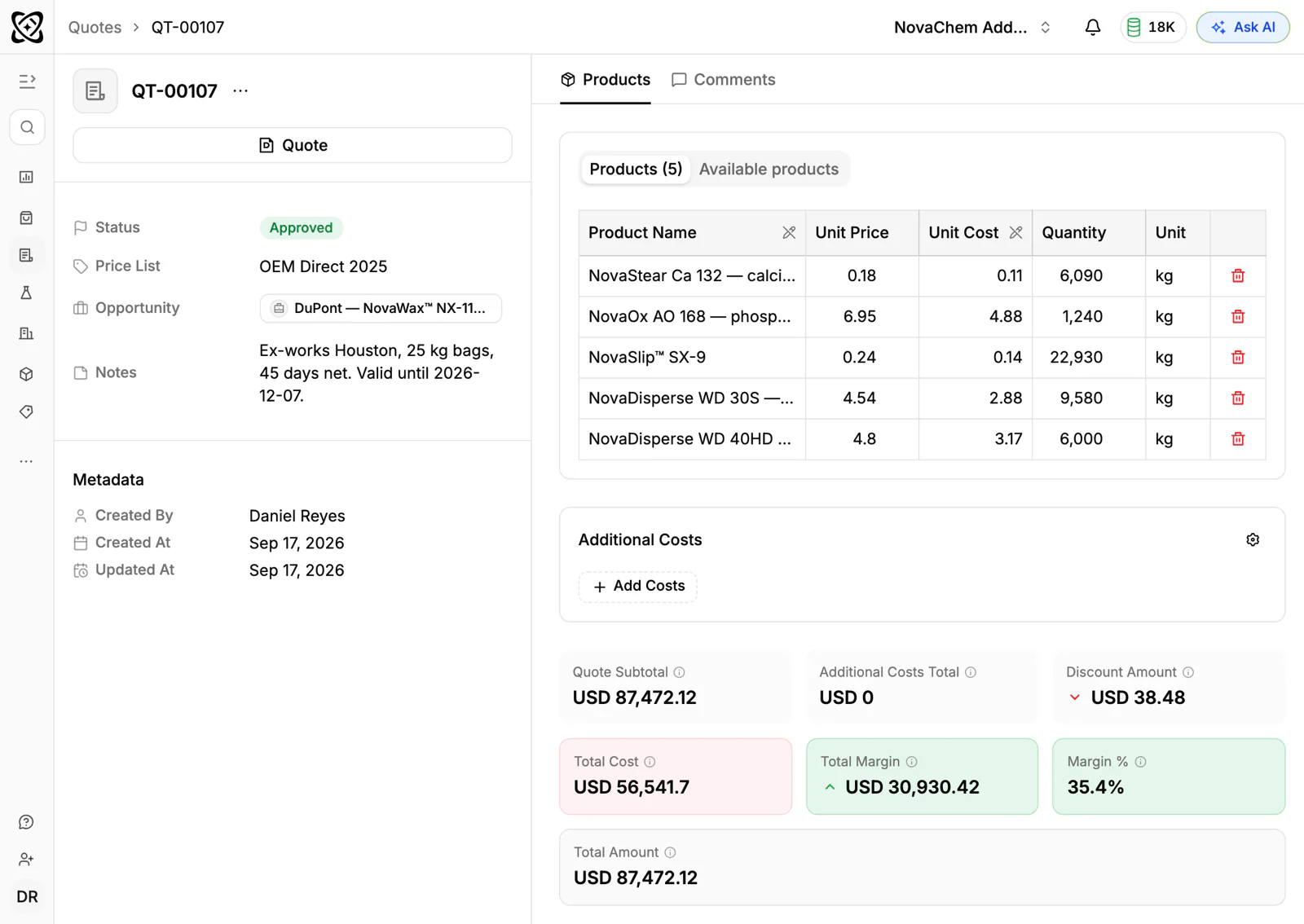
Create each quote from the account's price list, apply line discounts, and put stock, delivery time and price validity in the Notes field. The margin on each line shows while you build the quote.
- 4
Turn wins into sales orders
Create the sales order as its own record when the customer confirms, and an invoice from it when you bill. The order history shows who has gone quiet.
- 5
Put installers' chats in the Inbox
Many installers message from site or from a van. Connect your WhatsApp Business number and your company Telegram bot to the shared Inbox, so the thread lands on the account.
- 6
Automate the chasing
Use workflow automation to create a task when a quote changes status or a deal changes stage, and to post to Slack when a large quote is approved. A quote with no reply after a few days deserves a call.
How does PromptLab compare for solar equipment distributors?
Swipe the table sideways to see every CRM →
| Checked on 30 September 2026 | PromptLab |  HubSpot HubSpot |  Zoho CRM Zoho CRM |  Attio Attio |
|---|---|---|---|---|
| Pricing | ||||
| Paid plans, a month | $11.99 – $99per seat | $7 – $150per seat | $14 – $52per seat | $35 – $79per seat |
| Number of plans | 3 | 4 | 4 | 4 |
| Free trial | ||||
| Billing | Billed monthly | Billed annually, plus a $1,500–$3,500 onboarding fee | Billed annually | Billed annually; free plan for 3 seats |
| Import from CSV and Excel | ||||
| Sales management | ||||
| Deal pipelines | ||||
| Quotes | Add-on | From$23/month | ||
| Sales orders | From$23/month | |||
| Sample tracking | ||||
| Price lists | From$23/month | |||
| Meetings and calls | ||||
| Meeting recording and transcripts | From$90/month | Via marketplace | From$79/month | |
| AI meeting summaries | From$79/month | |||
| AI follow-up email drafts | From$90/month | From$23/month | From$79/month | |
| Meeting scheduler and call dialer | From$23.99/month | Via marketplace | ||
| AI and automation | ||||
| CRM fields filled in from calls | From$90/month | From$40/month | From$79/month | |
| Connect Claude or ChatGPT (MCP) | ||||
| Workflow automation | ||||
| API and webhooks | From$23.99/month | |||
| Conversations | ||||
| Gmail and Outlook email sync | ||||
| WhatsApp conversations | Add-on | |||
| Telegram conversations | ||||
| Save LinkedIn profiles | From$150/month | From$23/month | Via marketplace | |
| Privacy and security | ||||
| Single sign-on (SSO) | From$99/month | From$150/month | From$40/month | Enterprise plan |
HubSpot is the most polished all-in-one suite, with a Starter plan from $7 a seat a month, billed annually. For a team selling products, quoting sits in the separate Revenue Hub, and sales orders and price lists aren't there. Upper plans add a $1,500 to $3,500 onboarding fee. Zoho CRM is free for three users and has quotes, sales orders and price books from $23 a user a month, billed annually. Telegram isn't supported.
Attio is one of the best-designed of the new AI-native CRMs, with up to three seats free. You define every object yourself, so quotes, price lists and orders are left for you to build, and call recording waits for a plan at $79 a seat a month, billed annually. See the HubSpot and Attio comparisons.
Frequently asked questions
What should a CRM for a solar equipment distributor include?
It should hold installer accounts, customer price lists, project quotes with revisions and sales orders. PromptLab ships quotes, price lists, sales orders and sample tracking on every plan, from $11.99 per user per month.
Can I give each installer a different price?
Yes. Create a customer price list for each account or tier and build quotes from it. PromptLab includes customer price lists on every plan.
How do I say how long a quote's price holds?
PromptLab quotes have no expiry field, but they have a Notes field. Write the validity and the stock condition there, and a workflow can create a follow-up task when the quote's status changes.
Does PromptLab check my stock?
No. Stock and availability stay in your own system. Check there, then write what you found into the quote's Notes field.
Is there a free trial?
Basic and Professional come with a 14-day free trial. There is no free plan.