



















How to use SMS for B2B sales
Use SMS in B2B sales for short, timely messages: delivery updates, sample arrivals, reminders and a nudge after a call. With examples and consent rules.
 By the PromptLab team27 October 20266 min read
SMS works in B2B sales for short, timely messages that a buyer needs to see quickly: a delivery update, a note that a sample has arrived, a meeting reminder or a one-line nudge after a call. It works badly for anything long, formal or full of detail, such as a quote, a spec discussion or a price change. Text only people who have agreed to it, keep each message to a sentence or two, and log every text on the customer's record so the team sees it.
This guide covers when texting fits a product sale and when email or WhatsApp fit better, how to handle consent and opt-out, and example messages for the moments where a text earns its place. The examples come from teams selling chemicals, packaging, building materials and industrial supplies.
When SMS fits B2B product sales
A text is read fast and answered fast. That makes it right for messages that are short, time-sensitive and expected.
- Delivery and dispatch updates. A site manager waiting for a pallet of fixings wants to know it is on the truck.
- Sample arrived. A text when the courier confirms delivery prompts the engineer to find it before it sits in goods-in for a week.
- A quick nudge after a call. "As promised, the quote is in your inbox" is enough.
- Meeting and visit reminders. A text the morning of a site visit helps avoid a wasted trip.
- Buyers who live on their phone. Contractors, farm buyers and plant managers often answer a text long before an email.
When email or WhatsApp fit better
| Message | Best channel | Why |
|---|---|---|
| A quote, price list or spec sheet | Needs attachments, a paper trail and room for detail | |
| A price increase or contract terms | Formal, and the buyer will forward it | |
| An ongoing back-and-forth with photos and voice notes | Where many buyers already chat, especially outside North America | |
| A short reminder or update | SMS | Reaches any mobile, no app needed |
| A first contact with someone you have never spoken to | Email or phone | A cold text feels intrusive and may break consent rules |
In many markets, buyers prefer WhatsApp for chat-style selling. Read how to use WhatsApp for B2B sales if that is where your customers are. SMS is the fallback that works on every phone, and in the US and Canada many buyers are used to texting with suppliers.
Consent and opt-out
Texting rules are stricter than email in many countries. Before you send:
- Get permission first. Ask on the call, on your order form or in your web form, and note it on the contact.
- Say who you are. Start with your name and company, every time.
- Make opting out easy. Recognise STOP and similar keywords, and stop texting that number straight away.
- Text during working hours. Respect the buyer's time zone.
- Keep it about the business you have together. A delivery update is expected. A promotional blast is not.
This is general guidance, not legal advice. Check the rules for each country you text into.
Example SMS messages for product sales
Keep texts short, use the buyer's first name, and sign with your name. Replace the details in square brackets.
Sample arrived
Hi [First name], it's [Your name] from [Company]. The courier shows your [Product] sample was delivered this morning. It's a 1 kg pail, probably at goods-in. Let me know when you start testing.
Dispatch update
Hi [First name], [Your name] at [Company]. Your order of [Quantity] [Product] left our warehouse today. Expected delivery [Day]. Tracking is in your email.
Quick nudge after a call
Thanks for the call, [First name]. As promised, the quote for [Product] in drums is in your inbox. Happy to adjust the volume breaks if needed. [Your name]
Meeting or site visit reminder
Hi [First name], a reminder that I'll be at [Site] tomorrow at [Time] to look at the [Application] line. Reply here if the time needs to move. [Your name], [Company]
Chasing a sample result
Hi [First name], [Your name] here. Any early results from the [Product] trial? A one-line answer is fine, and I can call if it's easier to talk it through.
Delay notice
Hi [First name], [Your name] at [Company]. Your [Product] delivery is running a day late because of a carrier delay. New date [Day]. Sorry for the wait. Details by email shortly.
Set up SMS in your sales process
- 1
Decide which moments get a text
Pick two or three: sample delivered, order dispatched, the day before a visit. Do not text for everything.
- 2
Collect consent and mobile numbers
Add a mobile field and a consent checkbox to your forms and onboarding. Ask existing customers on your next call.
- 3
Send from a business number, not a personal phone
Texts from a rep's own mobile disappear when the rep leaves. A business number keeps the thread with the company.
- 4
Log every text on the customer record
The next rep, or the manager covering a holiday, should see what was said and when.
- 5
Reply within the working day
A buyer who texts back expects a quick answer. Route replies to the account owner.
A worked example
This example is made up.
A building materials distributor sells to contractors across Ontario. The site managers rarely read email during the day. The rep calls a contractor about a damp-proof membrane, and the buyer agrees to receive updates by text. Twenty minutes later, the rep texts: "Quote for the membrane rolls is in your inbox, 40 rolls with delivery Thursday." The buyer replies "OK go ahead" from the site. The rep confirms by email, creates the order, and the text thread sits on the contact's timeline next to the call recording.
How PromptLab helps
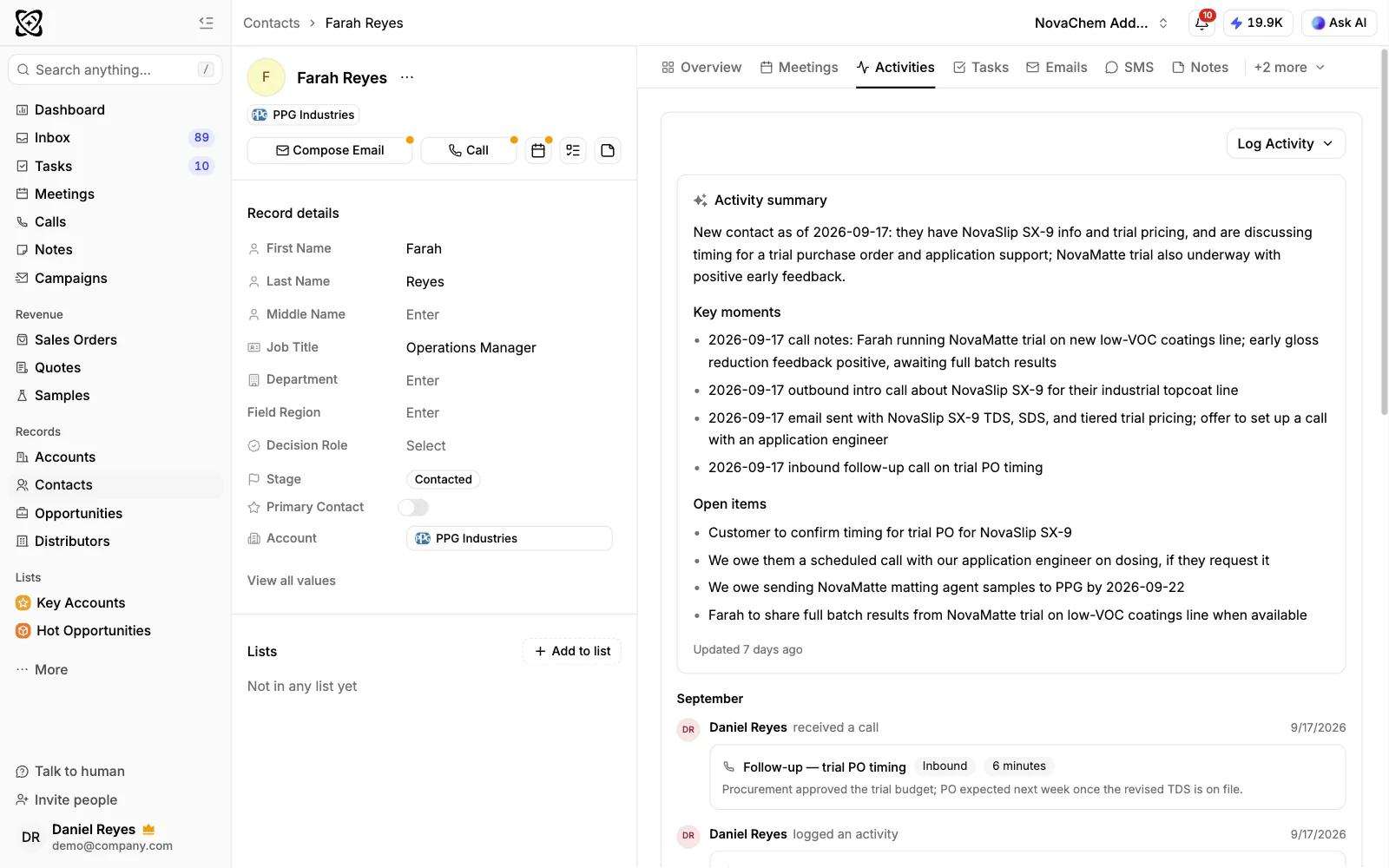
PromptLab's Professional plan ($23.99 per user per month) includes two-way SMS through the plan's phone number, the same US or Canadian local number as the call dialer. Each contact has one thread. Replies come back into the CRM, on a Messages tab on the contact and on the call, and in the inbox.
Messages can run up to 1,600 characters and carry MMS attachments. STOP and START opt-out and opt-in keywords are handled automatically. A text sent within 24 hours of a call is linked to that call, and every message is logged on the contact's timeline. For buyers who prefer WhatsApp, see WhatsApp in PromptLab.
Frequently asked questions
Is SMS effective for B2B sales?
For short, expected messages, yes: delivery updates, sample arrivals, reminders and quick nudges after a call. For quotes, specs and formal terms, email works better.
Do I need consent to text B2B customers?
In many countries, yes, even for business numbers. Ask for permission, note it on the contact, identify yourself in every message and stop texting anyone who replies STOP. Check the rules where your buyers are.
Should I use SMS or WhatsApp for B2B sales?
Use the channel your buyers answer. WhatsApp suits chat-style selling with photos and voice notes in many markets. SMS reaches any phone without an app and is common in the US and Canada.
How long should a B2B sales text be?
One to three short sentences. Say who you are, the one thing they need to know, and sign with your name. Move anything longer to email.
Which PromptLab plan includes SMS?
SMS is on Professional and above, at $23.99 per user per month billed monthly. It uses the plan's US or Canadian local number, the same one as the call dialer.