



















How to use WhatsApp for B2B sales
How a B2B team can use WhatsApp for sales: set up a business number, agree who answers, decide what goes in chat and keep every conversation in the CRM.
 By the PromptLab team16 October 20266 min read
To use WhatsApp for B2B sales as a team, set up a business number, agree who answers and how fast, decide which jobs belong in chat and which belong in email, and keep every conversation in your CRM. The chat itself is the easy part. The hard part is making sure it does not live on one rep's phone.
This guide is about running WhatsApp as a team channel for companies that sell physical products. For message wording, see our WhatsApp sales message templates, and for rep etiquette and quotes over chat, read how to sell to B2B buyers on WhatsApp.
Why B2B buyers use WhatsApp
In many markets, buyers of chemicals, packaging, ingredients and building materials already run their day on WhatsApp. It is quick to answer from a warehouse floor, easy to forward to a colleague and simple to attach a photo of a label or a pallet.
For a seller, that makes it a good channel for short, practical exchanges: a price check, a delivery update, a sample status, a reorder. It is a poor place for contracts, long specifications and anything that needs a signature. Treat it as a fast lane next to email, not a replacement.
Step 1: Set up a business number, not a personal one
Use a WhatsApp Business number that belongs to the company. WhatsApp Business has its own business profile, where you can show your company name, address, opening hours and website. Buyers see a company, not a stranger's phone.
A personal number ties the whole history to one person. When that person goes on leave or leaves the firm, the buyer's questions go unanswered and the history is gone. A company number can be handled by whoever is on duty.
Step 2: Agree who answers and how fast
A shared number needs simple rules, written down:
- 1
Name the person on duty
One person per day or half-day watches the channel. Everyone else knows the buyer will get an answer from someone.
- 2
Set a reply target
For example, a first answer within a working hour. Pick a promise you can keep, then keep it.
- 3
Hand over to the account owner
The person on duty answers the first message, then passes the chat to the account owner if the buyer is an existing customer. Say so in the chat: "I'm passing you to Maria, who looks after your account."
- 4
Set out-of-hours behaviour
WhatsApp Business lets you set an away message with your opening hours, so a buyer knows when to expect a reply.
Step 3: Decide what belongs in WhatsApp
Not everything fits a chat. A clear split avoids confusion.
| Good in WhatsApp | Better in email or a document |
|---|---|
| Quick price or availability check | Formal quotes and terms |
| Delivery and tracking updates | Contracts and legal wording |
| "Did the sample arrive?" | Technical data sheets and certificates |
| Reorder requests | Long specification discussions |
| Photos of a label, pallet or damage | Anything the buyer's finance team needs |
Say a buyer asks in chat for 5 tonnes of a resin. The rep agrees the grade, quantity and delivery point in the chat, then sends the formal quote as a document and puts a short cover note in the chat. The chat stays quick and the commitment is on paper.
Step 4: Get permission and respect it
Message buyers who expect to hear from you: those who have written to you, or who said that WhatsApp is fine. Start the first contact by email, at a meeting or through a referral, then ask: "Would it be easier to continue on WhatsApp?"
Do not use WhatsApp for mass cold messages. It annoys buyers and can get your number reported or blocked. It also breaks the trust that makes the channel useful. Quick replies in the WhatsApp Business app can save time on answers you give often, but keep them personal enough that the buyer feels a person wrote them.
Step 5: Write messages that are easy to act on
Buyers read WhatsApp on a phone, often between other tasks. Good messages are:
- Short: one topic per message.
- Specific: name the product, quantity and date. "Your 5 t of PL-220 leaves Thursday" is better than "your order is on its way".
- Ending with a next step: "Shall I send the quote today?"
- In the buyer's language: if the buyer writes in Turkish or Spanish, answer in it, as long as someone on your team can follow the thread.
Voice notes are common in some markets. If a buyer sends one, reply in whichever form suits you, but write down any numbers or dates the buyer mentioned so they are not lost.
Step 6: Keep every conversation in the CRM
This is the step that turns WhatsApp from a habit into a sales channel. Three rules help:
- Link each chat to an account and contact. Anyone opening the account sees what was said.
- Write agreed facts onto the deal the same day. A price, a quantity or a date agreed in chat belongs on the deal, the quote or the sales order.
- Give every chat a next action. A task with a date, so a reply does not depend on memory.
A manager can then review the chats the way they review email: to coach a rep, to find a missed follow-up or to see what the buyer asked three months ago. Our guide to a shared inbox explains the idea.
WhatsApp for B2B sales, team set-up
Mistakes to avoid
- Reps using personal phones. The history leaves with them.
- Promising a price in chat with no quote. It gets quoted back wrongly months later.
- Replying in a group by accident. Check who is in the chat before sending a price.
- Ignoring messages after hours. Set an away message.
- Letting chats fall outside the CRM. If the account record does not show it, the next person will not know it happened.
How PromptLab helps
PromptLab's shared Inbox connects your WhatsApp Business number, so customer chats sit next to email and Telegram, each linked to its account. Your team replies from the CRM, and a colleague can pick up a conversation without asking the first rep what was said.
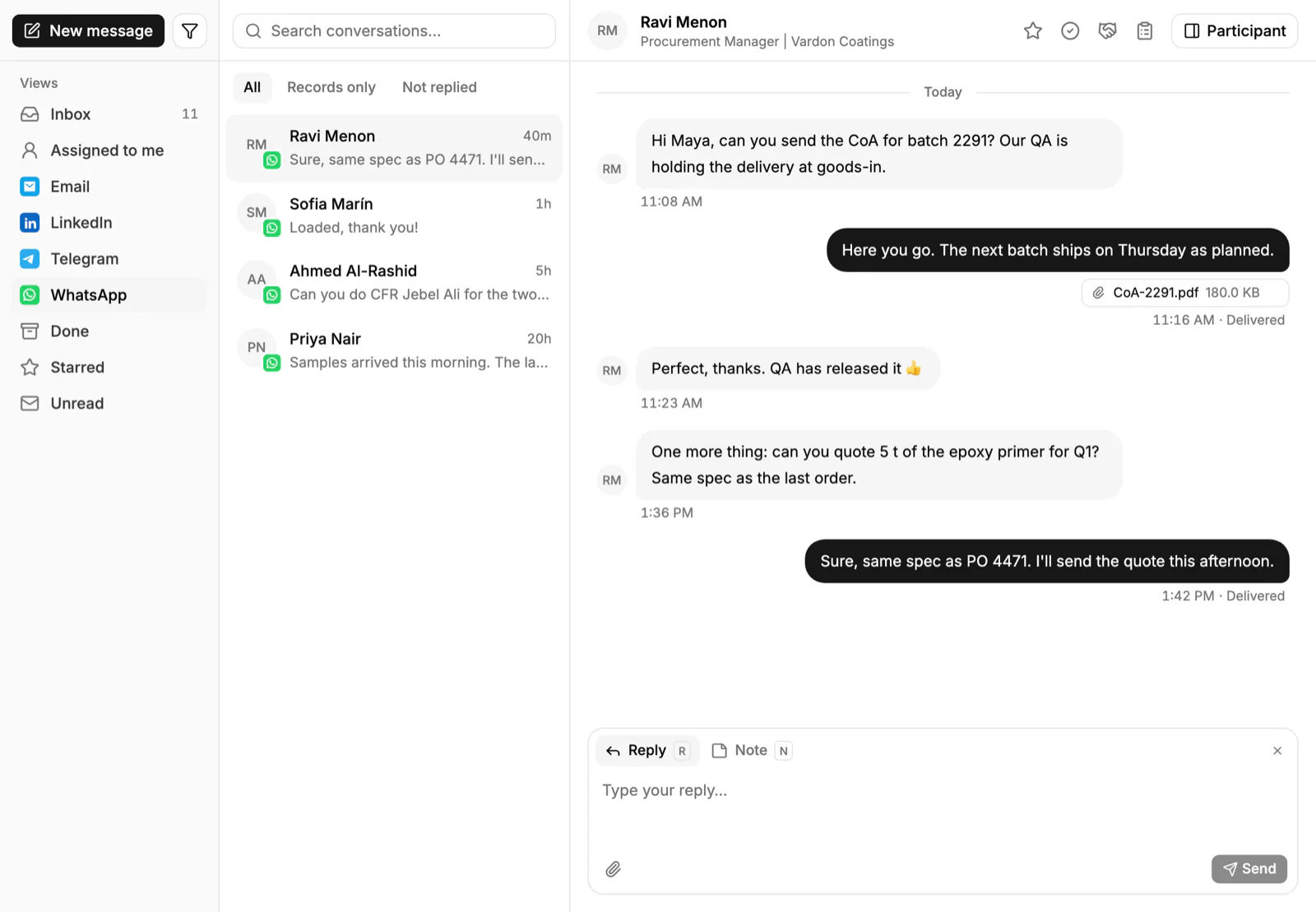
From the account you can build a quote from the customer's price list, track the sample and see the sales order. A workflow can create a task when a quote changes status or a deal changes stage. You can also get a daily digest in Slack, Telegram or WhatsApp, so the day starts with what needs attention.
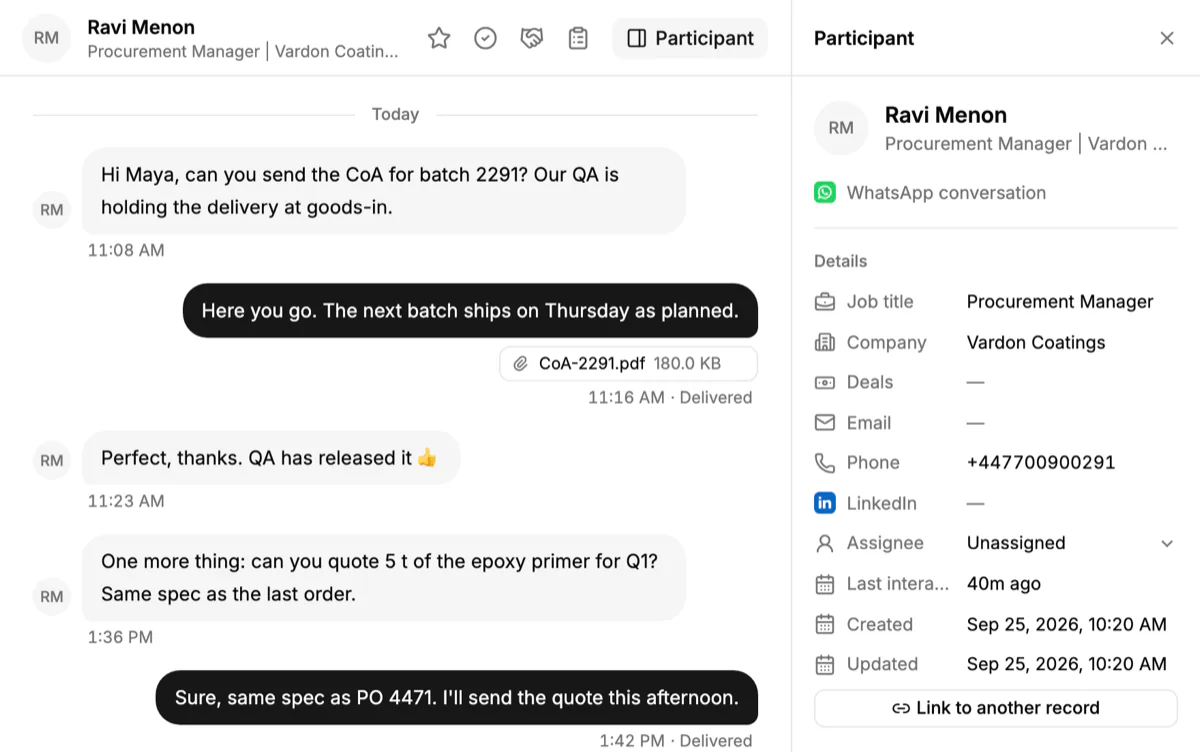
If your buyers also use Telegram, the same Inbox handles it. See Telegram in PromptLab, and compare tools in best CRM with WhatsApp integration.
Frequently asked questions
Is WhatsApp good for B2B sales?
It suits buyers who already use it for daily questions, especially in distribution, packaging and ingredients. Use it for quick exchanges and follow-ups, and use email and documents for quotes and contracts.
Should a company use WhatsApp Business instead of personal WhatsApp?
Yes. A business number carries your company name and keeps the history with the company. A personal number ties the account to one person and is lost when they leave.
Can several people answer from one WhatsApp number?
Yes, if the number is connected to a shared tool. In PromptLab, your WhatsApp Business number connects to the shared Inbox, and your team replies from the CRM.
Can I send a quote on WhatsApp?
Send it as a document and use the chat for a short cover note. The quote should come from your CRM, so the price and validity date are on record.
How do I get buyers to move to WhatsApp?
Ask. After an email or a meeting, say that you can answer quick questions on WhatsApp if that is easier for them. Do not start cold conversations there.