



















Call Intelligence: Turn Every Conversation into Action
Automatically capture, summarize, and extract commitments from every sales call so your team can act on conversations immediately.
Call Intelligence automatically records and analyzes every sales call, then turns those conversations into context your team can use. After each meeting, you get a concise AI-generated summary, a list of commitments made during the call, and a set of actionable tasks — all without lifting a finger. Before your next meeting, you can review exactly what was promised and what objections came up last time, so you walk in prepared instead of scrambling through notes.
Key capabilities
Automatic call capture
Calls on Google Meet, Zoom, and Microsoft Teams are recorded and processed automatically — no manual recording required.
10-second meeting summaries
AI distills hours of video calls into clear, skimmable summaries so you can catch up on any meeting in seconds.
Pre-meeting briefs
Before any follow-up call, review what was promised and what objections were raised in previous meetings — no digging through notes.
Automatic task creation
AI identifies every commitment made during a call and creates actionable tasks instantly — no manual entry required.
How calls are captured
PromptLab connects directly to your meeting platform. Once connected, the PromptLab recording bot joins the meeting as a visible participant and records the session. After the call ends, it transcribes the audio, generates a summary, identifies action items, and attaches everything to the relevant deal in your pipeline.
Supported platforms:
- Google Meet
- Zoom
- Microsoft Teams
Call Intelligence supports over 30 languages. Transcription and summarization work regardless of the language spoken during the call — useful for international manufacturing customers.
Meeting summaries
Every recorded call produces a structured summary that includes:
- Key discussion points — the main topics covered
- Decisions made — anything agreed upon during the meeting
- Objections raised — concerns or blockers the customer surfaced
- Next steps — commitments from both sides
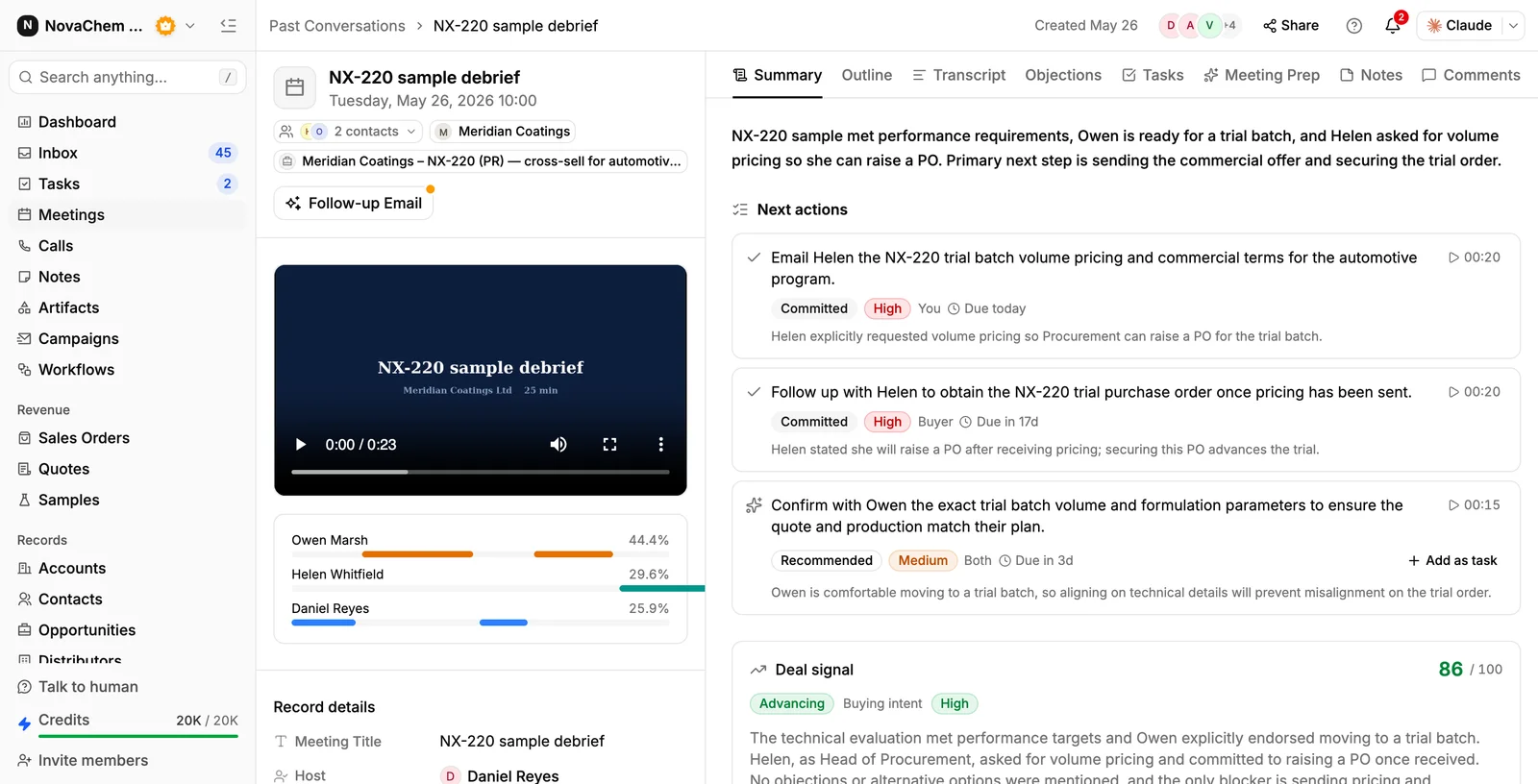
Summaries appear under Meetings → Past Conversations within minutes of the call ending, attached to the account and the opportunity the call belongs to. Each commitment is timestamped, so one click jumps to that moment in the recording.
Pre-meeting briefs
Before a follow-up call, open the previous conversation. The Objections tab collects what the customer pushed back on, Meeting Prep pulls together what you should walk in knowing, and Outline and Transcript are there when you want the detail. This replaces re-reading email threads or searching your own notes.
Post-meeting tasks
AI extracts every commitment made during the call — "I'll send the updated spec by Friday," "We'll schedule a demo with the plant manager" — and converts each one into a task in Tasks. Tasks include the context from the call so you know exactly what's needed.
Getting started with Call Intelligence
Connect your meeting platform
Go to Settings → Apps and connect Google Meet, Zoom, or Microsoft Teams. You'll authenticate with your meeting account, and PromptLab will begin joining your scheduled sales calls automatically.
See account setup for step-by-step integration instructions.
Attend a meeting
Run your call as normal. The PromptLab recording bot joins the meeting, where participants can see it, and records the session. Let your customer know the call is being recorded.
Review your AI summary
After the call ends, go to Meetings and open Past Conversations. Pick the call to see its summary, next actions, outline, objections and full transcript. It's typically ready within a few minutes of the call ending. Share Recording sends it to a colleague; Follow-up Email drafts the reply.
Review and act on generated tasks
Open Tasks, or the Tasks tab on the conversation. Review the tasks AI created from your call commitments — each one carries the sentence it came from and a due date. Reassign, adjust due dates, or close tasks as needed — then get back in front of customers.
Use pre-meeting briefs the morning of a customer call. Opening the previous meeting summary takes 30 seconds and ensures you walk in knowing exactly where things left off — no surprises.
The recording bot is visible to everyone in the meeting, but you should still tell participants the call is being recorded. Check with your legal or compliance team to confirm your consent and notification obligations before enabling call capture.