














CRM for agricultural machinery dealers
How agricultural machinery dealers sell tractors, implements and parts, from demos and quotes to seasonal buying and service, and a CRM setup that tracks it.
 By the PromptLab team31 October 20266 min read
An agricultural machinery dealer sells tractors, implements, attachments and spare parts to farms and contractors, and the buying follows the farming year. A CRM for that trade has to hold each farm's machines, quotes and conversations, so a rep knows who is ready to buy before the season starts.
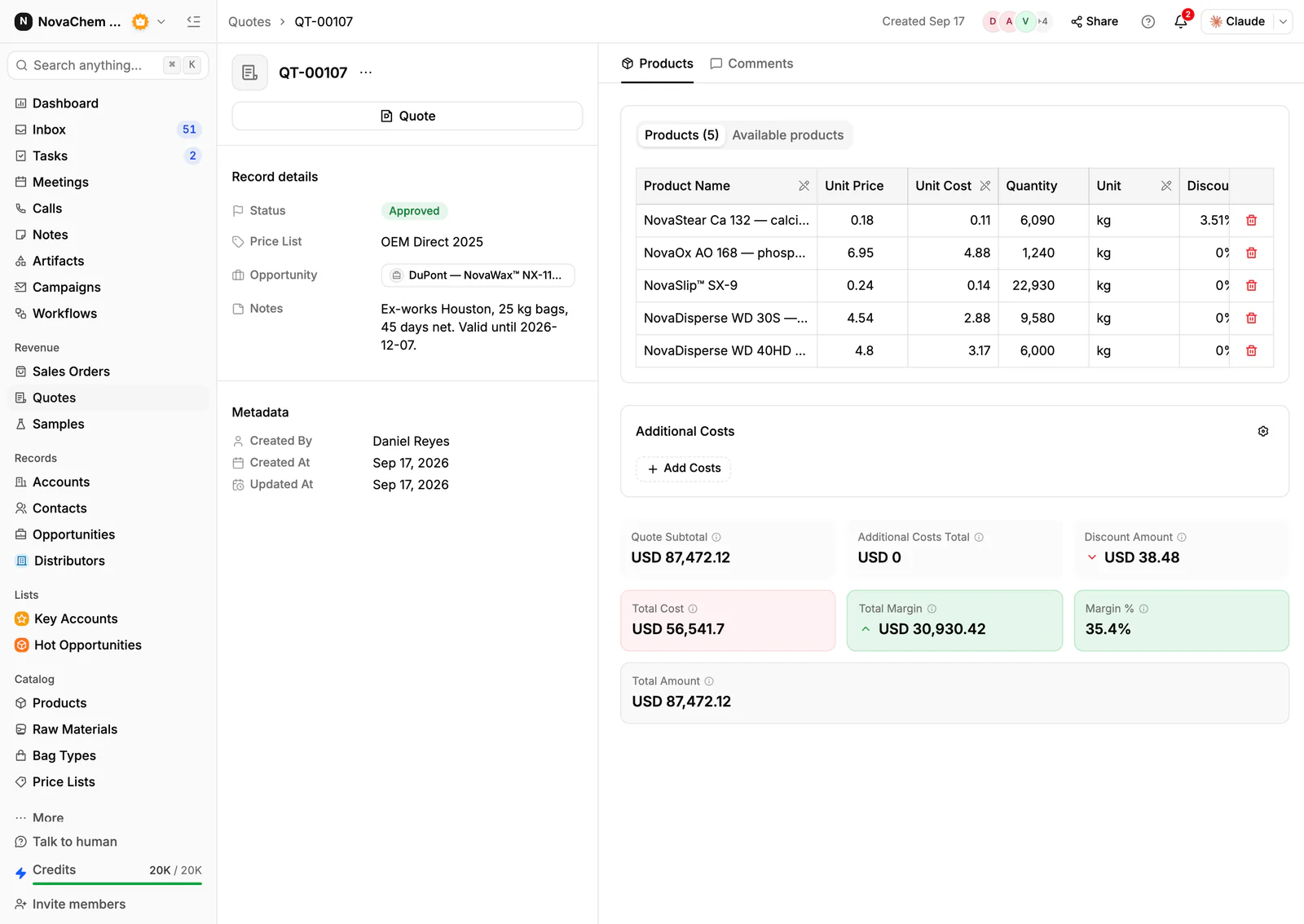
In PromptLab, quotes are built from your products with the margin on each line, each customer can have a price list, and sales orders sit on the account. New machine sales, parts and service accounts share one pipeline, told apart by a field. The wider reseller view is on the distributors page.
How does agricultural machinery actually sell?
Buyers are farm owners, farm managers and agricultural contractors. A new tractor or combine is a large, infrequent purchase decided over weeks or months, often with a trade-in and a financing arrangement. Implements and attachments are smaller and often bought together with the machine. Spare parts and wear items are bought again and again.
The calendar drives everything. Buyers plan purchases around harvest, planting and the end of the financial year. A rep who calls in the wrong month wastes a visit, and one who calls at the right moment finds a buyer already comparing. The quiet months are for demos, quotes and account reviews.
Trust counts. A farmer buys from the dealer who will send a technician when a machine fails in the middle of harvest. The after-sales promise is part of the sale.
What do buyers ask for before they commit?
Machinery is a big decision, so buyers ask for evidence. Expect these requests:
- A demonstration. Buyers want to see the machine work on their land. A demo needs a date, a machine and a follow-up call. You can log each demo as a sample record on the account, with the machine, the dates and the feedback.
- A quote with trade-in. The buyer wants a price with and without their old machine. Record the trade-in in the quote's notes and the valuation as a note on the deal.
- Finance options. Buyers ask about payment arrangements. Finance is usually arranged through a finance provider; the CRM holds the conversation and the quote.
- Delivery and set-up. The buyer wants a date. Put the agreed date in the quote's notes and on the sales order.
- Parts and service cover. The buyer wants to know who will fix it. Record the service agreement as a document on the account.
Why do seasons, parts and service matter so much?
A machine sale is rare, but a machine creates years of parts and service. A dealer that sells ten tractors has ten customers who will buy filters, belts and repairs for as long as the machines run. That repeat revenue often steadies a business where machine sales swing with the season and the harvest.
Seasons also mean reminders. A buyer who looked at a planter in autumn is worth a call before planting. A farm whose machine reaches a service milestone is worth a call before the season. A task with a date is how the dealer stops depending on one person's memory.
What pipeline stages fit a machinery dealer?
PromptLab has one deal pipeline per workspace, with stages you choose. Mark each deal as a new machine, an implement, parts or service with a field, and save a view for each. A workable set of stages:
| Stage | Entry condition |
|---|---|
| Enquiry | A farm or contractor has asked about a machine or attachment |
| Demo booked | A demonstration is logged with a date and a machine |
| Quote sent | A quote is built from your products, with any trade-in noted |
| Negotiation | Price, trade-in and delivery are being agreed |
| Won | The buyer has agreed and a sales order exists on the account |
| Delivered and serviced | The machine is delivered, and service is booked |
What must the CRM track?
- Farms and contacts. The owner decides, the manager uses the machine, and the accountant may approve the spend. Record each role.
- The farm's machines, as custom fields or notes on the account: what they own, its age and when it might be replaced.
- Demos, each with a date, a machine and the buyer's feedback.
- Quotes with the margin on every line, and a clear status: Draft, Pending or Approved.
- Season and timing, as a deal field for the month the buyer plans to decide, so a rep can list who to call before each season.
- Messages from every channel. Farmers email, send WhatsApp messages from the cab, or write on Telegram. They should all land on the account.
How do you set this up in PromptLab?
- 1
Import accounts and products
Bring in farms, contacts and your product catalogue from CSV or Excel. Add account fields for the machines the farm owns, and a deal field for the planned buying month.
- 2
Log every demo
Sample tracking works well for demos: record each one as a sample on the account with the machine, the dates and the feedback. How to track product samples covers the routine.
- 3
Quote from your products
Pick the machine, the attachments and the parts on each quote. Line discounts show as you build, and so does the margin on each line, worked out from each product's cost price. Send it as a PDF or a public link. How to write a sales quote covers the layout.
- 4
Set season reminders
Create tasks for the owner before each season for the farms that looked at a machine. A workflow can create a task for the owner when a deal changes stage or a quote changes status.
- 5
Record the sale and the service
Create a sales order on the account when a deal is won, and attach the service agreement to the account's Files tab, so the next rep sees what the farm bought.
- 6
Connect the channels
Connect email, your WhatsApp Business number and your company Telegram bot to the shared Inbox. The message about a breakdown lands on the account, not on one rep's phone.
How does PromptLab compare for machinery dealers?
Swipe the table sideways to see every CRM →
| Checked on 30 September 2026 | PromptLab |  Pipedrive |  Zoho CRM |  HubSpot |
|---|---|---|---|---|
| Pricing | ||||
| Paid plans, a month | $11.99 – $99per seat | $14 – $79per seat | $14 – $52per seat | $7 – $150per seat |
| Number of plans | 3 | 4 | 4 | 4 |
| Free trial | ||||
| Billing | Billed monthly | Billed annually | Billed annually | Billed annually, plus a $1,500–$3,500 onboarding fee |
| Import from CSV and Excel | ||||
| Sales management | ||||
| Deal pipelines | ||||
| Quotes | From$59/month | From$23/month | Add-on | |
| Sales orders | From$23/month | |||
| Sample tracking | ||||
| Price lists | From$23/month | |||
| Meetings and calls | ||||
| Meeting recording and transcripts | Via marketplace | From$90/month | ||
| AI meeting summaries | ||||
| AI follow-up email drafts | From$59/month | From$23/month | From$90/month | |
| Meeting scheduler and call dialer | From$23.99/month | From$39/month | Via marketplace | |
| AI and automation | ||||
| CRM fields filled in from calls | From$40/month | From$90/month | ||
| Connect Claude or ChatGPT (MCP) | ||||
| Workflow automation | From$39/month | |||
| API and webhooks | From$23.99/month | |||
| Conversations | ||||
| Gmail and Outlook email sync | From$39/month | |||
| WhatsApp conversations | From$39/month | Add-on | ||
| Telegram conversations | ||||
| Save LinkedIn profiles | Via marketplace | From$23/month | From$150/month | |
| Privacy and security | ||||
| Single sign-on (SSO) | From$99/month | From$40/month | From$150/month |
Pipedrive is one of the easiest sales CRMs to learn. It has no sample tracking, and quotes wait for Premium at $59 a seat a month, billed annually. Zoho CRM has quotes, sales orders and price books from $23 a user a month, billed annually, but it doesn't model samples at any tier.
HubSpot is a polished all-in-one suite with a Starter plan from $7 a seat a month, billed annually. For product sales, quoting sits in the separate Revenue Hub, and sales orders and price lists aren't there. Professional and Enterprise add a $1,500 to $3,500 onboarding fee. See the Pipedrive and HubSpot comparisons.
Frequently asked questions
What should a CRM for an agricultural machinery dealer include?
It should hold accounts and contacts, quotes built from your products, sales orders, notes on the machines each farm owns, and a record of every message. PromptLab includes these on every plan, starting at $11.99 per user per month.
Can I track machine demos in a CRM?
Yes. Treat each demo like a sample: a machine, the dates, a status and the buyer's feedback. PromptLab's sample tracking keeps that loop on the account.
How do I plan around the farming season?
Add a deal field for the month the buyer plans to decide, and create tasks before each season for the farms that looked at a machine. Workflows can create a task when a deal changes stage.
Can the CRM handle trade-ins and finance?
Record the trade-in and its valuation in the quote's notes and as a note on the deal. Finance is usually arranged through a finance provider, so the CRM holds the quote and the conversation, not the finance contract.
Is there a free trial?
Basic and Professional come with a 14-day free trial, with no card needed. There is no free plan.
Sources
Prices and features of other CRMs come from each vendor's own pages, on the dates below.
- Pipedrive, checked on 30 September 2026: Pricing, MCP server, Nova, Exporting data
- Zoho CRM, checked on 30 September 2026: Pricing, Features, WhatsApp integration, MCP
- HubSpot, checked on 30 September 2026: Sales Hub pricing, Revenue Hub quote software, WhatsApp integration, MCP servers, Single sign-on (SSO)