













How to track product samples from request to order
A practical process for tracking B2B product samples: what to record, the statuses to use, how to chase feedback and how to turn a result into a quote.
 By the PromptLab team6 October 20265 min read
To track product samples well, give every sample its own record with a product, quantity, contact, address, dates and a status, and follow it until the customer reports a result. Then act on that result in the deal: a quote, a second sample or a recorded no. A sample you cannot see is a cost you cannot recover.
Samples are one of the biggest costs of selling chemicals, coatings, plastics, ingredients and packaging. They use stock, lab time and freight, and many are never tested. This guide gives you a simple process to see where each sample is, nudge the customer for a result, and tell which samples turn into orders.
Why samples leak money
A typical sample problem has four causes. Requests arrive by email, WhatsApp and at shows, so nobody has the full list. Nobody knows which samples shipped. Customers do not report results unless asked. And the same customer gets three samples of the same grade because the last one was forgotten.
Say your team ships 30 samples a month at an average cost of $60 each. That is $1,800 a month in goods and freight. If you cannot say which ones led to orders, you cannot say whether that money works.
What to record on every sample
Keep the record short and complete. These fields are the minimum:
- Account and contact: who asked, and who will test it
- Product and grade: the exact code, including batch if relevant
- Quantity and unit: "500 g" and "5 kg" are different decisions
- Shipping address: where it goes, often not the head office
- Dates: requested, sent and delivered
- Tracking number: so nobody has to ask the warehouse
- The deal it belongs to: so the result moves the pipeline
- Test result and notes: what the customer found
The sample lifecycle
Use clear statuses so any rep can read the state in a second.
| Status | Meaning | Who acts |
|---|---|---|
| Requested | Customer asked, nothing done yet | Sales |
| Preparing | Being packed or approved | Warehouse or lab |
| Sent | Left your site, with tracking | Sales |
| In transit | With the carrier | Carrier |
| Delivered | Arrived at the customer | Sales (check) |
| Under evaluation | The customer is testing | Customer |
| Result: positive, negative or conditional | The outcome is recorded | Sales |
Step by step: run the process
- 1
Log the request the moment it arrives
Create the sample record while you are still reading the email or message. If it waits until the afternoon, it waits until the week after.
- 2
Confirm the details with the buyer
Check the grade, the quantity and the delivery address, and ask who will test it and what a pass looks like. The answer shapes your follow-up.
- 3
Tie it to a deal
A sample with no deal is a gift. Note the sample on the deal, and move the deal to "sample sent" when it ships. See how to build a B2B sales pipeline.
- 4
Add the tracking number when it ships
Update the status to sent, then in transit. Tell the customer the tracking number, and the date you expect it to arrive.
- 5
Check delivery and set a test date
Two days after the expected delivery, ask whether it arrived and when they will test. Put the date in a task.
- 6
Chase the result, politely and on a schedule
Ask at two weeks, then at four. The sample follow-up email templates give you wording for each stage.
- 7
Record the result and act on it
Positive: send the quote. Conditional: record the condition, such as a different viscosity, and create a task. Negative: record why, and decide whether to offer an alternative grade.
Metrics worth tracking
You do not need many. Four will do:
- Samples sent per month, by product
- Days from request to shipped
- Share of delivered samples with a recorded result
- Samples that led to a quote, and then to an order
The last one is your sample return. Say 40 samples in a quarter led to 6 orders. Then you know where to look: are the wrong customers getting samples, or is the follow-up too slow? Pair this with how to speed up quote to order to close the next gap.
Sample tracking routine
How PromptLab helps
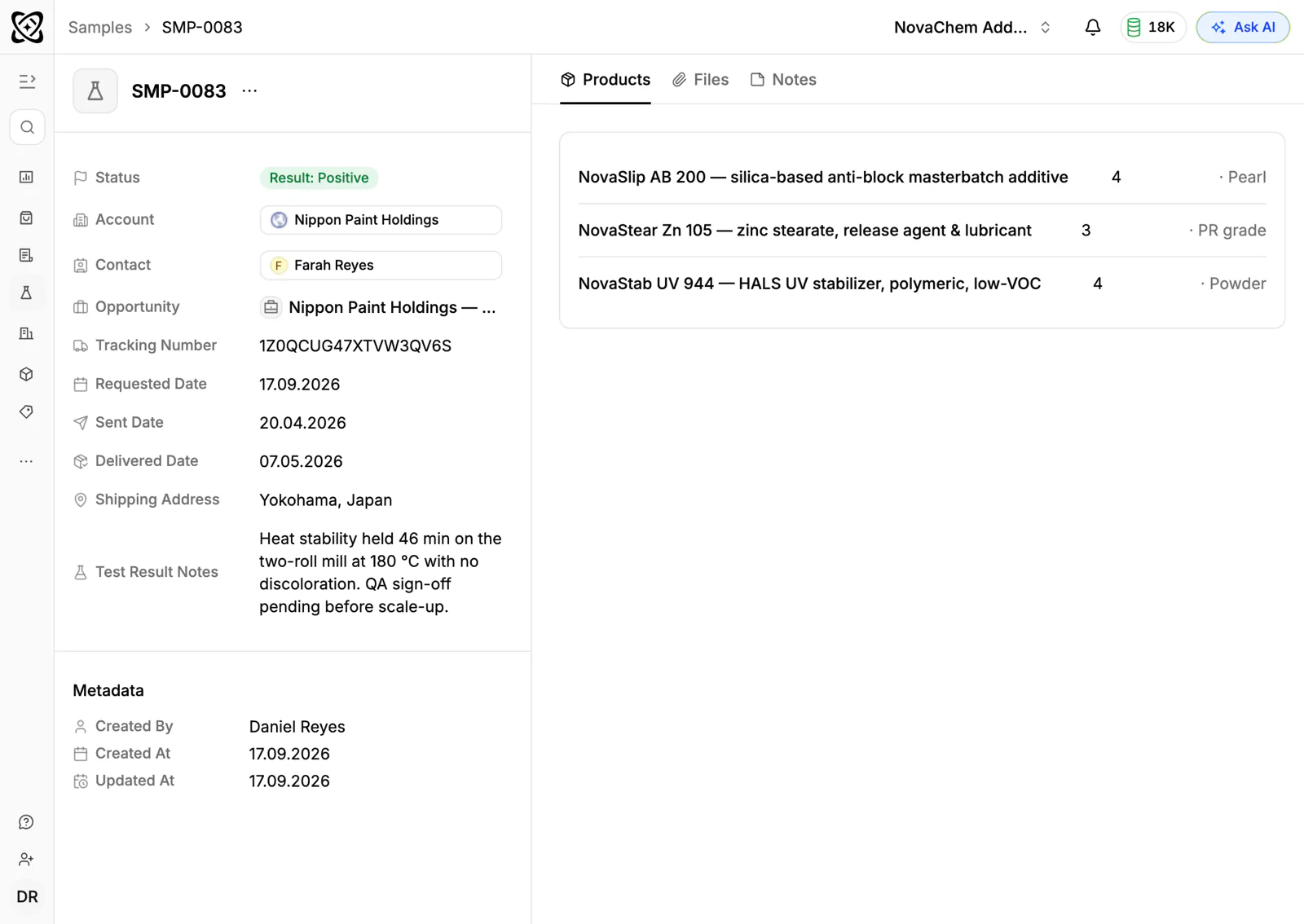
PromptLab has a Samples module on every plan. Each record holds the account, contact, product, quantity, shipping address, tracking number and the requested, sent and delivered dates. Status runs from Requested, Preparing, Sent and In Transit to Delivered and Under Evaluation, and ends at Result: Positive, Negative or Conditional, with room for the customer's notes.
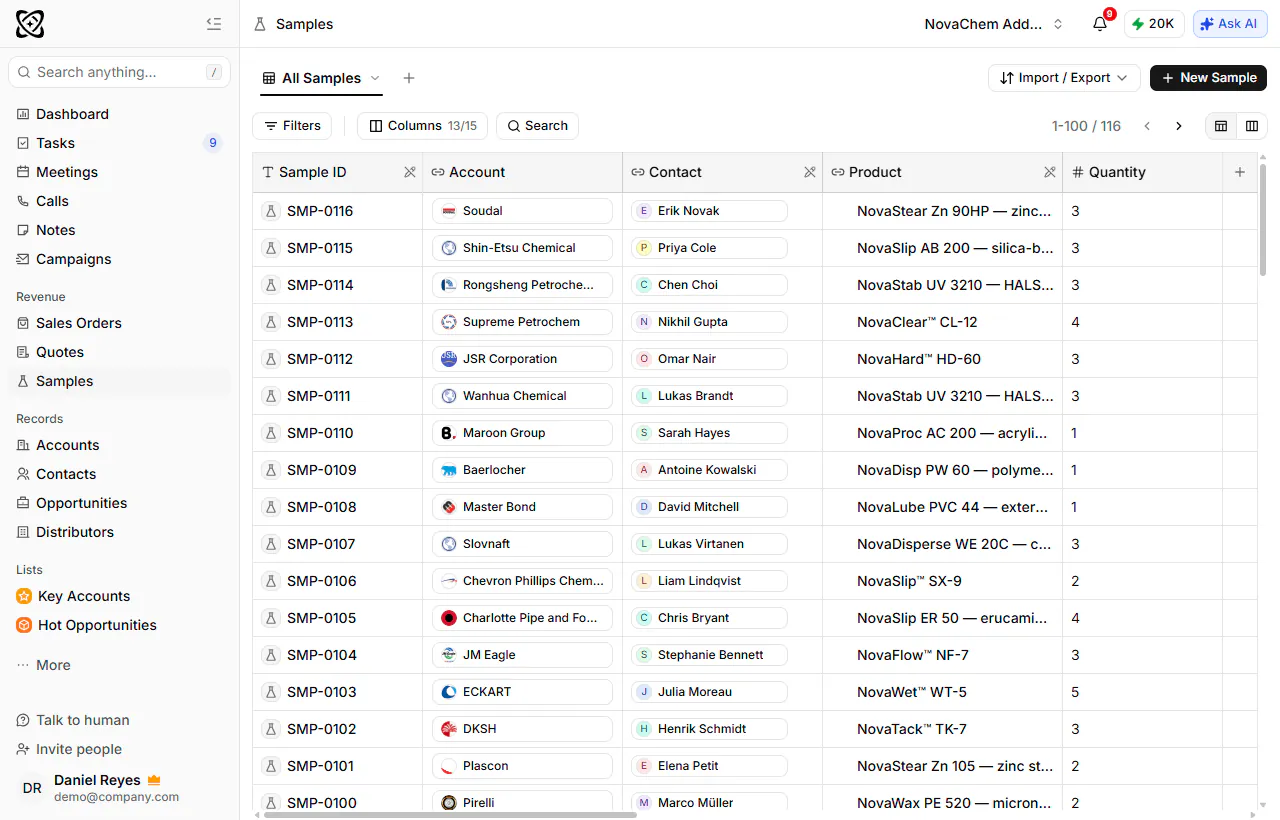
Because a sample belongs to an account, you see it beside the emails, meetings and quotes for that customer. A workflow can create a task when a deal changes stage, so the delivery check does not depend on memory.
When the result is positive, you create the quote and link it to the deal, with margin visible on every line. The quotes and samples page shows the full flow. The shared Inbox keeps the email, WhatsApp and Telegram messages about the sample on the same account.
Frequently asked questions
What is sample management?
Sample management is recording and following every product sample you send: who asked, what was sent, when it arrived and what the customer found. The sample management glossary entry covers the term.
How do I track product samples in a CRM?
Create a sample record for each shipment with its account and contact, note it on the deal, and update its status as it moves. Record the customer's result when it arrives. Doing it in the CRM keeps samples next to your quotes and emails.
How long should I wait before chasing a sample result?
Two days after delivery to confirm arrival, then at two weeks and again at four. Testing times vary by industry, so ask the customer for their date at the start and use it.
Should I charge for samples?
It depends on your trade and the cost. Many suppliers give small samples free and charge for large ones or for rush freight. Whichever you choose, keep a record of what each sample cost so you can compare it with the orders it produces.
What should I do with a conditional sample result?
Record the exact condition, such as a lower viscosity or a different pack size, and create a task to answer it. Offer a modified grade or a second sample, and log it on the same account so the history stays together.