



















CRM for auto parts distributors
How auto parts distribution sells, from garage accounts and fleet contracts to cross-references, returns and daily reorders, and a CRM setup that tracks it.
 By the PromptLab team24 October 20267 min read
An auto parts distributor needs a CRM that tells a garage ringing at eight in the morning apart from a fleet manager renewing a contract. The first buys in small lines all week at their own price. The second buys in volume against terms you agreed once a year. Both can be lost to a competitor with a van in the same street.
In PromptLab, each garage or fleet is an account with its own price list, quotes sit on deals, and sales orders show what was bought. The wider distributor view is on the distributors page.
How does an auto parts distributor actually sell?
Most distributors sell to the trade, not to the public. The customers are independent garages and workshops, body shops, fleet operators, dealerships, retail parts counters and smaller wholesalers. Each has its own rhythm.
A garage needs the right part, today, at a price that lets it quote the job. It orders by phone, by WhatsApp, through a portal or at the counter. A fleet manager wants a steady supply of consumables, such as filters, brake parts, bulbs and tyres, and a single invoice a month. A dealership buys what its own parts department is short of.
The product is huge and mostly identical to what the next distributor stocks. So the sale turns on availability, delivery time, price, credit terms and the rep who knows the workshop. A good rep can say which garage has gone quiet and which one has just taken on a new contract.
Why are part numbers, cross-references and brands the hard part?
A garage asks for a part for a specific vehicle. The distributor finds it by part number, by vehicle details or by cross-reference from an original equipment number to an aftermarket equivalent. Brand tiers matter too: an original equipment part, a premium aftermarket part and an economy part for the same job sit at three prices.
Your catalogue and stock system handle the lookup and live availability, and a CRM should not pretend to replace it. What the CRM does is hold the commercial layer on top: who buys which brand tier, who is on which price list, who gets which discount and what the rep promised.
This is where customer price lists earn their place. In auto parts, the same brake pad can have a different price for a large garage group, a small independent and a retail counter. Keeping those prices in a customer price list, not in a rep's memory, is the difference between a clean quote and a margin leak. See how to manage customer price lists.
How do returns, cores and warranty claims affect the account?
Auto parts have a returns culture that most industries don't. A wrong part gets sent back. A part that failed gets a warranty claim against the manufacturer. Some parts, such as alternators, starters and brake calipers, are sold with a core charge, which is refunded when the customer returns the worn unit.
You don't need a returns module in the CRM to benefit from knowing the pattern. A garage that returns a lot of parts may be mis-identifying them, and a rep can help. A garage that never claims a warranty may be using someone else. Keep notes on the account when a claim or dispute is open, so the next call doesn't start blind.
What do reorders and delivery runs mean for the sales rep?
An auto parts customer is never "won" once. They are won every day. A garage that gets a part late three times in a month starts ringing the competitor first. A fleet account that has not ordered brake pads in a quarter is probably getting them elsewhere.
That makes two views worth building. One is accounts that used to order and have gone quiet, sorted by value. The other is new accounts that opened and have not placed a second order, which is where first impressions get settled. How to reactivate dormant accounts covers the routine.
What pipeline stages fit auto parts distribution?
PromptLab has one deal pipeline with stages you set. Auto parts has two kinds of deal: opening a new account, and winning a larger contract such as a fleet. Use a deal field for the type and save a view for each. Daily counter orders don't need a deal at all. They are sales orders on the account.
| Stage | Entry condition |
|---|---|
| Lead | A garage, fleet or body shop has been identified |
| First visit | A rep has met the workshop and seen what it buys |
| Account terms | Credit terms and a price list are proposed |
| Trial orders | The first orders have been placed |
| Contract quote | For a fleet or group, a quote with agreed pricing is with them |
| Approved | The customer has accepted the quote and terms |
| Active | Orders arrive without being chased |
Pick a loss reason when a deal falls through. Price, Competitor and Timing point to different fixes, and a note on the deal can say whether slower delivery or credit terms decided it.
What must the CRM track?
- A price list per account, or per group of accounts, by brand tier and product group.
- Credit terms and limits, as fields on the account, so a rep knows whether to push or to wait.
- Fleet details, such as the number of vehicles and the makes, so you can plan the stock you carry for them.
- Order history by product group, so you see which brand tiers each garage buys and what it stopped buying.
- Open issues, such as a late delivery, a returned part or a disputed invoice, noted on the account.
- Messages from every channel. Garages often ask for a part on WhatsApp with a photo of the old part.
How do you set this up in PromptLab?
- 1
Create the stages and a deal-type field
Add the stages above and a deal field for new account or fleet contract. Save a view for each, and let simple counter customers live as accounts with sales orders.
- 2
Build price lists by customer group
Create customer price lists for large groups, independents and counters, then pick the right one when you build each quote. The quote takes its prices, with line discounts and the margin visible on each line.
- 3
Add credit and fleet fields
Add account fields for credit terms, credit limit, vehicle count and main makes. Use them in views, so a rep can filter for fleets of a size.
- 4
Put the chat threads on the account
Connect your WhatsApp Business number and your company Telegram bot. When a garage sends a photo of a worn pad, the thread sits on the account in the shared Inbox, not on one rep's phone.
- 5
Find the quiet accounts
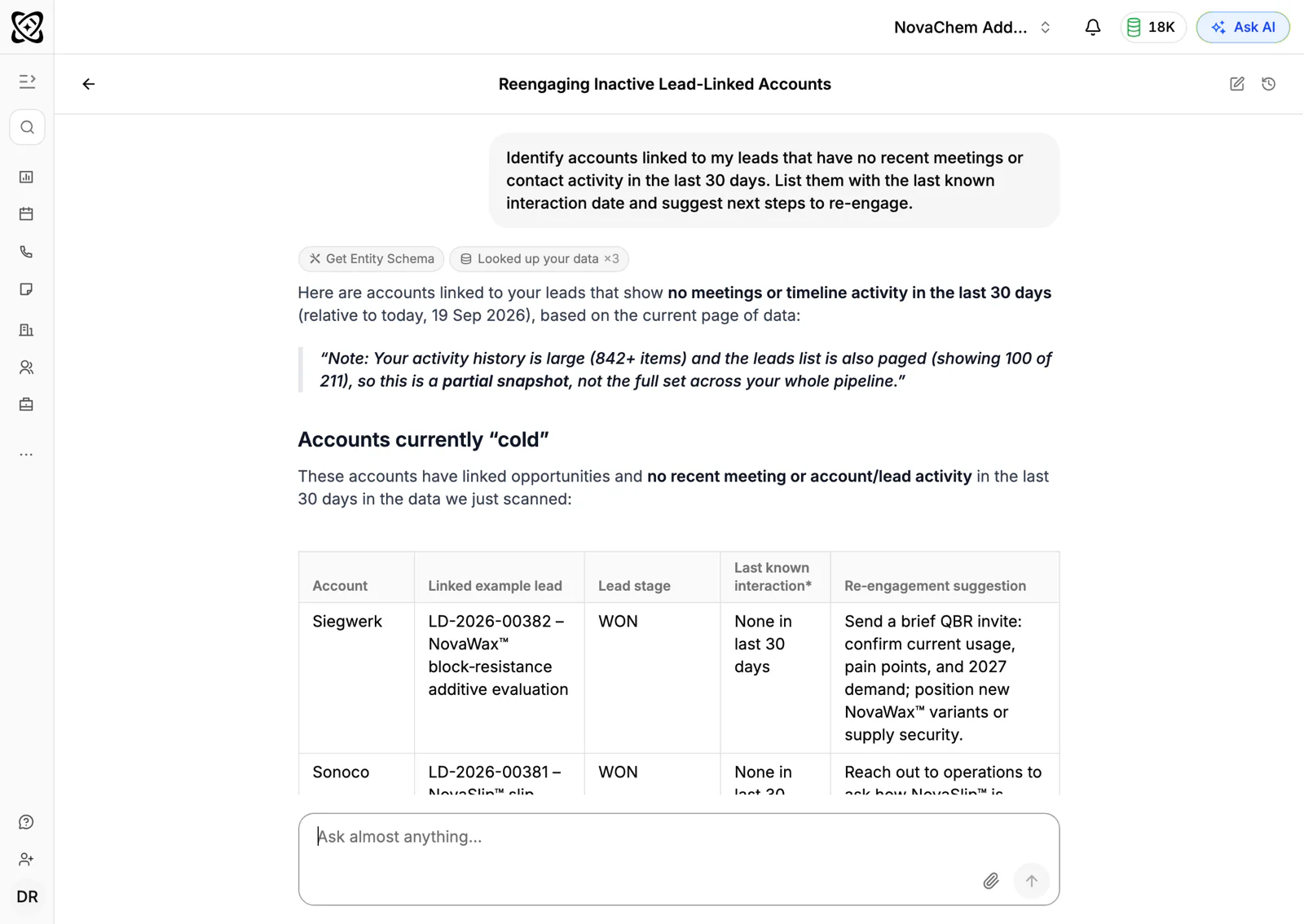
Ask AI can find accounts with no meetings or activity in the last 30 days, and the Customers dashboard template counts dormant customers per owner. Create a task for the rep to ring each one. You can also ask Ask AI which garages ordered brake parts last quarter, then which ordered them this quarter, and compare the two lists.
How does PromptLab compare for auto parts sales?
Swipe the table sideways to see every CRM →
| Checked on 30 September 2026 | PromptLab |  Pipedrive Pipedrive |  Zoho CRM Zoho CRM |  HubSpot HubSpot |
|---|---|---|---|---|
| Pricing | ||||
| Paid plans, a month | $11.99 – $99per seat | $14 – $79per seat | $14 – $52per seat | $7 – $150per seat |
| Number of plans | 3 | 4 | 4 | 4 |
| Free trial | ||||
| Billing | Billed monthly | Billed annually | Billed annually | Billed annually, plus a $1,500–$3,500 onboarding fee |
| Import from CSV and Excel | ||||
| Sales management | ||||
| Deal pipelines | ||||
| Quotes | From$59/month | From$23/month | Add-on | |
| Sales orders | From$23/month | |||
| Sample tracking | ||||
| Price lists | From$23/month | |||
| Meetings and calls | ||||
| Meeting recording and transcripts | Via marketplace | From$90/month | ||
| AI meeting summaries | ||||
| AI follow-up email drafts | From$59/month | From$23/month | From$90/month | |
| Meeting scheduler and call dialer | From$23.99/month | From$39/month | Via marketplace | |
| AI and automation | ||||
| CRM fields filled in from calls | From$40/month | From$90/month | ||
| Connect Claude or ChatGPT (MCP) | ||||
| Workflow automation | From$39/month | |||
| API and webhooks | From$23.99/month | |||
| Conversations | ||||
| Gmail and Outlook email sync | From$39/month | |||
| WhatsApp conversations | From$39/month | Add-on | ||
| Telegram conversations | ||||
| Save LinkedIn profiles | Via marketplace | From$23/month | From$150/month | |
| Privacy and security | ||||
| Single sign-on (SSO) | From$99/month | From$40/month | From$150/month |
Pipedrive has a pipeline a field rep picks up quickly, with plans from $14 a seat a month, billed annually. It has no price list per customer, so a large garage group and a retail counter can't each have their own price, and quotes wait for Premium at $59. Zoho CRM has quotes, orders and price books from $23 a user a month, billed annually, which suits the trade side. It doesn't model samples.
HubSpot is the most polished all-in-one suite, with a Starter plan from $7 a seat a month, billed annually. For a team selling products, quoting is an add-on, and sales orders and price lists aren't there. Professional and Enterprise add a $1,500 to $3,500 onboarding fee. See the Pipedrive and HubSpot comparisons.
Frequently asked questions
What should a CRM for an auto parts distributor include?
It should hold a price list per customer, quotes, sales orders and the contacts at each garage or fleet, with chat channels in one inbox. PromptLab ships price lists, quotes and sales orders on every plan, from $11.99 per user per month.
Does the CRM replace my parts catalogue?
No. Part lookup, cross-references and live stock stay in your catalogue and stock system. The CRM holds the customer side: prices, terms, contacts, quotes, orders and conversations.
How do I give garages different prices?
Keep a customer price list for each garage group or tier, and pick it when you build the quote. The quote then uses that list's prices.
Can I see which garages have stopped ordering?
Yes. Sales orders are recorded by account, so you can see which accounts used to order and have gone quiet. Ask AI can also list accounts with no recent activity. Then create a task for the rep to ring.
Is there a free trial?
Basic and Professional come with a 14-day free trial. There is no free plan.