



















CRM for fasteners distributors
How fastener distribution sells, from long part lists and certificates to blanket orders and reorders, and how to set up a CRM that tracks customer prices.
 By the PromptLab team29 October 20266 min read
A fasteners distributor sells thousands of small parts to a few hundred accounts, and the money is in the repeat orders. A CRM for that trade has to hold each customer's prices, their part lists and the paperwork that goes with a shipment, so a rep can quote in minutes and a buyer never gets a surprise.
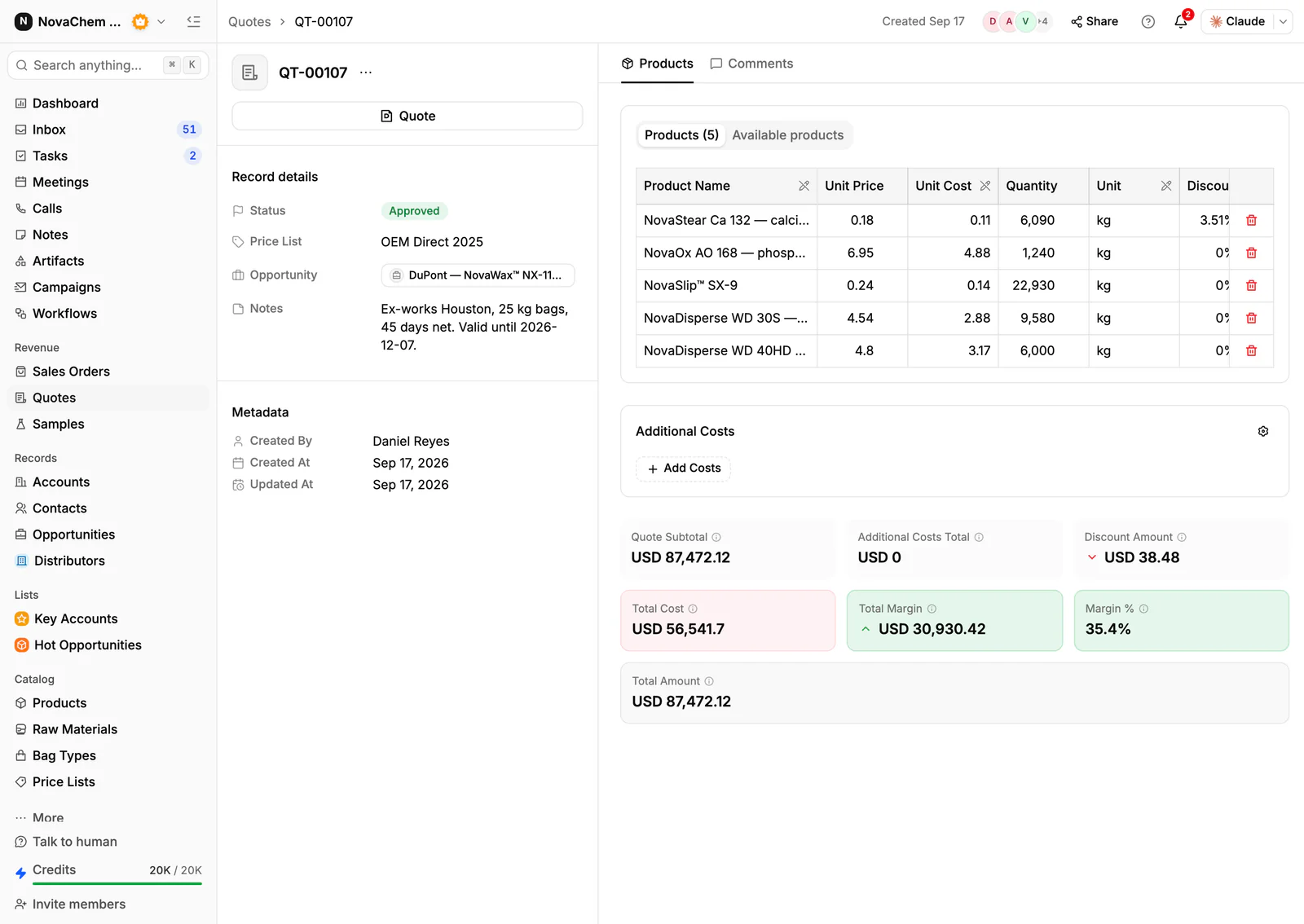
In PromptLab, each customer's agreed prices sit in a customer price list that you pick on each quote, quotes are built from your products with the margin on each line, and sales orders sit on the account. Direct customers and resellers share one pipeline, told apart by a field. The wider distribution view is on the distributors page.
How does fastener distribution actually sell?
Buyers come in three kinds. Manufacturers and assemblers buy screws, bolts, nuts and washers for a production line and want them on time, every week. Contractors and trade counters buy by the box and want the part today. Resellers and smaller distributors buy in volume and expect a distributor price.
The first order is rarely the prize. A buyer who finds a supplier that quotes quickly, ships the right part and answers the phone tends to put the whole family of fasteners with that supplier. That is why most reps spend more time on existing accounts than on new ones.
The enquiry itself is usually a list. A buyer sends a spreadsheet or an email with forty lines: size, thread, length, material, finish and quantity. The rep checks stock, applies the customer's price and sends the quote back. The slow part is the lookup, not the selling.
What do buyers ask for before they commit?
Fasteners are specified tightly. A buyer names a standard, a size, a property class or grade, a material and a coating. Two bolts that look the same can differ in strength or corrosion resistance, so mixing them up is a real problem for the buyer.
Expect these requests:
- Certificates. Many industrial buyers want a certificate of conformity or a material test report with each batch. Keep the current one on the account's Files tab so a rep can send it straight away.
- Samples. An assembler changing supplier often wants a small batch to test in their own process before moving the part number.
- Minimum order quantities and pack sizes. Loose bulk, boxes and bags are different lines with different prices.
- Lead times. Standard stock ships now, special finishes and long-length parts take longer. Say so on the quote.
Why do blanket orders and reorders drive the business?
Many production buyers do not place a fresh order each time. They agree a yearly volume and call off against it, which is a blanket purchase order. Our blanket purchase order explainer covers the term. For a distributor the questions are: how much of the agreed volume has been taken, and when is the next call-off due?
The same logic applies to ordinary accounts. A customer who bought every month and has gone quiet is a warning. A rep who can see the order history by product notices the gap early and rings, instead of finding out when the competitor's name appears on the next drawing.
What pipeline stages fit a fasteners distributor?
PromptLab has one deal pipeline per workspace, with stages you choose. Mark each deal as a new account, a reorder or a blanket agreement with a field, and save a view for each. A workable set of stages:
| Stage | Entry condition |
|---|---|
| Enquiry | A buyer has sent a part list or described a need |
| Quote sent | A quote is built from the customer's price list |
| Sample or certificate | A test batch or paperwork is requested and logged |
| Approved | The buyer has approved the part and the price |
| First order | A sales order exists on the account |
| Repeat supply | The account reorders, or calls off a blanket agreement |
What must the CRM track?
- A price list per customer, by part and pack size, so a rep never quotes from memory. See what is a customer price list.
- Quotes with the margin on every line, and a clear status: Draft, Pending or Approved.
- Certificates and documents on the account's Files tab.
- Samples, with a ship date and the buyer's feedback.
- Order history by product, so the rep sees what the account buys and what it stopped buying.
- Messages from every channel. Buyers email a part list, send a WhatsApp photo of a worn bolt, or message on Telegram. They should all land on the account.
How do you set this up in PromptLab?
- 1
Import accounts and products
Bring in accounts, contacts and products from CSV or Excel. Add a deal field for the type of account: new, reorder or blanket agreement.
- 2
Build a price list per account type
Create a customer price list for each key account and for your reseller tier. Quotes use them. Editing a list reprices every quote linked to it, so put a price change in a new list. Managing customer price lists shows the routine.
- 3
Quote from the list
Pick the products and the price list on each quote. Line discounts show as you build, and so does the margin on each line, worked out from each product's cost price. Send it as a PDF or a public link.
- 4
Attach the paperwork
Store certificates and approvals on the account's Files tab, so the next rep sees what the buyer already has.
- 5
Chase the quote with a task
A workflow can create a task for the owner when a quote changes status or a deal changes stage. A Pending quote then never sits unnoticed.
- 6
Connect the channels
Connect email, your WhatsApp Business number and your company Telegram bot to the shared Inbox. The thread about a short delivery lands on the account.
How does PromptLab compare for fastener distributors?
Swipe the table sideways to see every CRM →
| Checked on 30 September 2026 | PromptLab |  Pipedrive Pipedrive |  Zoho CRM Zoho CRM |  HubSpot HubSpot |
|---|---|---|---|---|
| Pricing | ||||
| Paid plans, a month | $11.99 – $99per seat | $14 – $79per seat | $14 – $52per seat | $7 – $150per seat |
| Number of plans | 3 | 4 | 4 | 4 |
| Free trial | ||||
| Billing | Billed monthly | Billed annually | Billed annually | Billed annually, plus a $1,500–$3,500 onboarding fee |
| Import from CSV and Excel | ||||
| Sales management | ||||
| Deal pipelines | ||||
| Quotes | From$59/month | From$23/month | Add-on | |
| Sales orders | From$23/month | |||
| Sample tracking | ||||
| Price lists | From$23/month | |||
| Meetings and calls | ||||
| Meeting recording and transcripts | Via marketplace | From$90/month | ||
| AI meeting summaries | ||||
| AI follow-up email drafts | From$59/month | From$23/month | From$90/month | |
| Meeting scheduler and call dialer | From$23.99/month | From$39/month | Via marketplace | |
| AI and automation | ||||
| CRM fields filled in from calls | From$40/month | From$90/month | ||
| Connect Claude or ChatGPT (MCP) | ||||
| Workflow automation | From$39/month | |||
| API and webhooks | From$23.99/month | |||
| Conversations | ||||
| Gmail and Outlook email sync | From$39/month | |||
| WhatsApp conversations | From$39/month | Add-on | ||
| Telegram conversations | ||||
| Save LinkedIn profiles | Via marketplace | From$23/month | From$150/month | |
| Privacy and security | ||||
| Single sign-on (SSO) | From$99/month | From$40/month | From$150/month |
Pipedrive is easy to learn and has a clear pipeline. It has no sample tracking and no price list per customer, and quotes wait for Premium at $59 a seat a month, billed annually. Zoho CRM has quotes, sales orders and price books from $23 a user a month, billed annually, which suits a trade business, but it doesn't model samples.
HubSpot is a polished all-in-one suite with a Starter plan from $7 a seat a month, billed annually. For product sales, quoting sits in the separate Revenue Hub, and sales orders and price lists aren't there. Professional and Enterprise add a $1,500 to $3,500 onboarding fee. See the Pipedrive and HubSpot comparisons.
Frequently asked questions
What should a CRM for a fasteners distributor include?
It should hold a price list per customer, quotes built from your products, sales orders, documents such as certificates, and a record of every message. PromptLab includes these on every plan, starting at $11.99 per user per month.
Can a CRM handle quotes with dozens of lines?
Yes. In PromptLab you pick products and a price list on each quote, add line discounts and see the margin on every line, worked out from each product's cost price. You can import products from CSV or Excel first, so you are not typing the catalogue.
How do I track blanket orders in a CRM?
Keep the agreement on the account, with the agreed volume and period as custom fields, and log each call-off as a sales order. A task reminds the owner when the next call-off is due.
Where do I keep certificates of conformity?
Keep the master copies in your quality system and attach the version you sent to the account's Files tab. The CRM then shows what each buyer has received.
Is there a free trial?
Basic and Professional come with a 14-day free trial, with no card needed. There is no free plan.