



















CRM for industrial gases suppliers
How industrial gases sales works, from cylinder and bulk supply contracts to site surveys and renewals, and a CRM setup that tracks quotes, prices and accounts.
 By the PromptLab team29 October 20265 min read
An industrial gases supplier needs a CRM that keeps the supply arrangement on the account: which gases, in which form, at what price, with which delivery pattern. The sale is rarely a one-off. A welding shop or a food plant that signs with you may stay for years, so the work is in winning the site, pricing it properly and noticing when consumption changes.
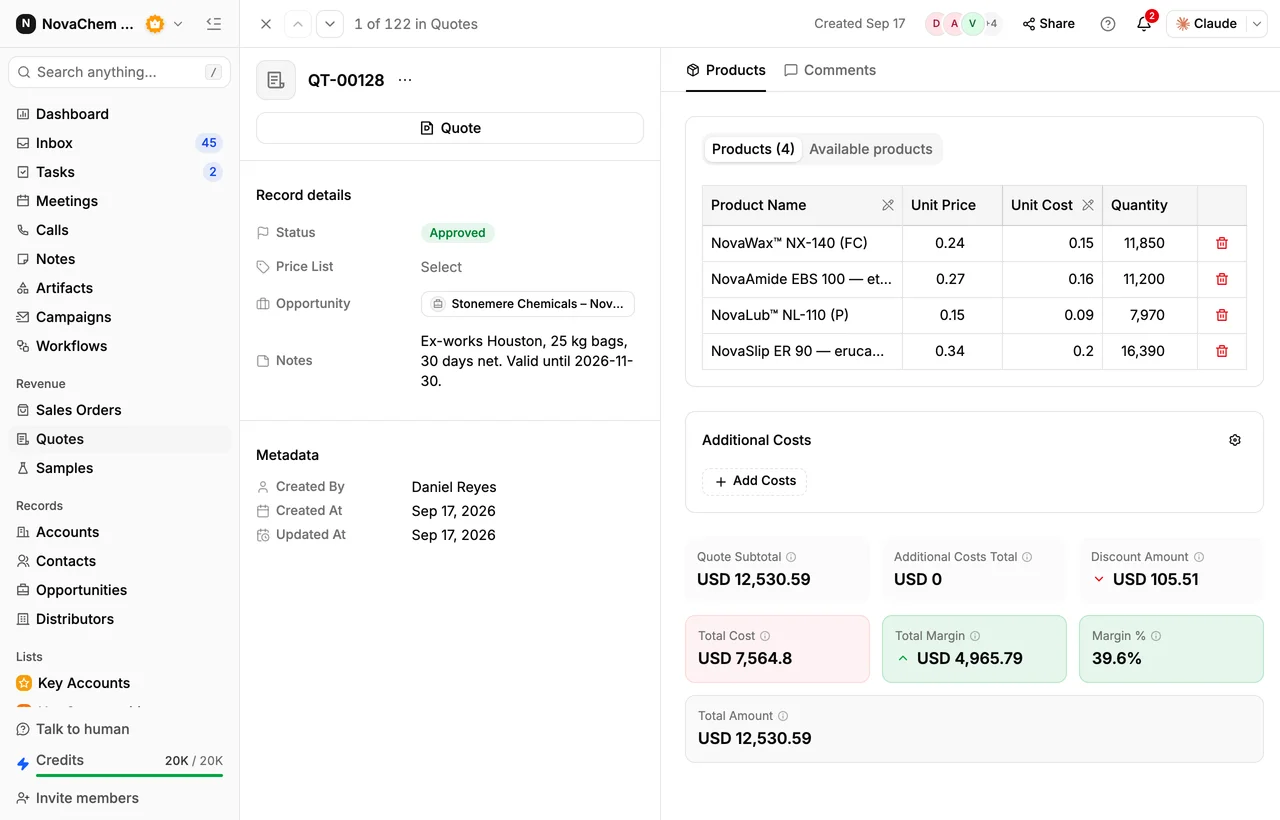
In PromptLab, each customer's agreed prices sit in a customer price list, quotes are built from products and that list, and deals sit in one pipeline with stages you set. Contracts and site documents go in the Files tab on the account. The wider distributor view is on the distributors page.
How does an industrial gases sale actually work?
Gases are sold in several forms. Packaged gas arrives in cylinders and bundles, bulk gas in tanks filled by tanker, and some large users have gas piped or generated on site. Each form changes the paperwork, the delivery pattern and the price.
Most suppliers sell to a mix of customers. Welding and fabrication shops buy argon, CO2 and mixtures. Food and drink plants buy CO2 and nitrogen. Hospitals and labs buy medical and specialty gases. Each group has its own purity needs, its own safety questions and its own buyer, sometimes a purchasing manager and sometimes the person who runs the shop floor.
The first conversation is usually a site visit. A rep or technical adviser looks at the points of use, the storage space, the consumption and whether the current supplier's arrangement is working. Then comes a quote, and then a supply agreement that sets the price and the terms.
What do cylinder rental and consumption mean for the sale?
Cylinders are often kept on rental rather than sold, so a customer's bill has more than one line: the gas, the cylinder rental and sometimes delivery. A quote that shows only the price per fill looks cheaper than it is, and the buyer will notice when the invoice differs.
Consumption is the other number to watch. Say a fabrication shop took 40 cylinders a month for a year and now takes 25. That drop is the most useful thing the CRM can show a rep, because it usually means a second supplier, a change in the shop's work or a leak in your service. A rep who sees it in the account can ring the same week.
What pipeline stages fit a gases supplier?
PromptLab has one deal pipeline per workspace, with stages you name. Use a field on the deal to mark packaged, bulk or on-site supply, and save a view for each, so each team can open its own deals in one click.
| Stage | Entry condition |
|---|---|
| Enquiry | A site has asked for supply or a price |
| Site survey | A visit is booked and the points of use are noted |
| Quote sent | A quote built from the customer's price list is out |
| Agreement in negotiation | Terms, volumes and rental are being agreed |
| Won, awaiting first delivery | The agreement is signed and the first order is due |
| Supplying | The account orders on a schedule |
Lost deals need a loss reason from a fixed list: Price, Competitor, Timing, No budget, Product fit or Other. Over a year, that list shows whether you are losing sites on price, to a competitor or on timing.
What must the CRM track?
- Gases and forms supplied to each site, so a rep knows whether the account buys packaged, bulk or both.
- Price per customer. A large fabricator and a small repair shop pay different rates for the same gas. Put each rate in a customer price list and pick that list on the quote.
- Agreement terms and renewal dates, held in custom fields on the account, with the signed document in the Files tab.
- Site details, such as access, storage and the contact who receives deliveries.
- Consumption over time, through the sales orders on the account.
- Every message, since site managers often use WhatsApp or Telegram to ask for an urgent delivery.
How do you set this up in PromptLab?
- 1
Load your products and price lists
Add the gases and services you sell as products. Create a price list for each customer group or key account. Editing a list's prices reprices every quote linked to it, so a price change goes in as a new list. How to manage customer price lists walks through it.
- 2
Set the stages and a supply-type field
Add the stages above to your pipeline, then a deal field for packaged, bulk or on-site. Save a view for each.
- 3
Add renewal fields
Add custom fields for agreement end date and notice period on the account. A saved view of accounts, sorted by that date, becomes your renewal list.
- 4
Build a follow-up workflow
Create a workflow that fires when a deal changes stage and creates a task for the account owner. Use it for the survey follow-up and the first-delivery check. A second workflow can post to Slack when a site is won.
- 5
Connect the channels
Connect your mailbox, your WhatsApp Business number and your company Telegram bot. Messages from a site land on the account in the shared Inbox, not on one driver's or rep's phone.
How does PromptLab compare for gases sales?
| Checked on 30 September 2026 | PromptLab |  Salesforce Salesforce |  Pipedrive Pipedrive |
|---|---|---|---|
| Pricing | |||
| Paid plans, a month | $11.99 – $99per seat | $25 – $550per seat | $14 – $79per seat |
| Number of plans | 3 | 5 | 4 |
| Free trial | |||
| Billing | Billed monthly | Billed annually | Billed annually |
| Import from CSV and Excel | |||
| Sales management | |||
| Deal pipelines | |||
| Quotes | From$100/month | From$59/month | |
| Sales orders | From$100/month | ||
| Sample tracking | |||
| Price lists | From$100/month | ||
| Meetings and calls | |||
| Meeting recording and transcripts | Add-on | ||
| AI meeting summaries | Add-on | ||
| AI follow-up email drafts | Add-on | From$59/month | |
| Meeting scheduler and call dialer | From$23.99/month | Add-on | From$39/month |
| AI and automation | |||
| CRM fields filled in from calls | From$195/month | ||
| Connect Claude or ChatGPT (MCP) | From$195/month | ||
| Workflow automation | From$39/month | ||
| API and webhooks | From$23.99/month | From$195/month | |
| Conversations | |||
| Gmail and Outlook email sync | From$39/month | ||
| WhatsApp conversations | Add-on | From$39/month | |
| Telegram conversations | |||
| Save LinkedIn profiles | Via marketplace | Via marketplace | |
| Privacy and security | |||
| Single sign-on (SSO) | From$99/month |
Salesforce Sales Cloud is the most configurable CRM there is, with five editions from $25 to $550 a user a month, billed annually. For a team selling products, quotes and price lists start at $100, and building it to fit usually takes an admin or partner. Pipedrive is one of the easiest sales CRMs to learn, with Nova on every plan from $14 a seat, billed annually. It keeps no price list per customer, and quotes wait for Premium at $59.
See the Salesforce and Pipedrive comparisons for plan-by-plan detail.
Frequently asked questions
What should a CRM for an industrial gases supplier include?
It should hold customer price lists, quotes, sales orders and the account's agreement details. PromptLab has those on every plan, plus custom fields for renewal dates and a Files tab for contracts.
Can a CRM track cylinders?
Cylinder movements belong in your operations or asset system. Use the CRM for the commercial side of the account: quotes, prices, orders and conversations.
How do I handle different prices for the same gas?
Give each customer or customer group its own price list and quote from it. See what is a customer price list for how they work.
How do I know when a customer is buying less?
Look at the account's sales orders over time. Ask AI can answer a question such as what an account ordered last quarter, in plain words.
Is there a free trial?
Basic and Professional come with a 14-day free trial, with no card needed. There is no free plan.