



















CRM for industrial machinery manufacturers
How machinery makers sell long, high-value deals, from demos and quotes with options to dealers and spare parts follow-up, and how to set up a CRM for it.
 By the PromptLab team16 October 20266 min read
A machinery manufacturer needs a CRM that can follow a deal for many months, hold a quote with options and revisions, and still be useful after the machine ships. The sale is slow and the stakes are high, so the record of who said what, and when, is worth a lot.
In PromptLab, each buyer is an account, each machine enquiry is a deal, quotes attach to that deal and move through statuses, and meetings are recorded so the next rep can read what was agreed. The manufacturers page covers the overview.
How does an industrial machinery manufacturer actually sell?
A buyer rarely wakes up needing a machine. A plant plans a new line, replaces ageing equipment or adds capacity, and a group of people weighs in: operations, engineering, maintenance, finance and often purchasing. Each cares about something different.
The sale usually moves through a sequence like this:
- Early conversations about the application, output and floor space.
- A technical discussion or a site visit to understand the process.
- A demo, either at your works or on a similar machine.
- A quote with options, covering the base machine, extras, installation and training.
- Negotiation, often involving commercial terms and delivery dates.
Some machines are sold direct. Others go through dealers or agents who know the local market. In both cases the manufacturer needs to see what is happening, even when someone else is in the room.
Why do long cycles break spreadsheets and inboxes?
A deal that runs for nine months passes through many hands and many threads. A rep leaves, an engineer joins a call, a buyer forwards your quote to a colleague. If the history lives in individual inboxes, it vanishes when they do.
Three things go wrong most often. A follow-up is forgotten because the next step was only in someone's head. A quote is revised and nobody can tell which version the buyer has. And a decision maker who joined late is never added to the account.
A CRM fixes this by giving the deal one record: the people involved, the meetings, the emails, the quotes and the next task. The guide to building a B2B pipeline covers the stage logic.
How do quotes with options work?
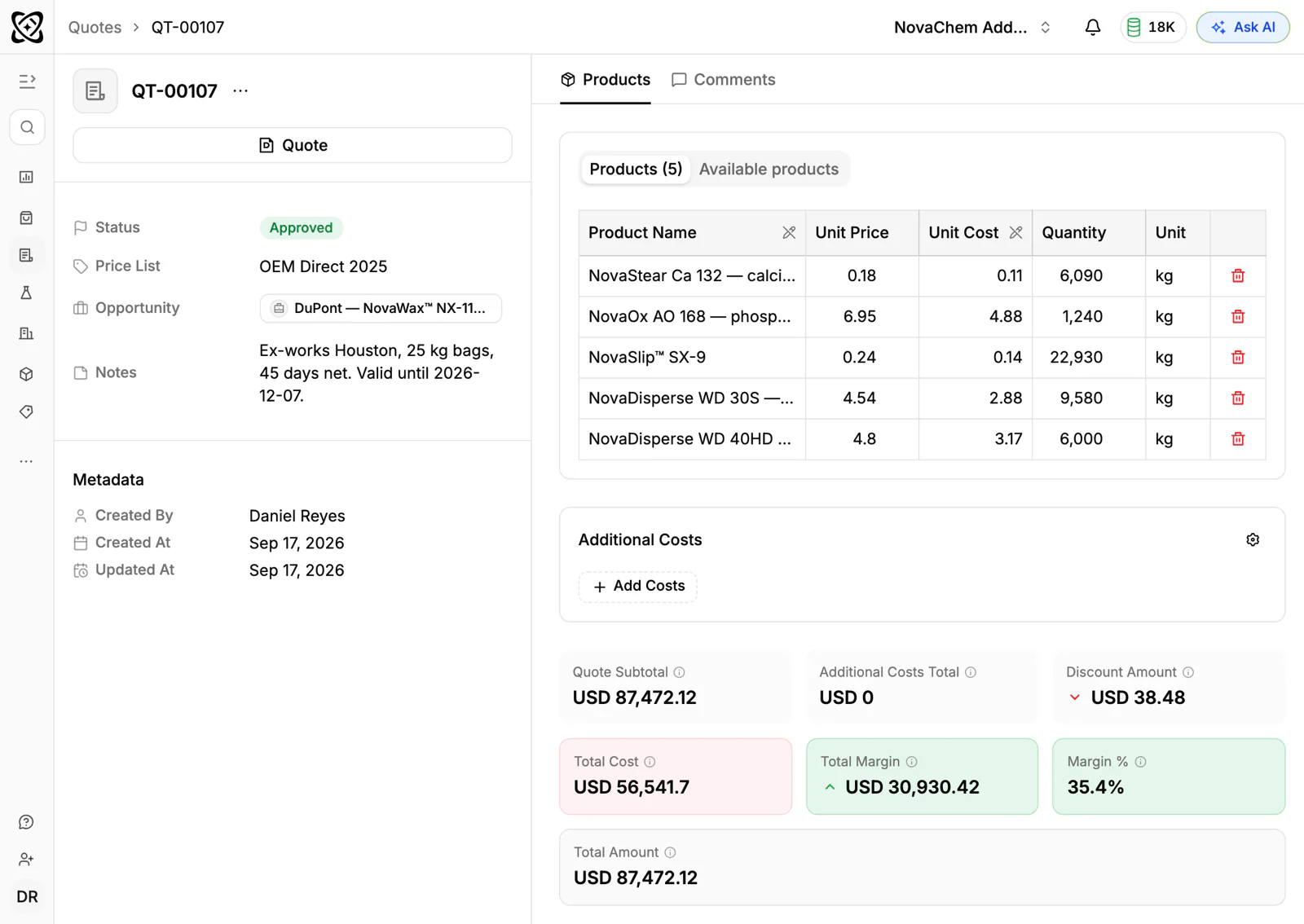
A machine quote is seldom a single price. There is a base configuration, then optional extras, then installation, commissioning and training. The buyer often asks for two or three variants to compare.
Keep every version on the same deal and give it a clear status, so the team can tell what is still a draft, what is pending with the buyer and what is approved. Make the lines specific enough that the sales order for an accepted quote can use them as they are. See how to write a sales quote for a structure that works.
What pipeline stages fit machinery sales?
| Stage | Entry condition |
|---|---|
| Enquiry | A plant asked about a machine or a line |
| Qualified | Budget, timing and decision makers are understood |
| Technical review | Engineering has discussed the application with you |
| Demo or site visit | A demo is booked or has taken place |
| Quote sent | A priced proposal with options is out |
| Negotiation | Terms, delivery and options are being agreed |
| Order | A purchase order or signed contract is in |
| Delivered | The machine is installed and accepted |
Keep a separate view for dealer deals, so you can see which opportunities come through partners. PromptLab has a single pipeline with stages you configure, so use a field on the deal to mark the source, such as direct or the dealer's name.
What happens after the machine ships?
The relationship does not end at installation. Spare parts, wear items, upgrades and the next machine all come from the same customer. The manufacturer that follows up well is the one that gets the call.
Use tasks linked to the account to remember the follow-ups: a check-in after commissioning, a reminder before a service interval you promised, a note to raise a retrofit. Orders for spare parts can be logged as sales orders on the account, so you can see what the customer buys over time.
PromptLab is a sales CRM, not a service desk. It has no service ticket or field-service features, so keep repair jobs and engineer scheduling in the system you already use for them.
What must the CRM track?
- Accounts with the sites, the contacts by role and the account owner.
- Deals with the machine, value, expected close and next step.
- Quotes with options and revisions, attached to the deal.
- Meetings, with recordings, transcripts and summaries.
- Dealers and agents, each as an account, with the deals they bring.
- Documents such as specifications, drawings and layouts, stored on the account.
- Spare parts orders as sales orders against the customer.
How do you set this up in PromptLab?
- 1
Import accounts and contacts
Load your customers, dealers and contacts from CSV or Excel, or pick a file from Google Drive. If you use Salesforce or HubSpot today, the two-way sync lets you run both while you move.
- 2
Build the pipeline
Create the stages above and agree what moves a deal from one to the next. Mark each deal's source with a field.
- 3
Record the meetings
Connect Google Meet, Zoom or Microsoft Teams, and meetings are recorded with transcripts in 100+ languages. The summary and the next steps are ready when the call ends, and a task can be created from the meeting.
- 4
Quote with options
Build each quote on the deal, send it and keep its status current. When it is accepted, create the sales order with the same lines.
- 5
Add a task when a quote goes quiet
Use workflow automation to create a task or post to Slack when a quote changes status or a deal changes stage. A proposal that has been out for a month with no word then reaches someone.
- 6
Keep customers warm after delivery
Link follow-up tasks to the account. PromptLab flags accounts with no recent engagement, which is useful when the next purchase is two years away.
How does PromptLab compare for machinery manufacturers?
Swipe the table sideways to see every CRM →
| Checked on 30 September 2026 | PromptLab |  Salesforce Salesforce |  Dynamics 365 Dynamics 365 |  HubSpot HubSpot |
|---|---|---|---|---|
| Pricing | ||||
| Paid plans, a month | $11.99 – $99per seat | $25 – $550per seat | $65 – $150per seat | $7 – $150per seat |
| Number of plans | 3 | 5 | 3 | 4 |
| Free trial | ||||
| Billing | Billed monthly | Billed annually | Billed annually | Billed annually, plus a $1,500–$3,500 onboarding fee |
| Import from CSV and Excel | ||||
| Sales management | ||||
| Deal pipelines | ||||
| Quotes | From$100/month | Add-on | ||
| Sales orders | From$100/month | |||
| Sample tracking | ||||
| Price lists | From$100/month | |||
| Meetings and calls | ||||
| Meeting recording and transcripts | Add-on | From$105/month | From$90/month | |
| AI meeting summaries | Add-on | From$105/month | ||
| AI follow-up email drafts | Add-on | From$105/month | From$90/month | |
| Meeting scheduler and call dialer | From$23.99/month | Add-on | From$105/month | |
| AI and automation | ||||
| CRM fields filled in from calls | From$195/month | From$150/month | From$90/month | |
| Connect Claude or ChatGPT (MCP) | From$195/month | From$150/month | ||
| Workflow automation | ||||
| API and webhooks | From$23.99/month | From$195/month | ||
| Conversations | ||||
| Gmail and Outlook email sync | ||||
| WhatsApp conversations | Add-on | Add-on | Add-on | |
| Telegram conversations | ||||
| Save LinkedIn profiles | Via marketplace | Add-on | From$150/month | |
| Privacy and security | ||||
| Single sign-on (SSO) | From$99/month | From$150/month |
Salesforce Sales Cloud is the most configurable CRM there is, with five editions from $25 to $550 a user a month, billed annually. Quotes and price lists start at $100, call recording is a $50 add-on, and building it usually takes an admin or a partner. Dynamics 365 Sales runs from $65 to $150 a user a month, billed annually, and suits a company standardised on Microsoft. Meeting recording starts on Enterprise at $105.
HubSpot is a polished all-in-one suite with a free CRM and Starter from $7 a seat a month, billed annually. For a team selling products, quoting sits in the separate Revenue Hub, sales orders and price lists are missing, and Professional or Enterprise adds a $1,500 to $3,500 onboarding fee. The HubSpot comparison goes through it line by line.
Frequently asked questions
What CRM features does a machinery manufacturer need?
Deals that last many months, quotes with revisions attached to the deal, meeting records, tasks linked to accounts and a way to log spare parts orders. PromptLab covers all of these on every plan.
Can a CRM handle quotes with optional extras?
Yes, if each version sits on the same deal with a status. Build the base machine and the options as quote lines, send the version the buyer asked for, and keep earlier versions so the history is clear.
How should I manage dealers in a CRM?
Treat each dealer as an account, and mark deals that come through them with a field on the deal. Then you can see which dealers bring the most opportunities and which have gone quiet.
Does PromptLab handle service tickets or field service?
No. PromptLab is for the sales side: accounts, deals, quotes, orders, meetings and conversations. It can hold follow-up tasks and spare parts orders on the account, but repair jobs and engineer scheduling belong in a dedicated tool.
Can I record site visits and demos?
Meetings on Google Meet, Zoom and Microsoft Teams are recorded and summarised. For an in-person visit, create a task from the meeting afterwards and add your notes to the account.
Sources
Prices and features of other CRMs come from each vendor's own pages, on the dates below.
- Salesforce, checked on 30 September 2026: Sales Cloud pricing, Sales Engagement pricing, Agentforce MCP support
- Dynamics 365, checked on 30 September 2026: Sales pricing, Conversation intelligence FAQ, Sales MCP server
- HubSpot, checked on 30 September 2026: Sales Hub pricing, Revenue Hub quote software, WhatsApp integration, MCP servers, Single sign-on (SSO)