



















CRM for lubricants distributors
How lubricants distribution sells, from OEM approvals and oil analysis to bulk and drum accounts and repeat orders, and a CRM setup that tracks it.
 By the PromptLab team16 October 20266 min read
A lubricants distributor needs a CRM that remembers what each customer burns through, what they pay and who approved which product. Most of the revenue comes from the same oils, greases and coolants bought again, so the account record matters more than the first sale.
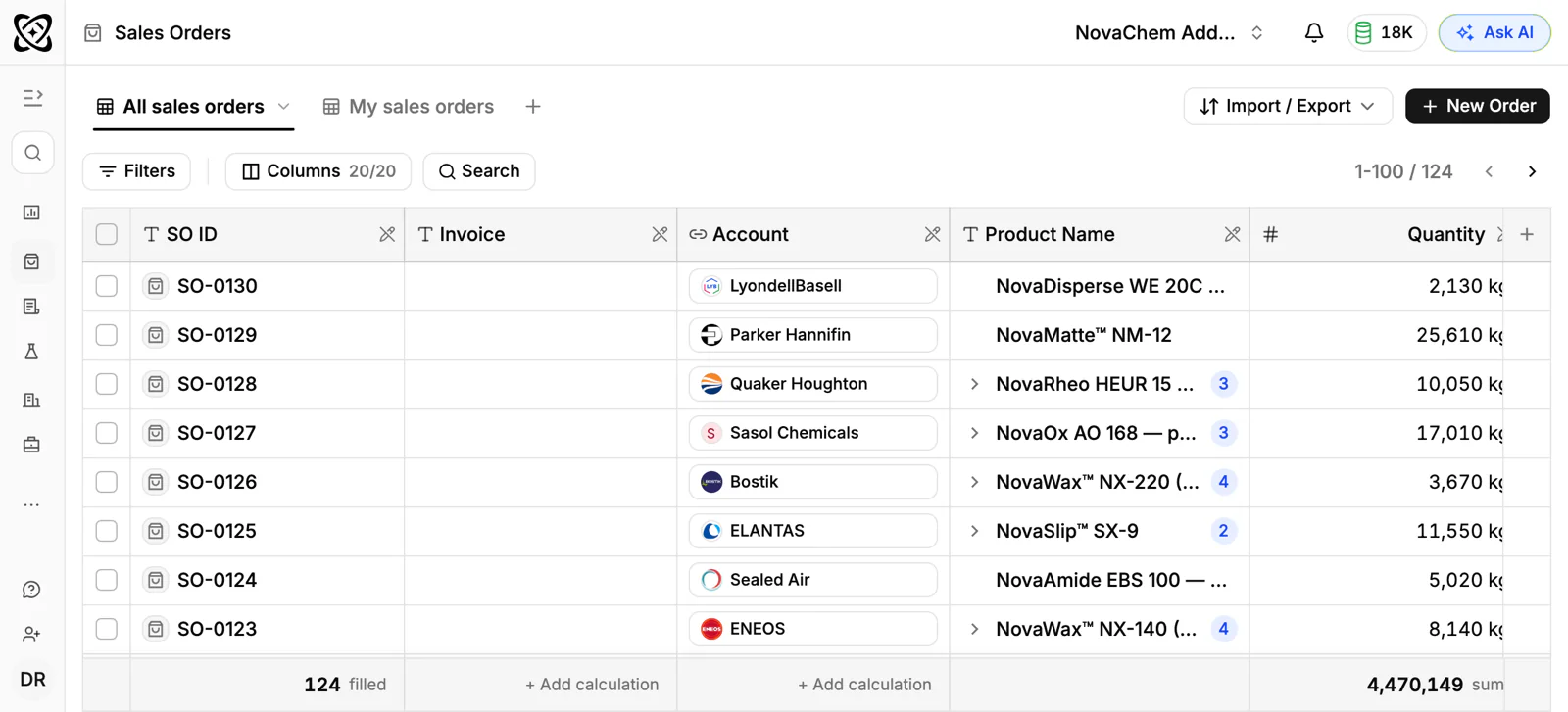
In PromptLab, each customer's price list feeds the quote, the approved quote's lines go into a sales order on the same account, and trial products go in as samples. The short version for resellers is on the distributors page.
How does a lubricants distributor actually sell?
A distributor buys from one or more base oil blenders and brand owners and sells to workshops, fleets, farms, quarries, factories and smaller resellers. Customers range from a garage that wants a few drums to a plant that takes a bulk delivery into its own tank.
Sales usually happen through a mix of routes:
- Outside reps who visit sites, look at the machines and agree supply terms.
- Phone, email and WhatsApp reorders from buyers who know exactly what they need.
- Quotes for larger accounts, often for a year of supply at an agreed price.
- Tenders from bigger organisations, priced for a set period.
The reorder calls matter as much as the visits. Most customers do not want a salesperson; they want the right drum on the right day.
Why do approvals, grades and trials matter?
A machine does not take just any oil. Equipment makers publish what they recommend for their machines, and a fleet or plant manager will usually want a product that meets it. Selling is often a conversation about whether your product is an acceptable equivalent to what they use now.
That conversation tends to run in steps. The customer shares what they use today. You propose a product and send the technical data sheet, and the safety data sheet for handling. Some customers then run a trial on one machine or one vehicle, sometimes with oil analysis to see how the product holds up. Only after that do they change over.
Because switching a lubricant on a plant is a decision that someone signs off, deals can be slow. A CRM should show the trial, who approved it and what is waiting on the customer.
Why are pack sizes and account pricing so central?
The same grade is sold in a small pack, a pail, a drum and a bulk delivery, each at its own price. Large customers expect a price agreed for the year, and a workshop expects a trade price. If reps quote from memory or from an old spreadsheet, the wrong price goes out sooner or later.
Say a customer buys the same hydraulic oil in a drum every month. The rep who can see that history knows when the next order is due. The rep who cannot only finds out when the customer rings someone else.
Seasonality is real in some segments. A farming customer's needs follow the working season, and a supplier who has not spoken to them beforehand tends to miss the early orders. Keep the seasonal accounts visible with a task before their busy period.
What pipeline stages fit a lubricants distributor?
Run two motions: winning new accounts and keeping existing ones supplied. PromptLab has one deal pipeline with stages you set, so give it the stages both motions need, mark each deal as new account or reorder with a field and save a view for each.
New account deals
| Stage | Entry condition |
|---|---|
| Lead | A site or fleet is worth a visit |
| Survey | The rep has listed the machines and the oils in use |
| Product proposed | Equivalent products and data sheets are with the buyer |
| Trial | A trial product is logged as a sample |
| Approved | The buyer or engineer has signed off the change |
| First order | A sales order is created for the approved quote |
| Regular supply | Reorders arrive without chasing |
Quote and reorder deals for existing accounts
| Stage | Entry condition |
|---|---|
| Enquiry or reorder due | A request arrived, or the next order date came round |
| Quote sent | Priced from the account's list |
| Chased | A follow-up task was done |
| Won or lost | An order was placed, or the reason is noted |
What must the CRM track?
- Equipment and products in use, as a note or a field on the account, so a rep knows what the customer runs.
- Account price lists, by grade and pack size.
- Trials as samples, with the product, the machine and the result.
- Order history by product, so a rep sees what the account buys and what it stopped buying.
- Contacts by role: buyer, maintenance engineer, fleet manager, accounts payable.
- Every channel: email, WhatsApp and Telegram in one thread view on the account.
How do you set this up in PromptLab?
- 1
Import your accounts
Import customers and contacts from CSV or Excel, or pick a file from Google Drive. If your team also uses Salesforce or HubSpot, the two-way sync lets you run both while you switch.
- 2
Set up stages and views
Add the stages above to your pipeline and a deal field for new account or reorder, then save a view for each. Give every account one owner, so an outside rep and the desk never both assume the other one called.
- 3
Load customer price lists
Create a list for each customer, by grade and pack size, starting with the accounts that quote most often. Quotes read from the list, so a junior rep and the sales manager send the same price. See how to manage customer-specific price lists.
- 4
Log trials as samples
Record each trial product on the account with the machine, the contact and the date, and put the engineer's verdict in the feedback. How to track product samples covers the routine.
- 5
Automate the chase
Set a workflow: when a quote's status changes or a deal changes stage, create a task or post to Slack. A quote marked as sent then puts a follow-up task on the rep's list.
- 6
Put reorders in one Inbox
Connect your WhatsApp Business number, your Telegram bot and your mail. A reorder sent by WhatsApp lands on the account, and anyone covering for the rep can see the thread.
How does PromptLab compare for lubricants distributors?
Swipe the table sideways to see every CRM →
| Checked on 30 September 2026 | PromptLab |  Zoho CRM Zoho CRM |  Dynamics 365 Dynamics 365 |  HubSpot HubSpot |
|---|---|---|---|---|
| Pricing | ||||
| Paid plans, a month | $11.99 – $99per seat | $14 – $52per seat | $65 – $150per seat | $7 – $150per seat |
| Number of plans | 3 | 4 | 3 | 4 |
| Free trial | ||||
| Billing | Billed monthly | Billed annually | Billed annually | Billed annually, plus a $1,500–$3,500 onboarding fee |
| Import from CSV and Excel | ||||
| Sales management | ||||
| Deal pipelines | ||||
| Quotes | From$23/month | Add-on | ||
| Sales orders | From$23/month | |||
| Sample tracking | ||||
| Price lists | From$23/month | |||
| Meetings and calls | ||||
| Meeting recording and transcripts | Via marketplace | From$105/month | From$90/month | |
| AI meeting summaries | From$105/month | |||
| AI follow-up email drafts | From$23/month | From$105/month | From$90/month | |
| Meeting scheduler and call dialer | From$23.99/month | Via marketplace | From$105/month | |
| AI and automation | ||||
| CRM fields filled in from calls | From$40/month | From$150/month | From$90/month | |
| Connect Claude or ChatGPT (MCP) | From$150/month | |||
| Workflow automation | ||||
| API and webhooks | From$23.99/month | |||
| Conversations | ||||
| Gmail and Outlook email sync | ||||
| WhatsApp conversations | Add-on | Add-on | ||
| Telegram conversations | ||||
| Save LinkedIn profiles | From$23/month | Add-on | From$150/month | |
| Privacy and security | ||||
| Single sign-on (SSO) | From$99/month | From$40/month | From$150/month |
Zoho CRM is the cheapest way in: free for three users, then from $14 a user a month, billed annually, with quotes, sales orders and price books from $23. Calls are recorded only through marketplace telephony apps, and Telegram isn't supported. It doesn't model samples at any tier.
Dynamics 365 Sales has quotes, price lists and orders on every plan from $65 a user a month, billed annually, and pairs naturally with a Dynamics ERP. Meeting recording waits for Enterprise at $105, and setup often involves a Microsoft partner. HubSpot has a Starter plan from $7 a seat a month, billed annually, but quoting sits in the separate Revenue Hub and sales orders and price lists aren't there. The Dynamics 365 Sales comparison goes through it line by line.
Frequently asked questions
What CRM features does a lubricants distributor need?
Account-specific price lists by grade and pack size, quotes and sales orders, order history per account, sample tracking for trials and a shared inbox for email and messaging. PromptLab has all of these on every plan.
Can a CRM track which oils a customer uses?
Yes. Add a field or note on the account for the equipment and the products in use, and keep the order history by product next to it. A rep then sees both what the customer runs and what they buy.
How do I stop reps quoting the wrong price?
Quote from the customer's price list, not from memory. With PromptLab the quote reads the list, so every rep sends the same agreed price.
Does PromptLab replace my ERP or stock system?
No. PromptLab is the sales side: accounts, quotes, orders and conversations. If you run Acumatica, it brings in customers, contacts, leads and opportunities. From any other system, import customers from a CSV or Excel export.
Can customers reorder over WhatsApp?
Yes. Connect your WhatsApp Business number to the shared Inbox, and each message lands on the account so any rep can turn it into a quote.
Sources
Prices and features of other CRMs come from each vendor's own pages, on the dates below.
- Zoho CRM, checked on 30 September 2026: Pricing, Features, WhatsApp integration, MCP
- Dynamics 365, checked on 30 September 2026: Sales pricing, Conversation intelligence FAQ, Sales MCP server
- HubSpot, checked on 30 September 2026: Sales Hub pricing, Revenue Hub quote software, WhatsApp integration, MCP servers, Single sign-on (SSO)