



















CRM for medical device distributors
How medical device distribution sells, from demo units and clinical evaluations to hospital tenders and consumable reorders, and a CRM setup that tracks it.
 By the PromptLab team24 October 20267 min read
A medical device distributor needs a CRM that follows a demo unit from the van to the ward and back, and keeps the buyer, the clinician and the tender on the same account. The sale is slow and has many voices in it. The person who likes the device is rarely the person who signs for it.
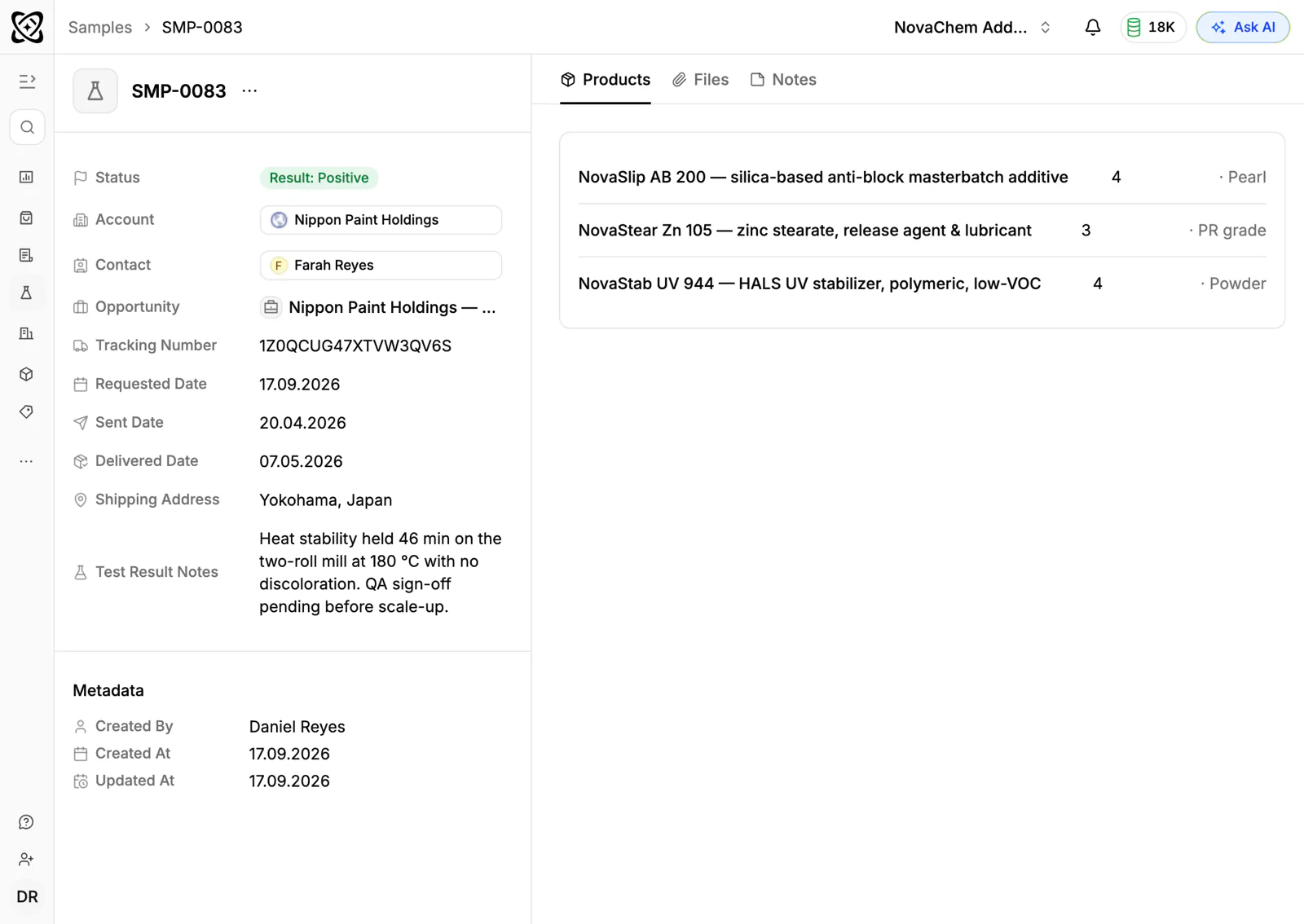
In PromptLab, a demo or evaluation unit is a sample request with a status, linked to the hospital account and the deal. Quotes come from your products and each customer's price list, and sales orders record what was actually bought. The wider distributor view is on the distributors page.
How does a medical device distributor actually sell?
Most distributors hold a territory for one or more manufacturers. They sell into hospitals, clinics, laboratories, surgical centres and sometimes directly to practitioners. Some sell capital equipment such as monitors, imaging accessories or sterilisers. Others sell consumables, implants, wound care or disposables that run out every week.
Capital equipment and consumables behave very differently. A capital sale is one large, infrequent deal with a long evaluation. A consumable is a small line on a standing order that repeats for years. Many distributors do both: the capital unit opens the door, and the consumables pay for the relationship.
Buying is a group decision. A clinician or department head asks for the device. A biomedical or clinical engineer checks that it fits the building and the existing kit. Procurement runs the commercial side. In many hospitals a committee reviews new products before they are allowed in. Your rep has to be known to all four.
What are demos, evaluations and loan units?
A demo is a short session where your rep or the manufacturer's specialist shows the device. An evaluation or trial leaves a unit with the department for a set period so staff can use it on real work. A loan unit is a device that stays on site, sometimes while a purchase is approved or a repair is done.
Each of these is a physical asset that must come back. Which unit went where, which serial number, who at the hospital has it and when it is due back are questions every distributor gets asked. A unit left too long with no decision costs you stock you could be demonstrating elsewhere.
Treat each one like a sample: a product, a destination, a ship date, a status and the user's feedback. How to track product samples covers the routine. For devices, add the serial number and the return date in the sample's notes or on a custom field.
What are tenders, framework agreements and value analysis?
Public hospitals and many large groups buy through tenders. You receive a document that lists requirements, you answer with a technical response and a price, and a panel scores it. Winning can mean the right to supply for a set term. How to respond to an RFQ covers the quoting side of that.
Some buyers award framework agreements or approved-supplier status instead. Once you are on the framework, individual departments order from it, and each order is smaller than the contract suggests. The commercial work becomes keeping departments ordering from you rather than outside it.
Hospitals with a value analysis or product review committee add a step before any of this. A department asks for a new product, the committee reviews it, and only then can a purchase happen. The committee's dates and requests are part of your timeline, whatever the clinician says.
Why do reorders and service matter so much?
Consumables and accessories are the quiet engine. A department that adopts your device keeps ordering the single-use parts, the cables, the reagents or the dressings that go with it. Losing that stream is worse than losing a one-off sale.
Three things are worth watching:
- The account that stops reordering. A department that took a box a month and has not for two months has probably switched, or the champion has left.
- Service and calibration dates. A visit due is a reason to call, and a way to find the next purchase.
- Training. A device that staff were not trained on sits unused, and an unused device does not generate reorders.
What pipeline stages fit medical device distribution?
PromptLab has one deal pipeline with stages you set. Use a deal field for the type of sale, such as capital, consumable or tender, and save a view for each. Capital and tender deals use every stage. A standing consumable order jumps straight to the end.
| Stage | Entry condition |
|---|---|
| Enquiry | A clinician or buyer has asked about a device |
| Demo done | A demo or specialist visit has taken place |
| Evaluation | A unit is on site with a return date |
| Evaluation feedback | The users' verdict is recorded on the sample |
| Committee or tender | The product is in review, or a tender response is submitted |
| Quote approved | The buyer has accepted and the quote is marked Approved |
| Order placed | A sales order has been created on the account |
| Supplying | Reorders and service are expected on a rhythm |
Pick a loss reason when a deal is lost. Price, Competitor and No budget are different problems, and the win and loss dashboard shows which one is growing. Add a note on the deal with the detail, such as the brand the hospital chose.
What must the CRM track?
- Every unit out on demo or loan, with serial number, location, status and return date.
- The people at each account: clinician, biomedical engineer, procurement and committee chair, with their role on the contact.
- Documents sent, such as brochures, instructions for use and certificates, so the next rep knows what the buyer already has.
- Price lists per customer. A public hospital, a private clinic and a group purchasing contract do not pay the same for the same item.
- Tender and framework dates, as fields on the account or deal, with a task for the closing date.
- Order history by product, so a rep sees which consumables a department buys and which it has stopped buying.
How do you set this up in PromptLab?
- 1
Add the stages and a sale-type field
Put the stages above into your pipeline and add a deal field for capital, consumable or tender. Save a view for each, so a tender specialist and a counter rep each see their own deals.
- 2
Log every demo and loan as a sample
Record the product, the department, the contact and the return date. Put the serial number in the notes. Change the status as the unit moves, and put the clinicians' feedback on the sample when it comes back.
- 3
Chase the feedback automatically
Build a workflow: when a sample's status changes to Under evaluation, create a task for the rep to ring for feedback before the return date. Workflows can also create a task when a quote changes status.
- 4
Build a price list per customer type
Create customer price lists for each hospital, clinic or contract. Quotes use them, with line discounts and a margin you can see.
- 5
Record the department meetings
Record demos and review calls on Google Meet, Zoom or Microsoft Teams. The transcript, summary and follow-up email draft land on the account, and action items become tasks.
- 6
Connect the chat channels
Ward managers and field specialists often message on WhatsApp. Connect your WhatsApp Business number and your company Telegram bot, so those threads sit on the account in the shared Inbox.
How does PromptLab compare for medical device sales?
Swipe the table sideways to see every CRM →
| Checked on 30 September 2026 | PromptLab |  Salesforce Salesforce |  Dynamics 365 Dynamics 365 |  Zoho CRM Zoho CRM |
|---|---|---|---|---|
| Pricing | ||||
| Paid plans, a month | $11.99 – $99per seat | $25 – $550per seat | $65 – $150per seat | $14 – $52per seat |
| Number of plans | 3 | 5 | 3 | 4 |
| Free trial | ||||
| Billing | Billed monthly | Billed annually | Billed annually | Billed annually |
| Import from CSV and Excel | ||||
| Sales management | ||||
| Deal pipelines | ||||
| Quotes | From$100/month | From$23/month | ||
| Sales orders | From$100/month | From$23/month | ||
| Sample tracking | ||||
| Price lists | From$100/month | From$23/month | ||
| Meetings and calls | ||||
| Meeting recording and transcripts | Add-on | From$105/month | Via marketplace | |
| AI meeting summaries | Add-on | From$105/month | ||
| AI follow-up email drafts | Add-on | From$105/month | From$23/month | |
| Meeting scheduler and call dialer | From$23.99/month | Add-on | From$105/month | Via marketplace |
| AI and automation | ||||
| CRM fields filled in from calls | From$195/month | From$150/month | From$40/month | |
| Connect Claude or ChatGPT (MCP) | From$195/month | From$150/month | ||
| Workflow automation | ||||
| API and webhooks | From$23.99/month | From$195/month | ||
| Conversations | ||||
| Gmail and Outlook email sync | ||||
| WhatsApp conversations | Add-on | Add-on | ||
| Telegram conversations | ||||
| Save LinkedIn profiles | Via marketplace | Add-on | From$23/month | |
| Privacy and security | ||||
| Single sign-on (SSO) | From$99/month | From$40/month |
Salesforce Sales Cloud is the most configurable CRM there is, with five editions from $25 to $550 a user a month, billed annually. For a team selling products, quotes and price lists start at $100, and it doesn't model samples, so demo units need a custom build. Dynamics 365 Sales suits a Microsoft shop, and quotes, price lists and orders are built in from Professional at $65 a user a month, billed annually. It has no sample tracking either, and meeting recording starts on Enterprise at $105.
Zoho CRM is the value pick, with paid plans from $14 a user a month, billed annually, and quotes, orders and price books from $23. Samples aren't modelled. See the Salesforce and Zoho CRM comparisons.
Frequently asked questions
What should a CRM for a medical device distributor include?
It should track demo and loan units, quotes, customer price lists and sales orders, with the clinical and procurement contacts on each account. PromptLab includes sample tracking, quotes, price lists and sales orders on every plan, from $11.99 per user per month.
Can a CRM track demo units and serial numbers?
Yes. Log each unit as a sample request linked to the account and deal, with a status, and put the serial number and return date in the notes or a custom field. The unit's history then stays on the account.
How do I manage a hospital tender in a CRM?
Make the tender a deal with a closing date, a task for each submission step and the response documents attached. Pick the loss reason if you lose, and add a note on what the panel said, so you can learn from it.
Can I give each hospital its own prices?
Yes. Keep a customer price list for each hospital, clinic or contract and quote from it, so every buyer sees its own agreed price.
Is there a free trial?
Basic and Professional come with a 14-day free trial. There is no free plan.