













LinkedIn connection message templates for B2B sales
Seven LinkedIn connection notes under 300 characters for product sellers, plus two messages to send once they accept.
 By the PromptLab team6 October 20264 min read
A LinkedIn connection note has very little room. Keep it under 300 characters, say why you are connecting, and don't sell. The aim is a yes to the request. The conversation comes afterwards.
These notes are for reps who sell physical products to buyers, engineers and operations managers. Each one is under 200 characters before you fill in the brackets, which leaves room for your details. The longer plan is in how to use LinkedIn for B2B prospecting.
Connection notes
Hi [First name], good to meet you at [Show name]. I enjoyed our chat about [Topic] and would be glad to stay in touch here.
Use it within a day or two of the show, while they remember you.
Hi [First name], thanks for the call today about [Topic]. I'll send the [Document] by email, and I'd like to connect here too.
Use it right after a first meeting.
Hi [First name], [Mutual contact] mentioned you work on [Area] at [Company]. I supply [Product] to similar teams and would be glad to connect.
Use it when you can name a real shared contact.
Hi [First name], I saw your comments in the [Group or event] discussion on [Topic]. Your point about [Detail] was useful. I work in [Your field] and would like to connect.
Use it when you both took part in something, not just joined the same group.
Hi [First name], your post on [Topic] made a point I agree with: [Detail]. We see the same with [Application]. I'd be glad to connect.
Use it when you read the post and have something true to say about it.
Hi [First name], I work with [Type of company] on [Product category] and saw that [Company] makes [Their product]. No pitch, I'd just like to connect with people in the field.
Use it sparingly, for accounts you have chosen on purpose. Skip it for people you know nothing about.
Hi [First name], we worked together on [Project or order] a few years ago. I hope things are going well at [Company]. It would be good to reconnect.
Use it to reopen old relationships, like the ones in our win-back templates.
Messages after they accept
These are not connection notes, so the 300-character limit does not apply. Keep them short anyway.
Thanks for connecting, [First name]. I won't fill your inbox. If [Product category] ever comes up at [Company], I'm happy to help or point you to someone who can. What does your team mainly work on?
Use it a day after they accept. One question, no pitch.
Hi [First name], you mentioned [Topic]. I have a one-page note on how other [Type of company] handle it. Shall I email it to you, or would a 15-minute call be easier?
Use it once there have been a few messages back and forth. For the email that follows a call, our follow-up email templates are a good start.
How to personalise them
The short limit helps: it forces you to pick one real detail.
- Lead with the shared thing. The show, the contact, the group, the post. Then your role in one line.
- Leave the pitch out. No price list, no brochure, no "I help companies like yours". Save it for after they accept.
- Read the profile first. Mention a role, a project or a post. Never write "I came across your profile".
- Send them yourself. Write each note by hand, or edit a draft. Don't use bots or bulk tools. They break LinkedIn's rules and read as spam.
Send them from your CRM
Frequently asked questions
How long can a LinkedIn connection note be?
LinkedIn caps the note at a few hundred characters, and free accounts can get a shorter limit than paid ones. The invite box shows a counter, so check it before you send. Shorter reads better anyway.
Should I add a note to every connection request?
For people who do not know you, yes. A short, specific note usually does better than a blank request. For people who already know you well, a blank request is fine.
Should I pitch in the connection request?
No. Ask to connect, name the reason, and wait. Pitching in the note is the quickest way to be ignored.
Can PromptLab send LinkedIn messages for me?
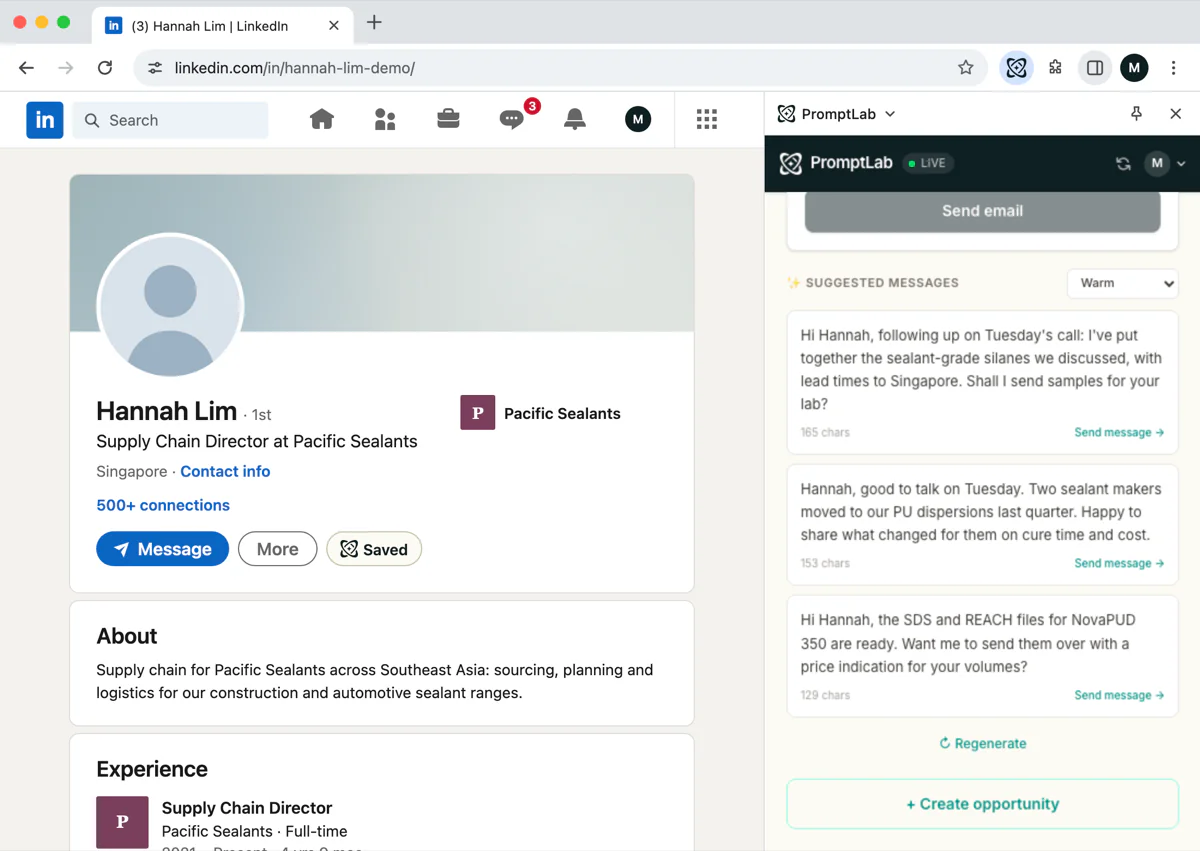
No. The Chrome extension saves profiles, drafts opening messages and creates tasks. You send the message yourself on LinkedIn. LinkedIn messages do not appear in the PromptLab Inbox either.
What do I do after someone accepts?
Say thanks, ask one question, and move the talk to email or a call when there is something real to discuss. Log the contact in your CRM so the next step is a task and not a memory.