













How to use LinkedIn for B2B prospecting
A practical LinkedIn prospecting routine for B2B product sellers: set up your profile, find buyers, write connection notes and save prospects to your CRM.
 By the PromptLab team6 October 20265 min read
To prospect on LinkedIn, fix your profile so a buyer understands what you sell, find the people who buy it, send a short connection note that mentions something real, and save every promising person to your CRM with a task for the next step. Do it in short, regular sessions, not in bursts.
For a company selling coatings, plastics, packaging or industrial supplies, LinkedIn is where you find the buyer's name, title and employer before you ever call. This guide gives you a routine you can run in half an hour a day.
Start with a profile that sells
Buyers check your profile after you send a request. Make it answer three questions in seconds: what do you supply, who do you supply it to, and why should they reply.
Profile checklist
Skip buzzwords. "Helping buyers source food-grade films with reliable lead times" tells a purchasing manager more than a paragraph of slogans.
Find the right buyers
Decide who buys before you search. In product sales that is usually a purchasing manager, a technical manager, a plant manager or the owner of a small company. Different products reach different people, so write the titles down.
- 1
Pick one segment
Choose a narrow group, such as "coatings manufacturers in Germany". A narrow search gives you people with a shared problem.
- 2
Search by title and industry
Use LinkedIn's search with the job title, industry and location filters. Look at the company page too, to see what the firm makes.
- 3
Look for a reason to write
A new role, a plant opening, a post about a new product or a trade show appearance is a reason to get in touch. No reason, no message.
- 4
Check for a warm route
See whether a colleague, a customer or a past contact knows them. An introduction beats a cold request.
Keep the list small. Twenty well-chosen people a week will do more than two hundred random ones.
Write connection notes that get accepted
A connection note has room for a couple of sentences. Write like a person, mention the reason you noticed them and don't pitch.
Hi [First name], I saw you at [Show name] on the [Company] stand. I work on [product area] for [your company]. I'd be glad to stay in touch.
Hi [First name], congratulations on the move to [Company]. We supply [product] to [type of buyer], so I thought it was worth connecting.
More wording is in our LinkedIn connection message templates. Don't attach a brochure to a first message, and don't ask for a call in the note.
What to send after they accept
Wait a day, then send a message that is useful. Ask a question about how they source a product, or offer a data sheet for something they already buy. Keep it to three or four lines.
If they reply, take the conversation to the channel they prefer, email or a call. If they don't, leave it, and come back in a few weeks with something new, such as a stock update or a case relevant to their market.
Build a weekly routine
Consistency beats intensity. Block three short sessions a week and give each a job. In the first, search and pick people. In the second, send notes and thank new connections. In the third, review replies and move prospects forward or drop them.
Keep a simple count of what you do, such as notes sent and conversations started. Your own numbers will tell you which segment and which opener work for your product. Share the best openers with colleagues so the whole team improves, and retire the ones nobody answers.
Also use LinkedIn for listening. Follow your customers' companies, congratulate people on milestones and comment when you have something useful to say. A buyer who recognises your name from a thoughtful comment is more likely to accept your note than one who has never seen you.
Save every prospect to the CRM
LinkedIn is not a CRM. Connections pile up with no next step, no deal and no record of what you discussed, and a connection you made last month is forgotten. Save each person you intend to follow up with, with the company, the title, the source and the next step.
Make that a rule: no one stays on your LinkedIn list unless there is a task against them in the CRM. That one habit turns browsing into a pipeline. For the next step, see how to qualify B2B leads and how to follow up after a trade show.
How PromptLab helps
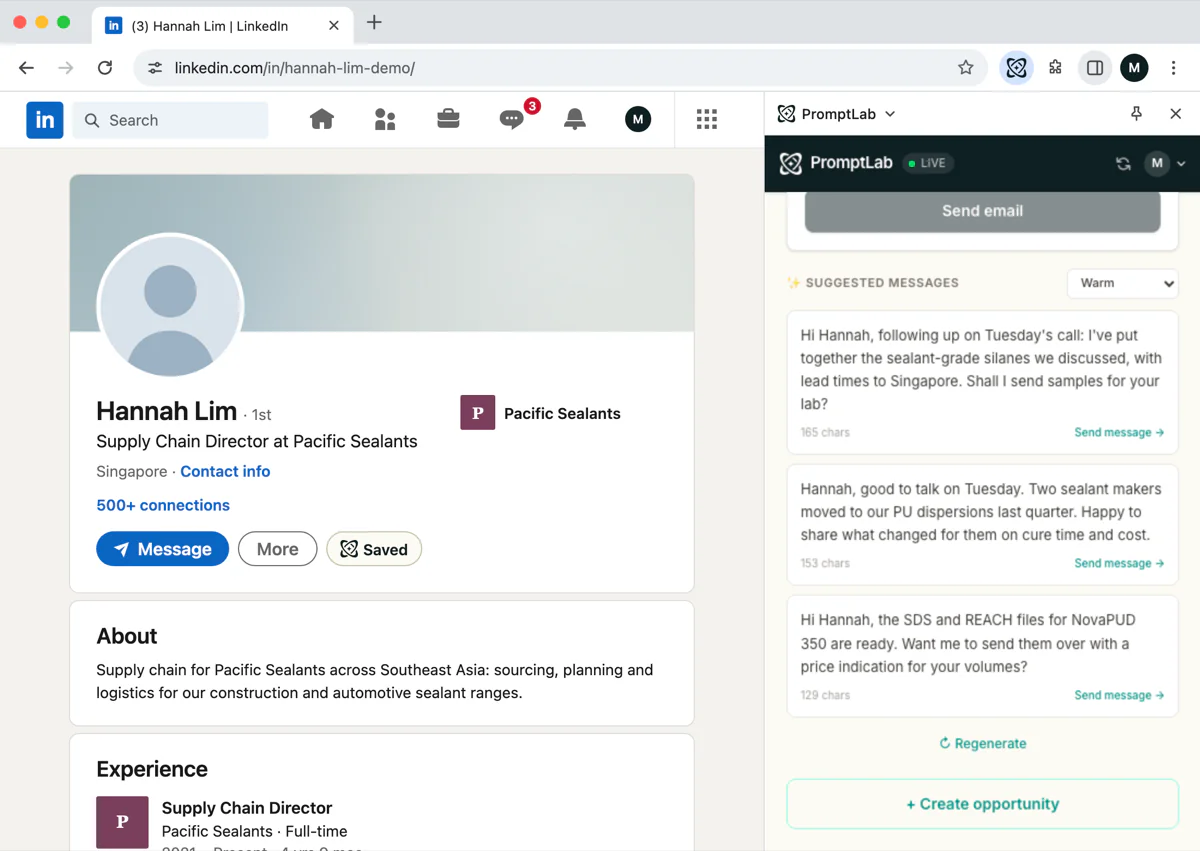
PromptLab's Chrome extension works beside LinkedIn. On a profile, it saves the person to the CRM, drafts opening messages for you to edit, and creates a task so the follow-up has a date.
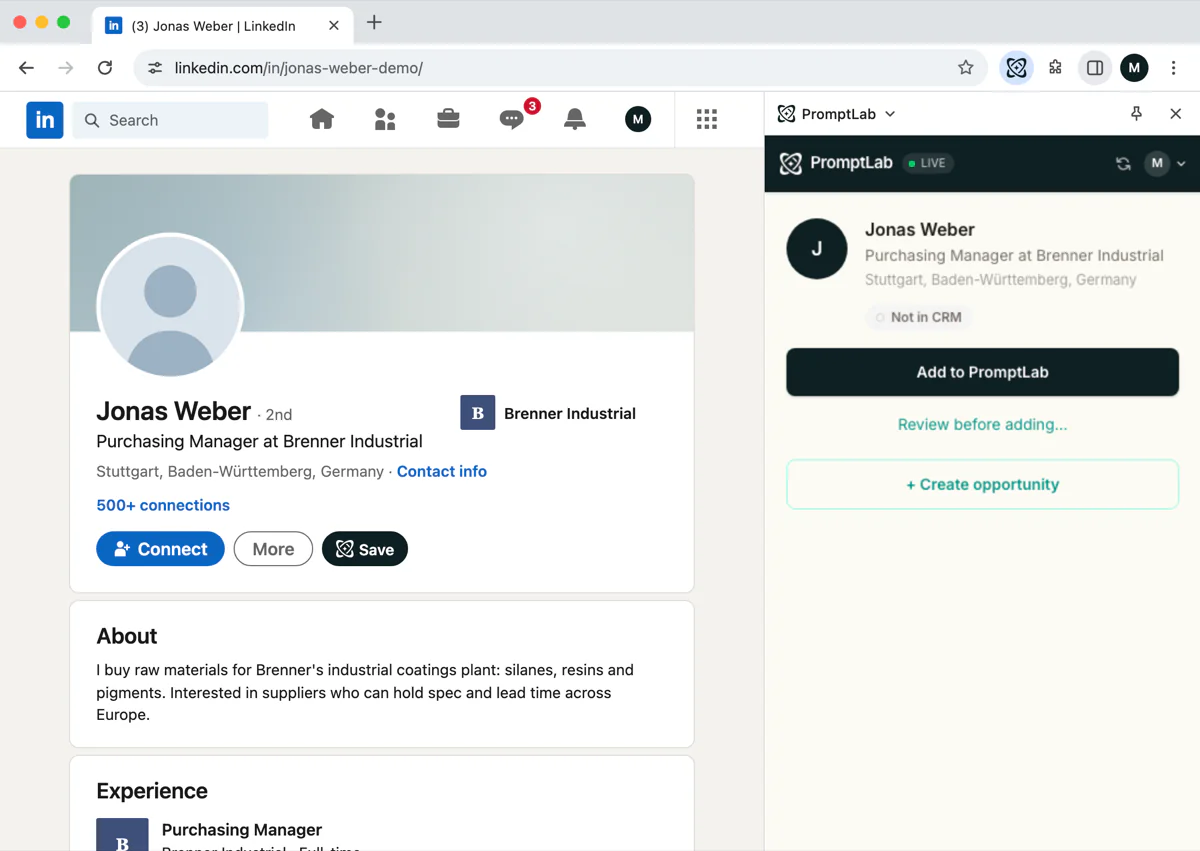
You send the message yourself: the extension drafts, it doesn't send, so you stay in control of what a buyer receives. The saved prospect lands in the same CRM as your quotes, samples and price lists, which means the first order doesn't start from a blank record.
See the LinkedIn CRM page and pricing. Basic and Professional include a 14-day free trial.
Frequently asked questions
Is LinkedIn good for B2B prospecting?
Yes, for finding who buys what at a company and getting a first introduction. It works best when you target a narrow group and write relevant messages. It is a way to start conversations, not close orders.
How many connection requests should I send?
Fewer than you think. A small number of well-chosen, personalised requests each week works better than a large number of generic ones, and it keeps your account safe.
Can a CRM send LinkedIn messages for me?
PromptLab's Chrome extension doesn't. It saves profiles, drafts openers and creates tasks, and you send the message yourself.
Should I connect with buyers before I email them?
It can help when you have a reason to write. A connection gives them a way to check who you are. Follow up by email or a call once they accept.
How do I keep LinkedIn prospects from being forgotten?
Save each one to your CRM and attach a task with a date. If a prospect has no next step, either add one or remove them from your list.