



















Best CRM with customer price lists in 2026
Which CRMs keep a price list per customer and quote from it? Six compared on the plan you need, what comes with the list and what it costs.
 By the PromptLab team16 October 20266 min read
If you sell products to businesses, you rarely have one price. A big buyer has a contract price, a regular customer has last year's price, and a new account gets list less something. The rep who quotes from memory, or from a spreadsheet on their own laptop, will eventually quote the wrong one.
So a CRM with customer price lists has to do more than store a product catalogue. It needs to hold a price list per customer, quote from it without retyping, and make the plan you need clear before you buy. We compared the CRMs we could check on exactly that, using each vendor's published plans checked on 30 September 2026. PromptLab is our own product and it ranks first, for reasons you can verify. The others have real strengths and we name them.
What to look for in a CRM with price lists
These are the criteria we used.
- A price list per customer. One shared catalogue price is not a price list. The CRM should hold the agreed prices for each account.
- Quotes that take those prices. A quote linked to a customer's price list should pick up that list's prices, so the rep doesn't type them.
- Margin visible on each line. Customer prices vary, so the rep needs to see what a discount does before the quote goes out.
- The plan you need. Several vendors put price lists two or three tiers up. We quote the cheapest plan that has them.
- The rest of the order path. A CRM with no sales orders leaves the last step in a spreadsheet.
The best CRMs with price lists at a glance
Swipe the table sideways to see every CRM →
| Checked on 30 September 2026 | PromptLab |  Zoho CRM Zoho CRM |  Dynamics 365 Dynamics 365 |  Salesforce Salesforce |
|---|---|---|---|---|
| Pricing | ||||
| Paid plans, a month | $11.99 – $99per seat | $14 – $52per seat | $65 – $150per seat | $25 – $550per seat |
| Number of plans | 3 | 4 | 3 | 5 |
| Free trial | ||||
| Billing | Billed monthly | Billed annually | Billed annually | Billed annually |
| Import from CSV and Excel | ||||
| Sales management | ||||
| Deal pipelines | ||||
| Quotes | From$23/month | From$100/month | ||
| Sales orders | From$23/month | From$100/month | ||
| Sample tracking | ||||
| Price lists | From$23/month | From$100/month | ||
| Meetings and calls | ||||
| Meeting recording and transcripts | Via marketplace | From$105/month | Add-on | |
| AI meeting summaries | From$105/month | Add-on | ||
| AI follow-up email drafts | From$23/month | From$105/month | Add-on | |
| Meeting scheduler and call dialer | From$23.99/month | Via marketplace | From$105/month | Add-on |
| AI and automation | ||||
| CRM fields filled in from calls | From$40/month | From$150/month | From$195/month | |
| Connect Claude or ChatGPT (MCP) | From$150/month | From$195/month | ||
| Workflow automation | ||||
| API and webhooks | From$23.99/month | From$195/month | ||
| Conversations | ||||
| Gmail and Outlook email sync | ||||
| WhatsApp conversations | Add-on | Add-on | ||
| Telegram conversations | ||||
| Save LinkedIn profiles | From$23/month | Add-on | Via marketplace | |
| Privacy and security | ||||
| Single sign-on (SSO) | From$99/month | From$40/month |
Competitor prices were checked on 30 September 2026, and are billed annually unless stated.
The best CRMs with customer price lists
PromptLab
Our pickAI-native CRM for product salesPaid plans, a month$11.99 – $99 per seatBest for: Product sellers who quote from each customer's own prices
Customer price lists come on every plan, from Basic at $11.99 a user a month. A quote linked to a customer's price list takes that list's prices, shows the margin on each line, carries a status and attaches itself to the deal. Editing a price list updates the quotes built from it, so put a price change in a new list and switch the old one to inactive. When a quote is approved, you create the sales order with the same lines, so the last step doesn't leave the CRM.
Nothing here is an add-on and there is no onboarding fee. Sample tracking sits beside the price list, so a rep can see what went out before quoting. Read how to set the lists up in our guide to managing customer price lists, or see quotes and samples in PromptLab.
Zoho CRM
Sales CRMPaid plans, a month$14 – $52 per seatBest for: Value-minded teams that want price books and orders
Zoho CRM has price lists, quotes and sales orders from $23 a user a month, billed annually. Paid plans start at $14, so the price list sits one step above the cheapest tier. There is a free plan for three users, and it does not include them.
Samples aren't modelled, call recording comes through marketplace apps and Telegram isn't supported. For the price, it covers the quote, price list and order path well.
Dynamics 365
Enterprise suitePaid plans, a month$65 – $150 per seatBest for: Microsoft companies with IT to configure it
Dynamics 365 Sales has price lists, quotes and sales orders from Professional at $65 a user a month, billed annually. It works inside Outlook and Teams, and it is the one other CRM here that has the whole path on its first plan.
The climb comes later: meeting recording from $105 and CRM autofill from $150. There is no sample tracking, and many companies bring in a Microsoft partner to set it up.
Salesforce
Enterprise suitePaid plans, a month$25 – $550 per seatBest for: Large teams that need a platform and have an admin
Salesforce can model almost any pricing structure. Price lists, quotes and sales orders start at Pro Suite, $100 a user a month billed annually, and editions run from $25 to $550.
Samples aren't modelled, so tracking them means a custom object someone builds. Call recording is a $50 add-on, and rollout usually means an admin or a partner.

Attio
AI-native CRMPaid plans, a month$35 – $79 per seatBest for: Teams that want to design their own data model
Attio is one of the best-designed of the newer CRMs. You define every object and attribute, and up to three seats are free. Price lists, quotes and sales orders are not in it, so someone has to design them before the team can quote.
Call recording starts on the Pro plan at $79 a seat, billed annually. If you enjoy building the model yourself, it is a flexible base. If you want to quote this week, it isn't.

Pipedrive
Sales CRMPaid plans, a month$14 – $79 per seatBest for: Small teams that want a simple pipeline
Pipedrive is easy to learn, and its Nova assistant adds briefs, call recording and CRM updates on every plan, from $14 a seat billed annually. It has a product catalogue, but no price list per customer and no sales orders.
Quotes wait for Premium at $59. Who got which price usually ends up in a spreadsheet.
How we picked
We read each vendor's plan and feature pages and asked one question first: does the CRM keep a price list per customer? Then we checked whether quotes use it, and which plan you need.
The CRMs with a price list and the full quote to order path ranked above those with a catalogue only. Within that group, we ranked on the cheapest plan with the feature and on what else you need to buy. A low entry price with the price list three tiers up was weighed against one that includes it from day one.
What price lists cost for 10 users
Take a team of ten reps and the cheapest plan that has price lists. These figures multiply the listed seat price by ten, with each vendor's billing note.
| CRM | Plan with price lists | Seat price | Ten users, per month |
|---|---|---|---|
| PromptLab | Basic | $11.99, billed monthly | $119.90 |
| Zoho CRM | $23 plan | $23, billed annually | $230 |
| Dynamics 365 Sales | Professional | $65, billed annually | $650 |
| Salesforce | Pro Suite | $100, billed annually | $1,000 |
PromptLab's Basic plan includes price lists, quotes, sales orders and sample tracking at $11.99 billed monthly, or $99 a year. Professional is $23.99 a month or $199 a year, and Business is $99 a month or $948 a year. Basic and Professional come with a 14-day free trial, with no card needed.
What a good price list setup does
Whichever CRM you pick, test these four things with your own data during the trial.
- Load the prices for your three biggest customers and quote each one.
- Change a price and see what happens to the quotes you already sent.
- Look at the margin on each quote line.
- Create a sales order with an approved quote's lines.
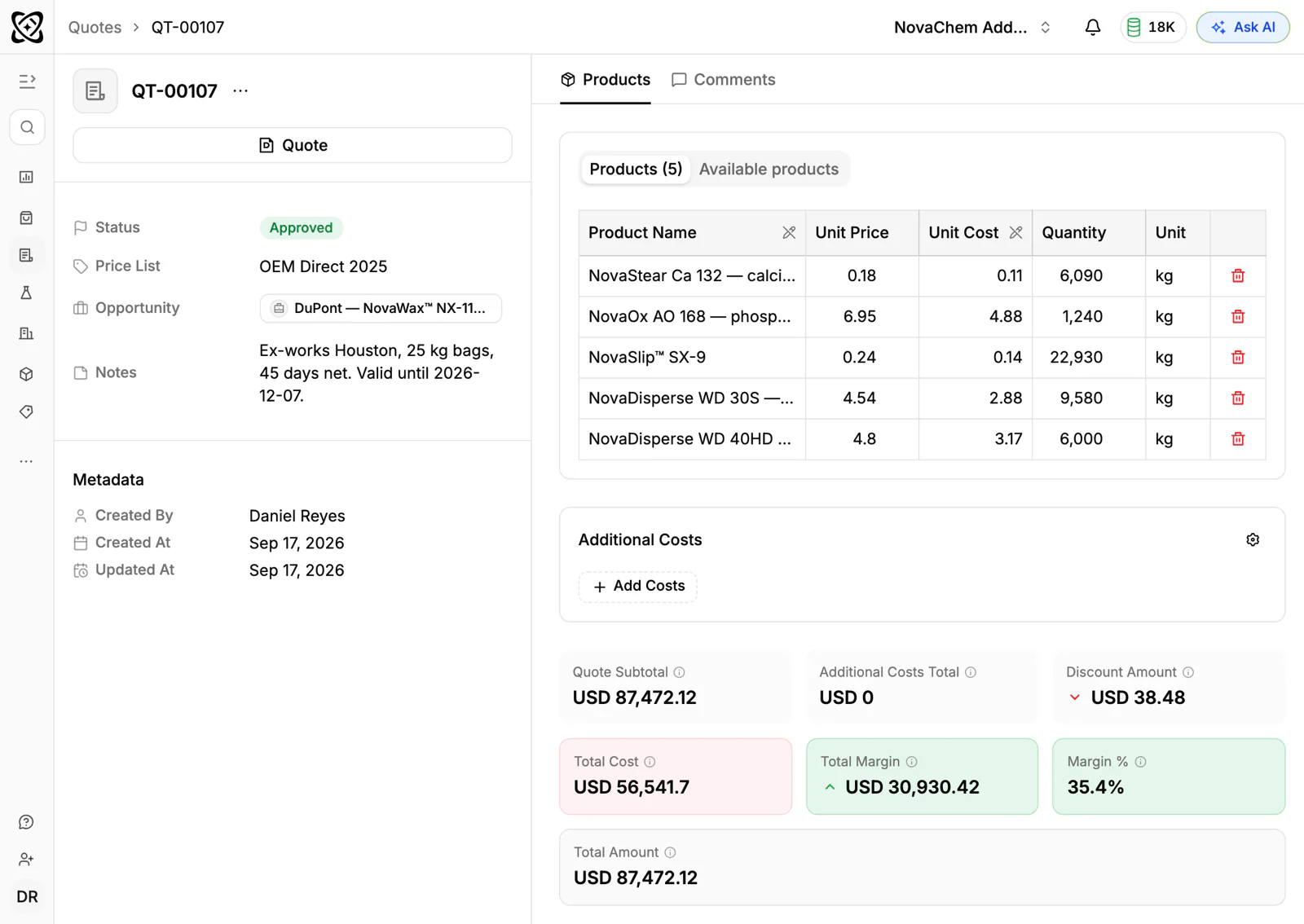
Our guides on how to write a sales quote and how to speed up quote to order cover the process around it.
Frequently asked questions
What is the best CRM with customer price lists?
PromptLab, if you want price lists, quotes, sales orders and sample tracking on every plan from $11.99 a user a month. Zoho CRM is the next most affordable, with price lists from $23 a user a month billed annually.
Can a CRM keep a different price list for each customer?
Some can. PromptLab holds customer price lists on every plan. Zoho CRM, Dynamics 365 Sales and Salesforce have them from $23, $65 and $100 a user a month, billed annually. Pipedrive keeps no price list per customer.
Does HubSpot have price lists?
No. HubSpot has no price lists or sales orders. Quoting there is an add-on, now in the separate Revenue Hub.
Does a quote use the customer's price list automatically?
In PromptLab, a quote linked to a customer's price list takes that list's prices, and you can see the margin on each line. Check the same step in any other CRM you trial.
Do I need CPQ software for customer prices?
For most B2B product teams, no. A CRM with price lists, quotes and sales orders covers the usual path. CPQ is for very complex configured products.
Sources
Prices and features of other CRMs come from each vendor's own pages, on the dates below.
- Zoho CRM, checked on 30 September 2026: Pricing, Features, WhatsApp integration, MCP
- Dynamics 365, checked on 30 September 2026: Sales pricing, Conversation intelligence FAQ, Sales MCP server
- Salesforce, checked on 30 September 2026: Sales Cloud pricing, Sales Engagement pricing, Agentforce MCP support
- Attio, checked on 30 September 2026: Pricing, Call Intelligence, AI, MCP server, Exporting lists and views
- Pipedrive, checked on 30 September 2026: Pricing, MCP server, Nova, Exporting data