














CRM for construction chemicals manufacturers
How construction chemicals sales works, from specifiers and contractor trials to distributors and project deals, and a CRM setup that tracks it.
 By the PromptLab team31 October 20266 min read
A construction chemicals manufacturer sells admixtures, waterproofing, repair mortars, grouts, sealants and floor coatings into building projects. A CRM for that trade has to follow the project, the people who specify the product and the distributors who stock it, because the sale is decided long before anyone places an order.
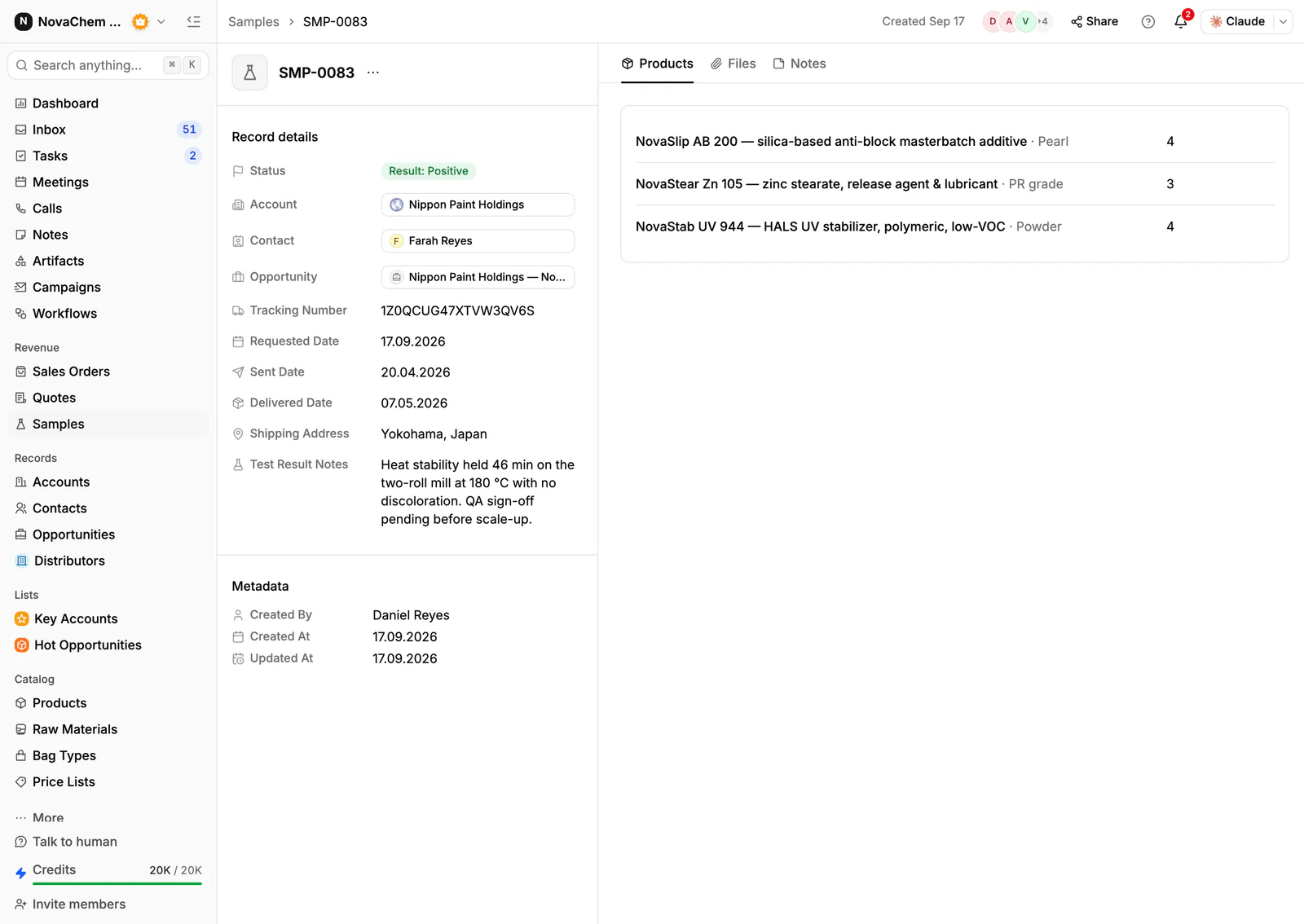
In PromptLab, trial samples go in as sample records with feedback, each distributor and contractor gets a price list, and project deals and distributor deals share one pipeline, told apart by a field. CRM for building materials suppliers covers the wider building trade.
How does a construction chemicals sale actually work?
Three audiences matter, and each wants something different. Specifiers, such as consultants and engineers, write your product into a project specification. Contractors apply the product on site and care about how it handles, how long it takes and what it costs per job. Distributors and builders' merchants stock it and sell it to contractors who need it tomorrow.
A manufacturer's rep works all three. They visit a consultant to get the product named in a specification, a contractor to run a site trial, and a merchant to keep shelf space. The same product can be won at the specifier, lost at the contractor and rescued at the merchant.
Because buildings take time, a deal can run for many months from the first specification meeting to the first delivery. The CRM has to carry that wait without losing the thread.
What are specifications, trials and approvals?
Every product comes with a technical data sheet (TDS) and a safety data sheet (SDS), and specifiers and contractors ask for both early. See what is a technical data sheet for the difference between the two. Keep the current version on the account and note which one you sent.
A site trial puts your product on a small area of a real job, often with your technician present. A laboratory test does the same on the customer's materials. Either way the loop is: sample out, trial, feedback, adjustment, retest.
Then comes specification and approval. A product written into a project specification is harder to replace: a contractor who wants to use another usually has to propose an equal and get the specifier to accept it. Winning the specification is worth far more than winning one order.
Why are projects and distributors the heart of the business?
A construction project is a deal with a start, a schedule and many contacts: the consultant, the main contractor, the applicator and the merchant. Each moves the deal in a different way. A rep who tracks only the contractor misses the specifier who can write a competitor in.
The distributor side behaves like a reorder business. A merchant stocks your range, sells it to contractors you will never meet, and tells you little. The things worth watching are which merchants reorder, which have gone quiet and which projects are drawing your products through them.
What pipeline stages fit construction chemicals?
Project and distributor deals behave differently. PromptLab has one deal pipeline with stages you set, so give it the stages both routes need, mark each deal's route with a field and save a view for each.
Project deals
| Stage | Entry condition |
|---|---|
| Project identified | A project and its specifier or contractor are known |
| Data sheets sent | TDS and SDS are logged as sent, with the version |
| Trial sample out | A sample is logged with a date and a test plan |
| Trial result | The feedback is recorded on the sample |
| Specified | The product is named in the specification |
| Order placed | A sales order exists on the account |
Distributor deals
| Stage | Entry condition |
|---|---|
| Introduced | A merchant has agreed to a first meeting |
| Range review | Samples and a price list are with them |
| Terms agreed | Account pricing is signed off |
| Stocking | A first stocking order has shipped |
| Active | They reorder without being chased |
What must the CRM track?
- Projects and who is on them, with the specifier, contractor and merchant as contacts on the account or the deal.
- Samples and trials, each with a ship date, the product, the application, the test and the result.
- Documents sent, such as the data sheets, so the next rep knows what the buyer already has.
- Price lists per account. A merchant, a contractor and a project pay different prices for the same pack.
- Pack sizes. The same product as a bag, a pail and a drum is three lines on a quote.
- Order history by product, so a rep sees what an account buys and what it stopped buying.
How do you set this up in PromptLab?
- 1
Set up stages and views
Add the stages above to your pipeline and a deal field for project or distributor. Save a view for each route, and let a deal skip the stages its route doesn't use.
- 2
Log every trial as a sample
Record each trial sample on the account with the product, the contact, the application and the test plan. Put the verdict in the sample's feedback. How to track product samples covers the routine.
- 3
Attach the documents
Store the data sheets and any approval letters on the account's Files tab, so a rep opening the account sees what has been sent.
- 4
Build a price list per account
Create customer price lists for each merchant and key contractor, by product and pack size. Quotes use them, and the margin shows on each line. See how to manage customer price lists.
- 5
Add specification fields
Add fields for the project, the specifier and the specification status on the deal, so anyone can see which projects name your product.
- 6
Chase trial results with a task
A workflow can create a task for the owner when a sample changes status or a deal changes stage, so a trial result never goes unanswered.
How does PromptLab compare for construction chemicals sales?
Swipe the table sideways to see every CRM →
| Checked on 30 September 2026 | PromptLab |  Pipedrive |  Zoho CRM |  HubSpot |
|---|---|---|---|---|
| Pricing | ||||
| Paid plans, a month | $11.99 – $99per seat | $14 – $79per seat | $14 – $52per seat | $7 – $150per seat |
| Number of plans | 3 | 4 | 4 | 4 |
| Free trial | ||||
| Billing | Billed monthly | Billed annually | Billed annually | Billed annually, plus a $1,500–$3,500 onboarding fee |
| Import from CSV and Excel | ||||
| Sales management | ||||
| Deal pipelines | ||||
| Quotes | From$59/month | From$23/month | Add-on | |
| Sales orders | From$23/month | |||
| Sample tracking | ||||
| Price lists | From$23/month | |||
| Meetings and calls | ||||
| Meeting recording and transcripts | Via marketplace | From$90/month | ||
| AI meeting summaries | ||||
| AI follow-up email drafts | From$59/month | From$23/month | From$90/month | |
| Meeting scheduler and call dialer | From$23.99/month | From$39/month | Via marketplace | |
| AI and automation | ||||
| CRM fields filled in from calls | From$40/month | From$90/month | ||
| Connect Claude or ChatGPT (MCP) | ||||
| Workflow automation | From$39/month | |||
| API and webhooks | From$23.99/month | |||
| Conversations | ||||
| Gmail and Outlook email sync | From$39/month | |||
| WhatsApp conversations | From$39/month | Add-on | ||
| Telegram conversations | ||||
| Save LinkedIn profiles | Via marketplace | From$23/month | From$150/month | |
| Privacy and security | ||||
| Single sign-on (SSO) | From$99/month | From$40/month | From$150/month |
Pipedrive is one of the easiest sales CRMs to learn. It keeps no price list per customer, so a merchant's and a contractor's agreed prices for the same pail live outside it, and quotes wait for Premium at $59 a seat a month, billed annually. Zoho CRM has quotes, sales orders and price books from $23 a user a month, billed annually, which covers the trade side, but it doesn't model samples at any tier, so site trials would go out untracked or on a spreadsheet.
HubSpot is a polished all-in-one suite with a Starter plan from $7 a seat a month, billed annually. For product sales, quoting sits in the separate Revenue Hub, and sales orders, samples and price lists aren't there. Professional and Enterprise add a $1,500 to $3,500 onboarding fee. For a side-by-side look at one of them, see Pipedrive vs PromptLab.
Frequently asked questions
What should a CRM for a construction chemicals manufacturer include?
It should hold samples or trials, quotes, customer price lists and sales orders, with project and distributor accounts kept apart so each gets the right price. PromptLab ships these on every plan, starting at $11.99 per user per month.
Can I track site trials in a CRM?
Yes. Treat each trial like a sample: a product, a ship date, a status and the customer's feedback. PromptLab's sample tracking keeps that loop on the account, with a status and feedback on every round.
How do I track a specification win?
Add a deal field for specification status and a field for the project. When the product is named in the specification, move the deal to the Specified stage and log who confirmed it in a note.
Where should I keep technical and safety data sheets?
Keep the master copies in your quality system, and attach the version you sent to the account's Files tab. The CRM then shows which sheet each buyer has, without becoming a second quality system.
Is there a free trial?
Basic and Professional come with a 14-day free trial, with no card needed. There is no free plan.
Sources
Prices and features of other CRMs come from each vendor's own pages, on the dates below.
- Pipedrive, checked on 30 September 2026: Pricing, MCP server, Nova, Exporting data
- Zoho CRM, checked on 30 September 2026: Pricing, Features, WhatsApp integration, MCP
- HubSpot, checked on 30 September 2026: Sales Hub pricing, Revenue Hub quote software, WhatsApp integration, MCP servers, Single sign-on (SSO)