
















CRM for refrigeration equipment distributors
How refrigeration equipment distribution sells to installers and service firms, from urgent repairs to project quotes, and a CRM setup that tracks it.
 By the PromptLab team31 October 20266 min read
A refrigeration equipment distributor sells compressors, condensers, evaporators, controls and fittings to installers, service engineers and contractors. A CRM for that trade has to hold each customer's prices, the jobs they are quoting and every urgent call, so a rep can answer a breakdown in minutes and still win the planned project.
In PromptLab, each customer's agreed prices sit in a customer price list that you pick on each quote, quotes are built from your products with the margin on each line, and sales orders sit on the account. Urgent repairs and project quotes share one pipeline, told apart by a field. The wider distribution view is on the distributors page, and CRM for HVAC distributors covers heating and air conditioning.
How does refrigeration distribution actually sell?
The customers are installers who fit systems, service firms who keep them running, and contractors who build cold rooms and commercial refrigeration into shops, kitchens and warehouses. Each buys differently. A service engineer on a call buys one part now. An installer quotes a project and buys a package of equipment against it. A contractor buys against a programme.
Urgency sets the tone. When a cold room fails, the food inside is at risk, so the buyer wants the part today and will remember who delivered. A rep or counter clerk who can match the part, give the price and confirm availability keeps that account.
Projects are slower. An installer asks for a price on a list of equipment, wins the job and orders after. The distributor who quotes accurately and keeps the price valid through the contractor's tender tends to win the supply.
What do buyers ask for?
Refrigeration parts must match the system, so buyers are specific. Expect these requests:
- Cross-references. The engineer has a part number from one maker and wants the equivalent in your range. Keep the cross-reference in a product field, so any rep can answer it.
- Technical documents. Buyers ask for data sheets and installation guidance for equipment. Keep the current version on the account's Files tab and note which one you sent.
- Package quotes. An installer wants a price on a compressor, condenser, evaporator and controls together. Quote them as one document with a line for each.
- Lead times. Parts on the shelf, parts from the maker and made-to-order items take different times. Say which in the quote's notes.
- Warranty questions. Buyers ask what is covered. Answers come from the maker's terms; the CRM stores the conversation.
Why do trade accounts and repeat orders matter?
A service firm that trusts your counter sends every job there. The value of an account is in the repeat orders and in the share of the firm's spend you win. An installer who buys compressors from you and condensers elsewhere is a cross-sell conversation waiting to happen.
Prices matter here. Installers compare, and a firm that gets a different price from each rep stops trusting the quote. A price list per customer keeps one agreed price on the account, whoever answers the call. How to increase repeat orders has the routine for the rest.
What pipeline stages fit a refrigeration distributor?
PromptLab has one deal pipeline per workspace, with stages you choose. Mark each deal as an urgent repair, a project or a stocking order with a field, and save a view for each. A workable set of stages:
| Stage | Entry condition |
|---|---|
| Enquiry | A buyer has sent a part number, a photo or an equipment list |
| Part or package identified | The part or the package is confirmed with the buyer |
| Quote sent | A quote is built from the customer's price list |
| Approved | The buyer has accepted the price and the lead time |
| Order placed | A sales order exists on the account |
| Repeat supply | The account reorders without being chased |
Urgent repairs will skip stages and close within the day. A deal can move straight from Enquiry to Order placed.
What must the CRM track?
- A price list per customer, by product, so a rep never quotes from memory.
- Quotes with the margin on every line, and a clear status: Draft, Pending or Approved.
- Cross-references and specifications, held as product fields.
- Project details, as deal fields: the site, the contractor and the programme.
- Documents such as data sheets on the account's Files tab.
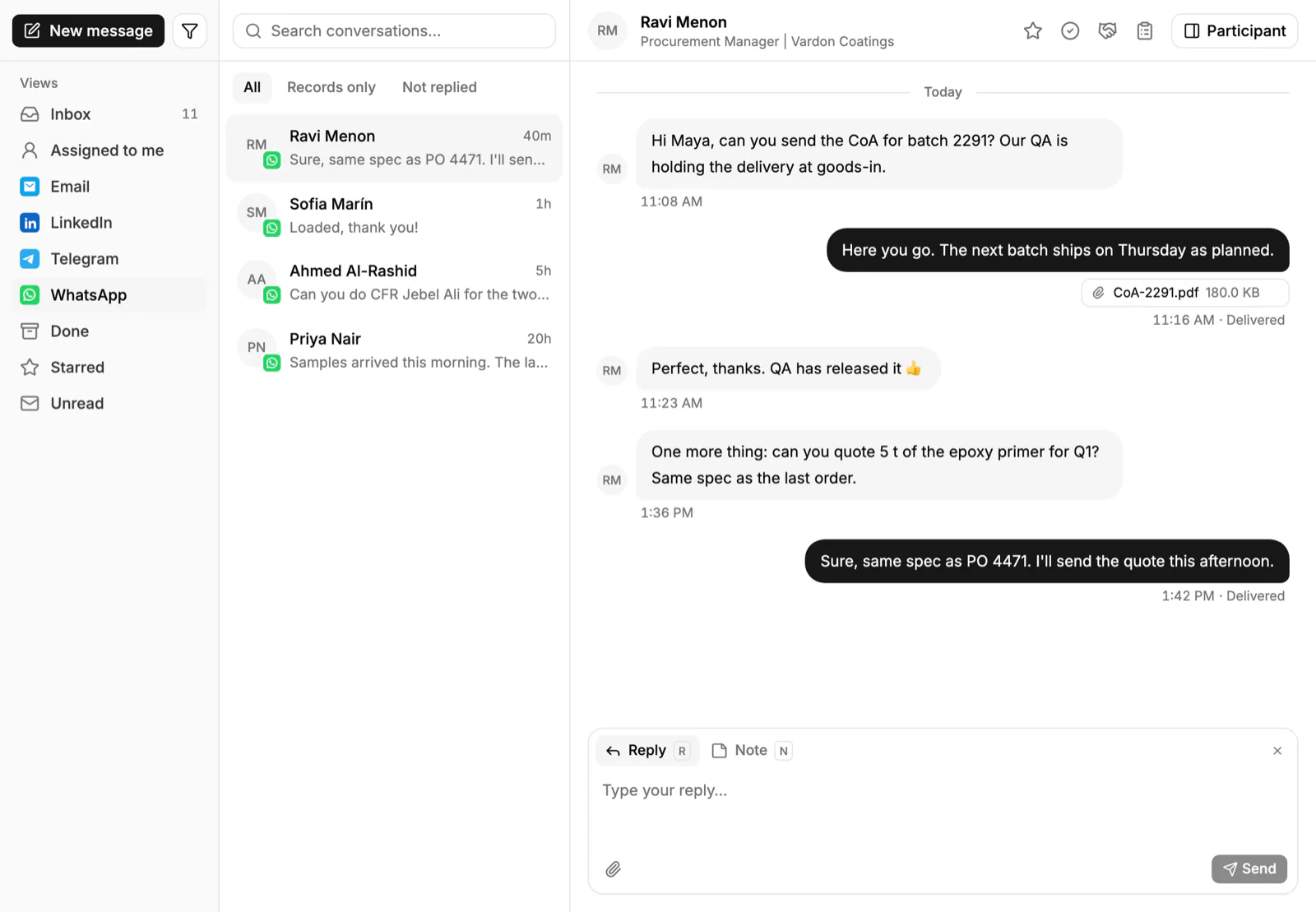
- Messages from every channel. Engineers email a part list, send a WhatsApp photo of a data plate, or message on Telegram. They should all land on the account.
How do you set this up in PromptLab?
- 1
Import accounts and products
Bring in accounts, contacts and products from CSV or Excel. Add a deal field for the type: urgent repair, project or stocking order. Add a product field for the cross-reference.
- 2
Build a price list per account type
Create a customer price list for each key account and for your installer trade tier. Quotes use them. Editing a list reprices every quote linked to it, so put a price change in a new list. Managing customer price lists shows the routine.
- 3
Quote from the list
Pick the products and the price list on each quote, one line for each part of a package. Line discounts show as you build, and so does the margin on each line. Send it as a PDF or a public link.
- 4
Put the engineers in the Inbox
Connect your WhatsApp Business number and your company Telegram bot, with email, and the photo of a data plate lands on the account, not on one rep's phone.
- 5
Chase the quote with a task
A workflow can create a task for the owner when a quote changes status or a deal changes stage. A Pending project quote then never sits unnoticed.
- 6
Review the project quotes weekly
Save a view of project deals by stage and run through it in the weekly sales meeting, so no installer's quote goes quiet.
How does PromptLab compare for refrigeration distributors?
Swipe the table sideways to see every CRM →
| Checked on 30 September 2026 | PromptLab |  Pipedrive |  Zoho CRM |  HubSpot |
|---|---|---|---|---|
| Pricing | ||||
| Paid plans, a month | $11.99 – $99per seat | $14 – $79per seat | $14 – $52per seat | $7 – $150per seat |
| Number of plans | 3 | 4 | 4 | 4 |
| Free trial | ||||
| Billing | Billed monthly | Billed annually | Billed annually | Billed annually, plus a $1,500–$3,500 onboarding fee |
| Import from CSV and Excel | ||||
| Sales management | ||||
| Deal pipelines | ||||
| Quotes | From$59/month | From$23/month | Add-on | |
| Sales orders | From$23/month | |||
| Sample tracking | ||||
| Price lists | From$23/month | |||
| Meetings and calls | ||||
| Meeting recording and transcripts | Via marketplace | From$90/month | ||
| AI meeting summaries | ||||
| AI follow-up email drafts | From$59/month | From$23/month | From$90/month | |
| Meeting scheduler and call dialer | From$23.99/month | From$39/month | Via marketplace | |
| AI and automation | ||||
| CRM fields filled in from calls | From$40/month | From$90/month | ||
| Connect Claude or ChatGPT (MCP) | ||||
| Workflow automation | From$39/month | |||
| API and webhooks | From$23.99/month | |||
| Conversations | ||||
| Gmail and Outlook email sync | From$39/month | |||
| WhatsApp conversations | From$39/month | Add-on | ||
| Telegram conversations | ||||
| Save LinkedIn profiles | Via marketplace | From$23/month | From$150/month | |
| Privacy and security | ||||
| Single sign-on (SSO) | From$99/month | From$40/month | From$150/month |
Pipedrive is easy to learn and has a clear pipeline. It has no price list per customer, so an installer's and a service firm's agreed prices for the same compressor live outside it, and quotes wait for Premium at $59 a seat a month, billed annually. Zoho CRM has quotes, sales orders and price books from $23 a user a month, billed annually, which suits a trade counter.
HubSpot is a polished all-in-one suite with a Starter plan from $7 a seat a month, billed annually. For product sales, quoting sits in the separate Revenue Hub, and sales orders and price lists aren't there. Professional and Enterprise add a $1,500 to $3,500 onboarding fee. For a side-by-side look at one of them, see Pipedrive vs PromptLab.
Frequently asked questions
What should a CRM for a refrigeration equipment distributor include?
It should hold a price list per customer, quotes built from your products, sales orders, documents such as data sheets, and a record of every message. PromptLab includes these on every plan, starting at $11.99 per user per month.
Can a CRM quote a package of equipment?
Yes. Build one quote with a line for each part of the package, from the customer's price list, and see the margin on each line. Send it as a PDF or a public link.
How do I manage installer pricing?
Keep a price list for each key account or trade tier and quote from it, so every installer gets their agreed price. Put a price change in a new list, because editing a list reprices every quote linked to it.
Where do I keep data sheets and installation guidance?
Keep the master copies in your own system and attach the version you sent to the account's Files tab. The CRM then shows what each buyer has received.
Is there a free trial?
Basic and Professional come with a 14-day free trial, with no card needed. There is no free plan.
Sources
Prices and features of other CRMs come from each vendor's own pages, on the dates below.
- Pipedrive, checked on 30 September 2026: Pricing, MCP server, Nova, Exporting data
- Zoho CRM, checked on 30 September 2026: Pricing, Features, WhatsApp integration, MCP
- HubSpot, checked on 30 September 2026: Sales Hub pricing, Revenue Hub quote software, WhatsApp integration, MCP servers, Single sign-on (SSO)