

















CRM for seed companies
How a seed company sells, from trial plots and variety data to dealer pre-booking and season orders, and a CRM setup that follows the growing calendar.
 By the PromptLab team31 October 20267 min read
A seed company needs a CRM built around the growing calendar. The sale runs on trials that take a season to read, on dealers who pre-book months ahead, and on a few weeks each year when most of the orders arrive. A CRM that cannot hold a trial result next to a pre-season order will lose both.
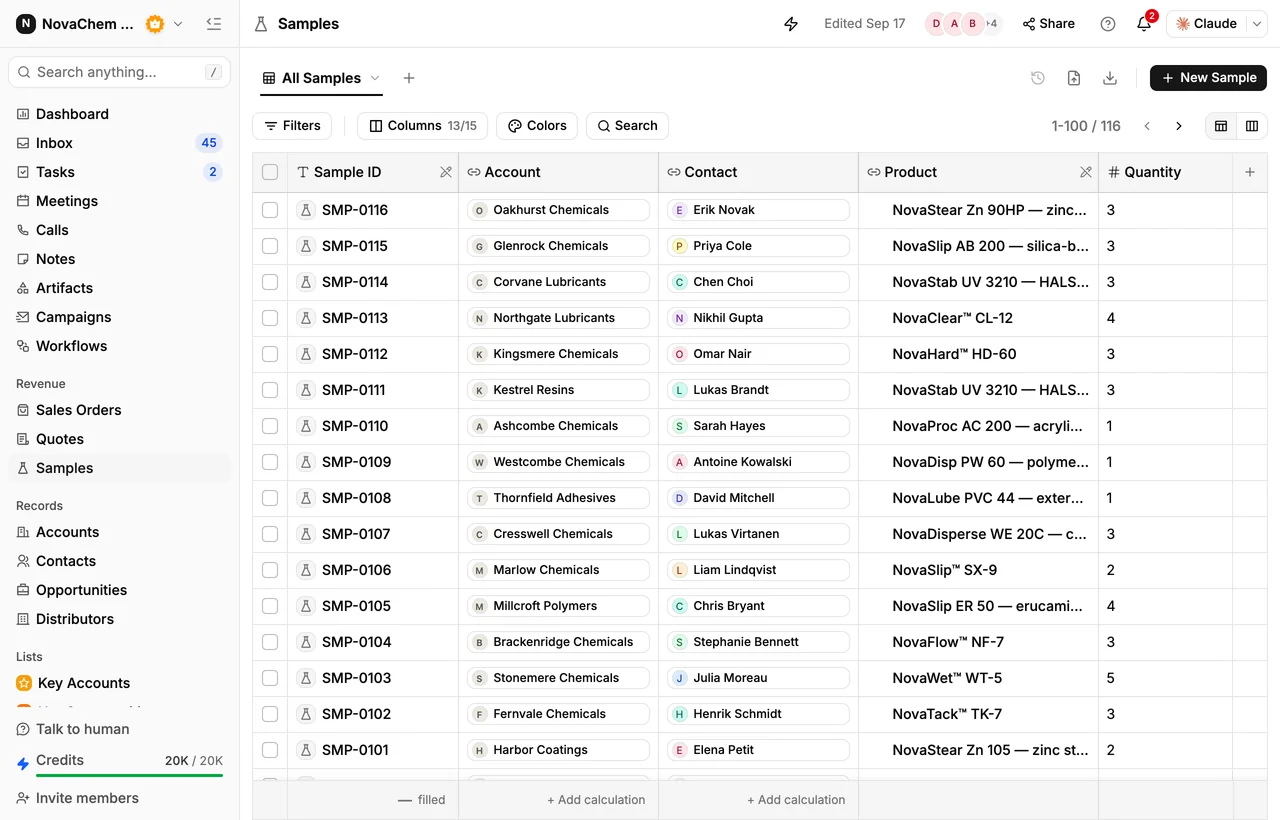
In PromptLab, trial packs are sample records with feedback, each dealer has a price list, pre-season bookings and season orders are sales orders on the account, and scheduled workflows create the tasks that keep the calendar moving. If you sell fertiliser and crop care through the same dealers, CRM for agricultural inputs distributors covers that side.
How does a seed company actually sell?
Seed is sold through several layers. A company may sell direct to large growers and farming businesses, through agricultural dealers and merchants who stock and advise, and through distributors who cover a region or a country. Some also sell to other seed companies, to processors or to contract-growing programmes.
At each layer, the buyer wants proof for their own conditions. A grower wants to know how a variety performs on their soil, in their climate, against what they grow today. A dealer wants a range that sells, margins that work and a supplier who answers the phone in the busy weeks. A distributor wants all of that across many dealers.
That is why seed sales is an agronomy conversation as much as a price conversation. The rep who knows the customer's crops, areas and last season's problems is the one who gets the order.
Why do trials and variety data drive the sale?
New varieties are proven in the field before they are sold in volume. A trial puts a small quantity of seed on a customer's own land, or on a demonstration plot a dealer hosts, and the result is read at harvest or at a field day. The loop is slow: seed out in one season, results in the next, order after that.
- Trial packs. Each pack goes to a named contact, for a named field and crop, with a plan for what will be recorded.
- Results. The customer or your agronomist records what happened, and the figures and observations go back to the account.
- Variety information. Dealers and growers ask for data sheets, descriptions and recommendations for each variety. Keep the current version attached to the account and note which one was sent.
- Field days and visits. A visit in the middle of the season is the easiest way to learn what the customer thinks, and it is the first thing to be forgotten.
How does pre-booking and the season calendar work?
Seed is a seasonal product, and many companies ask dealers to pre-book volumes well before sowing. Pre-booking helps the supplier plan production and supply, and it helps the dealer secure what they expect to sell. Final orders then follow as the season approaches, and many companies handle unsold stock and returns under terms agreed with each dealer.
A calendar helps. Think of a year in four parts:
- Results and review. Trial outcomes come in. Reps hold review calls with every trial customer.
- Planning and pre-booking. Dealers estimate their volumes, and reps agree pre-booking quantities and prices.
- Season orders. Orders flood in, and speed of reply decides who wins them.
- After the season. Settle returns and terms, record what sold, and start the next round of trials.
Say a dealer pre-books 600 units across three varieties at 200 each, and later raises the order by 150 units of one of them. The account should show 750 units in total, in two sales orders, with the change dated and noted, so nobody has to rebuild it from an email thread.
What pipeline stages fit a seed company?
PromptLab has one deal pipeline with stages you set. Use a deal field for the customer type (grower, dealer, distributor), and a saved view for each. A dealer deal runs through the cycle of a season, so you may also want a field for the season it belongs to.
| Stage | Entry condition |
|---|---|
| Introduced | A buyer has agreed to a first conversation about their crops and areas |
| Trial agreed | A variety, a field and a plan are noted |
| Trial pack sent | A sample is logged with ship date and crop |
| Result recorded | Feedback is on the sample |
| Pre-booking | A quote is out, with quantities and price list |
| Season order | A sales order is on the account |
| Review | The season's results are discussed, and the next season planned |
What must the CRM track?
- Trials as samples, each with crop, variety, field, ship date and the result.
- Documents sent, such as variety descriptions, attached to the account.
- A price list per dealer and per season. Because a price change goes in a new price list, a new season gets a new list. See what is a customer price list.
- Pre-bookings and final orders, so the gap between them is visible.
- Crops and areas per account, as fields, so a rep can find every grower of one crop.
- Visits and field days, as meetings and notes on the account.
How do you set this up in PromptLab?
- 1
Add crop and area fields
Add fields for crops grown, area and customer type on the account. A saved view for one crop then lists every account to call before sowing.
- 2
Log every trial as a sample
Create a sample for each trial pack with the contact, the variety and the field. Record the result as feedback when it arrives, even if that is a season later. How to track product samples covers the routine.
- 3
Build a price list per season
Make a customer price list for each dealer and each season. Quote pre-bookings from it, and the margin shows on each line.
- 4
Enter pre-bookings as sales orders
Record each pre-booking and each season order as a sales order on the account. Approving a quote does not create one, so decide who enters them.
- 5
Schedule the calendar
Use workflows with a schedule trigger to create reminder tasks for the account owners: review the trial, ask for a pre-booking, check in during the season. How to build your first sales workflow shows the pattern.
- 6
Take season orders from the Inbox
Connect email, your WhatsApp Business number and your company's Telegram bot to the shared Inbox. In the busy weeks, every order request lands on the account instead of on one person's phone.
How does PromptLab compare for seed companies?
Swipe the table sideways to see every CRM →
| Checked on 30 September 2026 | PromptLab |  Attio |  Close |  Zoho CRM |
|---|---|---|---|---|
| Pricing | ||||
| Paid plans, a month | $11.99 – $99per seat | $35 – $79per seat | $9 – $139per seat | $14 – $52per seat |
| Number of plans | 3 | 4 | 4 | 4 |
| Free trial | ||||
| Billing | Billed monthly | Billed annually; free plan for 3 seats | Billed annually | Billed annually |
| Import from CSV and Excel | ||||
| Sales management | ||||
| Deal pipelines | From$35/month | |||
| Quotes | From$23/month | |||
| Sales orders | From$23/month | |||
| Sample tracking | ||||
| Price lists | From$23/month | |||
| Meetings and calls | ||||
| Meeting recording and transcripts | From$79/month | Via marketplace | ||
| AI meeting summaries | From$79/month | |||
| AI follow-up email drafts | From$79/month | From$23/month | ||
| Meeting scheduler and call dialer | From$23.99/month | Via marketplace | ||
| AI and automation | ||||
| CRM fields filled in from calls | From$79/month | From$40/month | ||
| Connect Claude or ChatGPT (MCP) | ||||
| Workflow automation | From$99/month | |||
| API and webhooks | From$23.99/month | |||
| Conversations | ||||
| Gmail and Outlook email sync | ||||
| WhatsApp conversations | ||||
| Telegram conversations | ||||
| Save LinkedIn profiles | Via marketplace | From$23/month | ||
| Privacy and security | ||||
| Single sign-on (SSO) | From$99/month | Enterprise plan | Google only | From$40/month |
Attio is one of the best-designed of the newer CRMs, and up to three seats are free. You define every object, attribute and workflow yourself, so quotes, price lists, sales orders and samples are yours to build, and call recording waits for its Pro plan at $79 a seat, billed annually. Close is a calling-first CRM with a dialer, email and SMS built in, and Chloe, its AI teammate, summarises calls on every plan. Quotes, samples and price lists aren't part of it, and pipelines start at $35 a seat, billed annually.
Zoho CRM has paid plans from $14 a user a month, billed annually, with quotes, sales orders and price books from $23. It doesn't model samples at any tier, so trial packs would go out untracked or on a spreadsheet. See the Zoho CRM comparison.
Frequently asked questions
What should a CRM for a seed company include?
It should track trials with results, a price list per dealer, pre-bookings and season orders, and the crops and areas each account covers. PromptLab provides samples, price lists and sales orders on every plan, from $11.99 per user per month.
Can I track field trials in a CRM?
Yes. Treat each trial like a sample: a variety, a ship date, a field, a status and the customer's feedback. PromptLab's sample tracking keeps all of it on the account, even when the result arrives a season later.
How do I manage pre-booking for the season?
Quote the pre-booking from the dealer's season price list, then record the agreed quantity as a sales order on the account. A workflow on a schedule can create a task reminding the owner to check it against final orders.
Can a CRM remind reps about the growing calendar?
Yes. A workflow with a schedule trigger can create tasks and assign an owner on set dates, such as a trial review before pre-booking opens.
Is there a free trial?
Basic and Professional come with a 14-day free trial, with no card needed. There is no free plan.
Sources
Prices and features of other CRMs come from each vendor's own pages, on the dates below.
- Attio, checked on 30 September 2026: Pricing, Call Intelligence, AI, MCP server, Exporting lists and views
- Close, checked on 30 September 2026: Pricing, Facts for AI agents, Security, Developer platform, Exporting data
- Zoho CRM, checked on 30 September 2026: Pricing, Features, WhatsApp integration, MCP