



















How to record and summarise sales meetings
How to record sales calls on Google Meet, Zoom and Teams, get a summary and action items, and put them in the CRM so nothing the buyer said is lost.
 By the PromptLab team24 October 20265 min read
To record and summarise sales meetings, tell the buyer you are recording, record the call on your meeting platform, get a transcript and a short summary with action items, then save them on the right account and deal. Do it the same day, while the call is fresh. The summary is useful only if the next person can find it, so the record belongs in your CRM, not in a personal folder.
This guide covers what to do before, during and after the call, what a good summary holds, and where recordings usually go wrong. It is written for teams that sell products, where a single call can contain a grade, a volume, a price expectation and a test date.
Why record sales calls at all
Notes taken during a call split your attention. You write while the buyer talks about the thing that matters most, and you miss part of it. Notes written afterwards come from memory, and memory flattens detail. "They want 5 tonnes" is not the same as "they want 5 tonnes a month, starting in March, if the sample passes".
A recording and summary fix both. The rep listens during the call and the detail is kept afterwards. A manager can see what was said without sitting in. A colleague who takes over the account reads the history in minutes.
Before the call
Before you record
Asking permission is not just a legal matter. Buyers talk more freely when they know how the recording will be used. Say that it is for accurate notes, and offer to stop if they prefer.
During the call
Do the job you are there to do. Ask your questions, then listen. Say the important figures out loud and in full, such as "so that is 5 tonnes a month, starting in March". Both the transcript and the summary will pick them up.
A few habits help the transcript:
- Say product names and grades clearly. Spell out a code if it is unusual.
- Confirm numbers and units before moving on.
- Name the next step and the date out loud: "I'll send the quote by Thursday."
- Summarise the call in two sentences at the end. It becomes the spine of the summary.
After the call
- 1
Check the transcript and summary
Read the summary against what you remember. Look for wrong product names, units and dates. Fix what is wrong before anyone else relies on it.
- 2
Save it on the right account and deal
The summary should sit on the account and on the deal it belongs to, so the next person finds it where they would look.
- 3
Turn action items into tasks
Every "I'll send" and "they'll test" needs an owner and a date. A list in a document gets forgotten. A task in the task list does not.
- 4
Send the follow-up the same day
Send the buyer a short email with what you agreed. Start from a draft, then edit it. The follow-up email after a meeting templates give you wording.
- 5
Update the deal
Move the stage if it changed, and fix the value, the close date and any custom fields the call settled.
What a good summary contains
A summary should be short enough that people read it. Look for these parts:
- Who was there and their roles
- What the buyer needs: product, grade, volume, timing
- Open questions on either side
- Decisions made
- Action items, each with an owner and a date
- Concerns raised: price, lead time, spec, a competitor
Say a buyer at a packaging company asks for a lower price on 40 pallets a month, and says the decision sits with the plant manager. A good summary records the volume, the lower-price ask and the plant manager as the decision maker. A bad one records "discussed pricing".
Common mistakes
- Recording without telling the buyer. It damages trust and may break the rules where you work.
- Never opening the summary. If nobody reads it, it is a storage cost.
- Leaving recordings in the meeting tool. They need to be on the account to be useful.
- Trusting the summary for exact figures. Confirm prices and specs in the follow-up email.
- Skipping the action items. The summary matters least when the follow-up is the thing that wins the order.
How PromptLab helps
PromptLab records meetings on Google Meet, Zoom and Microsoft Teams, with unlimited meetings on every plan. Each recording comes with a transcript in 30+ languages, an AI summary and an AI follow-up email draft, and before a meeting you can generate a pre-meeting brief. Action items from the meeting become CRM tasks automatically.
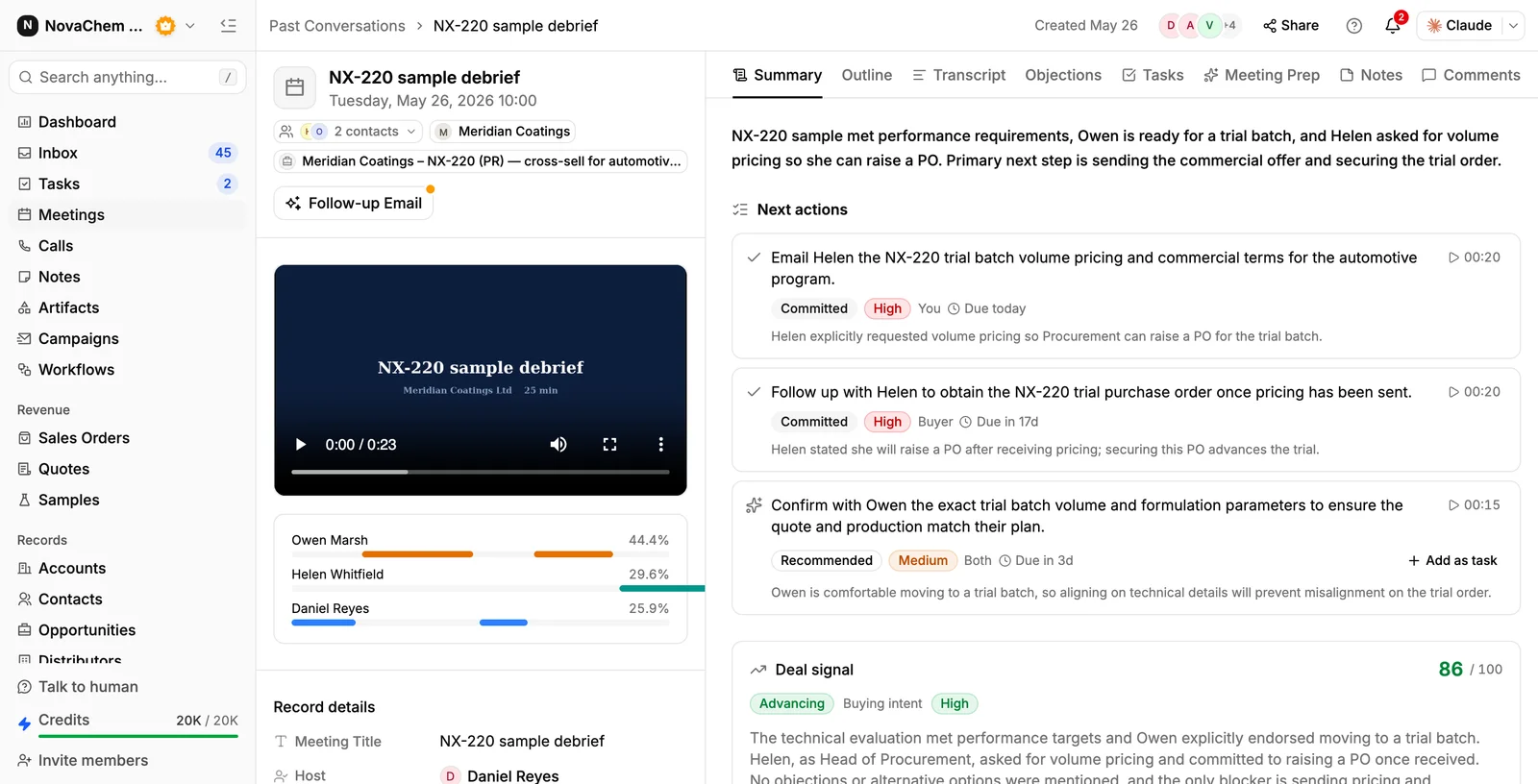
The recording shows on the account, next to the emails, quotes and samples for that customer. CRM autofill can fill fields from the call when a user runs it, and when an account is created. The rep still checks the result.
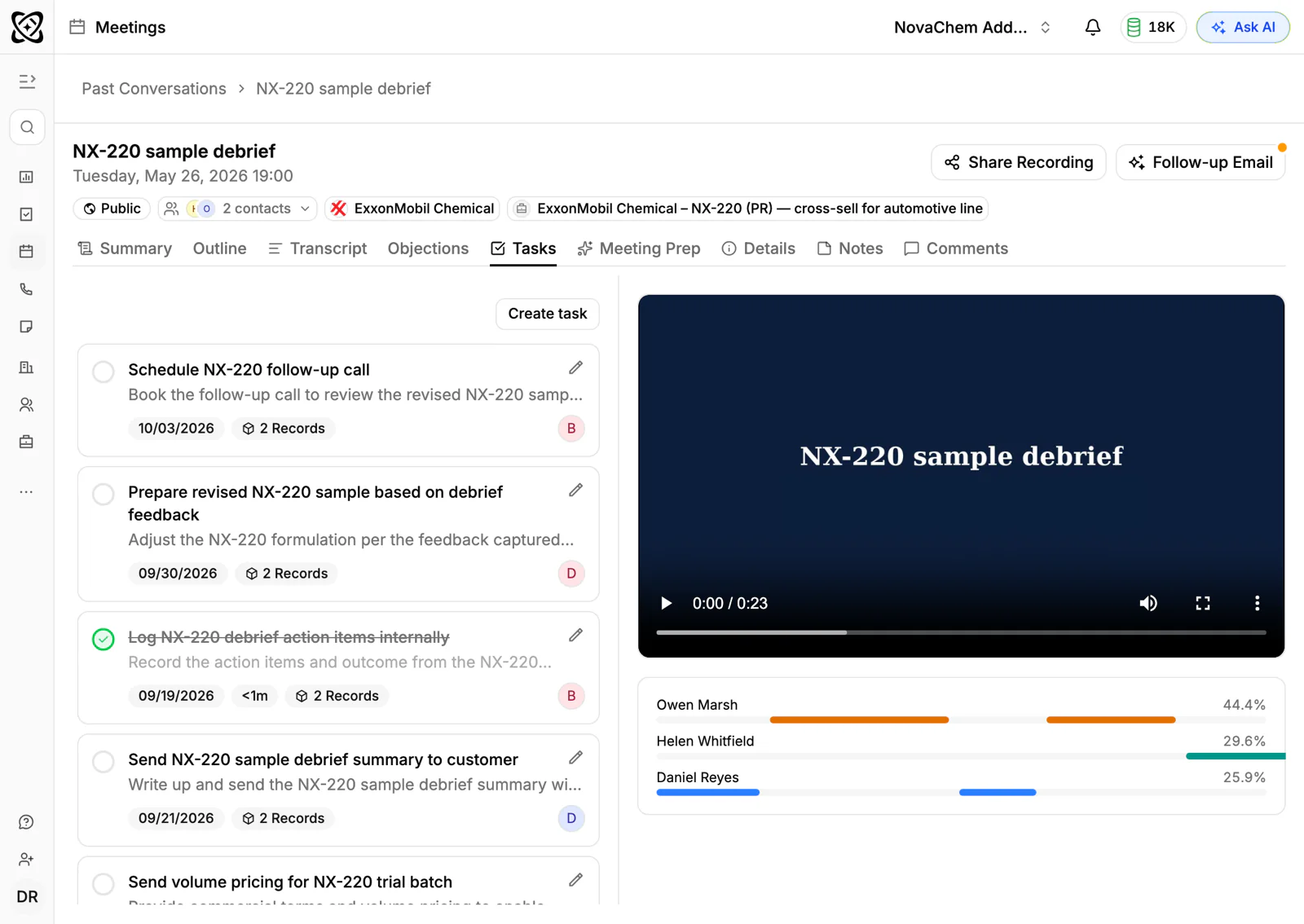
Before the next call, the pre-meeting brief draws on the summaries of earlier meetings, so you see what was said last time. Read more about call intelligence or the Tasks module.
Frequently asked questions
Do I need permission to record a sales call?
Rules differ by country, state and company. As a habit, always tell the buyer at the start of the call that you are recording and why. If you work across borders or are unsure, ask your legal adviser.
Which platforms can I record sales meetings on?
PromptLab records on Google Meet, Zoom and Microsoft Teams. Check that your meeting tool is connected before an important call, not as the call begins.
Is an AI meeting summary accurate?
It is a good first draft, and it can get product names, units and numbers wrong. Read it against your memory, fix the errors and confirm exact figures with the buyer in writing.
How long should a meeting summary be?
Long enough to hold the needs, decisions and action items, and short enough to read in a minute. A page is too long. A few lines with a task list is about right.
Can I record a call in another language?
PromptLab transcribes meetings in 30+ languages. If your buyers speak a language outside that list, test it on a real call before you rely on it.