













Best CRM with WhatsApp integration in 2026
The best CRMs with WhatsApp built in for B2B teams that sell products, ranked by what each plan includes and what WhatsApp costs on top.
 By the PromptLab team6 October 20265 min read
If your buyers answer on WhatsApp, the CRM has to see those messages. Otherwise the order confirmation, the price question and the "can you send the data sheet again" all sit on one rep's phone, and nobody else on the team can pick them up.
For a team that sells products, a good WhatsApp integration has five things. It uses your company's WhatsApp Business number, not a rep's personal one. It puts the thread on the right contact and account. It shows the whole team the conversation. It doesn't cost extra per month. And it sits next to quotes, samples and orders, because that's what the chat is usually about.
We rank eight CRMs on those points, using each vendor's published plans as checked on 30 September 2026 (2 October for GoHighLevel). We built PromptLab, so it is first, and we say why. The others get their real strengths too.
The best CRMs with WhatsApp at a glance
Swipe the table sideways to see every CRM →
| Checked on 30 September 2026 | PromptLab |  Breakcold Breakcold |  Close Close |  Zoho CRM Zoho CRM |
|---|---|---|---|---|
| Pricing | ||||
| Paid plans, a month | $11.99 – $99per seat | $99+ $10/seat | $9 – $139per seat | $14 – $52per seat |
| Number of plans | 3 | 1 | 4 | 4 |
| Free trial | ||||
| Billing | Billed monthly | One plan with one seat included, 20% less billed annually | Billed annually | Billed annually |
| Import from CSV and Excel | ||||
| Sales management | ||||
| Deal pipelines | From$35/month | |||
| Quotes | From$23/month | |||
| Sales orders | From$23/month | |||
| Sample tracking | ||||
| Price lists | From$23/month | |||
| Meetings and calls | ||||
| Meeting recording and transcripts | Via marketplace | |||
| AI meeting summaries | ||||
| AI follow-up email drafts | From$23/month | |||
| Meeting scheduler and call dialer | From$23.99/month | Via marketplace | ||
| AI and automation | ||||
| CRM fields filled in from calls | From$40/month | |||
| Connect Claude or ChatGPT (MCP) | ||||
| Workflow automation | From$99/month | |||
| API and webhooks | From$23.99/month | |||
| Conversations | ||||
| Gmail and Outlook email sync | ||||
| WhatsApp conversations | ||||
| Telegram conversations | ||||
| Save LinkedIn profiles | From$23/month | |||
| Privacy and security | ||||
| Single sign-on (SSO) | From$99/month | Google only | From$40/month |
The best CRMs with WhatsApp integration
PromptLab
Our pickAI-native CRM for product salesPaid plans, a month$11.99 – $99 per seatBest for: Product sellers who chat with buyers on WhatsApp
WhatsApp is on every plan, from Basic at $11.99 a user a month. You connect your WhatsApp Business number, and each conversation lands in the shared Inbox beside email and Telegram, on the right contact. The same account holds the quote, the sample request and the sales order the buyer is asking about, so a rep answering "where is my sample?" sees the answer without switching tools. There is no WhatsApp add-on to buy and no onboarding fee. See how WhatsApp works in PromptLab.
Breakcold
AI-native CRMPaid plans, a month$99 + $10/seatBest for: Social sellers who live in chat and LinkedIn
Breakcold puts LinkedIn, WhatsApp, Telegram and email in one inbox, and it's the only CRM here besides PromptLab with a real Telegram channel. It also records meetings. The catch for a product sale is on the deal side: no quotes, samples or price lists, and pricing is one plan at $99 a month with a seat included, plus $10 for each extra seat, with AI use metered in tokens beyond 3,000 included AI actions. A great fit for outreach-led teams, less so for order-led ones.
Close
Sales CRMPaid plans, a month$9 – $139 per seatBest for: Phone-first teams that add WhatsApp to calling
Close is a calling-first CRM with a built-in dialer, email and SMS, and WhatsApp is listed in its feature set. If your reps spend the day on the phone, it is the strongest calling tool on this list. Its prices run from $9 to $139 a seat, billed annually, but pipelines start at $35 and workflows at $99. Quotes, samples and price lists are missing, and there is no Telegram.
Zoho CRM
Sales CRMPaid plans, a month$14 – $52 per seatBest for: Budget-minded teams already in the Zoho family
Zoho CRM has WhatsApp built in, and it is free for three users, with paid plans from $14 a user a month, billed annually. Quotes, orders and price books arrive from $23. Samples aren't modelled, call recording comes through marketplace telephony apps, and Telegram isn't supported. Good value if you want accounting and help desk from the same vendor.

Pipedrive
Sales CRMPaid plans, a month$14 – $79 per seatBest for: Small teams that want a simple pipeline
Pipedrive keeps a simple pipeline most reps already know, and WhatsApp starts on the Growth plan at $39 a seat a month, billed annually. Its Nova assistant adds call recording and CRM updates on every plan. Quotes wait for Premium at $59, and there are no samples, price lists or sales orders, and no Telegram.

HubSpot
Enterprise suitePaid plans, a month$7 – $150 per seatBest for: Marketing-led teams that need one suite
HubSpot has the strongest marketing tools here and a free CRM, with a Starter plan from $7 a seat billed annually. WhatsApp is an add-on, Telegram isn't supported, and quoting sits in a separate hub. Professional and Enterprise also carry a $1,500 to $3,500 onboarding fee.

GoHighLevel
All-in-one marketingPaid plans, a month$97 – $497 per accountBest for: Agencies running messaging for many clients
GoHighLevel sells per account, from $97 to $497 a month, and WhatsApp is a $10 a month add-on on top. Calls, messages and AI are billed by usage as well. It's built for agencies with client sub-accounts, so a single manufacturer or distributor pays for a lot it won't use.

Salesforce
Enterprise suitePaid plans, a month$25 – $550 per seatBest for: Large organisations building a custom platform
Salesforce can connect almost anything, and WhatsApp is available as an add-on. Quotes and price lists start at $100 a seat on Pro Suite, and call recording is another add-on. The editions run from $25 to $550, billed annually, and setup usually needs an admin or a partner.
How we picked
We scored each CRM on the vendor's own published plans: is WhatsApp included, an add-on, or missing, and from which plan. Then we asked what sits around the chat. A CRM that shows a WhatsApp thread but has no quotes or orders leaves your team copying numbers between tools.
We also weighed cost the way a team buying seats would. A WhatsApp add-on, a usage bill or an onboarding fee changes the price you actually pay. Where a vendor wins on something that matters, such as calling or marketing, we said so.
What it looks like when WhatsApp sits on the account
Say a buyer at a packaging converter writes on Thursday evening: "Can you hold 40 pallets at last month's price?" In a CRM without a real integration, that message reaches one rep's phone. The rep is off until Monday, and the buyer assumes silence means no.
In a shared Inbox, a colleague sees the message on the account, opens the quote and the customer's price list, and answers the same evening. The reply is logged on the contact, so the rep who owns the deal reads the whole exchange on Monday instead of piecing it together.
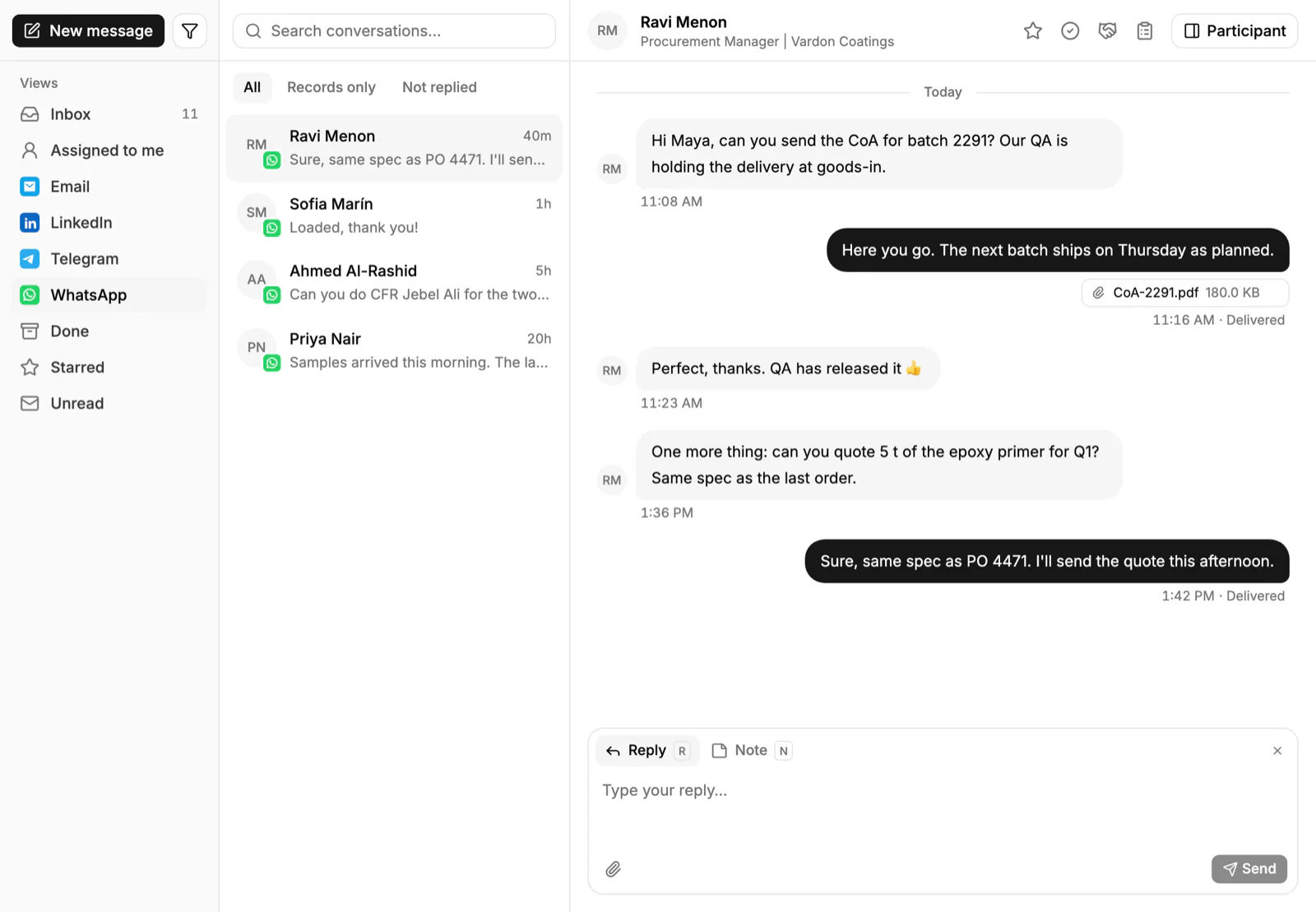
That is the test we'd apply to any vendor on this list. Ask for a live demo of a message arriving, and check what the rep can see next to it.
What to check before you connect WhatsApp
- Which number it uses. A company WhatsApp Business number keeps the history with the company when a rep leaves.
- Who can see the thread. A shared Inbox beats a rep's phone.
- What it links to. The message should sit on a contact and account.
- What it costs. Look for add-ons and per-message fees.
For a deeper look at selling over chat, read how to sell on WhatsApp.
Frequently asked questions
Which CRM has the best WhatsApp integration?
For a team that sells products, PromptLab, because WhatsApp is on every plan and the thread sits on the account beside its quotes and sales orders. For social selling with LinkedIn, Breakcold is also strong. Check each vendor's current plan before you buy.
Does a CRM need the WhatsApp Business number?
In PromptLab you connect your WhatsApp Business number, so the conversation belongs to the company, not to one rep's phone. Other vendors differ, so check how each one connects.
Does WhatsApp cost extra in a CRM?
It depends on the vendor. In this list, PromptLab, Breakcold, Zoho CRM and Close include it in the plan. HubSpot and Salesforce sell it as an add-on, GoHighLevel charges $10 a month on top, and Pipedrive starts it on its $39 Growth plan.
Can the whole team see WhatsApp conversations?
In a shared Inbox, yes. PromptLab shows each thread on the right contact, so a colleague can reply when the owner is away.
What about Telegram?
Only PromptLab and Breakcold in this set support it. PromptLab uses your company's own Telegram bot, and the buyer messages first. See the Telegram CRM list.
Sources
Prices and features of other CRMs come from each vendor's own pages, on the dates below.
- Breakcold, checked on 30 September 2026: Pricing, Features, Integrations, Importing custom fields via CSV
- Close, checked on 30 September 2026: Pricing, Facts for AI agents, Security, Developer platform, Exporting data
- Zoho CRM, checked on 30 September 2026: Pricing, Features, WhatsApp integration, MCP
- Pipedrive, checked on 30 September 2026: Pricing, MCP server, Nova, Exporting data
- HubSpot, checked on 30 September 2026: Sales Hub pricing, Revenue Hub quote software, WhatsApp integration, MCP servers, Single sign-on (SSO)
- GoHighLevel, checked on 2 October 2026: Pricing, AI product pricing, Phone system pricing, Estimates, Exporting contacts, Fathom in workflows, MCP server, Single sign-on
- Salesforce, checked on 30 September 2026: Sales Cloud pricing, Sales Engagement pricing, Agentforce MCP support