













What is a shared inbox?
A shared inbox puts a team's customer messages in one place instead of personal accounts. Learn how it works and why B2B sales teams use one.
 By the PromptLab team6 October 20263 min read
Definition
Shared inbox
A shared inbox is one place where a whole team sees and answers customer messages, instead of each person keeping them in a private mailbox or phone. It can hold email, chat apps or both.
Picture a buyer who emails your rep on Monday, sends a WhatsApp message to your colleague on Tuesday and asks a question on Telegram on Wednesday. In a shared inbox, all three sit on the same customer record where anyone on the team can read them.
Why a shared inbox matters
When messages live in personal accounts, three things go wrong. A rep goes on holiday and their buyers wait. A new rep takes over an account and cannot see what was promised. A manager has no idea if a quote request has been answered.
A shared inbox fixes this by keeping the conversation with the company, not with one person's phone.
How a shared inbox works
- Channels connect once. You link a mailbox or a business chat account and its messages flow in.
- Messages attach to the right customer. Good systems match the sender to a contact and an account.
- The team sees the thread. Anyone with access can read it and reply.
- Ownership is clear. You can see who is handling a thread and what is waiting.
The best versions sit inside the CRM. A shared inbox in a separate tool leaves you copying details across.
An example from chemical distribution
This example is made up.
A distributor's buyer at a cleaning-products plant emails asking for a price on drum quantities. Two days later the same buyer sends a WhatsApp message to say the order is urgent. The rep is at a trade fair.
In a shared inbox, a colleague opens the account, reads the email and the WhatsApp message together, sees the open quote and replies on WhatsApp, the channel the buyer chose. The rep returns to find the thread up to date.
Why email alone is not enough in product sales
B2B buyers do not stick to email. In many markets, procurement and buyers use WhatsApp or Telegram for quick questions. If your CRM only captures email, a large part of the relationship is invisible.
A shared inbox keeps those conversations beside the quote, the sample request and the order, so the history is complete.
Related terms
- A CRM is where the inbox should live.
- Conversation intelligence covers the spoken side of the same relationship.
- Quote-to-order often starts with a message in the inbox.
- Account-based selling depends on seeing every contact at a customer in one view.
How PromptLab handles it
PromptLab has a shared Inbox with email, WhatsApp and Telegram. Email comes in from Gmail, Outlook or your own mail server over IMAP. WhatsApp runs on your WhatsApp Business number. Telegram runs on your company's own Telegram bot, and the buyer has to message first.
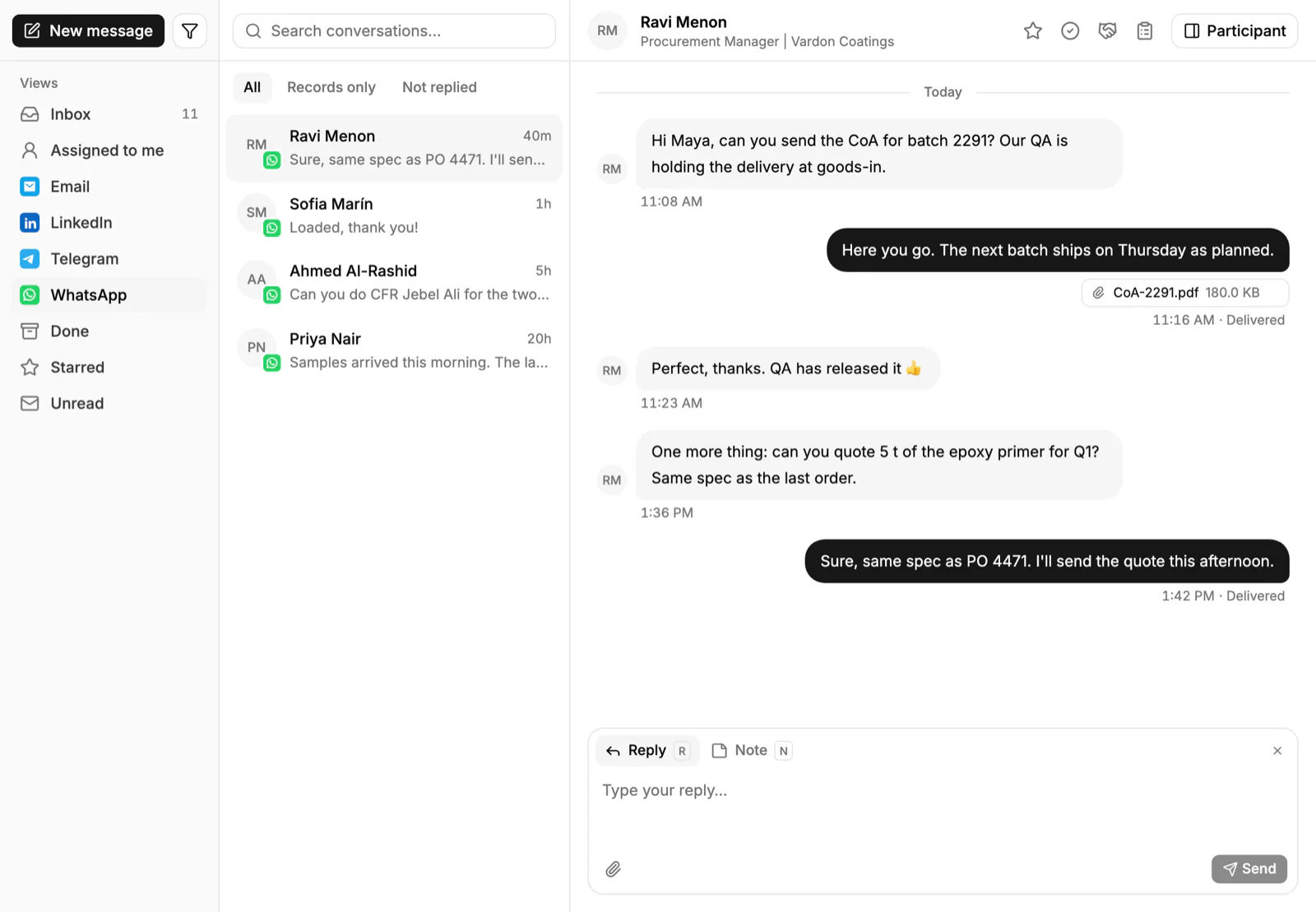
Each thread is linked to its account, alongside that account's deals and quotes. Read how to sell on WhatsApp, or see the WhatsApp and Telegram pages.
Frequently asked questions
Is a shared inbox the same as a shared mailbox?
A shared mailbox is usually email only, such as a sales@ address. A shared inbox in a CRM can also hold chat messages and links each thread to a customer record.
Which channels does PromptLab's Inbox support?
Email, WhatsApp and Telegram. WhatsApp uses your WhatsApp Business number. Telegram uses your company's own bot, and the buyer messages first.
Does the Inbox include LinkedIn or SMS?
No. The Inbox covers email, WhatsApp and Telegram.
Can I keep using Gmail or Outlook?
Yes. PromptLab captures email from Gmail, Outlook or your own mail server over IMAP.