













How to sell to B2B buyers on WhatsApp
How to sell to B2B buyers on WhatsApp: etiquette, sending quotes over chat, and keeping every conversation in the CRM instead of on one rep's phone.
 By the PromptLab team6 October 20265 min read
To sell to B2B buyers on WhatsApp, use a business number, wait for the buyer to be comfortable on the channel, keep messages short and specific, and move anything binding, such as a quote, into a document. Then keep the whole chat in your CRM so the next person on the account can read it.
Many buyers of chemicals, packaging, ingredients and industrial supplies already run their day on WhatsApp. They send a photo of a label, ask "price for 5 t?" and expect an answer within the hour. This guide covers how to do that well and how to avoid losing the history.
Why WhatsApp works for product sales
Buyers use it because it is quick. A purchasing manager can reply from a warehouse floor, forward your message to a colleague and attach a photo of a drum. Email can't match that for small questions.
The weakness is on your side. When a rep uses a personal phone, the conversation, the quote and the delivery date live in one pocket. If the rep goes on leave or leaves the company, the account goes quiet. The fix is a shared number and a shared inbox, covered below.
The etiquette that keeps buyers happy
WhatsApp etiquette for B2B reps
Never start a cold conversation on WhatsApp. Make first contact by email, at a meeting or through a referral, and ask whether WhatsApp is fine. Buyers who say yes are the ones who reply.
How to send a quote over WhatsApp
A chat message is a poor place for a price. It gets lost, edited in a forward and quoted back wrongly three months later. Use the chat to agree the details, then send a proper quote.
- 1
Confirm the request in the chat
Repeat the product, grade, quantity and delivery point. "So that is 5 t of PL-220 in 25 kg bags, delivered to your Leeds site?" Wait for a yes.
- 2
Build the quote in your CRM
Add the lines, the customer's price from their price list and the validity date. Your CRM should attach it to the deal automatically.
- 3
Send the quote as a document
Share the quote, with a one-line cover message in the chat: "Quote attached, valid until 31 October."
- 4
Note the next step in the chat
Say what happens next and when: "I will call on Thursday to answer questions."
- 5
Log the outcome
When the buyer accepts or asks for changes, update the quote status so the pipeline stays honest.
Our guide to writing a sales quote that wins the order goes deeper on the quote itself.
What to write: a few message patterns
Good messages are short and end with a clear next step.
- After a sample ships: "Hi Maria, your sample of PL-220 left today. I will check in on Friday to hear how it performs."
- Price question: "For 5 t the price is $1,850 per tonne delivered. Shall I send a quote?"
- Chasing a quote: "Hi Maria, did the quote reach the right person? Happy to adjust the quantity."
Real wording you can copy is in our WhatsApp sales message templates. For a different channel, see how Telegram works with the same Inbox.
Handling slow replies and handovers
Buyers go quiet for days. Don't send a string of nudges. Wait two working days, send one message that adds something, such as a delivery slot or a stock update, and then set a task to call.
When a rep is away, a colleague should be able to continue the chat without a briefing. Write messages as if someone else will read them tomorrow: name the product, the quantity and the agreed date. That habit makes handovers painless, and it makes the history useful when a buyer comes back for a reorder months later.
Keep the chats in the CRM
A WhatsApp history is worth as much as an email thread, and it should be as easy to find. Connect the channel to your CRM, link each chat to an account, and make it visible to the team.
Then set a rule: anything agreed in the chat, such as a price, a date or a quantity, is written onto the deal the same day. A shared inbox keeps the chat itself on record; the rule makes sure the facts in it reach the deal. See what a shared inbox is for how teams use one.
How PromptLab helps
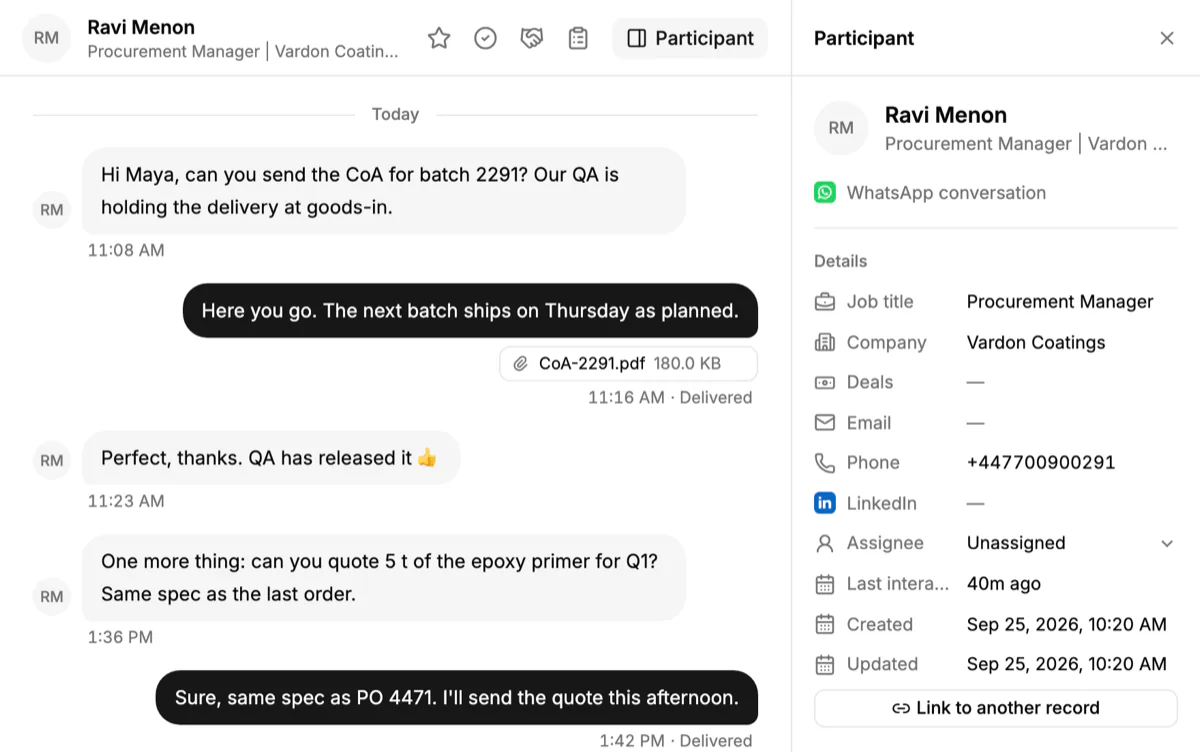
PromptLab's shared Inbox connects your WhatsApp Business number. Customer conversations arrive next to email and Telegram, each one linked to its account, and your team replies from the CRM. A colleague can pick up a chat without asking the first rep what was said.
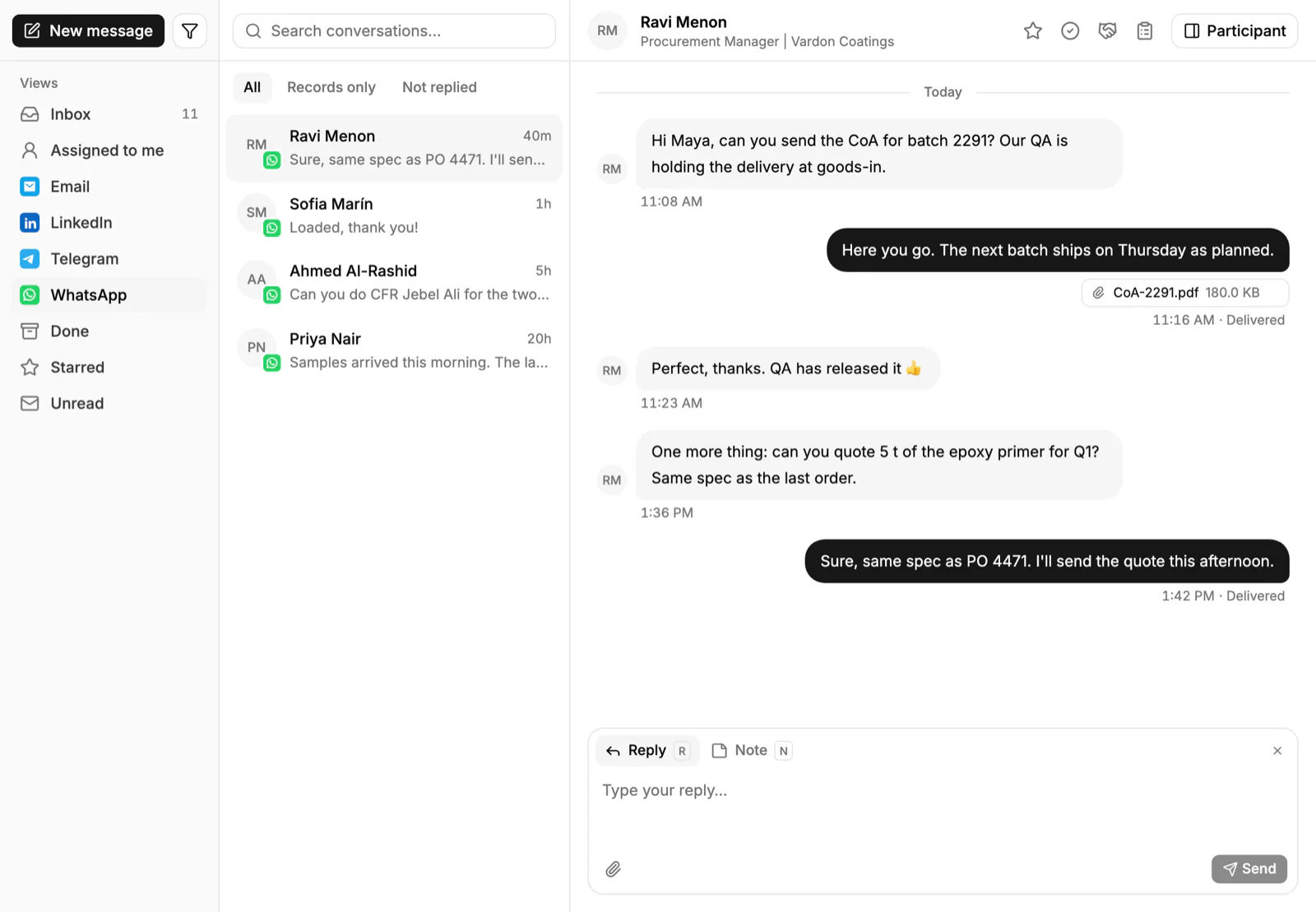
From the same account you can build a quote with the customer's price list, track the sample and see the order. The WhatsApp channel is on every plan from $11.99 per user per month.
See the WhatsApp CRM page, or compare tools in best CRM with WhatsApp integration.
Frequently asked questions
Is WhatsApp good for B2B sales?
It suits buyers who already use it for day-to-day questions, especially in distribution, packaging and ingredients. Use it for quick exchanges and follow-ups, and use email and documents for quotes and contracts.
Can I send a quote on WhatsApp?
Yes, but send it as a document and use the chat only for a short cover note. The quote should come from your CRM so the price and validity date are on record.
Should reps use their personal WhatsApp?
No. A business number keeps the history with the company and lets colleagues take over a chat. A personal phone ties the account to one person.
How do I keep WhatsApp chats in my CRM?
Connect your WhatsApp Business number to a CRM with a shared inbox. In PromptLab, chats arrive in the Inbox and link to the account.
Can I message buyers first on WhatsApp?
Only when they expect it. Start with email or a meeting, ask whether WhatsApp is welcome, and then use it. Unwanted bulk messages get numbers blocked.