



















CRM for animal feed ingredients suppliers
How feed ingredient and premix suppliers sell to feed mills, from sample trials and technical selling to contracts and reorders, and how to set up a CRM for it.
 By the PromptLab team16 October 20266 min read
A supplier of animal feed ingredients needs a CRM that tracks trials, keeps the technical side of the conversation with the account and makes reorders easy to see. Premixes, additives and ingredients are sold on trust and repeat business, and the work between the first sample and the standing order is where most deals are won or lost.
In PromptLab, each feed mill or integrator is an account, trial requests are tracked as samples, quotes attach to the deal, and the approved quote's lines go into a sales order on the same account. The manufacturers page gives the short version.
How does an animal feed ingredients supplier actually sell?
The customers are feed mills, premix producers, integrators and large farms that mix their own feed. Some buy a single ingredient or additive in volume. Others buy a custom premix designed for their formulation. Distributors and traders sit between you and smaller mills.
The sale is technical. A nutritionist or production manager wants to know what a product does, how it fits the formulation and how it behaves in processing. The buyer is rarely one person: nutrition, production, quality and purchasing each have a say.
Typical channels:
- Direct sales to larger mills, run by a named technical sales rep.
- Distributors and traders who serve smaller customers.
- Email and WhatsApp for prices, specs and delivery questions.
- Contracts for agreed volumes over a season or a year.
Because prices of raw ingredients move, quotes tend to have a short validity. Speed and accuracy matter.
Why do trials matter so much?
A mill will usually test an additive or premix before switching. The supplier sends a sample, the customer runs a trial in its own conditions, and the result decides whether the account is won. A good result starts a standing order. A vague one starts a long silence.
So the trial is the centre of the pipeline, and it needs tracking. What was sent, to whom, on what date, for which formulation, and what did the customer see? Without a record, a rep guesses, and a manager cannot tell which trials are waiting for a result.
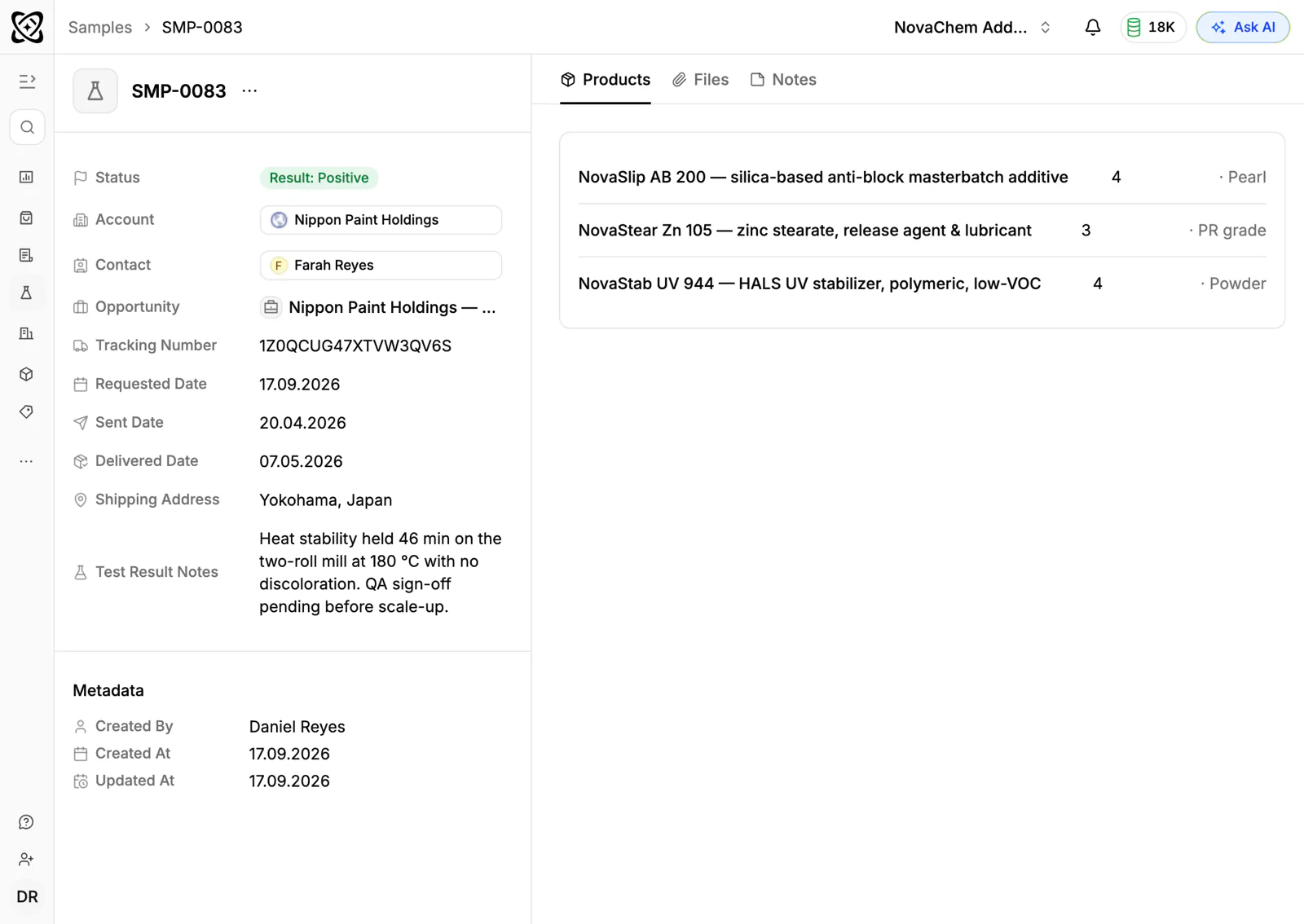
Track each trial as a sample request on the account, with its status and feedback. Set a task to ask for the result at the point it should be in. The guide to tracking product samples walks through the routine.
How do you quote when prices move?
Raw material prices can change quickly, so a quote that was right on Monday can be wrong by Friday. Put a clear validity date on each quote and keep track of which quotes are still open, which were accepted and which are past their date. The buyer then knows how long the price holds, and your team knows which quotes need refreshing.
Customers on agreed terms should have a price list, so the same product is priced consistently. Quotes linked to a customer's price list take its prices. The guide to responding to an RFQ and the one on writing a sales quote cover the structure.
What pipeline stages fit feed ingredients?
| Stage | Entry condition |
|---|---|
| Lead | A mill or premix producer worth approaching |
| Technical discussion | You have discussed the formulation and the need |
| Sample sent | A trial sample has shipped |
| Trial running | The customer is testing the product |
| Quote sent | A priced quote is out, with a validity date |
| First order | A sales order is created for the approved quote |
| Reorder | The customer is buying regularly |
After the first order, the focus moves from winning to keeping. Make the reorder stage visible, so the team sees which customers have stopped ordering. See how to increase repeat orders.
What must the CRM track?
- Accounts for each mill, integrator and distributor, with the owner and contacts by role: nutritionist, production, quality, purchasing.
- Samples and trials, with the product, date, status and feedback.
- Price lists per customer, and quotes with the validity date written on each.
- Sales orders, to see what each account buys and when it slows.
- Documents, such as specification sheets and product information, stored on the account.
- Every channel: email, WhatsApp and Telegram, in one view.
How do you set this up in PromptLab?
- 1
Import your accounts
Bring in mills, distributors and contacts from CSV or Excel, or pick a file from Google Drive. If you use Salesforce or HubSpot, the two-way sync lets you run both while you switch.
- 2
Build the pipeline
Create the stages above and give each account an owner, so a technical rep and a sales manager never both assume the other one called.
- 3
Track trials as samples
Log each sample with the product and the contact who will run it. Create a task to ask for the result, and record the feedback when it arrives.
- 4
Quote with a validity date
Build the quote from the customer's price list where one exists, write the validity date in its notes, send it and keep its status current. When the buyer accepts, create the sales order with the same lines.
- 5
Automate the follow-up
Use workflow automation to create a task or post to Slack when a quote changes status or a deal changes stage. A trial that has been running too long, or a quote about to lapse, then reaches a person.
- 6
Record the technical calls
Meetings on Google Meet, Zoom and Microsoft Teams are recorded with transcripts in 100+ languages. The summary captures the formulation questions, and a task can be created from the meeting.
How does PromptLab compare for feed ingredients suppliers?
Swipe the table sideways to see every CRM →
| Checked on 30 September 2026 | PromptLab |  Zoho CRM Zoho CRM |  HubSpot HubSpot |  Pipedrive Pipedrive |
|---|---|---|---|---|
| Pricing | ||||
| Paid plans, a month | $11.99 – $99per seat | $14 – $52per seat | $7 – $150per seat | $14 – $79per seat |
| Number of plans | 3 | 4 | 4 | 4 |
| Free trial | ||||
| Billing | Billed monthly | Billed annually | Billed annually, plus a $1,500–$3,500 onboarding fee | Billed annually |
| Import from CSV and Excel | ||||
| Sales management | ||||
| Deal pipelines | ||||
| Quotes | From$23/month | Add-on | From$59/month | |
| Sales orders | From$23/month | |||
| Sample tracking | ||||
| Price lists | From$23/month | |||
| Meetings and calls | ||||
| Meeting recording and transcripts | Via marketplace | From$90/month | ||
| AI meeting summaries | ||||
| AI follow-up email drafts | From$23/month | From$90/month | From$59/month | |
| Meeting scheduler and call dialer | From$23.99/month | Via marketplace | From$39/month | |
| AI and automation | ||||
| CRM fields filled in from calls | From$40/month | From$90/month | ||
| Connect Claude or ChatGPT (MCP) | ||||
| Workflow automation | From$39/month | |||
| API and webhooks | From$23.99/month | |||
| Conversations | ||||
| Gmail and Outlook email sync | From$39/month | |||
| WhatsApp conversations | Add-on | From$39/month | ||
| Telegram conversations | ||||
| Save LinkedIn profiles | From$23/month | From$150/month | Via marketplace | |
| Privacy and security | ||||
| Single sign-on (SSO) | From$99/month | From$40/month | From$150/month |
Zoho CRM is the value pick: free for three users, then from $14 a user a month, billed annually, with quotes, sales orders and price books from $23. Its suite includes dozens of other apps, but sample tracking isn't built in at any tier. HubSpot is a polished all-in-one suite with a free CRM and Starter from $7 a seat a month, billed annually. For a team selling products, quoting sits in the separate Revenue Hub, and sales orders and price lists are missing.
Pipedrive is easy to learn and adds pre-call briefs, call recording and CRM updates on every plan, from $14 a seat billed annually. It has no samples, price lists or sales orders, and quotes wait for Premium at $59. The Zoho CRM comparison goes through it line by line.
Frequently asked questions
What CRM features does a feed ingredients supplier need?
Sample tracking for trials, customer price lists, quotes and sales orders and a shared view of email and messaging. PromptLab includes all four on every plan.
How do I track a feed trial in a CRM?
Log it as a sample request on the account, with the product, the date and the contact. Record the customer's result when it arrives, and set a task to ask for it if it doesn't.
How should I handle quotes when ingredient prices move?
Write the validity date on each quote and keep its status current. Quotes built from a customer's price list take that list's prices, and a task can prompt you to refresh a quote before it lapses.
Can a CRM store product specification sheets?
Yes. Accounts in PromptLab have files and documents, so the specification sheet you sent sits on the account where any rep can find it.
Does PromptLab replace my ERP?
No. PromptLab is the sales side: accounts, trials, quotes, orders and conversations. If you run Acumatica, it brings in customers, contacts, leads and opportunities. Keep formulation data and stock elsewhere.
Sources
Prices and features of other CRMs come from each vendor's own pages, on the dates below.
- Zoho CRM, checked on 30 September 2026: Pricing, Features, WhatsApp integration, MCP
- HubSpot, checked on 30 September 2026: Sales Hub pricing, Revenue Hub quote software, WhatsApp integration, MCP servers, Single sign-on (SSO)
- Pipedrive, checked on 30 September 2026: Pricing, MCP server, Nova, Exporting data