

















CRM for cement and aggregates suppliers
How cement and aggregates sales works, from delivered prices and project quotes to contractor accounts and repeat orders, and a CRM setup that tracks it.
 By the PromptLab team31 October 20266 min read
A cement and aggregates supplier sells a heavy, low-margin product by the tonne or the cubic metre, and the price depends on where it goes. A CRM for that trade has to hold each customer's delivered prices, the projects they are working on and the conversations about timing, so a rep can quote quickly and a buyer never gets a surprise.
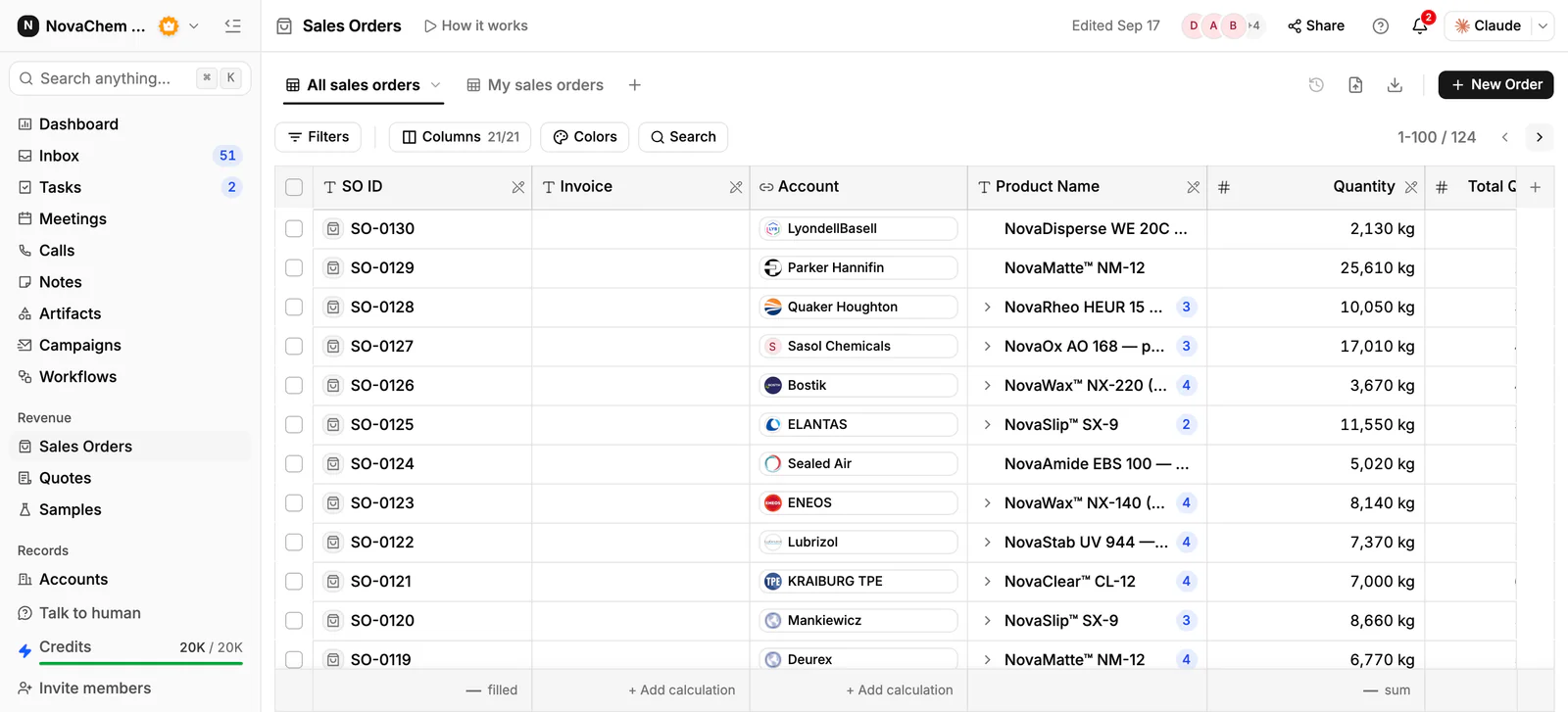
In PromptLab, each customer's agreed prices sit in a customer price list that you pick on each quote, quotes are built from your products with the margin on each line, and sales orders sit on the account. Project quotes and regular accounts share one pipeline, told apart by a field. CRM for building materials suppliers covers the wider building trade.
How does cement and aggregates selling actually work?
The customers are ready-mix and precast producers, building contractors, civil engineering firms, builders' merchants and, for small loads, tradespeople. Each buys differently. A ready-mix plant orders every week against a standing arrangement. A contractor buys against a project and needs the material on a programme. A merchant buys to stock and resell.
Unlike most products, the price is not just the material. It is the material plus the haul. A quarry or plant sells at a price per tonne, and the cost of getting it to a site depends on distance, load size and access. Customers compare delivered prices, so a rep who can quote a delivered price quickly wins the enquiry.
Because the product is bulky and hard to move, a competitor's plant is only a competitor when it is near. Territory, delivery zones and haulage capacity matter more than in most industries.
What do buyers ask for?
Buyers want a price, a delivery slot and assurance that the material meets the specification. Expect these requests:
- Delivered price per tonne or cubic metre, for a named site and a named product.
- Product and grade. The buyer names a product type and size or strength class. Check the grade you quote with your own technical team.
- Test or conformity documents. Many buyers ask for the declaration or test results that go with a product. Keep the current copy on the account's Files tab.
- Delivery schedules. A pour or a surfacing job needs material on time. Put the agreed dates in the quote's notes and on the sales order.
- Payment terms. Buyers ask for account terms. The terms are agreed outside the CRM; record what was agreed in a note.
Why are projects and standing accounts both important?
A big project is a one-off prize: a road, a development, a plant extension. It can mean months of supply, and winning it means being priced well at the right moment and then delivering reliably. But projects end, and a supplier who lives on them has to keep finding the next one.
Standing accounts, such as ready-mix plants and merchants, are the steady base. They order again and again, so the value is in not losing them. The risk is the quiet account whose volume falls because a competitor opened a quarry or depot nearer to it.
Most cement and aggregates companies run both, and a rep needs to see both on one screen without mixing them up.
What pipeline stages fit a cement and aggregates supplier?
PromptLab has one deal pipeline per workspace, with stages you choose. Mark each deal as a project or a standing account with a field, and save a view for each. A workable set of stages:
| Stage | Entry condition |
|---|---|
| Enquiry | A buyer has named a product, a quantity and a site |
| Delivered price quoted | A quote is built from the customer's price list |
| Specification confirmed | Grade and documents are agreed with the buyer |
| Terms agreed | Price, schedule and payment terms are agreed |
| First order | A sales order exists on the account |
| Regular supply | The account orders on a rhythm without chasing |
What must the CRM track?
- A price list per customer or zone, by product, so a rep never quotes from memory. See what is a customer price list.
- Quotes with the margin on every line, and a clear status: Draft, Pending or Approved.
- Sites and projects, as fields on the deal, with the contact on site and the programme.
- Documents such as test or conformity documents on the account's Files tab.
- Order history by product, so the rep sees what the account buys and when volumes drop.
- Messages from every channel. Site managers email, send a WhatsApp message from the yard, or write on Telegram. They should all land on the account.
How do you set this up in PromptLab?
- 1
Import accounts and products
Bring in accounts, contacts and products from CSV or Excel. Add a deal field for the type: project or standing account, and a field for the site.
- 2
Build price lists
Create a customer price list for each key account and for each delivery zone or tier. Quotes use them. Editing a list reprices every quote linked to it, so put a price change in a new list. Managing customer price lists shows the routine.
- 3
Quote from the list
Pick the products and the price list on each quote, add the haulage as an additional cost, and see the margin on each line, worked out from each product's cost price. The quote total then includes delivery. Send it as a PDF or a public link. How to write a sales quote covers the layout.
- 4
Record the sales orders
Create a sales order on the account for each confirmed job or standing arrangement, so the history of what the account buys is in one place.
- 5
Chase the quote with a task
A workflow can create a task for the owner when a quote changes status or a deal changes stage. A Pending quote then never sits unnoticed.
- 6
Connect the channels
Connect email, your WhatsApp Business number and your company Telegram bot to the shared Inbox. The message about a late delivery lands on the account, not on one dispatcher's phone.
How does PromptLab compare for cement and aggregates suppliers?
Swipe the table sideways to see every CRM →
| Checked on 30 September 2026 | PromptLab |  Pipedrive |  Zoho CRM |  HubSpot |
|---|---|---|---|---|
| Pricing | ||||
| Paid plans, a month | $11.99 – $99per seat | $14 – $79per seat | $14 – $52per seat | $7 – $150per seat |
| Number of plans | 3 | 4 | 4 | 4 |
| Free trial | ||||
| Billing | Billed monthly | Billed annually | Billed annually | Billed annually, plus a $1,500–$3,500 onboarding fee |
| Import from CSV and Excel | ||||
| Sales management | ||||
| Deal pipelines | ||||
| Quotes | From$59/month | From$23/month | Add-on | |
| Sales orders | From$23/month | |||
| Sample tracking | ||||
| Price lists | From$23/month | |||
| Meetings and calls | ||||
| Meeting recording and transcripts | Via marketplace | From$90/month | ||
| AI meeting summaries | ||||
| AI follow-up email drafts | From$59/month | From$23/month | From$90/month | |
| Meeting scheduler and call dialer | From$23.99/month | From$39/month | Via marketplace | |
| AI and automation | ||||
| CRM fields filled in from calls | From$40/month | From$90/month | ||
| Connect Claude or ChatGPT (MCP) | ||||
| Workflow automation | From$39/month | |||
| API and webhooks | From$23.99/month | |||
| Conversations | ||||
| Gmail and Outlook email sync | From$39/month | |||
| WhatsApp conversations | From$39/month | Add-on | ||
| Telegram conversations | ||||
| Save LinkedIn profiles | Via marketplace | From$23/month | From$150/month | |
| Privacy and security | ||||
| Single sign-on (SSO) | From$99/month | From$40/month | From$150/month |
Pipedrive is easy to learn and has a clear pipeline. It has no price list per customer, so a plant's and a contractor's agreed prices for the same product live outside it, and quotes wait for Premium at $59 a seat a month, billed annually. Zoho CRM has quotes, sales orders and price books from $23 a user a month, billed annually, which suits a trade business.
HubSpot is a polished all-in-one suite with a Starter plan from $7 a seat a month, billed annually. For product sales, quoting sits in the separate Revenue Hub, and sales orders and price lists aren't there. Professional and Enterprise add a $1,500 to $3,500 onboarding fee. For a side-by-side look at one of them, see Pipedrive vs PromptLab.
Frequently asked questions
What should a CRM for a cement and aggregates supplier include?
It should hold a price list per customer or zone, quotes built from your products, sales orders, documents such as test results, and a record of every message. PromptLab includes these on every plan, starting at $11.99 per user per month.
Can a CRM quote a delivered price?
Yes. Add the haulage as an additional cost on the quote next to the material lines, and the quote total becomes the delivered price. Keep a price list per zone if your prices vary by distance.
How do I separate project quotes from standing accounts?
Add a deal field for the type and save a view for each. Both share one pipeline, so a rep sees everything on one board and filters when needed.
Where do I keep test and conformity documents?
Keep the master copies in your quality system and attach the version you sent to the account's Files tab. The CRM then shows what each buyer has received.
Is there a free trial?
Basic and Professional come with a 14-day free trial, with no card needed. There is no free plan.
Sources
Prices and features of other CRMs come from each vendor's own pages, on the dates below.
- Pipedrive, checked on 30 September 2026: Pricing, MCP server, Nova, Exporting data
- Zoho CRM, checked on 30 September 2026: Pricing, Features, WhatsApp integration, MCP
- HubSpot, checked on 30 September 2026: Sales Hub pricing, Revenue Hub quote software, WhatsApp integration, MCP servers, Single sign-on (SSO)