



















CRM for dental supplies distributors
How dental supplies distribution sells to practices, labs and groups, from samples and demos to reorders, and a CRM setup that tracks accounts and prices.
 By the PromptLab team29 October 20265 min read
A dental supplies distributor needs a CRM that treats each practice as an account with a buying pattern. Most revenue comes from consumables that a practice uses every week, so the work is in winning the account, pricing it fairly and noticing when an order does not come.
In PromptLab, each account's agreed prices sit in a customer price list you pick on each quote, quotes are built from your products, sales orders sit on the account, and samples are tracked as records. Contact details, orders and conversations stay in one place. The wider view is on the distributors page.
How does a dental supplies sale actually work?
A distributor sells to a few kinds of buyer. Independent practices are small, with a dentist or an office manager placing orders. Dental groups have several sites and often a central buyer. Dental laboratories buy materials for crowns, dentures and appliances. Each group has a different decision-maker and a different order rhythm.
Products fall into two kinds. Consumables, such as gloves, impression materials, bonding agents and disposables, are bought again and again. Equipment, such as chairs, imaging units and sterilisers, is bought rarely and in larger sums, often with a demo and a finance conversation.
A rep for a distributor usually runs a territory. They visit practices, introduce new products, leave samples and take orders. Between visits, practices order by phone, email or a message to the rep.
Why do samples and demos matter?
Clinicians have strong preferences about materials, because a product affects how they work. A dentist may be loyal to a brand until a colleague recommends another. A sample of a new composite, an impression material or a disposable lets them try it on a real patient day without committing.
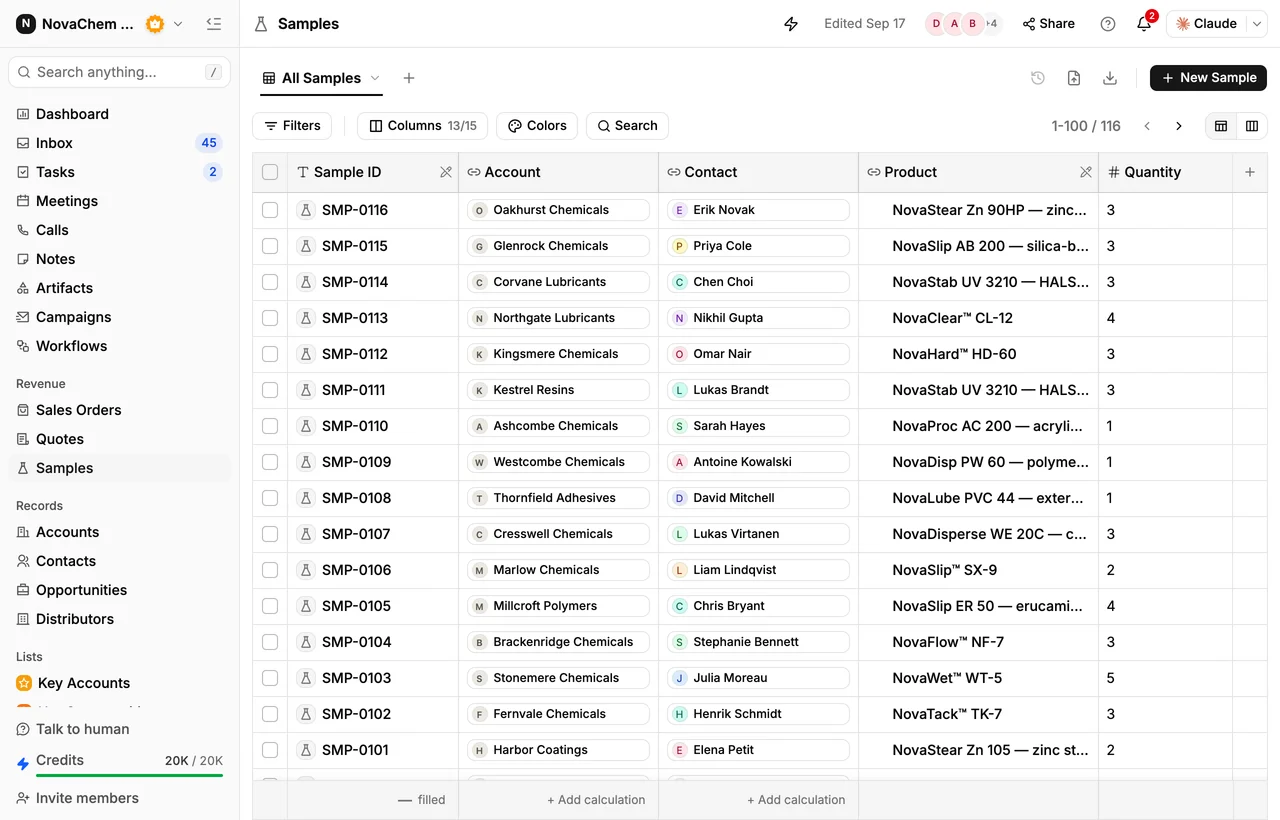
A sample is only useful if someone follows it up. Log which practice got what, on which date, and who tried it. A call a few days later asks the simple question: did it work for you? If the answer is yes, a quote follows.
How do groups and equipment deals differ from consumables?
A dental group is one buyer with many sites. The central buyer may agree a price once, and each practice then orders against it. Hold each practice as an account, add a custom field that names its group, and quote every site from the group's price list so each one gets the same prices.
Equipment deals are slower. A practice looks at a steriliser or an imaging unit for months, asks for a demo, compares quotes and talks to its accountant. Log the demo as a meeting, keep the quote on the deal and set a task for the follow-up call. If the practice goes quiet, the task is what brings the deal back. How to sell through distributors is the supplier-side view of the same channel.
What pipeline stages fit a dental supplies distributor?
PromptLab has one deal pipeline with stages you name. Mark each deal's buyer type (practice, group, lab or equipment) with a field and save a view for each.
| Stage | Entry condition |
|---|---|
| New account | A practice has been introduced or has asked for a price list |
| Sample or demo | A sample is logged, or a demo is booked |
| Trial feedback | The clinician's response is recorded |
| Quote sent | A quote built from the account's price list is out |
| First order | A sales order exists for the first purchase |
| Regular buyer | The practice reorders without being chased |
For equipment deals, add a stage for the finance conversation if your buyers need one.
What must the CRM track?
- Samples, with the product, the practice, the clinician who tried it and the feedback.
- Price lists per account type. A single practice, a group on a contract and a lab buy at different prices.
- Order history by product, so a rep sees what a practice buys and what it stopped buying.
- Contacts at each practice, usually the dentist, the practice manager and whoever places the order.
- Lot and batch details where you need them, held in a note on the account.
- Every conversation. Practice managers often prefer a quick message to a long email.
How do you set this up in PromptLab?
- 1
Build price lists per account type
Create a price list for single practices, one for groups and one for labs. Add negotiated prices as a new list for key accounts. How to manage customer price lists covers it.
- 2
Log samples with the clinician's name
Record each sample on the account, with the product, the contact who tried it and the date. Put the verdict in the sample's feedback. See how to track product samples.
- 3
Import your practices
Bring accounts and contacts in from a CSV or Excel file, or pick a file from Google Drive. Add fields for practice type and territory.
- 4
Create reorder tasks
Create a workflow that fires when a deal changes stage, for example to Regular buyer, and creates a task for the account owner to check in before the next order is due. Use reorder reminder templates for the message.
- 5
Connect the channels
Connect your mailbox, WhatsApp Business number and company Telegram bot. A practice manager's message lands on the account in the shared Inbox, so any rep can answer.
How does PromptLab compare for dental supplies distribution?
| Checked on 30 September 2026 | PromptLab |  Attio Attio |  HubSpot HubSpot |
|---|---|---|---|
| Pricing | |||
| Paid plans, a month | $11.99 – $99per seat | $35 – $79per seat | $7 – $150per seat |
| Number of plans | 3 | 4 | 4 |
| Free trial | |||
| Billing | Billed monthly | Billed annually; free plan for 3 seats | Billed annually, plus a $1,500–$3,500 onboarding fee |
| Import from CSV and Excel | |||
| Sales management | |||
| Deal pipelines | |||
| Quotes | Add-on | ||
| Sales orders | |||
| Sample tracking | |||
| Price lists | |||
| Meetings and calls | |||
| Meeting recording and transcripts | From$79/month | From$90/month | |
| AI meeting summaries | From$79/month | ||
| AI follow-up email drafts | From$79/month | From$90/month | |
| Meeting scheduler and call dialer | From$23.99/month | ||
| AI and automation | |||
| CRM fields filled in from calls | From$79/month | From$90/month | |
| Connect Claude or ChatGPT (MCP) | |||
| Workflow automation | |||
| API and webhooks | From$23.99/month | ||
| Conversations | |||
| Gmail and Outlook email sync | |||
| WhatsApp conversations | Add-on | ||
| Telegram conversations | |||
| Save LinkedIn profiles | Via marketplace | From$150/month | |
| Privacy and security | |||
| Single sign-on (SSO) | From$99/month | Enterprise plan | From$150/month |
Attio is one of the best-designed of the new AI-native CRMs: you define every object, attribute and workflow, and up to three seats are free. For a team selling products, quotes, price lists and orders are left for you to build, and call recording waits for the Pro plan at $79 a seat, billed annually. HubSpot has a Starter plan from $7 a seat a month, billed annually, but quoting sits in the separate Revenue Hub and sales orders and price lists are missing.
See the Attio and HubSpot comparisons.
Frequently asked questions
What should a CRM for a dental supplies distributor include?
It should hold accounts and contacts for each practice, customer price lists, quotes, sales orders and sample tracking. PromptLab includes all of these from $11.99 per user per month.
Can I track samples given to clinicians?
Yes. Log each sample as a record with the product, the practice and the contact, and record the feedback. The sample sits on the account beside the quote.
How do I manage prices for groups and single practices?
Keep a customer price list for each and pick it on every quote. Editing a list reprices the quotes linked to it, so a negotiated change goes in a new list.
Can reps see which practices stopped ordering?
Yes. Sales orders sit on the account, so a rep can see order history, and Ask AI can answer questions about what an account ordered and when.
Is there a free trial?
Basic and Professional come with a 14-day free trial, with no card needed. There is no free plan.