



















CRM for dried fruit and nut exporters
How dried fruit and nut exporters sell new-crop lots to importers and packers, from sample approval to certificates and Incoterms, and a CRM setup for it.
 By the PromptLab team7 November 20266 min read
A dried fruit and nut exporter sells almonds, walnuts, pistachios, hazelnuts, raisins, apricots, figs or dates by the container to importers, packers and food manufacturers. A CRM for that trade has to follow each buyer through the crop calendar: the sample, the lab approval, the contract, the certificates and the next season's offer.
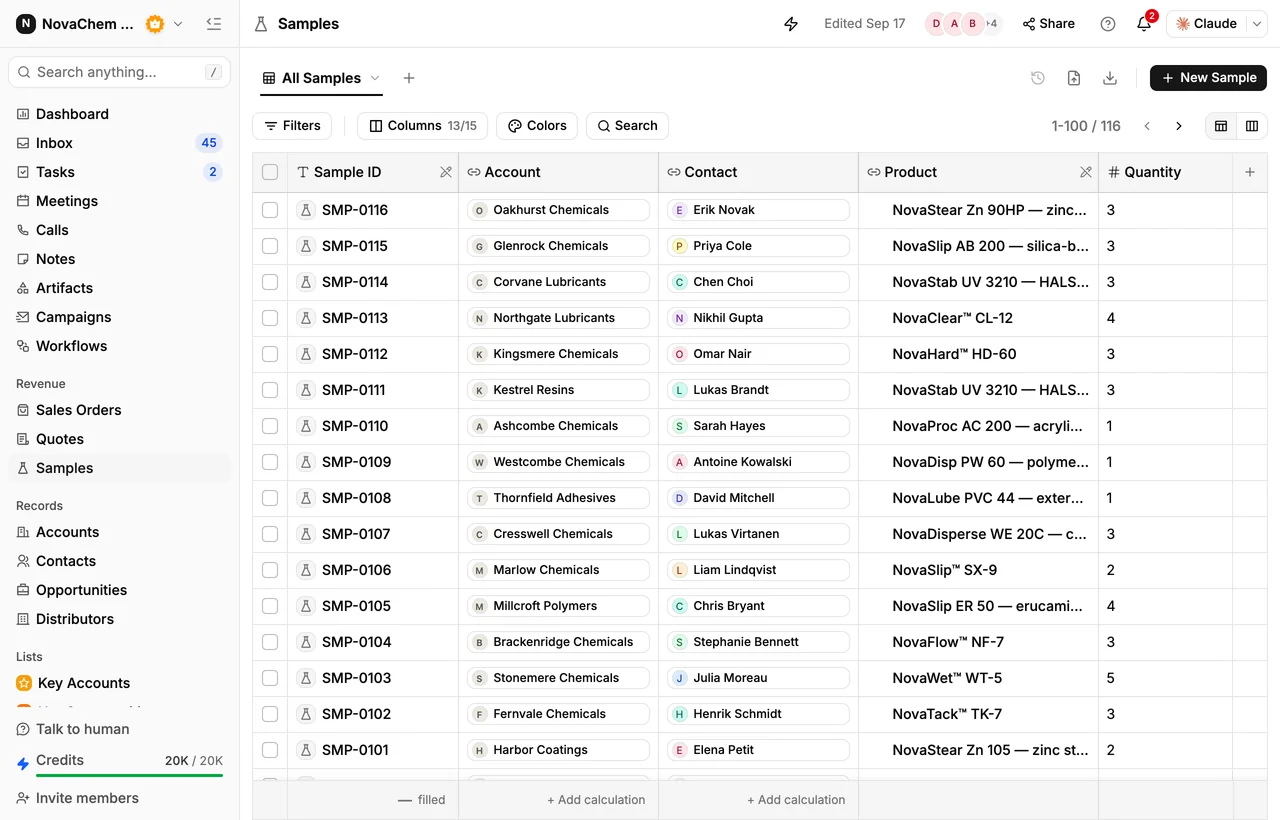
In PromptLab, samples are tracked on the deal, quotes are built from your products and a price list, and a sales order on the account carries the Incoterm, payment terms and planned delivery date. The wider export routine is in the export order checklist.
How do dried fruit and nuts actually sell?
Buyers are importers who resell to the trade, packers who repack for supermarkets, bakery and confectionery makers, and private-label retailers. Most are repeat buyers who return every season to the origin they trust. Quality is judged on grade or size, moisture, colour and the test results, so the conversation is about specification as much as price.
The crop year sets the rhythm. Many exporters offer new crop before it is fully known, then confirm volumes and prices as the harvest comes in. Some products have a seasonal demand peak at the importing end, such as dates ahead of Ramadan or nuts ahead of the winter holidays, so buyers book early. Between harvests, the work is sample rounds, offers and reorders from stock.
A normal sale runs like this: the buyer asks for an offer, you send a pre-shipment sample, their lab or buyer approves it, you agree a contract, and you ship against the approved sample. The shipping sample must match what the buyer approved. That match is where many disputes start.
Which documents and Incoterms do buyers expect?
Exact requirements depend on the product and the destination, so confirm them with your freight forwarder and the buyer's import rules. These are the documents most often asked for:
- Commercial invoice and packing list. See what is a commercial invoice and what is a packing list.
- Phytosanitary certificate, issued by the plant-health authority in the origin country.
- Certificate of origin. See what is a certificate of origin.
- Lab results, such as moisture and mycotoxin tests, in the form of a certificate of analysis.
- Bill of lading for sea freight. See what is a bill of lading.
Terms are usually FOB, CFR or CIF for sea freight, with a container as the unit: the buyer buys a full container, or a part of one when a shared load is possible. See what is FOB and what is CIF for where risk passes. Those three are sea-only rules, and when the container is handed to a terminal before it goes on board, the ICC points to FCA, CPT or CIP instead, so that risk passes where you actually let go of the goods. Payment is often a deposit with the balance against shipping documents, or a letter of credit with a new buyer.
What pipeline stages fit an exporter?
PromptLab has one deal pipeline per workspace. Keep one pipeline and tell products and seasons apart with a custom field, then save a view for each. A workable set of stages:
| Stage | Entry condition |
|---|---|
| Enquiry | A buyer has asked for a product, grade or crop |
| Sample sent | A sample is logged on the deal with a tracking number and a sent date |
| Sample approved | The buyer's lab or buyer has signed off |
| Offer sent | A quote is out, with price, Incoterm and shipment window |
| Contract agreed | Price, volume and payment terms are accepted |
| Shipped | A sales order exists on the account and the documents are sent |
What must the CRM track?
- Buyers and roles. The trader negotiates, the quality manager approves the sample, and finance opens the letter of credit. Record each as a contact.
- Product, grade and crop year, as custom fields on products and deals, so a filtered view of deals shows who took a given almond variety or last season's apricots.
- Samples, each with the product and grade, a tracking number, sent and delivered dates, and the buyer's verdict as a result status (positive, conditional or negative) with test notes. Add a custom field for the lot. How to track product samples covers the routine.
- Offers with the Incoterm and shipment window. The quote's Notes field is printed on the PDF, so put the window and the sampling basis there.
- Expected close date and expected volume. Volume is built in on deals, and an expected close date is a custom date field.
- Messages in every channel. Importers write on email, WhatsApp and Telegram, often at odd hours across time zones.
How do you set this up in PromptLab?
- 1
Import buyers and your products
Bring in accounts, contacts and your product list from CSV or Excel. Add product fields for grade, size and crop year, and a deal field for the season. Store each buyer's usual Incoterm on the account so new orders fill in.
- 2
Create a price list per market or buyer
A customer price list adds a set amount on top of each product's base price, so it can't go below base. Edit a list and only its Draft quotes reprice. See how to manage customer price lists.
- 3
Log every sample on the deal
Record the lot, the sent date and the tracking number. A workflow can create a task for the owner when a sample changes status, so the lab verdict gets chased.
- 4
Quote with terms in the notes
Build the quote from your products and the buyer's price list. Add named costs such as freight to the total and put the shipment window in Notes. Send it as a PDF or a public link.
- 5
Create the sales order
Approving a quote does not create a sales order. Create the order on the account, choose the Incoterm, set payment terms and the planned delivery date, and raise the invoice from it.
- 6
Plan the next crop
Before each harvest, list last year's buyers and create a follow-up task for each owner. Deals have a next follow-up date built in.
How does PromptLab compare for exporters?
Swipe the table sideways to see every CRM →
| Checked on 30 September 2026 | PromptLab |  Pipedrive |  Zoho CRM |  HubSpot |
|---|---|---|---|---|
| Pricing | ||||
| Paid plans, a month | $11.99 – $99per seat | $14 – $79per seat | $14 – $52per seat | $7 – $150per seat |
| Number of plans | 3 | 4 | 4 | 4 |
| Free trial | ||||
| Billing | Billed monthly | Billed annually | Billed annually | Billed annually, plus a $1,500–$3,500 onboarding fee |
| Import from CSV and Excel | ||||
| Sales management | ||||
| Deal pipelines | ||||
| Quotes | From$59/month | From$23/month | Add-on | |
| Sales orders | From$23/month | |||
| Sample tracking | ||||
| Price lists | From$23/month | |||
| Meetings and calls | ||||
| Meeting recording and transcripts | Via marketplace | From$90/month | ||
| AI meeting summaries | ||||
| AI follow-up email drafts | From$59/month | From$23/month | From$90/month | |
| Meeting scheduler and call dialer | From$23.99/month | From$39/month | Via marketplace | |
| AI and automation | ||||
| CRM fields filled in from calls | From$40/month | From$90/month | ||
| Connect Claude or ChatGPT (MCP) | ||||
| Workflow automation | From$39/month | |||
| API and webhooks | From$23.99/month | |||
| Conversations | ||||
| Gmail and Outlook email sync | From$39/month | |||
| WhatsApp conversations | From$39/month | Add-on | ||
| Telegram conversations | ||||
| Save LinkedIn profiles | Via marketplace | From$23/month | From$150/month | |
| Privacy and security | ||||
| Single sign-on (SSO) | From$99/month | From$40/month | From$150/month |
Pipedrive is one of the easiest sales CRMs to learn. It has no sample tracking, and quotes wait for Premium at $59 a seat a month, billed annually. Zoho CRM has quotes, sales orders and price books from $23 a user a month, billed annually, but it doesn't model samples at any tier.
HubSpot is a polished all-in-one suite with a Starter plan from $7 a seat a month, billed annually. For product sales, quoting sits in the separate Revenue Hub, and sales orders and price lists aren't there. Professional and Enterprise add a $1,500 to $3,500 onboarding fee. See the Pipedrive and HubSpot comparisons. Prices are as checked on 30 September 2026.
Frequently asked questions
What should a CRM for a nut exporter include?
It should hold buyers and contacts, samples with their verdicts, quotes built from your products and price lists, and sales orders with the Incoterm. It should also keep every message with the buyer. PromptLab has all of these on every plan.
Can I track pre-shipment samples in a CRM?
Yes. PromptLab's sample tracking records each sample on the deal, with its dates, a result status and the buyer's test notes. Put the lot number in a custom field so you can match it to the shipment later.
How do I plan around the harvest?
Add a season field to deals and a next follow-up date, then list last year's buyers before the new crop and create a task for each owner. An expected close date is a custom date field.
Does the CRM issue export certificates?
No. Certificates come from the authorities and labs. Attach copies to the account's Files tab, so the team finds them with the order.
Is there a free trial?
Basic and Professional come with a 14-day free trial, with no card needed. There is no free plan.
Sources
Prices and features of other CRMs come from each vendor's own pages, on the dates below.
- Pipedrive, checked on 30 September 2026: Pricing, MCP server, Nova, Exporting data
- Zoho CRM, checked on 30 September 2026: Pricing, Features, WhatsApp integration, MCP
- HubSpot, checked on 30 September 2026: Sales Hub pricing, Revenue Hub quote software, WhatsApp integration, MCP servers, Single sign-on (SSO)