













CRM for packaging manufacturers
How packaging sales works, from artwork and dielines to prototypes, tooling, MOQs and repeat runs, and a CRM setup that keeps every spec on the account.
 By the PromptLab team6 October 20265 min read
A packaging manufacturer needs a CRM that keeps the spec, the artwork and the quote together, because every enquiry is a small custom project. A box, pouch or label is different for each customer, and the same job comes back again, so the history of the first run is what makes the second quote fast.
In PromptLab, the spec lives in fields on the deal, prototypes go in as samples, proofs as documents and each run as a sales order. For the wider factory view, see the manufacturers page.
How does a packaging sale actually work?
A brand owner or a contract packer asks for a price on a pack. The enquiry has a size, a board or film, a print spec, a quantity and a delivery date. The first quote is a calculation from the spec, and it is rarely the last.
The usual sequence is:
- The customer sends a brief, often with a competitor's price in mind.
- You quote against the spec, usually at several quantities, because the unit price falls as the run gets longer.
- The customer asks for a structural sample or a prototype.
- Artwork is sent, checked against your dieline and corrected.
- The customer approves a proof, and tooling is made if the pack needs it.
- The first run ships, and the repeat runs follow.
Each loop between customer and factory is a chance to lose a week. The CRM has to show which step the job is at and who owes the next move.
What are artwork, dielines and tooling?
A dieline is the flat template of the pack, showing cuts, folds and glue areas. The customer's designer places artwork on it, and a wrong dieline means a wrong print. A prototype is a physical mock-up to check fit and look. Tooling is the cutting die, printing plate or mould made for the job, often paid for by the customer or recovered over the first runs.
You want these items on the deal: the dieline version, the approved proof, the tooling status and who is paying. Without them, a rep takes a call about a reprint and has to ask the factory what was approved.
Why do MOQs and repeat runs shape the quote?
A minimum order quantity exists because setup costs are fixed. A quote at 5,000 units and one at 50,000 are different prices for the same pack, so the quote usually shows several quantities, one line each.
Repeat runs are where the money is. The first order carries the cost of tooling and setup, and later runs are cheaper to make and quote. A rep who can see the run history can offer a stocking plan or a call-off schedule, and can notice when a customer is overdue to reorder.
A short example. Say a cosmetics brand asks for 20,000 mono-cartons. The rep quotes at 10,000, 20,000 and 50,000, and the customer picks 20,000 with a plan to reorder twice a year. If the second order is logged as a repeat of the first, the deal record shows the dieline, the approved proof and the price, and the reorder quote takes minutes instead of a day.
What pipeline stages fit packaging?
| Stage | Entry condition |
|---|---|
| Brief received | A spec, quantity and date are on the deal |
| Quoted | A quote with a line per quantity is sent |
| Prototype | A structural sample or mock-up is logged |
| Artwork and proof | Artwork is on the dieline and a proof is out |
| Approved | The customer approved the proof and the price |
| First run | The sales order is placed |
| Repeat | A reorder date is set on the account |
What must a packaging CRM track?
- The spec on the deal: dimensions, material, print method, finish, quantity.
- Prototypes, as samples with ship date and the customer's comments.
- Artwork and proof versions, as documents on the deal.
- Tooling, its status and who owns it.
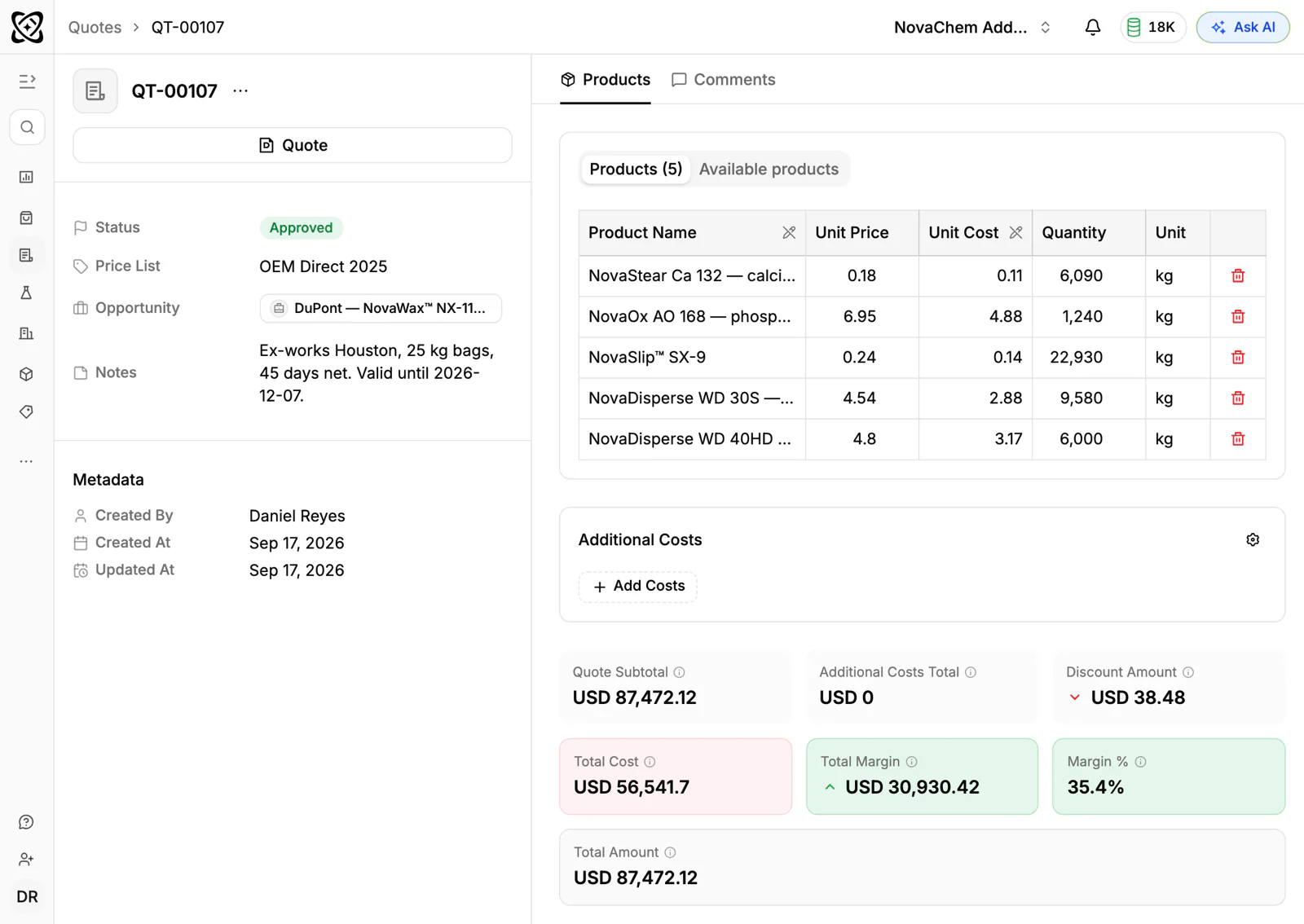
- Quotes with a line per quantity, kept on the customer's deal.
- Customer price lists for stock or standard items and agreed rates for repeat jobs.
- Sales orders per run, so reorders are visible by date.
How do you set this up in PromptLab?
- 1
Shape the pipeline around the job
Create the seven stages above. Add a field for the pack type and one for the quantity, so every deal shows what kind of job it is.
- 2
Put the spec on the deal
Add fields for material, dimensions, print and finish, or attach the spec sheet as a document. On Professional, CRM autofill can fill those custom fields from what the customer says on a call, so a rep does not retype a brief after a meeting.
- 3
Track prototypes as samples
Log each prototype with sample tracking, with the date and the customer's comments. Later changes are then visible next to the original.
- 4
Store artwork and proofs as documents
Attach each proof to the deal, and name the file with its version. When the customer says "the old one", you can open it.
- 5
Quote each quantity, then convert to an order
Build the quote with one line per quantity, send it, and track its status. The approved quote becomes a sales order. Add a task on the account for the next expected run.
- 6
Keep the customer's designer in the loop
Designers often reply by WhatsApp or Telegram with a file or a screenshot. Connect both to the shared Inbox so those messages stay on the account.
How does PromptLab compare for packaging manufacturers?
Swipe the table sideways to see every CRM →
| Checked on 30 September 2026 | PromptLab |  HubSpot HubSpot |  Copper Copper |  Close Close |
|---|---|---|---|---|
| Pricing | ||||
| Paid plans, a month | $11.99 – $99per seat | $7 – $150per seat | $23 – $99per seat | $9 – $139per seat |
| Number of plans | 3 | 4 | 3 | 4 |
| Free trial | ||||
| Billing | Billed monthly | Billed annually, plus a $1,500–$3,500 onboarding fee | Billed annually | Billed annually |
| Import from CSV and Excel | ||||
| Sales management | ||||
| Deal pipelines | From$35/month | |||
| Quotes | Add-on | Via marketplace | ||
| Sales orders | ||||
| Sample tracking | ||||
| Price lists | ||||
| Meetings and calls | ||||
| Meeting recording and transcripts | From$90/month | |||
| AI meeting summaries | ||||
| AI follow-up email drafts | From$90/month | From$59/month | ||
| Meeting scheduler and call dialer | From$23.99/month | Via marketplace | ||
| AI and automation | ||||
| CRM fields filled in from calls | From$90/month | |||
| Connect Claude or ChatGPT (MCP) | ||||
| Workflow automation | From$59/month | From$99/month | ||
| API and webhooks | From$23.99/month | From$59/month | ||
| Conversations | ||||
| Gmail and Outlook email sync | ||||
| WhatsApp conversations | Add-on | Via marketplace | ||
| Telegram conversations | ||||
| Save LinkedIn profiles | From$150/month | |||
| Privacy and security | ||||
| Single sign-on (SSO) | From$99/month | From$150/month | From$99/month | Google only |
HubSpot's marketing tools suit a packaging firm that wins brand owners through its website, and its free CRM costs nothing to start. For the job itself, quoting sits in the separate Revenue Hub, and there are no sales orders, samples or price lists, so prototypes and repeat runs live somewhere else.
Copper runs inside Gmail and Calendar and syncs Google Drive, which is handy if artwork already lives there. But quotes need a marketplace app such as PandaDoc, there is no sales order or sample tracking, and Gmail is the only inbox it syncs. Close suits an estimator who lives on the phone, with its dialer built in, but it keeps no quotes, samples or price lists. See the HubSpot and Copper comparisons for detail.
Frequently asked questions
What CRM is best for a packaging manufacturer?
A CRM with quotes, sales orders, sample tracking and documents on the base plan. PromptLab includes them on every plan, from $11.99 per user per month.
Can I track prototypes and proofs in a CRM?
Yes. Log prototypes as samples, and attach proofs and artwork as documents on the deal.
How do I quote different quantities?
Build the quote with one line per quantity, or send a separate quote for each. The quote guide shows a layout a buyer can compare at a glance.
Can the CRM remind us about repeat runs?
Yes. Set a task on the account for the next expected run, dated from the customer's reorder pattern. A workflow can also create a task when a deal moves to a stage such as First run, so the rep sets the reorder date the day the order lands.
Do I need a developer to set it up?
No. Your sales team can configure pipelines, fields and price lists itself. Professional adds webhooks and the API if you want to connect other systems.
Sources
Prices and features of other CRMs come from each vendor's own pages, on the dates below.
- HubSpot, checked on 30 September 2026: Sales Hub pricing, Revenue Hub quote software, WhatsApp integration, MCP servers, Single sign-on (SSO)
- Copper, checked on 30 September 2026: Pricing, Integrations, Homepage
- Close, checked on 30 September 2026: Pricing, Facts for AI agents, Security, Developer platform, Exporting data