



















CRM for paper and board manufacturers
How paper and board mills sell, from grade specs and trial runs to contract pricing and reorders, and how to set up a CRM that keeps it on one account.
 By the PromptLab team16 October 20266 min read
A paper or board manufacturer needs a CRM that holds the spec, the price and the history of each customer in one place. The sale rarely ends at the first order. A converter or printer approves a grade, runs a trial, then reorders for years, so the account record matters more than any single deal.
In PromptLab, each customer is an account with its own price list, trial requests are tracked as samples, quotes attach to the deal, and the approved quote's lines go into a sales order on the same account. The manufacturers page has the short version.
How does a paper and board manufacturer actually sell?
The buyers are mostly other businesses that turn your material into something else: printers, box makers, label converters, packaging plants and merchants who hold stock for smaller customers. Each has its own machines, and the paper has to run on them.
That shapes the whole sale. A buyer does not choose on price alone, because a grade that jams a press or splits on a folding line costs more than the saving. So the conversation starts with the application and the equipment, and only then moves to price.
Typical channels sit side by side:
- Direct sales to larger converters and printers, usually through a named account manager.
- Merchants and agents who stock and resell to smaller buyers.
- Email and WhatsApp enquiries from buyers who need a quick price or a delivery date.
- Annual or half-yearly contracts with agreed volumes and pricing.
A mill that sells through all four needs to see one customer once, not four times.
Why do specs and trials come first?
Paper and board are specified by grade, weight, size and finish, and the buyer often asks for a technical data sheet before anything else. Then comes a trial: a pallet or a reel sent to run on the buyer's line. The result of that trial decides whether the account is won.
If trials live in a rep's inbox, nobody can answer simple questions. Which grade did we send? Who ran it? What did the customer say? Did anyone follow up? Track each trial as a sample request on the account, with its status and the feedback, and the answer is on the screen.
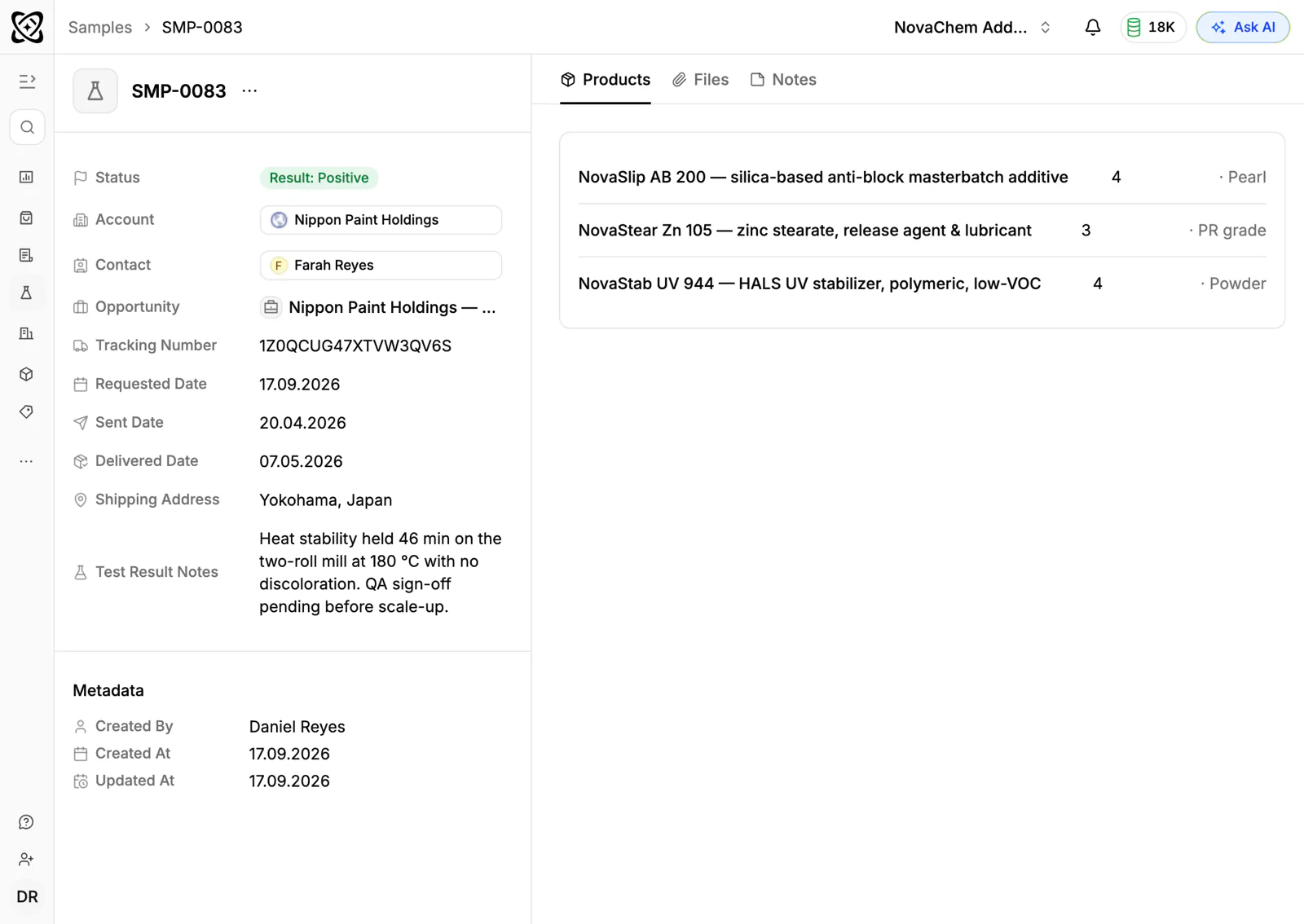
The guide to tracking product samples covers the routine in more detail.
How does contract pricing work?
Few customers pay list price. A large printer on an annual agreement gets one structure, a merchant another, and a small converter a third. Prices may also be tied to volume bands, so a repeat buyer expects the same terms every time.
Keep each customer's agreed prices on their own price list and quote from it. A junior rep and the sales director then send the same number. When terms change, update the list once instead of correcting a dozen old quotes. See how to manage customer-specific price lists.
What pipeline stages fit paper and board?
Two motions deserve two sets of stages: winning a new customer and managing the quote cycle for existing ones.
New account
| Stage | Entry condition |
|---|---|
| Lead | A converter or printer worth approaching |
| Spec discussed | You know the application, machine and grade |
| Data sheet sent | The buyer has the technical data sheet |
| Trial running | A sample or trial pallet has shipped |
| Trial approved | The customer has confirmed the grade works |
| First order | A sales order is created for the approved quote |
Existing customer
| Stage | Entry condition |
|---|---|
| Enquiry | A request for price or delivery arrived |
| Quote sent | Priced from the customer's list |
| Chased | A follow-up task was done |
| Order or lost | An order was placed, or the reason is noted |
PromptLab has one pipeline with stages you configure, so name the stages so that both motions read clearly, or tag new-account deals with a field. Either keeps the board readable.
What must the CRM track?
- Accounts for each customer and merchant, with an owner and the contacts by role: buyer, production manager, quality and accounts.
- Trials as samples, with grade, status and feedback.
- Price lists per customer, so quotes use the agreed terms.
- Quotes and sales orders, so you can see what each account really buys.
- Documents, such as data sheets and certificates, stored on the account.
- Every channel: email, WhatsApp and Telegram in the same thread view.
How do you set this up in PromptLab?
- 1
Import your accounts
Bring in customers, merchants and contacts from CSV or Excel, or pick a file from Google Drive. If part of the team still works in Salesforce or HubSpot, the two-way sync lets you run both while you switch.
- 2
Shape the pipeline
Create the stages above. Give every account an owner, so two reps never both assume the other one called.
- 3
Set up price lists for your biggest accounts
Start with the customers who quote most often, then add the rest as time allows. Quotes built on the list pick up its prices.
- 4
Track every trial as a sample
Log the grade, the date it shipped and the contact who will run it. Add a task to ask for the result a week later.
- 5
Quote, then create the order
Send the quote, follow its status, and when it is approved create the sales order with the same lines. The guide to quote-to-order shows how to shorten the gap.
- 6
Automate the nudge
Use workflow automation to create a task or post to Slack when a quote changes status or a deal changes stage. A trial that has gone quiet then lands on someone's list instead of being forgotten.
How do you keep regular customers reordering?
Most of a mill's revenue comes from customers who already run its grades. The risk is a slow drift: a printer moves one grade to another supplier and nobody notices for months.
Look at orders by account and by product, and call the accounts that have slowed. Ask AI answers plain-language questions about accounts, deals, quotes, sales orders, meetings and email, so a manager can ask which customers have not ordered a given grade for a while. The guide to increasing repeat orders has more tactics.
How does PromptLab compare for paper and board?
Swipe the table sideways to see every CRM →
| Checked on 30 September 2026 | PromptLab |  Salesforce Salesforce |  Zoho CRM Zoho CRM |  Dynamics 365 Dynamics 365 |
|---|---|---|---|---|
| Pricing | ||||
| Paid plans, a month | $11.99 – $99per seat | $25 – $550per seat | $14 – $52per seat | $65 – $150per seat |
| Number of plans | 3 | 5 | 4 | 3 |
| Free trial | ||||
| Billing | Billed monthly | Billed annually | Billed annually | Billed annually |
| Import from CSV and Excel | ||||
| Sales management | ||||
| Deal pipelines | ||||
| Quotes | From$100/month | From$23/month | ||
| Sales orders | From$100/month | From$23/month | ||
| Sample tracking | ||||
| Price lists | From$100/month | From$23/month | ||
| Meetings and calls | ||||
| Meeting recording and transcripts | Add-on | Via marketplace | From$105/month | |
| AI meeting summaries | Add-on | From$105/month | ||
| AI follow-up email drafts | Add-on | From$23/month | From$105/month | |
| Meeting scheduler and call dialer | From$23.99/month | Add-on | Via marketplace | From$105/month |
| AI and automation | ||||
| CRM fields filled in from calls | From$195/month | From$40/month | From$150/month | |
| Connect Claude or ChatGPT (MCP) | From$195/month | From$150/month | ||
| Workflow automation | ||||
| API and webhooks | From$23.99/month | From$195/month | ||
| Conversations | ||||
| Gmail and Outlook email sync | ||||
| WhatsApp conversations | Add-on | Add-on | ||
| Telegram conversations | ||||
| Save LinkedIn profiles | Via marketplace | From$23/month | Add-on | |
| Privacy and security | ||||
| Single sign-on (SSO) | From$99/month | From$40/month |
Salesforce Sales Cloud is the most configurable option, with five editions from $25 to $550 a user a month, billed annually. Quotes and price lists start at $100, call recording is an add-on, and building it usually takes an admin or a partner. Zoho CRM is the value pick: free for three users, then from $14 a user a month, billed annually, with quotes, sales orders and price books from $23. Samples aren't modelled, and Telegram isn't supported.
Dynamics 365 Sales fits a company already on Microsoft, with quotes, price lists and orders from $65 a user a month, billed annually. Meeting recording starts on Enterprise at $105, and there is no sample tracking. The Salesforce comparison goes through it line by line.
Frequently asked questions
What does a paper and board manufacturer need from a CRM?
Customer price lists, quotes and sales orders, sample tracking for trials and a shared view of email and messaging on each account. PromptLab includes all four on every plan.
How do I track a trial run with a customer?
Log it as a sample request on the account, with the grade, the ship date and the status. Add the customer's feedback when it comes back, and set a task to chase it if it does not.
Can a CRM store data sheets and certificates?
Yes. Accounts in PromptLab have files and documents, so the data sheet you sent and the certificate the customer asked for sit on the account where any rep can find them.
Does PromptLab replace my ERP or planning system?
No. PromptLab is the sales side: accounts, trials, quotes, orders and conversations. If you run Acumatica, it brings in customers, contacts, leads and opportunities. Keep production planning and stock in your own system.
Can reps use WhatsApp with merchants and converters?
Yes. Connect your WhatsApp Business number to the shared Inbox, and each message lands on the account so any rep can pick up the thread. See the WhatsApp page.
Sources
Prices and features of other CRMs come from each vendor's own pages, on the dates below.
- Salesforce, checked on 30 September 2026: Sales Cloud pricing, Sales Engagement pricing, Agentforce MCP support
- Zoho CRM, checked on 30 September 2026: Pricing, Features, WhatsApp integration, MCP
- Dynamics 365, checked on 30 September 2026: Sales pricing, Conversation intelligence FAQ, Sales MCP server