



















CRM for pet food manufacturers
How pet food makers sell to retailers, distributors and private-label buyers, from trial samples to listings and reorders, and a CRM setup for it.
 By the PromptLab team29 October 20265 min read
A pet food manufacturer needs a CRM that follows a listing from first sample to repeat order. The buyer at a retailer or distributor wants to see the product, read the specification and compare your price with what is already on the shelf. Winning a listing takes several meetings, and keeping it takes reliable supply.
In PromptLab, sample shipments are records with feedback, each buyer's agreed prices sit in a customer price list, and listings are deals in one pipeline. Orders, quotes and conversations sit on the account. The wider factory view is on the manufacturers page.
How does a pet food sale actually work?
A pet food maker sells through several routes. Retail chains and independent pet shops list finished products. Distributors and wholesalers take pallets and sell on to smaller shops. Private-label buyers ask you to make a product under their brand. Some makers also supply ingredients or co-pack for other brands.
Each route has a different buyer. A category buyer at a chain looks at range, margin, packaging and promotion support. A distributor cares about pack sizes that move and reliable delivery. A private-label buyer wants a recipe, a specification and a price per tonne or per unit.
The sale is long. A buyer asks for a product spec, samples to test, a price list and sometimes a visit to your site. Several people at the buyer may have a say, from category and quality to logistics.
What do samples and trials look like in pet food?
Pet food samples are tested in a few ways. A retailer may review packaging and ingredients on paper. A private-label buyer may run a feeding or palatability test with a panel of pets. A distributor may simply want to see and feel the product.
Either way, the loop is: sample out, trial, feedback, adjustment and a decision. Say a private-label buyer asks for a grain-free recipe in two bag sizes. You send a sample of each, they test, and they ask for a change to the kibble size. The change goes into a second sample. Without a record on the account, nobody remembers which version the buyer last saw.
What pipeline stages fit a pet food manufacturer?
PromptLab has one deal pipeline with stages you name. Mark each deal's route (retail, distributor or private label) with a field, and save a view for each.
| Stage | Entry condition |
|---|---|
| Introduced | A buyer has agreed to see the range |
| Spec and samples sent | The product spec is shared and a sample is logged |
| Trial feedback | The buyer's response is recorded on the sample |
| Quote and terms | A quote from the buyer's price list is out |
| Listing agreed | The buyer has approved the product and terms |
| First order | A sales order exists for the first delivery |
| Repeat supply | Orders arrive on a schedule |
Lost deals need a loss reason from a fixed list: Price, Competitor, Timing, No budget, Product fit or Other.
What must the CRM track?
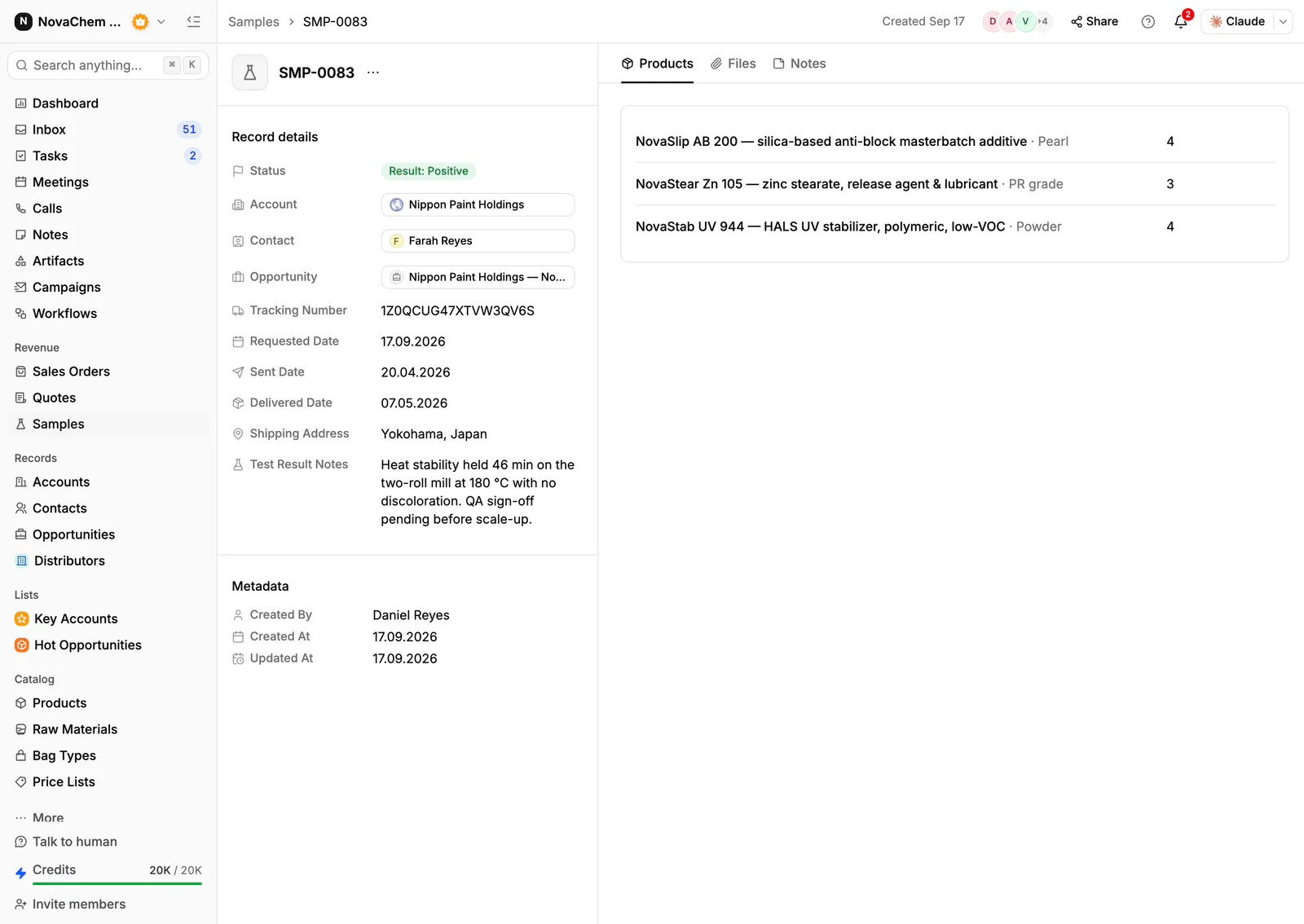
- Samples, with the recipe or product, the pack size, the date and the buyer's feedback on each round.
- Documents, such as the spec sheet and any approval letter, held in the Files tab of the account.
- Price lists per buyer. A retail chain, a distributor and a private-label customer pay different prices for what looks like the same product.
- Pack sizes, because a 2 kg bag and a 15 kg sack are separate quote lines.
- Order history by product, so a rep sees which lines a buyer takes and which ones it dropped.
- Contacts by role, such as category buyer, quality manager and logistics, since each has a say.
How do you set this up in PromptLab?
- 1
Set up stages and a route field
Add the stages above to your pipeline and a deal field for retail, distributor or private label. Save a view for each route.
- 2
Log every sample as a record
Record each sample with the product, the pack, the contact and the date, and put the buyer's feedback on it. See how to track product samples.
- 3
Attach the spec and approvals
Store the spec sheet and approval letters in the Files tab on the account, so any rep sees what the buyer has been sent.
- 4
Build price lists by buyer
Create a customer price list for each key buyer and one for each route, by product and pack size. Quotes use them, with the margin on each line worked out from each product's cost price. How to manage customer price lists covers it.
- 5
Add a follow-up workflow
Create a workflow that fires when a sample changes status and creates a task for the owner to ask for feedback. Create another for a deal moving to Listing agreed that posts to Slack, so production and logistics know.
- 6
Connect email, WhatsApp and Telegram
Buyers and distributors often reply on WhatsApp. Connect your WhatsApp Business number and your company Telegram bot, and the thread lands on the account.
How does PromptLab compare for pet food sales?
| Checked on 30 September 2026 | PromptLab |  Pipedrive Pipedrive |  Close Close |
|---|---|---|---|
| Pricing | |||
| Paid plans, a month | $11.99 – $99per seat | $14 – $79per seat | $9 – $139per seat |
| Number of plans | 3 | 4 | 4 |
| Free trial | |||
| Billing | Billed monthly | Billed annually | Billed annually |
| Import from CSV and Excel | |||
| Sales management | |||
| Deal pipelines | From$35/month | ||
| Quotes | From$59/month | ||
| Sales orders | |||
| Sample tracking | |||
| Price lists | |||
| Meetings and calls | |||
| Meeting recording and transcripts | |||
| AI meeting summaries | |||
| AI follow-up email drafts | From$59/month | ||
| Meeting scheduler and call dialer | From$23.99/month | From$39/month | |
| AI and automation | |||
| CRM fields filled in from calls | |||
| Connect Claude or ChatGPT (MCP) | |||
| Workflow automation | From$39/month | From$99/month | |
| API and webhooks | From$23.99/month | ||
| Conversations | |||
| Gmail and Outlook email sync | From$39/month | ||
| WhatsApp conversations | From$39/month | ||
| Telegram conversations | |||
| Save LinkedIn profiles | Via marketplace | ||
| Privacy and security | |||
| Single sign-on (SSO) | From$99/month | Google only |
Pipedrive has the visual pipeline many reps already know, with Nova on every plan from $14 a seat, billed annually. It keeps no samples, price lists or sales orders, and quotes wait for Premium at $59. Close is a calling-first CRM with the dialer, email and SMS built in. For a team selling products, quotes, samples and price lists are missing, and pipelines start at $35 a seat, with workflows at $99, billed annually.
See the Pipedrive and Close comparisons.
Frequently asked questions
What should a CRM for a pet food manufacturer include?
It should hold samples, quotes, customer price lists and sales orders, with retail, distributor and private-label deals kept apart by a field and a view. PromptLab has these on every plan, from $11.99 per user per month.
Can I track private-label trials in a CRM?
Yes. Treat each round as a sample with a product, a date and the buyer's feedback. The sample history shows what the buyer last saw.
How do I manage prices for retailers and distributors?
Keep a customer price list for each and quote from it. See what is a customer price list.
Where do I keep spec sheets?
Keep the master copy in your quality system, and attach the version you sent in the Files tab of the account.
Is there a free trial?
Basic and Professional come with a 14-day free trial, with no card needed. There is no free plan.