



















How to automate sales follow-ups
Set up CRM workflows that create follow-up tasks when a quote, sample or deal changes, so no step depends on memory. Triggers and examples for product sales.
 By the PromptLab team24 October 20265 min read
To automate sales follow-ups, find the moments where a follow-up is due, such as a quote sent, a sample delivered or a deal changing stage, and set a workflow that creates a task for the right person when each one happens. The task reminds the rep. The rep writes and sends the message. That keeps the follow-up on time without sending anything on its own.
This guide shows the follow-ups worth automating in a product business, how to build them as workflows and how to keep them useful. It does not cover automated email series. Buyers of chemicals, packaging or industrial supplies answer a person who knows their order, so the aim is to make sure that person acts at the right time.
What to automate and what to leave alone
A follow-up has two parts: knowing it is due, and writing it. Automate the first. Keep the second human, with an AI draft to start from if it helps.
Good candidates are follow-ups that always follow the same event:
- A quote moves to Pending, and you want to chase it in three days
- A sample status changes to Delivered, and you need a result
- A deal reaches a stage and needs a next step
- A message arrives from a buyer and nobody has replied
- A meeting ends with action items
Poor candidates are messages that depend on judgement, such as a reply to a complaint or a price negotiation. Write those yourself.
The follow-ups worth setting up first
After a quote is created or changes status
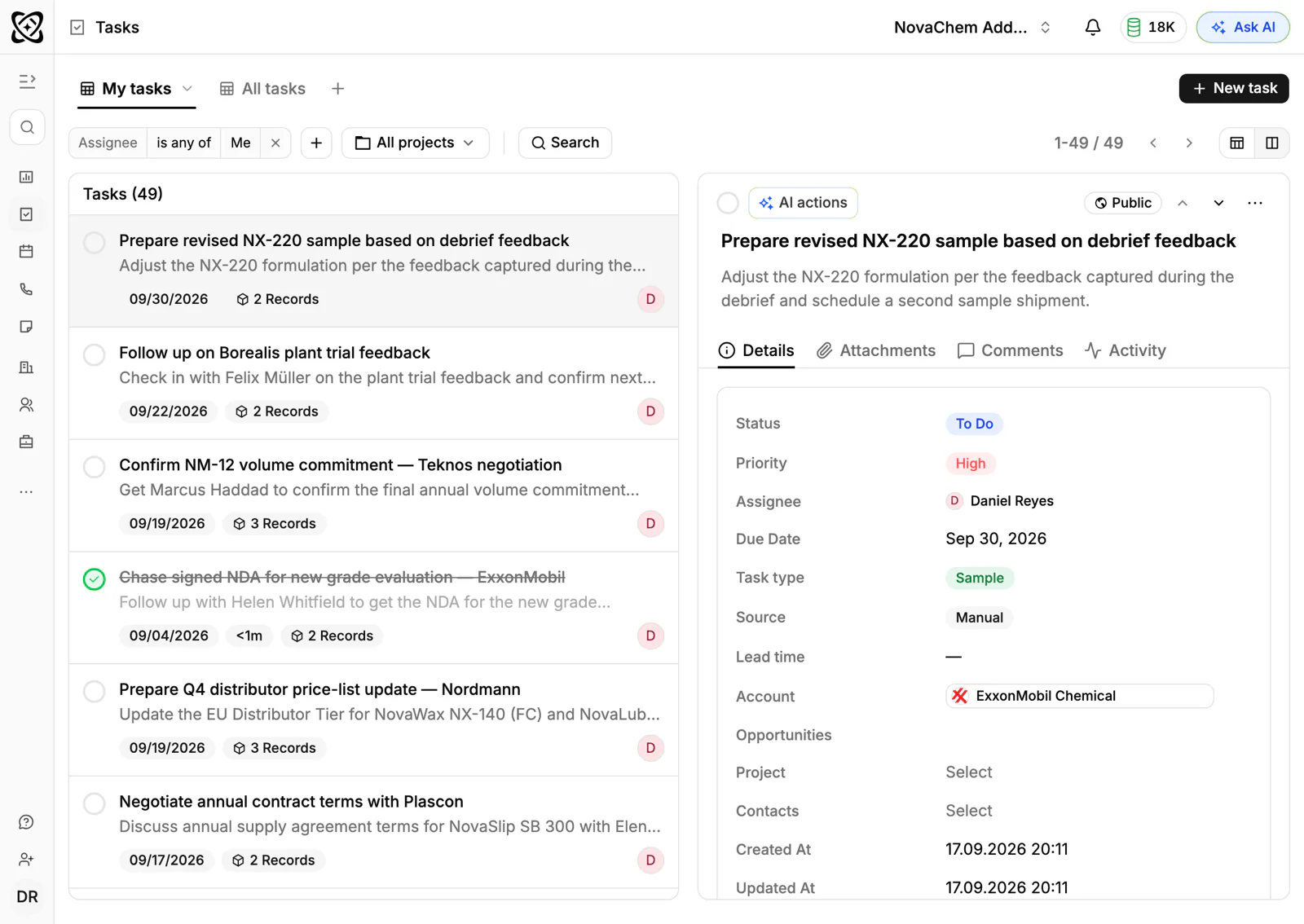
A quote with no answer is the most common stalled deal. When a quote changes to Pending, create a task for the deal owner to chase it. Use the quote follow-up email templates for the wording.
After a sample is delivered
Samples are only useful when the customer reports a result. When a sample's status changes, create a task to ask how testing is going. The sample follow-up email templates give you the wording.
When a deal changes stage
A deal that moves stage often needs a new step. A move to "Negotiation" might create a task to prepare the volume pricing, and assign it to the account owner.
When a message comes in
A buyer who writes on email, WhatsApp or Telegram expects an answer. A workflow can create a task when a message is received, so it does not sit unread in someone's inbox.
After a meeting
Action items from a recorded meeting become CRM tasks automatically. You don't need to build anything for this one. Add a workflow only if you want something else to follow, such as a task for a manager. See how to record and summarise sales meetings.
Build a follow-up workflow
Every workflow has three parts: a trigger, a condition if you need one, and an action. Write them as one sentence before you build anything.
When a quote's status changes to Pending, create a task "Chase quote" for the deal owner.
- 1
Pick one follow-up that keeps getting missed
Ask the team which follow-up they forget most. Start with that one, not with ten.
- 2
Choose the trigger
Pick the event that makes the follow-up due: a quote or sample status change, a deal stage change, a message received or a meeting event.
- 3
Choose the action
Create a task, assign an owner, create a meeting, or post a message to Slack. For a follow-up, creating a task and assigning the owner covers most cases.
- 4
Write a task title that says what to do
"Chase the quote for [account]" is better than "Follow up". The rep should know what to do without opening the record.
- 5
Test it on one real deal
Change a status on a test record and check that the task appears with the right owner. Then turn it on for the team.
- 6
Review after a month
Look at which tasks were done and which were ignored. Delete the workflows that nobody acts on.
Worked example
Say a plastics distributor sends 30 quotes a month. Reps chase them when they remember. The sales manager sets one workflow: when a quote changes to Pending, create a task for the deal owner, titled "Chase quote". The rep opens the task, writes the reply and sends it. When the buyer says yes, the quote moves to Approved, and a second workflow, triggered by that status change, creates a task to enter the sales order. Nothing is sent without a person. Nothing is forgotten either.
Keep automation from becoming noise
- One task per event. Two workflows that fire on the same change create duplicate tasks.
- Assign an owner. A task nobody owns is a task nobody does.
- Name the next step in the title. A vague task is easy to dismiss.
- Keep the number of workflows small. Five that people use beat twenty that people ignore.
- Post to Slack only when it needs the team. An approved quote is worth a message. Every status change is not.
How PromptLab helps
PromptLab's workflow automation is on every plan. Triggers include a sample created or changed, a quote created or changed, a deal stage changed, an email, WhatsApp or Telegram message received, and meeting, task and note events. Actions include creating a task, assigning an owner, creating a meeting, creating a sales order and posting to Slack.
Quotes and samples are linked to the deal, and sales orders to the account, so a task on the deal or account opens with the context. The shared Inbox keeps email, WhatsApp and Telegram conversations on the account, and AI follow-up email drafts from meetings give the rep something to start from.
Open the Workflows reference to see the options, or the sales automation page for the overview.
Frequently asked questions
What sales follow-ups can be automated?
The reminders to follow up can be automated: a task when a quote is pending, a sample is delivered, a deal changes stage or a message arrives. The message itself should still be written or approved by a person.
Should I automate follow-up emails?
For B2B product sales, most buyers expect a reply from someone who knows their order. It is safer to automate the reminder and keep the sending in the rep's hands. You can use a draft to save time.
How soon should I follow up after sending a quote?
Two to three working days is a common starting point, then again about a week later. Adjust it to how long your customers usually take to decide, and ask the buyer for their timeline when you send the quote.
Can a workflow post to Slack?
Yes. A workflow can post a message to Slack when something happens, such as a deal moving to a late stage. Use it for events the whole team needs to know about, so the channel does not become noise.
How many workflows should a small team have?
Start with two or three that cover the follow-ups people forget most. Add more only after you have checked that the first ones are used.