

















How to hand over accounts when a rep leaves
Hand over accounts when a rep leaves by sorting accounts by risk, capturing what the rep knows, introducing the new owner and checking in at 30 days.
 By the PromptLab team31 October 20265 min read
To hand over accounts when a rep leaves, sort their accounts by value and risk, get what they know out of their head and into the CRM, assign each account a new owner, and introduce that owner to the buyer within days. The goal is that no customer notices a gap and no open quote, sample or promise is dropped.
This guide is for sales managers at manufacturers and distributors. It covers the first week, what to capture from the leaving rep, how to introduce the new owner, and what to check after 30 days. For a list to tick off, use the sales territory handover checklist, and for wording, the account handover email templates.
Why handovers go wrong
Much of what makes a rep good at an account is not in the CRM. It is who really decides, which price the buyer expects, what was promised on the last visit, and which colleague at the customer cannot stand another. When the rep leaves, that goes with them unless you capture it.
Three failures are common: open items are forgotten (a quote waiting for an answer, a sample promised), the buyer hears nothing and drifts to a competitor, and the new owner starts from a cold record. All three can be prevented in the first week.
Step by step: run the handover
- 1
Take stock of every account the rep owns
List accounts, open deals, open quotes, samples in progress and sales orders still in motion. Sort by annual value and by risk: a large account with an open quote comes before a small dormant one.
- 2
Decide the new owners
Match accounts to colleagues by territory, product knowledge and capacity, not by who is free. Avoid giving one person all the big accounts. For the thinking, see how to manage sales territories.
- 3
Get the rep to write down what only they know
Ask for a short note per important account: the real decision maker, the buyer's habits, the price history, any promises made, and anything sensitive. If the rep is leaving on good terms, a conversation per account is better than a form. If not, rely on the record and the email history.
- 4
Clean up the record before you transfer it
Close deals that are dead with a reason. Update the next step on live ones. Fix contact details. A new owner inherits whatever state you leave.
- 5
Introduce the new owner in the first week
Send a short message to the buyer from the leaving rep or the manager: who is taking over, how to reach them, and that nothing changes on open orders. A call from the new owner within a day or two follows.
- 6
Keep the open items alive
Give every open quote, sample and promise an owner and a date. These are what customers notice if they slip.
- 7
Review at 30 days
Check each important account: has the new owner spoken to the buyer, are there new orders, and is anything stuck? Adjust where needed.
What to capture from the leaving rep
Keep this to what helps the next person act. A short template per account:
- Who matters: decision maker, influencer, the person who places orders.
- What they buy and how often: products, usual quantities, the reorder rhythm.
- Price position: the customer price list, recent discounts, any deal they push for.
- Open items: quotes, samples, complaints, promises.
- Relationship notes: preferred channel (email, WhatsApp, phone), best time to call, sensitivities.
- Risk: is the buyer talking to a competitor, or unhappy about anything?
How to introduce the new owner
The introduction should come quickly and carry a reason to stay. A good message says who is taking over, what they know about the account, that open orders and quotes are unchanged, and offers a call. Say the new owner has the full history. A buyer who feels looked after does not go looking elsewhere.
Say a distributor's rep leaves and her 30 accounts are shared between three colleagues. Each buyer gets a note the same day and a call the next. The two largest accounts get a joint visit with the manager in the first fortnight.
Handling the risky accounts
Some accounts need more than a message. Treat these with a joint call or visit:
- The largest accounts, where losing one would be felt in the quarter.
- Accounts with an open complaint or a late delivery, where the buyer is already unhappy.
- Accounts where the leaving rep was the only contact, with no relationship to anyone else at your company.
- Accounts with a live quote, sample or tender, where a missed deadline loses the deal.
For these, the manager or a senior colleague attends the first conversation with the new owner, so the buyer sees continuity. Afterwards, add a note of what was said and set the next task.
Common mistakes
- Splitting accounts by who has time. Fit and knowledge matter more.
- Waiting until the last day. Start the stock-take when you know the date.
- Telling the buyer late. They will hear it elsewhere, and silence looks like neglect.
- Letting the old rep's email and phone number go dead. Forward and redirect.
- Assuming the CRM has everything. Capture what is not written down.
- Ignoring the small accounts. Dormant ones can be reactivated; see how to reactivate dormant accounts.
How PromptLab helps
PromptLab keeps the history on the account, not with the rep. Contacts, deals, quotes, samples, sales orders, notes, files and the email, WhatsApp and Telegram conversations all sit on the account, so a new owner opens one page and sees where things stand.
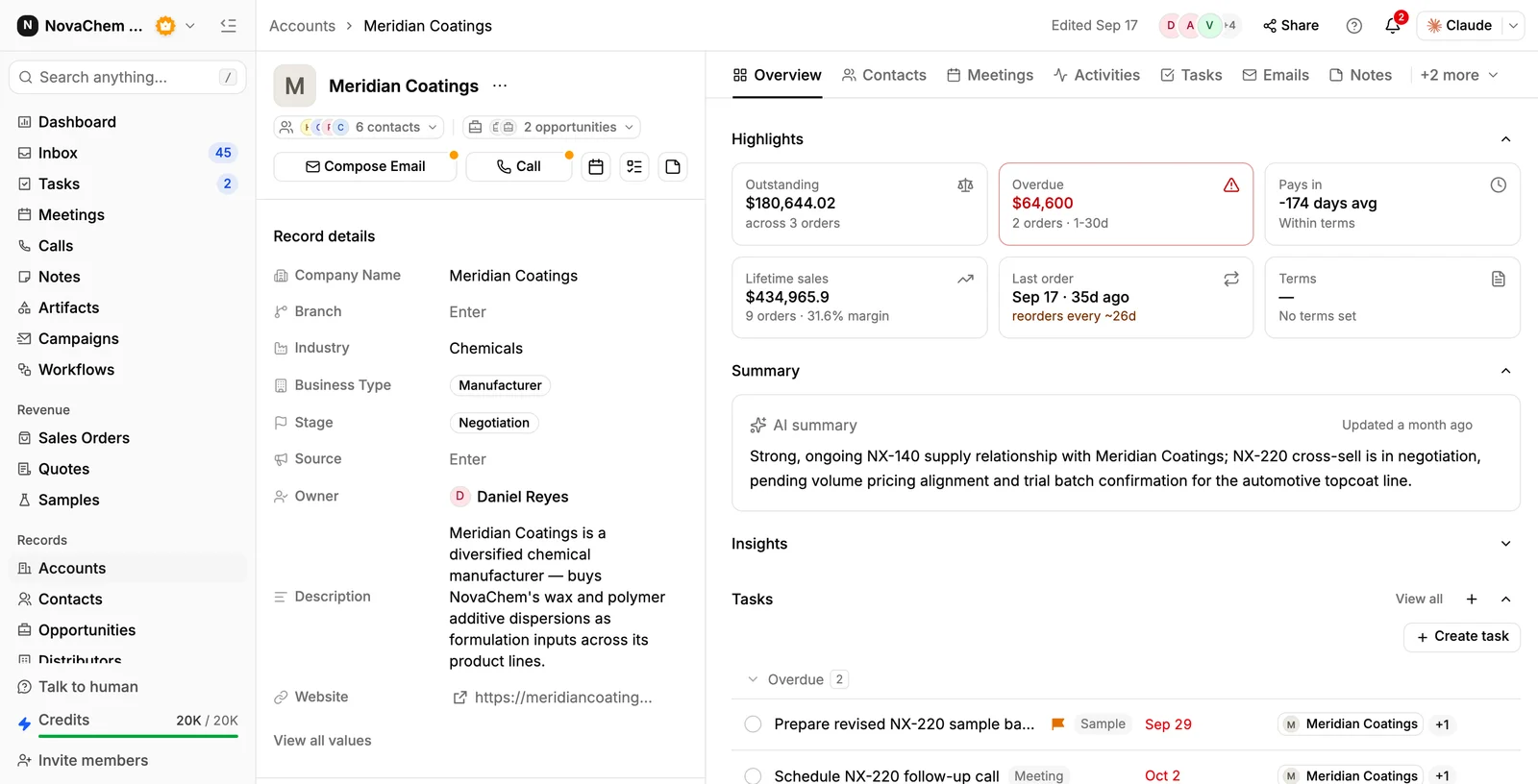
Filter the Accounts list by owner to see a leaving rep's accounts, and save it as a view to work through. Change the owner in the list, where a value can be pasted or filled down a column like a spreadsheet, and select the rep's open deals and assign them to the new owner in one go. Recorded meetings have transcripts and AI summaries, and their action items become tasks, so the context from past calls is there. Ask AI answers plain-language questions such as what has been discussed with an account, which helps a new owner prepare. Open tasks are reassigned the same way, in the task list. See the accounts reference.
Frequently asked questions
How do I hand over accounts when a salesperson leaves?
List their accounts and open items, assign new owners, capture what the rep knows, clean up the records, and introduce the new owner to each buyer in the first week. Review at 30 days.
Who should tell the customer that their rep is leaving?
Ideally the leaving rep or the sales manager, quickly, with the name and contact of the new owner. The new owner should follow with a call or message within a day or two.
What should be in an account handover note?
The decision makers, what the account buys and how often, price position, open quotes and samples, relationship notes and any risk. Keep it to what the next person needs to act.
Which accounts should I hand over first?
Start with the largest and the riskiest, especially those with an open quote, a sample in progress or a complaint. Then cover the rest by value.
What if the rep leaves without notice?
Rely on the record: notes, email history, deals, quotes and recorded meetings. Then call each important buyer yourself to introduce the new owner and ask what they need.