



















How to segment your B2B customers
Segment B2B customers by what they buy, how much, how often and who they are. Start with three to five segments and give each a different way of selling.
 By the PromptLab team29 October 20265 min read
To segment your B2B customers, group them by a few facts that change how you sell: what they buy, how much they spend, how often they reorder, their industry and how they buy. Start with three to five segments, give each one a different way of selling, and check the segments every quarter. A segment is only worth having if it changes what you do.
This guide is for sales leaders and founders at manufacturers and distributors with enough customers that treating them all alike wastes effort. It covers which facts to segment on, a method you can finish in an afternoon and how to act on the result.
Why segment at all
Your customers don't need the same things. A large distributor that reorders every month needs stock cover and a named contact. A small formulator that buys twice a year needs a sample and a clear price. A new buyer in a region you're testing needs attention before anything else.
When you treat them all the same, your best accounts get too little time and your smallest get too much. Segmenting lets you decide who gets a visit, who gets a call, who gets an email and who gets a reorder reminder.
Which facts to segment on
Choose from what you can already see in your sales data. Keep the list short.
| Fact | Question it answers | Example segments |
|---|---|---|
| Spend | How much do they buy? | Top accounts, mid-size, small |
| Frequency | How often do they reorder? | Monthly, seasonal, one-off |
| Product mix | What do they buy? | Single product, several product lines |
| Industry | What do they make? | Coatings, packaging, construction |
| Type | How do they buy? | Distributor, end user, agent |
| Region | Where are they? | Home market, export region |
| Stage | Where are they in the relationship? | New, active, dormant |
Don't use all seven at once. Pick two or three that most change how you'd treat the account.
Step by step: build your segments
- 1
Export or list your accounts with the facts you need
For each account, gather last year's order value, number of orders, product lines bought, industry, type and region. Missing data is a finding: note which fields are blank.
- 2
Pick two or three segmenting facts
Choose the ones that would change your actions. For many product sellers that is spend and frequency, plus type (distributor or end user).
- 3
Draw the lines
Set thresholds you can defend. Say your top accounts are those who ordered more than a figure you choose, or the ones that together make up most of your revenue. Check them against your own data and adjust.
- 4
Name each segment and say how you'll sell to it
Write one line per segment. "Key accounts: named owner, quarterly review, price list agreed once a year." "Small repeat buyers: reorder reminder and email only."
- 5
Tag every account
Record the segment on the account so it's easy to filter. Review the accounts that don't fit any segment.
- 6
Review every quarter
Accounts move. A fast-growing buyer may become a key account, and a quiet one may be slipping. Move them and check the results.
A made-up example
Say a plastics distributor has 120 active accounts. It looks at last year's orders and finds three groups.
- Key accounts (12). Order every month, buy several grades. Each has a named owner and a quarterly review.
- Regular accounts (48). Order every few months. They get a reorder reminder and a yearly price review.
- Occasional accounts (60). Order once or twice a year. They get an email campaign, and a call only when they ask for a quote.
The numbers add up: 12 + 48 + 60 = 120. The segments tell the team where to put its time, and it can see which accounts to move up.
What to do with each segment
Segmentation pays only when it changes action. Here are actions that fit each kind.
- Key accounts. Named owner, regular reviews, agreed price lists and early notice of changes. See how to manage key accounts.
- Growing accounts. More contact, samples of new products, and cross-selling. See how to cross-sell to existing customers.
- Steady small accounts. Light-touch email and reorder reminders. See how to increase repeat orders.
- Dormant accounts. A win-back plan. See how to reactivate dormant accounts.
Common mistakes
- Too many segments. If your team can't remember them, they won't use them.
- Segmenting once. Accounts change, so check the segments every quarter.
- Judging only by spend. A small buyer in a new industry may be your next big segment.
- No action attached. A segment without a different way of selling is just a label.
- Dirty data. Wrong industry or region fields give wrong segments. A data cleanup first saves trouble.
How PromptLab helps
PromptLab has accounts, contacts and one deal pipeline per workspace, with custom fields, lists and views. Add a custom field such as Segment on accounts, then use lists and views to pull out each group and see who owns what. You work on one pipeline, so the segments live in fields and lists, not in separate pipelines.
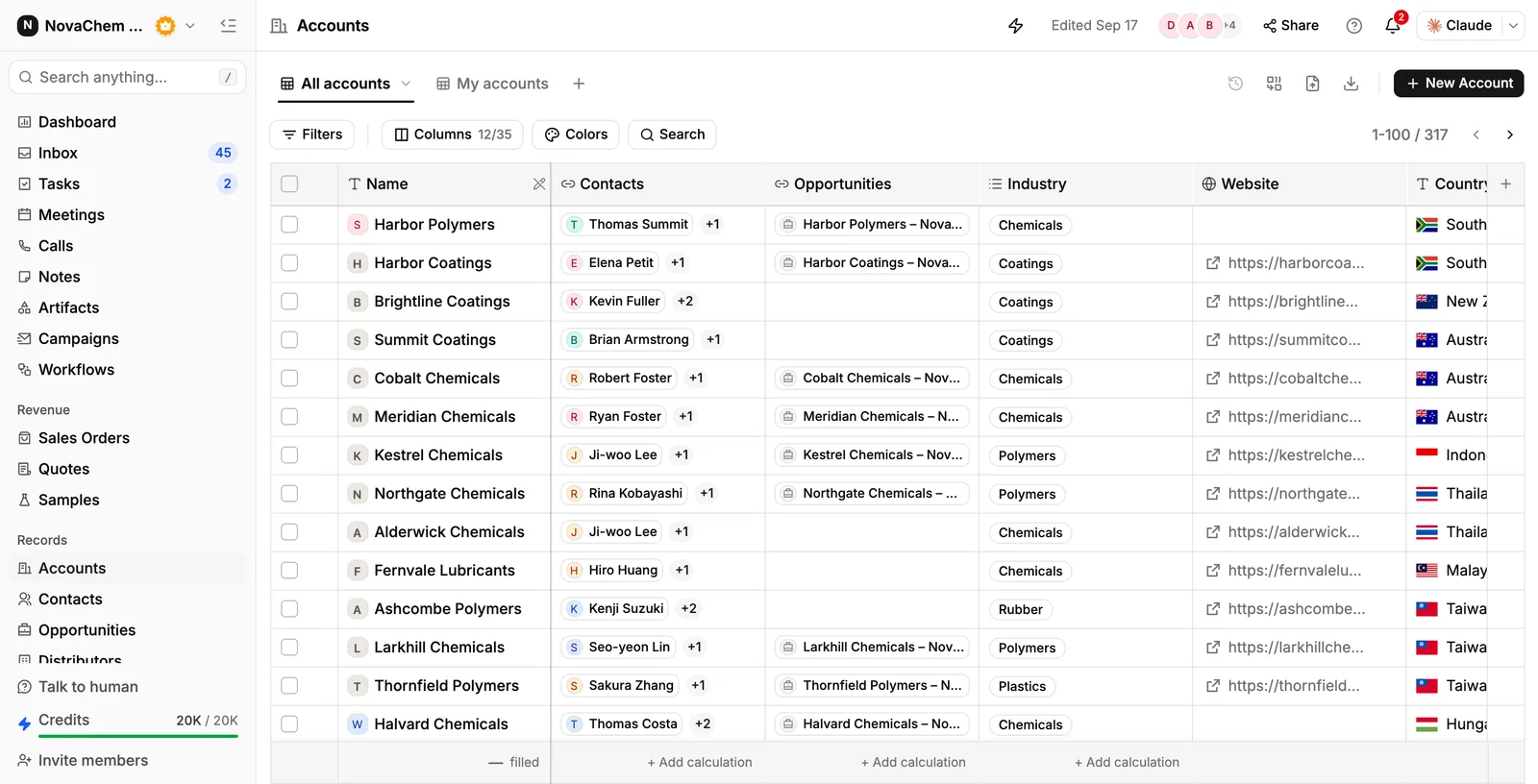
To find the facts, use reports and dashboards on pipeline and revenue, and ask Ask AI in plain words about your accounts, deals, quotes and sales orders. Email campaigns can then go to the accounts in the segments that suit them.
Frequently asked questions
How many customer segments should a B2B company have?
Three to five is enough for most. More than that and the team can't remember them or act on the differences. Add a segment only when it changes how you sell.
What is the best way to segment B2B customers?
Start with spend and how often they reorder, then add type, such as distributor or end user. Choose the facts that would change your actions, not the ones that are easy to count.
How often should I review my segments?
Every quarter is a good rhythm. Accounts grow, shrink and go quiet, and a quarterly look moves them before you miss the chance to act.
What data do I need to segment customers?
Order value, order count, product lines, industry, customer type and region for each account. If some fields are blank, treat that as the first job and fill them before you draw the lines.
Can I segment customers in a CRM without a separate tool?
Yes. In PromptLab you can add a custom field for the segment on accounts and use lists and views to see each group. Reports and Ask AI help you find the facts to segment on.