



















How to set up a shared inbox for sales
Set up a shared inbox for sales in five steps: connect email, WhatsApp and Telegram, agree who answers what, set response rules and review the inbox weekly.
 By the PromptLab team29 October 20266 min read
To set up a shared inbox for sales, connect every channel your buyers use to one place inside your CRM, agree who answers which kind of message, set a response time and a handover rule, and review what's waiting once a week. The tool matters less than the rules. A shared inbox with no owners just moves the mess from five phones to one screen.
This guide is for sales leaders and founders at manufacturers and distributors, where one buyer may write by email on Monday, send a WhatsApp message on Tuesday and ask a quick question on Telegram on Wednesday. It covers what to connect, how to split the work and what to do when a rep is away. If you want the short definition first, read what a shared inbox is.
Why sales teams need a shared inbox
When customer messages live in personal mailboxes and phones, the company forgets what the rep knows. A rep goes on holiday and a quote request sits unanswered. A new rep inherits an account and can't see what was promised. A manager has no way to tell whether the buyer who asked for a price on Tuesday ever got one.
A shared inbox keeps the conversation with the company, not with one person. In product sales that matters more than usual, because the message is often about something with money attached: a quote, a sample, a delivery date or a price list.
What to connect first
List the channels your buyers really use before you connect anything. Look at your last twenty orders and ask where the first message came from.
- Email. Almost every team starts here. You can capture email from Gmail, Outlook or your own mail server (IMAP).
- WhatsApp. Many buyers prefer it for quick questions. PromptLab connects your WhatsApp Business number.
- Telegram. PromptLab connects your company's own Telegram bot. The buyer messages first, so share the bot link where buyers will find it.
Connect the channels that carry real traffic and leave the rest. You can add another later. For the channel-specific details, see how to use WhatsApp for B2B sales and how to use Telegram for B2B sales.
Step by step: set up the inbox
- 1
Decide who the inbox is for
Write down who needs to see messages: the reps who own accounts, the person who handles quote requests, and a manager. Anyone who answers customers should work from the inbox, not from a private mailbox.
- 2
Connect your channels
Link your mailbox, your WhatsApp Business number and your Telegram bot in the CRM. Do one channel at a time and send yourself a test message before you tell the team it's live.
- 3
Agree who answers what
Split the work by something simple a rep can apply without thinking: the account owner answers their own customers, and one named person covers messages from people the CRM doesn't know yet. Write it on one page.
- 4
Set response rules
Pick a response time you can keep. Say, "Quote requests get a reply the same working day, everything else within one working day." A rule that's too tight gets ignored.
- 5
Set up a handover for absences
Name a cover for each rep before they leave for a trade show or a holiday. The cover reads the thread on the account and answers from there.
- 6
Review the inbox every week
Spend ten minutes in your weekly sales meeting on what's waiting, what's slow and which threads need a quote or a sample. Fix the rule, not the person.
Rules that keep a shared inbox useful
A few habits decide whether the team trusts the inbox.
- One reply channel per conversation. Answer on the channel the buyer used, unless they ask to move.
- Turn a request into a task. If a message needs a quote, a sample or a call back, create a task with an owner and a date, so it can't hide inside a thread.
- Keep internal talk out of customer threads. Put internal notes on the account instead.
- Don't promise what the CRM can't show. If you agree a price or a delivery date, add it to the quote or the sales order so it isn't only in a chat.
A made-up example
Say a distributor's buyer at a cleaning-products plant emails asking for a price on drum quantities. Two days later the same buyer sends a WhatsApp message to say the order is urgent. The account owner is at a trade fair.
With a shared inbox, a colleague opens the account, reads the email and the WhatsApp message together, sees the open quote and replies on WhatsApp, the channel the buyer chose. The owner comes back to a thread that's up to date. Without one, the WhatsApp message sits on the owner's phone until Monday.
Add workflows so nothing waits
Once the rules work by hand, let the CRM do the nagging. In PromptLab, a workflow can start when an email, WhatsApp or Telegram message arrives, and create a task or post to Slack. A simple one: when a WhatsApp or Telegram message arrives, post a note to the sales channel in Slack so whoever is free can pick it up. Keep it small at first. See how to automate sales follow-ups for more ideas.
Common mistakes
- Connecting everything on day one. Start with the channels that carry real traffic.
- No owner for unknown senders. New buyers are the messages most likely to be lost.
- Replying from personal phones. The thread then lives on one phone again.
- Treating the inbox as a to-do list. Tasks belong in tasks, with dates.
- Never reviewing it. A weekly look finds the stuck threads before the customer does.
How PromptLab helps
PromptLab has a shared Inbox on every plan, with email, WhatsApp and Telegram in one place and inside the CRM. Each conversation shows the buyer's contact, account and deal beside it, and you can link a deal from the thread.
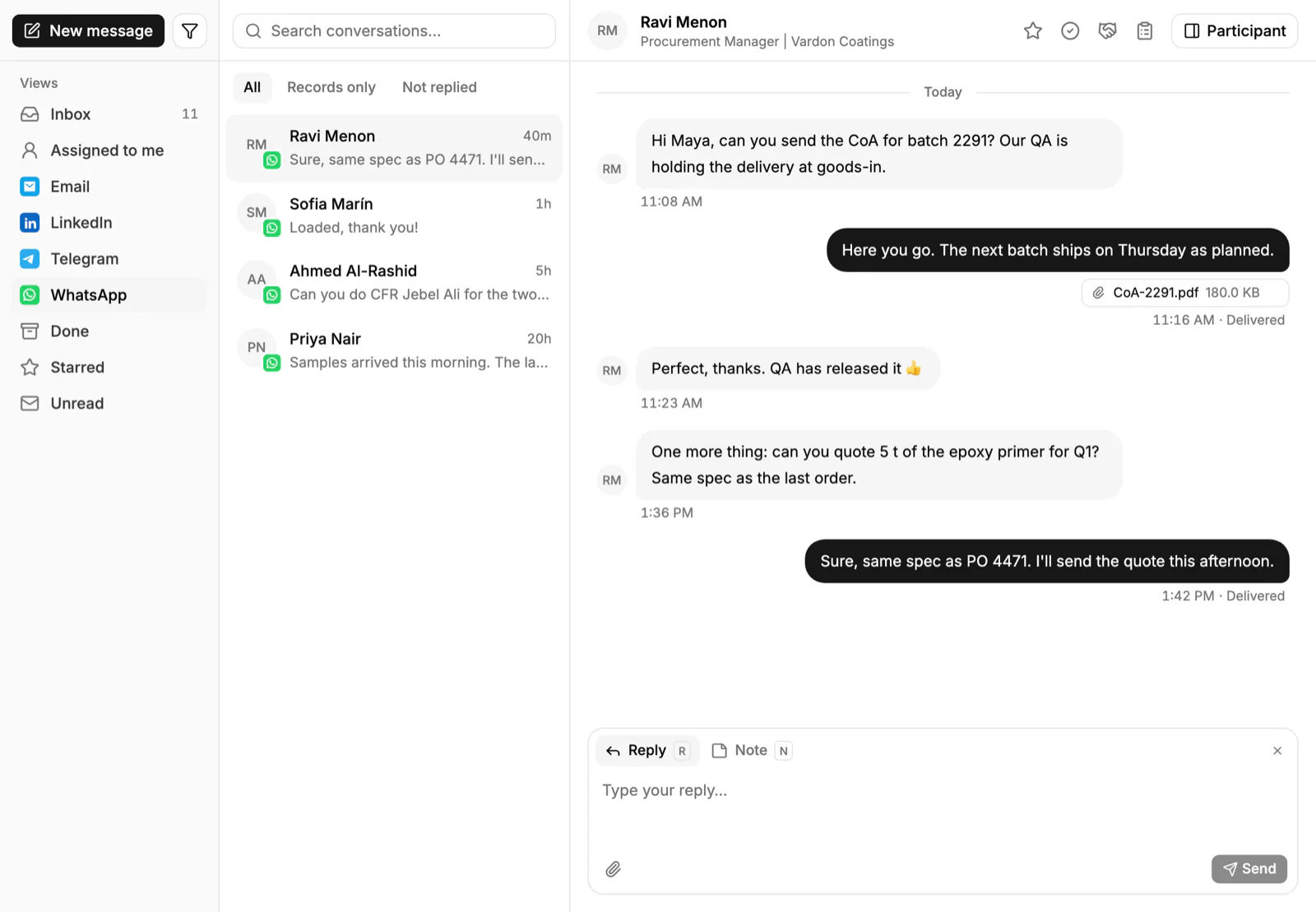
Because the Inbox is part of the CRM, messages from a linked conversation also show on the account's timeline, so the person covering for a rep can open the account and read the email and the WhatsApp thread together. Read more about WhatsApp in the CRM.
Frequently asked questions
What is a shared inbox for sales?
It is one place where the whole sales team sees and answers customer messages, instead of each person using a private mailbox or phone. In a CRM, the messages also attach to the account, so the history stays with the customer.
Which channels should a B2B sales team connect first?
Connect the ones your buyers already use. For most product sellers that means email first, then WhatsApp or Telegram if buyers write there. Check where your last twenty orders started.
How do we decide who answers which message?
Keep it simple. The account owner answers their own customers, and one named person covers new senders. Write the rule on one page and name a cover for each rep who is away.
How fast should we reply in a shared inbox?
Choose a time you can keep, such as the same working day for quote requests and one working day for everything else. A tight target that's missed every week teaches the team to ignore it.
Can a shared inbox start a task automatically?
In PromptLab, a workflow can start when an email, WhatsApp or Telegram message arrives and create a task or post to Slack. That keeps a request from sitting unanswered in a thread.