



















How to use Telegram for B2B sales
How a B2B team can use Telegram for sales: set up a company bot, decide who answers, keep chat for quick exchanges and save every conversation in the CRM.
 By the PromptLab team16 October 20266 min read
To use Telegram for B2B sales as a team, run it through a company account rather than a rep's personal one, agree who answers and how fast, keep chat for short practical exchanges and save every conversation in your CRM. Telegram is where some buyers prefer to talk. The risk is that those conversations sit on one person's phone.
This guide covers how to run Telegram as a team channel for companies that sell physical products. For ready-made wording, see our Telegram sales message templates. For how it compares with the other big chat app, see how to use WhatsApp for B2B sales. To compare tools, read best CRM with Telegram integration.
Why some B2B buyers use Telegram
In some regions and industries, Telegram is where buyers and suppliers already talk. A buyer of ingredients, packaging or building materials may use it all day, so asking a price, confirming a delivery or sending a photo of a pallet takes seconds.
Telegram works on a phone and on a desktop, and supports text, voice messages, photos and documents. That makes it a good place for short, practical exchanges. It is a weaker place for contracts, formal quotes and anything that needs sign-off. Treat it as a fast lane beside email.
Not every market uses Telegram. If your buyers live in WhatsApp or email, follow them there. Add Telegram only where buyers ask for it.
Step 1: Use a company bot, not a personal account
A personal Telegram account ties the whole history to one rep. When that person is away or leaves, the buyer's messages go unanswered.
A better set-up is a bot that belongs to the company. A Telegram bot is an account that a business creates through Telegram's own bot tools, and a tool such as a CRM can then read and reply to the messages it receives. Name it after your company so buyers know who they are talking to, and add a clear profile photo and description.
In this set-up the buyer messages the bot first. That is useful: the conversation starts because the buyer wanted it, which respects the channel and avoids cold contact.
Step 2: Let buyers know it exists
Because the buyer has to start the chat, they need to know the bot is there. Put the link where buyers already look:
- In your email signature, such as "Quick questions? Message us on Telegram."
- On quotes and order confirmations.
- In a line at the end of a follow-up after a sample or a meeting.
- On your website contact page.
Step 3: Agree who answers and how fast
A shared channel needs rules, written down:
- 1
Name the person on duty
One person per day or half-day watches the channel. Everyone else knows an answer is coming.
- 2
Set a reply target
For example, a first answer within a working hour. Choose a promise you can keep.
- 3
Hand over to the account owner
The person on duty answers first, then passes the chat to the rep who owns the account: "I'm passing you to Ali, who looks after your orders."
- 4
Cover time zones
If your buyers are several hours ahead or behind, say when you are online, so silence is not a surprise.
Step 4: Decide what belongs in Telegram
A clear split keeps chats useful.
| Good in Telegram | Better in email or a document |
|---|---|
| Quick price or availability check | Formal quotes and terms |
| Delivery and tracking updates | Contracts and legal wording |
| "Did the sample arrive?" | Data sheets and certificates |
| Reorder requests | Long specification discussions |
| Photos of a label, pallet or damage | Anything the buyer's finance team needs |
Say a buyer asks in chat for 2 tonnes of a grade you stock. The rep confirms the grade and the delivery point in the chat, then sends the quote as a document and adds a short cover note. The chat stays fast and the commitment is on record.
Step 5: Write messages that are easy to act on
Buyers read Telegram on a phone, between other tasks. Good messages are:
- Short: one topic per message.
- Specific: name the product, quantity and date. "Your 2 t of the 40 kg bags ship Thursday" beats "your order is on its way".
- Ending in a next step: "Shall I send the quote today?"
- In the buyer's language: reply in the language they write in, if someone on the team can follow the thread.
If a buyer sends a voice message, write down any numbers or dates they mention, so nothing is lost. Be careful with files too: a photo is fine, but send price lists and certificates as proper documents from your CRM or email.
Step 6: Keep every conversation in the CRM
This step turns Telegram from a habit into a sales channel. Three rules help:
- Link each chat to an account and contact. Anyone opening the account sees what was said.
- Write agreed facts onto the deal the same day. A quantity, price or date agreed in chat belongs on the quote or the sales order.
- Give every chat a next action. A task with a date means a reply does not depend on memory.
A manager can then review chats as they review email: to coach, to catch a missed follow-up or to see what the buyer asked three months ago. Our guide to the shared inbox explains the idea.
Telegram for B2B sales, team set-up
Mistakes to avoid
- Running it from a personal phone. The history leaves with the rep.
- Quoting a price in chat with no document. Months later, nobody can prove what was agreed.
- Leaving messages unread overnight. Set expectations about hours.
- Treating it as a broadcast tool. It is a conversation channel.
- Keeping chats outside the CRM. If the account does not show it, the next person will not know it happened.
How PromptLab helps
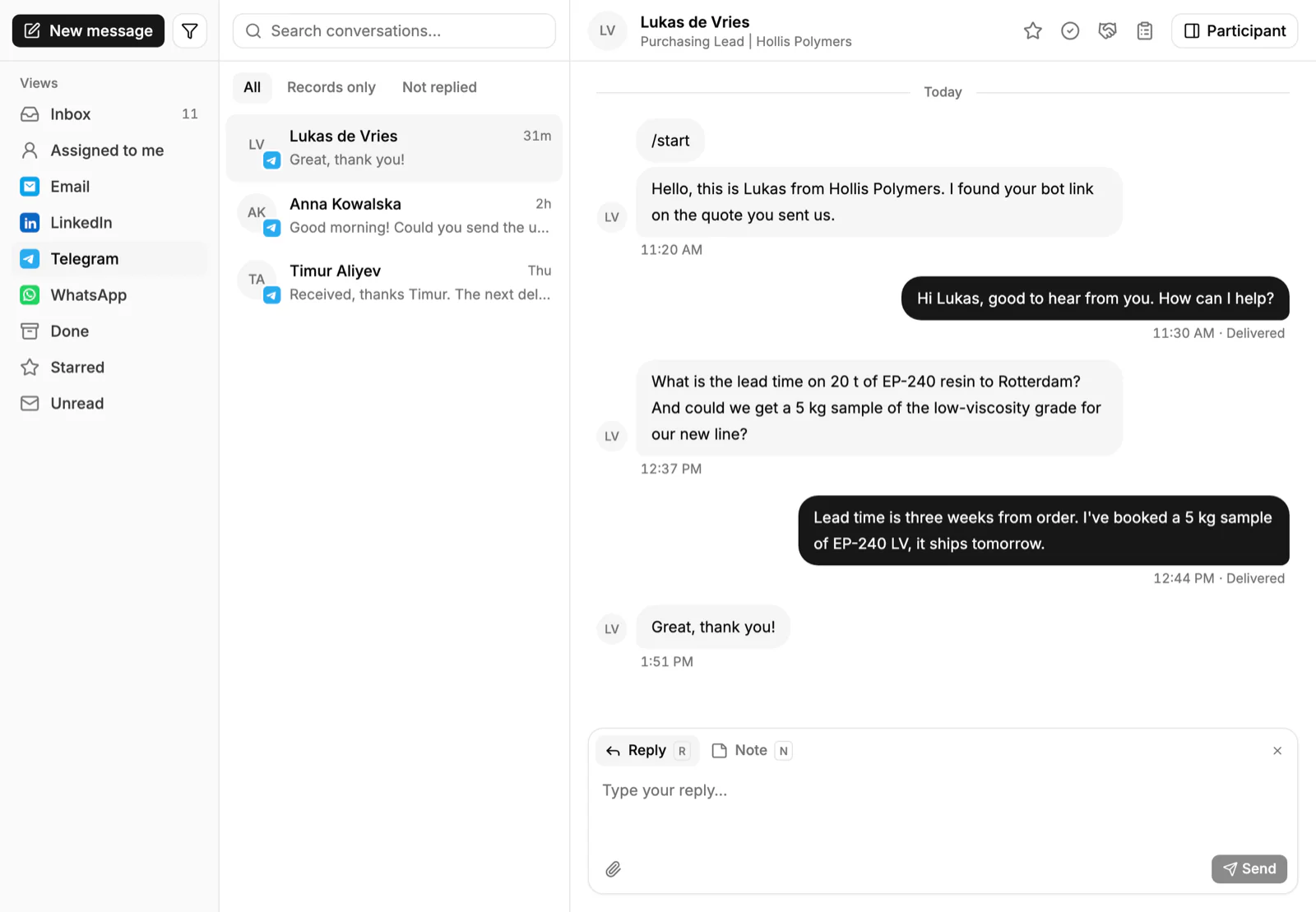
PromptLab runs Telegram on your company's own Telegram bot. The buyer messages the bot first, and the conversation lands in the shared Inbox with email and WhatsApp. Your team replies from the CRM, and a colleague can pick up a thread without asking the first rep what was said.
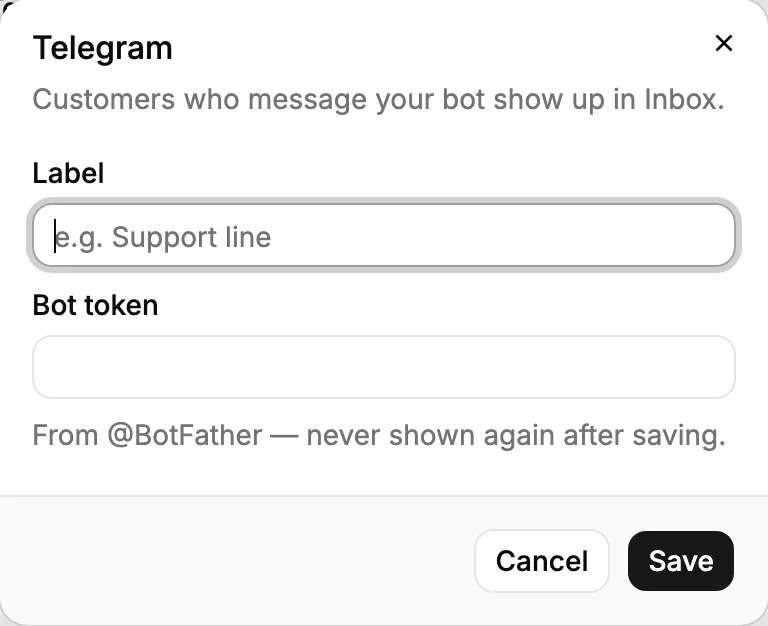
Connecting takes a bot and a few steps in settings.
From the same account you can build a quote from the customer's price list, track the sample and see the sales order. A workflow can create a task when a quote changes status or a deal changes stage, and a daily digest can go to Slack, Telegram or WhatsApp. See how Telegram works in PromptLab, or the WhatsApp page if your buyers use both.
Frequently asked questions
Is Telegram good for B2B sales?
It suits buyers who already use it every day, which depends on your market. Use it for quick questions, delivery updates and reorders, and use email and documents for quotes and contracts.
Can a company use Telegram without a personal account?
Yes. A company can create a Telegram bot, and a CRM can receive and answer the messages sent to it. That keeps the history with the company, not with one person.
Can several people answer from one Telegram bot?
Yes, if the bot is connected to a shared tool. In PromptLab the bot's conversations arrive in the shared Inbox, and your team replies from the CRM.
Who has to message first on Telegram?
With a company bot, the buyer messages first. Put the bot link in your signature, quotes and follow-ups so buyers know where to find you.
Should I use Telegram or WhatsApp for B2B sales?
Use the one your buyers use. Some teams offer both. What matters is that both land in one shared Inbox and are saved against the account.