



















CRM for construction equipment dealers
How construction equipment dealers sell excavators, loaders and attachments, from demos and trade-ins to parts and service, and a CRM setup for it.
 By the PromptLab team7 November 20266 min read
A construction equipment dealer sells excavators, loaders, telehandlers, compactors and attachments to contractors, rental companies, quarries and municipalities. Machines are expensive, bought rarely and followed by years of parts and service. A CRM for that trade has to hold each contractor's fleet, the quotes and the next reason to call.
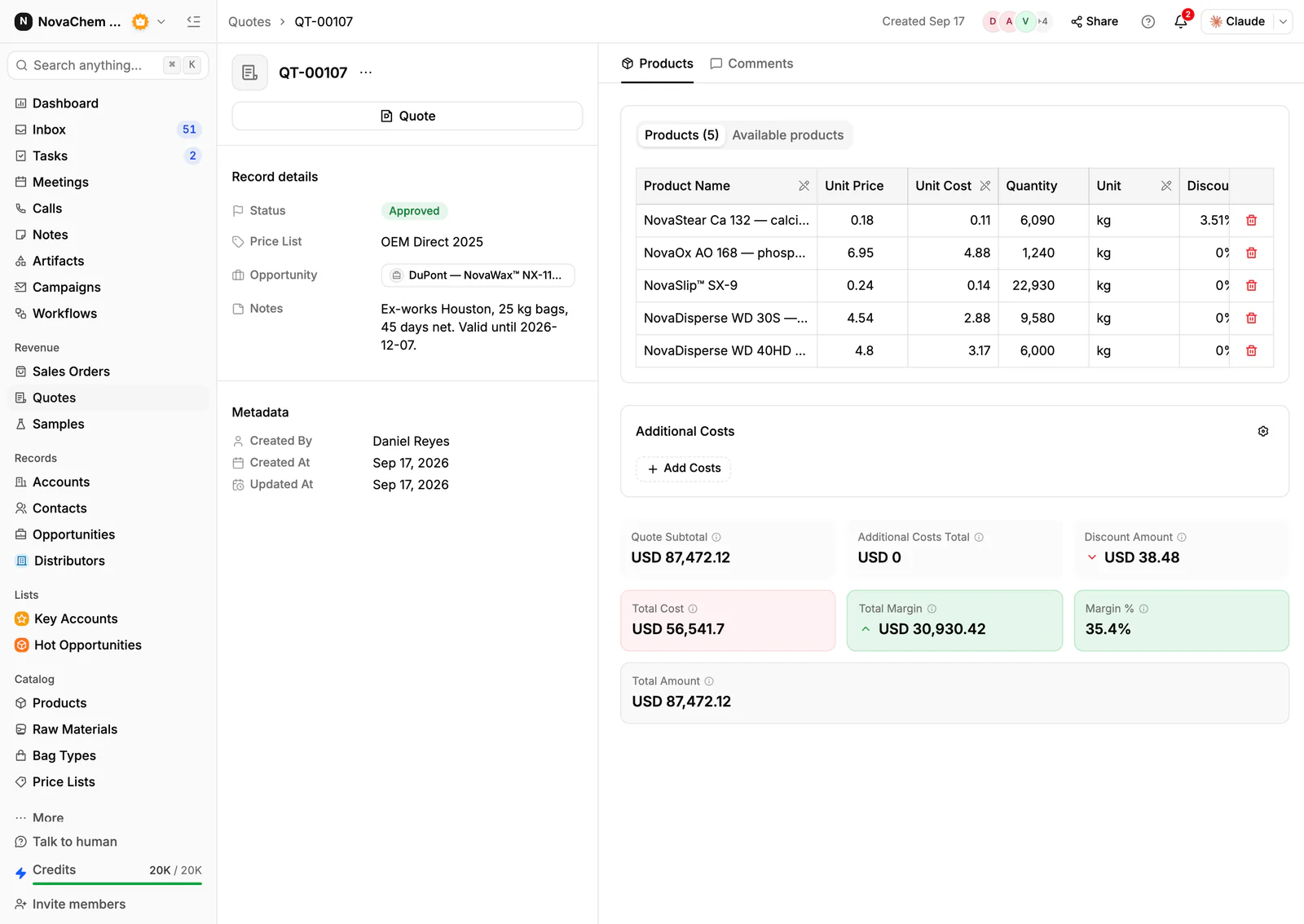
In PromptLab, quotes are built from your products with the margin on each line, demos are tracked as samples on the deal, and sales orders sit on the account. The farming equivalent is CRM for agricultural machinery dealers, and the heavier mining side is in CRM for mining equipment suppliers.
How does construction equipment actually sell?
A dealer's revenue comes from several lines: new machines, used machines, attachments, parts and service, and sometimes rental. Each line has a different buyer rhythm.
New machines are bought by contractors who have just won work, by rental companies refreshing a fleet, and by public bodies through tenders. The decision takes weeks, and the buyer compares two or three brands on price, availability, finance and who will come when the machine stops. Used machines sell fast and depend on a dealer who knows what is on the yard. Parts and service are the steady line: filters, wear parts, repairs and scheduled maintenance.
Timing follows the building season and the contractor's order book. Spring and the start of big projects bring enquiries. The quiet months are for demos, fleet reviews and service reminders.
Trust decides ties. Contractors lose money every hour a machine is down, so they buy from the dealer who answers the phone and has the part.
What do buyers ask for before they commit?
- A demonstration on their site or your yard. Log each demo as a sample on the deal, with the machine, dates and feedback.
- A quote with attachments, such as buckets, breakers and couplers, and with or without a trade-in. Build the lines from your products.
- Finance or rental-to-buy options. These are arranged through a finance provider, so the CRM keeps the quote and the conversation, not the finance contract.
- Delivery and handover. Record the agreed date on the sales order and the quote's Notes.
- Warranty, parts and service cover. Attach the service agreement to the account's Files tab.
- For exports, an Incoterm. Dealers who ship abroad often sell FCA or FOB, or CIF to a port. FOB and CIF are sea-only rules, while FCA works for any mode, including a machine handed over at a terminal. See what is FOB and what is CIF.
What pipeline stages fit a dealer?
PromptLab has one deal pipeline per workspace. Tell new, used, parts and service deals apart with a custom field, and save a view for each. A workable set of stages:
| Stage | Entry condition |
|---|---|
| Enquiry | A contractor or rental company asks about a machine |
| Demo booked | A demo is logged with a date and a machine |
| Quote sent | A quote is out, with attachments and any trade-in noted |
| Negotiation | Price, trade-in, finance and delivery are being agreed |
| Won | The buyer agrees and a sales order exists on the account |
| Delivered and serviced | The machine is handed over and the first service is booked |
What must the CRM track?
- Contractors and contacts. The owner decides, the site manager or fleet manager uses the machine, and the accountant releases the money. Record each role.
- The fleet each account runs: make, model, year and hours, as custom fields or notes on the account, with a task when a machine is due for replacement.
- Machines as products, with custom fields such as serial number, hours and condition for used stock.
- Quotes with the margin on every line, and a status: Draft, Pending or Approved.
- Expected value, expected close date and next follow-up date. Value and follow-up are built in, and an expected close date is a custom date field.
- Messages in every channel. Site managers send photos and questions on WhatsApp and Telegram. The shared Inbox links each thread to the contact, and the messages show in the account's activity.
How do you set this up in PromptLab?
- 1
Import accounts and products
Bring in contractors, contacts and your catalogue from CSV or Excel. Add product fields for serial number, hours and condition, and account fields for the fleet.
- 2
Log every demo
Record each demo as a sample on the deal, with the machine, dates and the buyer's feedback. How to track product samples covers the routine.
- 3
Quote from your products
Pick the machine and its attachments. Line discounts show as you build, and so does the margin on each line. Name extra costs such as delivery and add them to the total. How to write a sales quote covers the layout.
- 4
Record the trade-in
Put the trade-in and its valuation in the quote's Notes, and on the deal as a note. A quote has one Notes field and no expiry date, so write the validity in it.
- 5
Create the sales order
Approving a quote does not create a sales order. When the deal is won, create the order on the account, with the Incoterm if you export, payment terms and the planned delivery date.
- 6
Book the first service
Create a task for the owner for the first service date. A workflow can create a task when a deal changes stage. Tasks don't repeat, so create the next service reminder when you close the last.
How does PromptLab compare for dealers?
Swipe the table sideways to see every CRM →
| Checked on 30 September 2026 | PromptLab |  Pipedrive |  Salesforce |  Close |
|---|---|---|---|---|
| Pricing | ||||
| Paid plans, a month | $11.99 – $99per seat | $14 – $79per seat | $25 – $550per seat | $9 – $139per seat |
| Number of plans | 3 | 4 | 5 | 4 |
| Free trial | ||||
| Billing | Billed monthly | Billed annually | Billed annually | Billed annually |
| Import from CSV and Excel | ||||
| Sales management | ||||
| Deal pipelines | From$35/month | |||
| Quotes | From$59/month | From$100/month | ||
| Sales orders | From$100/month | |||
| Sample tracking | ||||
| Price lists | From$100/month | |||
| Meetings and calls | ||||
| Meeting recording and transcripts | Add-on | |||
| AI meeting summaries | Add-on | |||
| AI follow-up email drafts | From$59/month | Add-on | ||
| Meeting scheduler and call dialer | From$23.99/month | From$39/month | Add-on | |
| AI and automation | ||||
| CRM fields filled in from calls | From$195/month | |||
| Connect Claude or ChatGPT (MCP) | From$195/month | |||
| Workflow automation | From$39/month | From$99/month | ||
| API and webhooks | From$23.99/month | From$195/month | ||
| Conversations | ||||
| Gmail and Outlook email sync | From$39/month | |||
| WhatsApp conversations | From$39/month | Add-on | ||
| Telegram conversations | ||||
| Save LinkedIn profiles | Via marketplace | Via marketplace | ||
| Privacy and security | ||||
| Single sign-on (SSO) | From$99/month | Google only |
Pipedrive is one of the easiest sales CRMs to learn. It has no sample tracking, and quotes wait for Premium at $59 a seat a month, billed annually. Salesforce is the most configurable CRM there is, with five editions from $25 to $550 a user a month, billed annually, and quotes, sales orders and price lists from Pro Suite at $100 a user a month.
Close is a calling-first CRM priced from $9 to $139, billed annually. Quotes, samples and price lists are missing, pipelines start at $35 a seat and workflows at $99. See the Pipedrive and Salesforce comparisons. Prices are as checked on 30 September 2026.
Frequently asked questions
What should a CRM for an equipment dealer include?
Accounts and contacts, a note of each customer's fleet, quotes built from your products with line margins, sales orders, and every message in one place. PromptLab has these on every plan.
Can I track used machines in a CRM?
Yes, as products with custom fields for serial number, hours and condition. PromptLab is not an inventory system, so keep yard stock and availability in your dealer system.
How do I handle trade-ins?
Record the trade-in and its valuation in the quote's Notes and as a note on the deal. The quote then prints with the agreed basis.
Can the CRM track rentals?
PromptLab has no built-in rental or booking record. You can track a rental enquiry as a deal and the paperwork in the account's Files tab.
Is there a free trial?
Basic and Professional come with a 14-day free trial, with no card needed. There is no free plan.
Sources
Prices and features of other CRMs come from each vendor's own pages, on the dates below.
- Pipedrive, checked on 30 September 2026: Pricing, MCP server, Nova, Exporting data
- Salesforce, checked on 30 September 2026: Sales Cloud pricing, Sales Engagement pricing, Agentforce MCP support
- Close, checked on 30 September 2026: Pricing, Facts for AI agents, Security, Developer platform, Exporting data