



















CRM for industrial automation distributors
How automation distribution sells PLCs, drives, sensors and panels to integrators and panel builders, and a CRM setup that tracks BOMs, quotes and spares.
 By the PromptLab team6 November 20267 min read
An industrial automation distributor sells PLCs, drives, sensors, HMIs, relays and industrial networking to panel builders, system integrators, OEMs and plant maintenance teams. The sale is rarely one part. It is a bill of materials for a panel, a project that runs for months, or a spare for a line that has stopped. A CRM for this trade has to hold the part list on the quote, the lead time of the slow lines and the account's installed base, so the rep can answer "what do they run?" before the call.
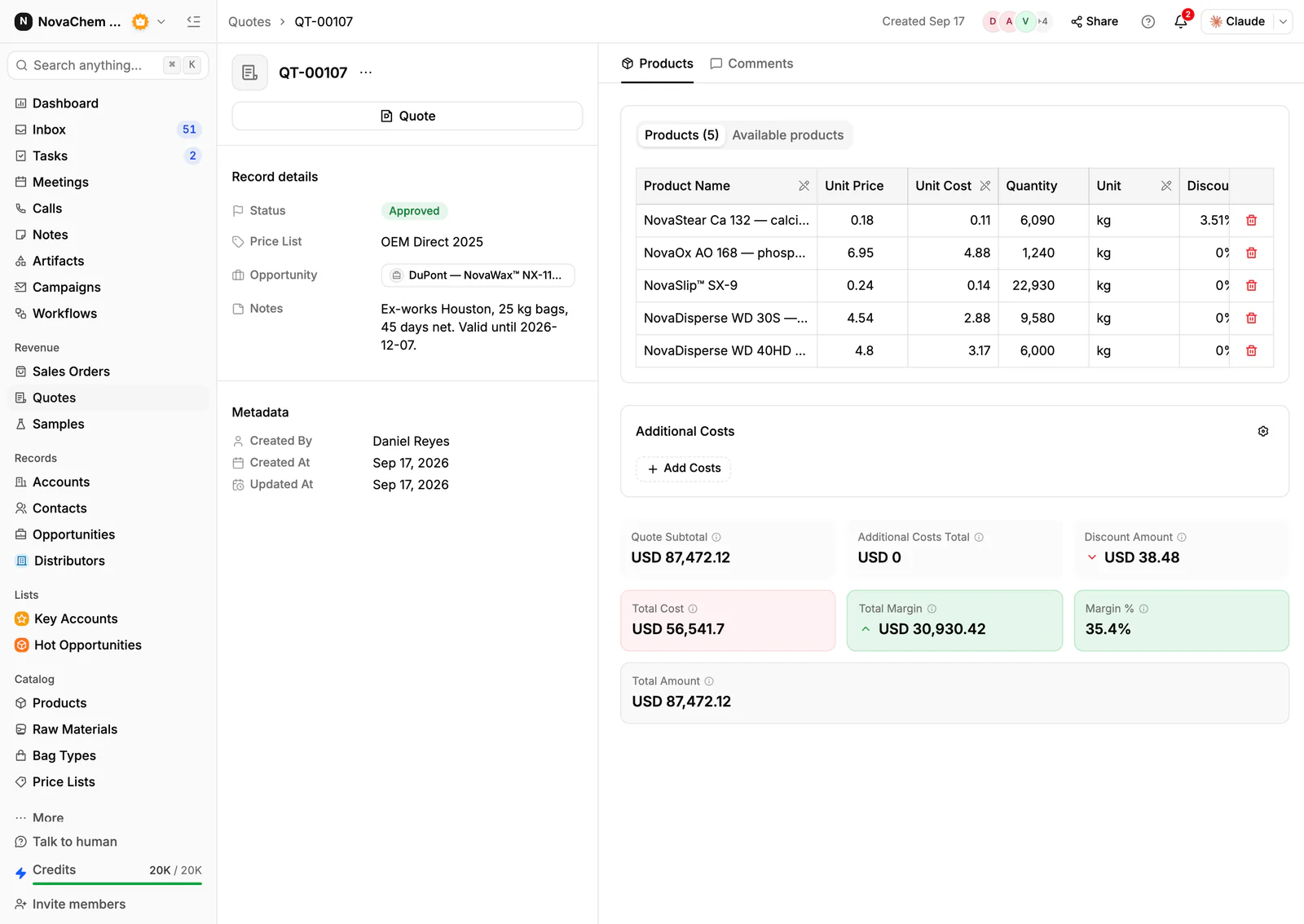
In PromptLab, a bill of materials becomes a quote built from your products and the account's customer price list, the order becomes a sales order on the account, and the thread behind it stays in the shared Inbox. The wider view is on the distributors page.
How does automation distribution actually sell?
There are three buyers, and they want different things from the same catalogue.
Panel builders and integrators send a BOM for a project and buy it in one or two drops. They compare you with two other distributors on price, stock and delivery date, line by line. The rep who quotes the whole list fast, and flags the one part that is eight weeks out, wins the trust.
OEMs and machine builders buy the same controller and drive for every machine they build. Their value is a steady forecast and a price held for the year, and they get upset when a reorder arrives at a different price.
Plant maintenance teams buy a spare when something fails. The order is a single part, urgent, and often for a product that has been discontinued by the manufacturer. The sale is the replacement advice.
What do buyers ask before they order?
Automation parts are specified by exact order code, and a near match can be the wrong part. Expect these questions:
- Exact part, series and revision. A drive with one extra letter in its code can be a different power rating or a different fieldbus. Keep the full order code, the series and the lifecycle status as product fields, so the rep quotes what the buyer asked for.
- Replacements for obsolete parts. The buyer has a controller that is no longer made and wants the successor. Store the successor and any compatibility notes on the product, so every rep gives the same answer.
- Stock against lead time. One BOM line is on the shelf and the next is on a long order. Say which in the quote's notes. What is lead time covers the term.
- Datasheets and manuals. Attach the current files to the account's Files tab when you send them, so you can see which revision a buyer received.
- Project pricing. An integrator quoting a customer's project asks for a project price. Agree it in a price list for that account rather than in an email thread.
What happens on a project?
A panel builder wins a job, then buys the parts. If you lose track of that chain, you quote the same BOM three times and never learn which job won.
Treat the end job as part of the deal. Add deal fields for the project name, the end customer and the expected order date (an expected close date is a custom date field on a deal). When the integrator says the job is won, the deal moves on and you raise the sales order. When it is lost, the deal closes with a loss reason from the fixed list, such as Price, Competitor or Timing, and the note says why. A year of those notes tells you whether you lose on price or on delivery.
Many distributors also register big projects with the manufacturer to protect their margin. Add a yes or no field, a registration reference and an expiry date to the deal, and a saved view of registered projects sorted by expiry shows which are about to lapse.
What pipeline stages fit an automation distributor?
PromptLab has one deal pipeline per workspace, with stages you choose. Mark each deal as a project, a spare or an OEM programme with a field, and save a view for each.
| Stage | Entry condition |
|---|---|
| BOM received | The buyer has sent a part list or drawings |
| Parts confirmed | Order codes, series and replacements are checked |
| Quote sent | A quote is built from the account's price list |
| Project won | The integrator or OEM confirms the job |
| Order placed | A sales order exists on the account |
| Delivered | Parts have shipped, in one drop or several |
| Spares and reorders | The account returns for spares, or a standing OEM order |
Spare deals skip straight from BOM received to Order placed. That is normal.
What must the CRM track?
- A price list per account, so project, OEM and counter prices never mix. Editing a list reprices every quote linked to it, so a price change goes in a new list.
- Quotes with line discounts, a status of Draft, Pending or Approved, and named additional costs such as delivery on the total.
- Product fields for order code, series, lifecycle status and the successor part.
- The installed base, as a custom field or note on the account, listing the controller and drive families the plant runs. The next spare then writes itself.
- Trade terms on the sales order, with the account's preferred Incoterm stored on it.
- Every channel. Integrators send BOMs as Excel files by email, and maintenance engineers send a photo of a nameplate on WhatsApp.
How do you set this up in PromptLab?
- 1
Import accounts, contacts and products
Bring in accounts, contacts and products from CSV or Excel. Add product fields for the order code, the series and the successor part, and a deal field for the type: project, spare or OEM programme.
- 2
Create the price lists
Make one customer price list for each OEM and key integrator, and one for the counter. A price list imports its name and region only, so enter its prices in the app. Managing customer price lists shows the routine.
- 3
Quote the BOM
Pick the products and the price list on each quote. Put the lead time for the slow lines in the quote's Notes field, which prints on the PDF, and send it as a PDF or a public link. How to write a sales quote has the layout.
- 4
Raise the order on the account
Approving a quote does not create a sales order, so create the sales order on the account yourself and add the trade terms, payment terms and planned delivery date. Create an invoice from it.
- 5
Connect the channels
Connect email, your WhatsApp Business number and your company Telegram bot to the shared Inbox, so a nameplate photo lands on the account.
- 6
Automate the nudges
A workflow can create a task for the owner when a quote changes status or a deal changes stage, so a Pending quote on a live project does not sit quiet.
How does PromptLab compare for automation distributors?
Swipe the table sideways to see every CRM →
| Checked on 30 September 2026 | PromptLab |  Pipedrive |  Zoho CRM |  Salesforce |
|---|---|---|---|---|
| Pricing | ||||
| Paid plans, a month | $11.99 – $99per seat | $14 – $79per seat | $14 – $52per seat | $25 – $550per seat |
| Number of plans | 3 | 4 | 4 | 5 |
| Free trial | ||||
| Billing | Billed monthly | Billed annually | Billed annually | Billed annually |
| Import from CSV and Excel | ||||
| Sales management | ||||
| Deal pipelines | ||||
| Quotes | From$59/month | From$23/month | From$100/month | |
| Sales orders | From$23/month | From$100/month | ||
| Sample tracking | ||||
| Price lists | From$23/month | From$100/month | ||
| Meetings and calls | ||||
| Meeting recording and transcripts | Via marketplace | Add-on | ||
| AI meeting summaries | Add-on | |||
| AI follow-up email drafts | From$59/month | From$23/month | Add-on | |
| Meeting scheduler and call dialer | From$23.99/month | From$39/month | Via marketplace | Add-on |
| AI and automation | ||||
| CRM fields filled in from calls | From$40/month | From$195/month | ||
| Connect Claude or ChatGPT (MCP) | From$195/month | |||
| Workflow automation | From$39/month | |||
| API and webhooks | From$23.99/month | From$195/month | ||
| Conversations | ||||
| Gmail and Outlook email sync | From$39/month | |||
| WhatsApp conversations | From$39/month | Add-on | ||
| Telegram conversations | ||||
| Save LinkedIn profiles | Via marketplace | From$23/month | Via marketplace | |
| Privacy and security | ||||
| Single sign-on (SSO) | From$99/month | From$40/month |
Pipedrive is easy to learn and has a clear pipeline, from $14 to $79 a seat a month billed annually. It has no sample tracking, sales orders or price lists, and quotes start on Premium at $59. Zoho CRM has quotes, sales orders and price books from $23 a user a month, billed annually, but no sample tracking.
Salesforce is the most configurable CRM there is, with five editions from $25 to $550 a user a month, billed annually. Quotes, price lists and orders start at $100, and building them usually takes an admin or a partner. For a side-by-side look at one of them, see Salesforce vs PromptLab.
Frequently asked questions
What should a CRM for an industrial automation distributor include?
It should hold a price list per account, quotes built from your product list, sales orders, the full order code on each product and a record of every message. PromptLab includes these on every plan from $11.99 per user per month.
Can a CRM take a customer's BOM?
You can import products from CSV or Excel and build the quote by picking the products on it. A BOM that arrives as a spreadsheet still has to be matched to your products, but once it is, the quote is quick to build and the price list does the pricing.
How do I track an integrator's project through to the order?
Use one deal for the project, with fields for the end customer and the expected order date. When the job is won, create the sales order on the account. If it is lost, close the deal with a loss reason and a note.
How do I handle obsolete parts?
Add a lifecycle status and a successor part to each product. The rep who gets the call about a discontinued controller then sees the replacement straight away.
Is there a free trial?
Basic and Professional come with a 14-day free trial, with no card needed. There is no free plan.
Sources
Prices and features of other CRMs come from each vendor's own pages, on the dates below.
- Pipedrive, checked on 30 September 2026: Pricing, MCP server, Nova, Exporting data
- Zoho CRM, checked on 30 September 2026: Pricing, Features, WhatsApp integration, MCP
- Salesforce, checked on 30 September 2026: Sales Cloud pricing, Sales Engagement pricing, Agentforce MCP support