



















CRM for machine tool dealers
How machine tool dealers sell lathes and machining centres, from test cuts and long quotes to installation and service, and a CRM that tracks it.
 By the PromptLab team7 November 20267 min read
A machine tool dealer sells lathes, machining centres, grinders, presses and the tooling and spares that keep them running. A single sale can take a year and cost more than a house, and the buyer is a shop owner or production manager who has been burnt before. A CRM for this trade has to hold the long deal, the test cut, the quote with its options and the service history, because the machine you sell today is the account you service for fifteen years.
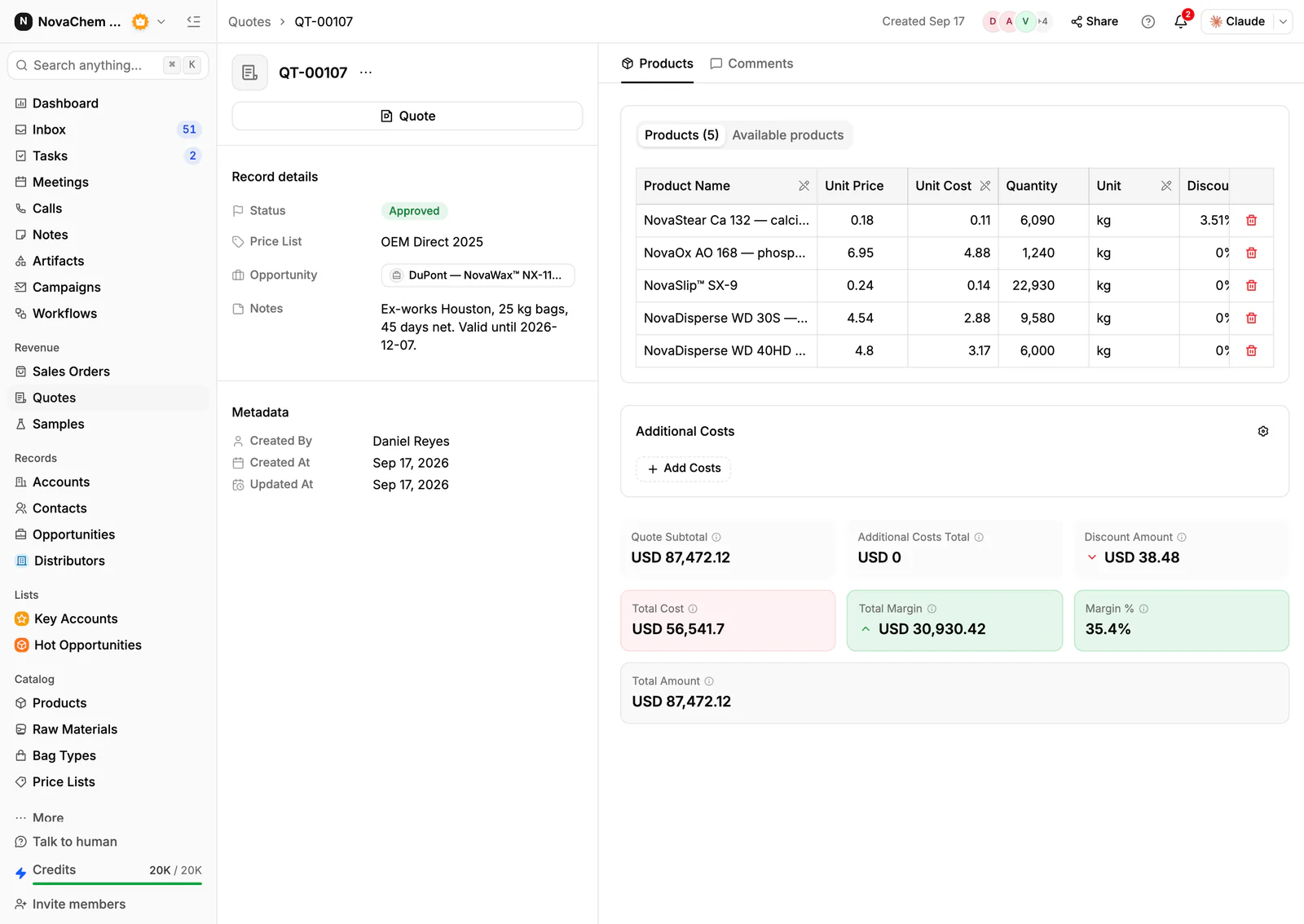
In PromptLab, a test cut is tracked as a sample on the deal, the quote carries the machine, options and delivery, and the sales order sits on the account. The wider view is on the distributors page.
How does a machine tool dealer actually sell?
The buyers are job shops, subcontract machinists, tool rooms and manufacturers with their own production lines. Each one buys differently.
Job shops buy to win a particular job or fix a bottleneck. They are price-sensitive, they ask for delivery dates first and they often finance the machine.
Manufacturers with a production line buy for cycle time and repeatability. A production engineer writes the specification, and purchasing negotiates the price afterwards.
Tool rooms and workshops buy used or new smaller machines and care most about the brand and about whether you can get a spindle repaired next month.
Most dealers represent one or more machine builders. That means the dealer, not the builder, carries the relationship: the demo, the installation, the training and every call when the machine stops.
What do buyers ask before they commit?
- Can it do my part? The buyer sends a drawing and wants to see it cut. A test cut on a demo machine, or at the builder's showroom, is the most persuasive step in the sale.
- Cycle time and accuracy. Expect questions on tolerance, spindle speed, tool capacity and what the control can do.
- Delivery and installation. Lead time from the builder, foundation or floor requirements, power and air supply, and who installs it.
- Financing, leasing and trade-in. Many buyers want an old machine taken in part exchange, and many finance the rest through a third party. Note the arrangement on the deal. PromptLab does not do the financing.
- Service and spares. What happens when it breaks, how fast an engineer arrives and how long a spare takes.
- Documents. Technical specifications, layout drawings, CE or equivalent declarations, and the operating manual.
How does a test cut work as a sample?
A test cut is the machine tool version of a product sample. The buyer sends material and a drawing, you run it, and the result goes back with the cycle time. It is the evidence the deal turns on.
PromptLab has sample tracking on every plan, and samples sit on the deal. Create a sample for each test cut, add custom fields for the part, the material and the cycle time you achieved, and move it from Sent through Under evaluation to a positive, conditional or negative result. Set a follow-up date on the deal. The routine in how to track product samples fits a test part as well as a bag of powder, and how to turn samples into orders covers the call that follows.
How should you quote a machine?
A machine quote is a base machine, a list of options, tooling and delivery. Lines have no notes of their own in PromptLab, so put the specification in the quote's Notes field, which prints on the PDF, and add delivery and installation as named additional costs.
Build the quote from products and a price list, and add a line discount where you give one. A quote has statuses Draft, Pending and Approved. It has no expiry field and no e-signature, so state the validity in the notes and send the PDF or public link.
For long builder lead times, the planned delivery date on the sales order is the date to chase. What is lead time explains why it slips, and what is Incoterms covers the delivery terms a builder quotes you.
What pipeline stages fit a machine tool dealer?
PromptLab has one deal pipeline per workspace. Keep it for machines, and use a field to tell new, used and tooling deals apart.
| Stage | Entry condition |
|---|---|
| Enquiry | A shop asks about a machine or sends a part drawing |
| Needs confirmed | Part, material, volume and budget are known |
| Test cut | A part is cut on a demo machine, or at the builder |
| Quote sent | Machine, options, delivery and terms are quoted |
| Negotiation | Price, trade-in and financing are being settled |
| Order placed | A sales order exists on the account |
| Installed | Machine is commissioned and the buyer trained |
Add an expected close date as a custom date field: deals have no built-in one. Lost deals need a loss reason from a fixed list (Price, Competitor, Timing, No budget, Product fit, Other).
What must the CRM track?
- The machines each customer owns, with model, serial number, install date and warranty end, in a custom object (Settings → Objects), one record per machine with a field that links it to the customer's account, so the machines show on the account's page. The next machine is sold from this list.
- Deals with a long cycle, each with a next follow-up date, so a deal that goes quiet for two months shows up.
- Test cuts as samples on the deal.
- Quotes with options, discounts and additional costs.
- Documents on the account's Files tab: specifications, layouts, declarations and signed paperwork.
- Service enquiries. Track a breakdown call as a task on the account with an owner, and the repair parts quote on a new deal.
- Messages from email, WhatsApp and Telegram in the shared Inbox. A shop owner on the floor sends a photo of an alarm code, not an email.
How do you set this up in PromptLab?
- 1
Import accounts and products
Bring accounts, contacts and products in from CSV or Excel. Add a product field for machine type, and an Installed machines object for what each customer already runs, so deals and the installed base can be filtered.
- 2
Set the stages and fields
Configure the stages above. Add a custom date field for the expected close and a next follow-up date on every open deal.
- 3
Log each test cut as a sample
Create a sample on the deal with fields for part, material and result. A workflow can create a task when a sample changes status, so the call after the cut is never forgotten.
- 4
Quote, then raise the order yourself
Build the quote from products and a price list. When the buyer signs, create the sales order on the account with trade terms and a planned delivery date.
- 5
Keep the service trail
Record every installation and service visit as a note on the account, and a task for each follow-up. A task dated one year after install keeps the service-contract conversation alive. Tasks do not repeat, so create the next one when you close it.
- 6
Ask for the next machine
Use Ask AI to list accounts that bought a machine more than a few years ago, then call them. How to reactivate dormant accounts has a script.
How does PromptLab compare for machine tool dealers?
Swipe the table sideways to see every CRM →
| Checked on 30 September 2026 | PromptLab |  HubSpot |  Pipedrive |  Zoho CRM |
|---|---|---|---|---|
| Pricing | ||||
| Paid plans, a month | $11.99 – $99per seat | $7 – $150per seat | $14 – $79per seat | $14 – $52per seat |
| Number of plans | 3 | 4 | 4 | 4 |
| Free trial | ||||
| Billing | Billed monthly | Billed annually, plus a $1,500–$3,500 onboarding fee | Billed annually | Billed annually |
| Import from CSV and Excel | ||||
| Sales management | ||||
| Deal pipelines | ||||
| Quotes | Add-on | From$59/month | From$23/month | |
| Sales orders | From$23/month | |||
| Sample tracking | ||||
| Price lists | From$23/month | |||
| Meetings and calls | ||||
| Meeting recording and transcripts | From$90/month | Via marketplace | ||
| AI meeting summaries | ||||
| AI follow-up email drafts | From$90/month | From$59/month | From$23/month | |
| Meeting scheduler and call dialer | From$23.99/month | From$39/month | Via marketplace | |
| AI and automation | ||||
| CRM fields filled in from calls | From$90/month | From$40/month | ||
| Connect Claude or ChatGPT (MCP) | ||||
| Workflow automation | From$39/month | |||
| API and webhooks | From$23.99/month | |||
| Conversations | ||||
| Gmail and Outlook email sync | From$39/month | |||
| WhatsApp conversations | Add-on | From$39/month | ||
| Telegram conversations | ||||
| Save LinkedIn profiles | From$150/month | Via marketplace | From$23/month | |
| Privacy and security | ||||
| Single sign-on (SSO) | From$99/month | From$150/month | From$40/month |
HubSpot is a polished all-in-one suite with a Starter plan from $7 a seat a month, billed annually. Quoting sits in the separate Revenue Hub, and sales orders, price lists and sample tracking aren't there. Pipedrive is one of the easiest sales CRMs to learn, from $14 a seat billed annually, but it has no samples, price lists or sales orders, and quotes wait for Premium at $59.
Zoho CRM is the value pick among the big generalists, with paid plans from $14 a user a month billed annually. Quotes, orders and price books start at $23, and samples aren't modelled. See Zoho CRM vs PromptLab for the detail. Prices are as checked on 30 September 2026.
Frequently asked questions
What should a CRM for a machine tool dealer include?
It should hold long deals with follow-up dates, test cuts, quotes with options and delivery costs, sales orders, the machines each customer owns and every service conversation. PromptLab covers these from $11.99 per user per month.
How do I track a test cut for a prospect?
Log it as a sample on the deal, with custom fields for the part, material and cycle time. Set a follow-up date on the deal so the result is discussed while it is fresh.
Can the CRM handle financing and trade-ins?
PromptLab does not do financing. Record the trade-in machine and the lender's arrangement in the deal's notes or custom fields, and attach paperwork to the account's Files tab.
How do I keep track of installed machines?
Create an Installed machines custom object with model, serial number, install date and warranty end, and a field that links each machine to its account. Filter it to see who is due a service visit or a newer machine.
Is there a free trial?
Basic and Professional come with a 14-day free trial, with no card needed. There is no free plan.
Sources
Prices and features of other CRMs come from each vendor's own pages, on the dates below.
- HubSpot, checked on 30 September 2026: Sales Hub pricing, Revenue Hub quote software, WhatsApp integration, MCP servers, Single sign-on (SSO)
- Pipedrive, checked on 30 September 2026: Pricing, MCP server, Nova, Exporting data
- Zoho CRM, checked on 30 September 2026: Pricing, Features, WhatsApp integration, MCP