



















How to organise sales tasks and reminders
Organise sales tasks so follow-ups never slip: one next step per deal, a due date on every task, a daily review and a few rules for creating and closing tasks.
 By the PromptLab team7 November 20266 min read
To organise sales tasks and reminders, give every open deal one clear next step with a due date, keep all tasks in one place instead of in heads and notebooks, review the day's list each morning, and close or reschedule a task the moment you have dealt with it. The aim is simple: no buyer waits because someone forgot.
This guide covers the system. For writing the follow-up itself, see how to write follow-up emails, and for letting software create tasks for you, see how to automate sales follow-ups.
Why sales tasks get lost
Most missed follow-ups are not laziness. They are a system problem.
- The next step lives in an email thread, a sticky note or a rep's memory.
- A quote goes out and nobody sets a date to ask about it.
- A sample ships and the "how did it test?" call depends on someone remembering.
- A rep goes on holiday, and their promises go with them.
- A meeting ends with five action points that nobody writes down.
For a company that sells on samples, quotes and repeat orders, the gaps between steps are where deals are lost. A buyer who waits a week for an answer to a price question will talk to your competitor.
The rules of a good sales task
A task is only useful if it can be done without thinking about what it meant.
- It starts with a verb. "Call Anna about the resin sample result", not "Anna".
- It has one owner. A task for "the team" belongs to nobody.
- It has a due date. A date, not "soon".
- It is linked to a record. The deal, account or contact, so the context is one click away.
- It is small enough to finish in one go. If it takes three days, split it.
- It says what done looks like. "Send the revised quote" is clearer than "Look at pricing".
Step by step: set up your task system
- 1
Pick one home for tasks
Choose the CRM, and use nothing else for customer follow-ups. Private lists, notebooks and phone reminders create a second system that nobody else can see.
- 2
Give every open deal a next step
Review the pipeline and make sure each open deal has a task with a date. A deal with no next step is stuck. Ask what the very next move is, and write it as a task.
- 3
Set follow-up moments for the usual triggers
Decide when a task is always created. For example: two working days after a quote is sent, one week after a sample ships, ten days after the last order for a regular buyer, and the same day for every action item from a meeting.
- 4
Review your list every morning
Spend ten minutes on today's tasks and anything overdue. Reorder by importance: the buyer waiting on a price comes before the tidy-up job.
- 5
Reschedule on purpose
If you cannot do a task today, move it to a real date and keep going. Never leave an overdue task sitting there for weeks: it teaches the team to ignore the list.
- 6
Review overdue tasks weekly
Once a week, the sales lead looks at overdue tasks by person. The question is not blame but what is blocking the follow-up.
Tasks tied to the sales cycle
These are the follow-ups that product sellers miss most. Build them into your routine.
| Moment | Task to create | When it is due |
|---|---|---|
| New enquiry arrives | Reply to the buyer | Same working day |
| Discovery call done | Send summary and next steps | Same day |
| Sample request approved | Ship the sample | Your usual lead time |
| Sample delivered | Ask for test feedback | A few days after delivery |
| Quote sent | Ask whether they have questions | Two or three working days |
| Quote approved | Confirm the order and delivery date | Same day |
| Order delivered | Check the goods arrived and are right | Day after delivery |
| No order for a while | Check whether they need a refill | Based on their usual cycle |
Adjust the timings to your product. A chemical that is reordered monthly needs a different rhythm from equipment bought once a year. The posts on following up on a quote and turning samples into orders go deeper on the first two.
Handling repeat reminders
Many sales jobs repeat: a monthly check-in with a key account, a quarterly review, a reorder reminder. Be honest about how your tool handles this. If it cannot repeat a task, the fix is easy: when you complete a task, create the next one at once, with its date. Treat "close this task" and "create the next" as one move.
Meetings produce tasks too
Most dropped actions are promises made on a call: "I'll send the datasheet", "we'll check the lead time". Write them down during the meeting, or let a tool do it, and give each a date before the call ends. A meeting with no tasks afterwards usually means actions were forgotten, not that there were none.
How PromptLab helps
PromptLab keeps tasks beside the records they belong to: the account, the deal or the contact. Tasks sit on every plan, with a priority, a due date and custom fields of your own. Each assignee gets a reminder 24 hours before a task is due, and a task still open when its due date passes is marked Expired, so missed follow-ups stand out instead of hiding in the list. Each deal also has a built-in next follow-up date, so the next step is visible on the deal as well as in the task list.
When a meeting is recorded, the action items become CRM tasks automatically, assigned to the meeting's creator, with a due date when the transcript gives one. Workflow automation can create a task when a quote changes status, a sample is created or a deal moves to a new stage, so the quote follow-up appears without anyone remembering it.
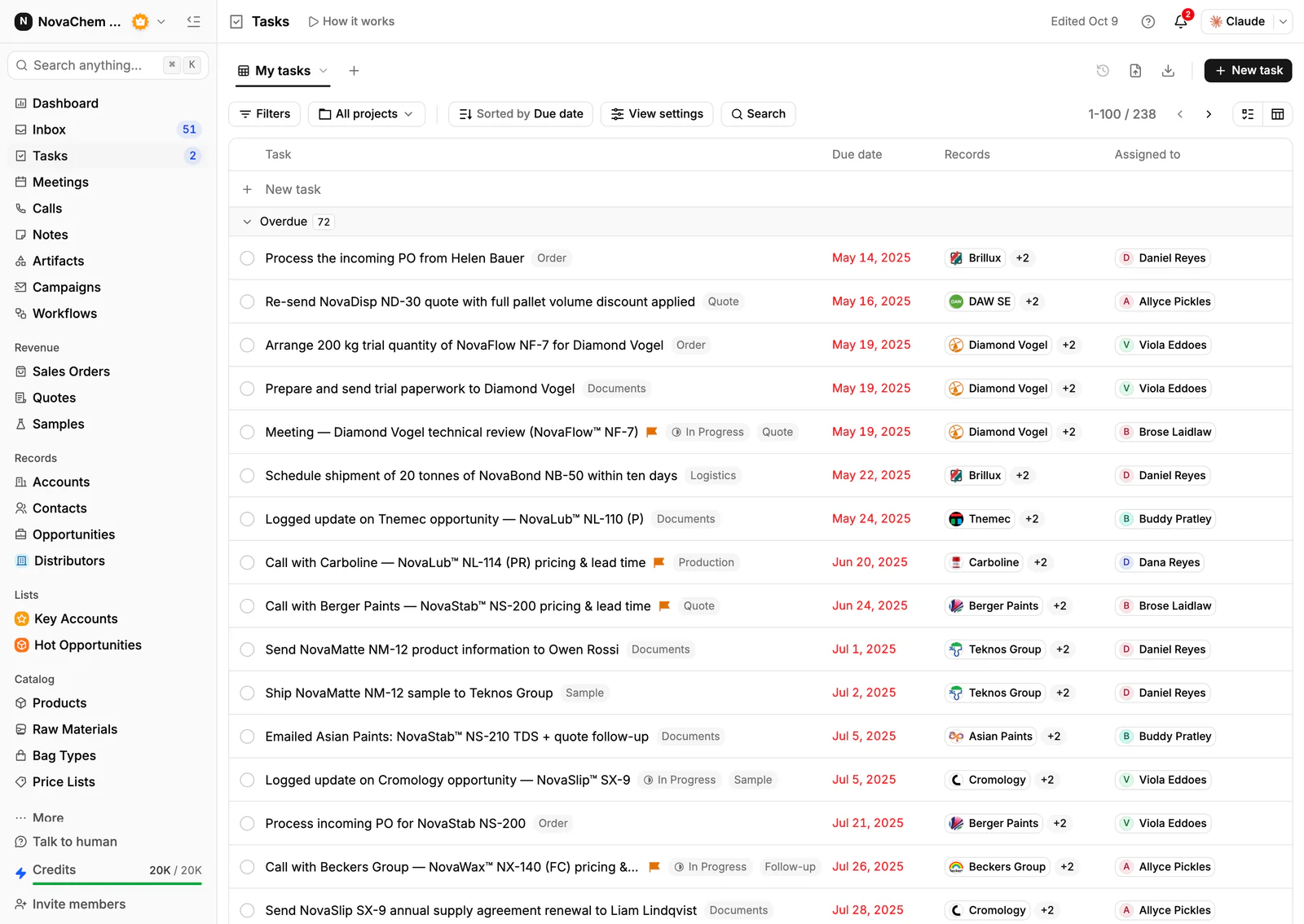
A daily digest in Slack, Telegram or WhatsApp lists overdue tasks and those due today and tomorrow, deals whose follow-up date has come, the day's meetings, overdue invoices and deals added in the last day. That is your morning review, delivered where you already look. PromptLab does not repeat tasks, so use the habit above: create the next dated task as you close the last one.
Frequently asked questions
How do I keep track of sales tasks?
Keep them all in your CRM, each linked to a deal or account, with an owner and a due date. Check today's list every morning, and make sure every open deal has one dated next step.
How many tasks should a sales rep have per day?
There is no fixed number. A better test is that nothing is overdue and every open deal has a next step. If the list keeps growing, tasks are too big or the rep has too many deals.
What should I do with overdue tasks?
Do them, reschedule them to a real date, or close them as no longer needed. An overdue list that grows quietly makes the whole system useless, because nobody can tell what matters.
Should reminders go to email or to a chat app?
Use whichever the rep actually reads in the morning. A daily summary in a chat app they already have open is usually noticed faster than another email.
Can a CRM repeat a task every month?
Some do, some do not. PromptLab does not repeat tasks. Create the next task with its date when you complete the current one, and keep the next review date in a date field on the account.