



















Best Bitrix24 alternatives in 2026
The best Bitrix24 alternatives for teams that only need to sell: samples, price lists, sales orders, quotes, WhatsApp and Telegram, with prices.
 By the PromptLab team6 November 20265 min read
Bitrix24 is a workspace for the whole company with a CRM inside: tasks, projects, chat, video calls, a drive, sites and an online store. Teams rarely leave because it lacks features. They leave because they only wanted the sales part, and the rest is more to set up than they need.
If you sell products, the gap is samples and agreed prices: Bitrix24 has no sample tracking and no price list per customer. The best Bitrix24 alternative for that team is PromptLab. Below are six others. Prices are per user a month, billed annually, as of 30 September 2026, except Bitrix24 and PromptLab, which are noted.
Why teams leave Bitrix24
Bitrix24's reasons are about focus, and about what sits around the deal.
- A company workspace, not a sales CRM. Tasks, HR tools, sites and a store come with the CRM. That is a strength for a company that wants one tool, and a lot to configure for a team that only sells.
- No samples. Its catalogue has products, price types and stock, but nothing tracks a sample. A trial batch lives in a spreadsheet.
- Plans gate the documents. Four paid plans run $49 to $399 per organisation, billed annually. Estimates start on Standard at $99, the MCP server and API on Vibe+ from $59, and single sign-on at $399.
- Calls inside Bitrix24 only. CoPilot summarises calls made on its own telephony and video calls, and phone transcription is paid per call.
In fairness, Bitrix24 wins on breadth, a free plan, an on-premise edition and one flat price for a large team. It is priced as of 3 November 2026.
The best Bitrix24 alternatives at a glance
Swipe the table sideways to see every CRM →
| Checked on 3 November 2026 and 30 September 2026 | PromptLab |  Bitrix24 |  Zoho CRM |  HubSpot |
|---|---|---|---|---|
| Pricing | ||||
| Paid plans, a month | $11.99 – $99per seat | $49 – $399per account | $14 – $52per seat | $7 – $150per seat |
| Number of plans | 3 | 4 | 4 | 4 |
| Free trial | ||||
| Billing | Billed monthly | Billed annually, 5 to 250 users | Billed annually | Billed annually, plus a $1,500–$3,500 onboarding fee |
| Import from CSV and Excel | ||||
| Sales management | ||||
| Deal pipelines | ||||
| Quotes | From$99/month | From$23/month | Add-on | |
| Sales orders | From$23/month | |||
| Sample tracking | ||||
| Price lists | Price types | From$23/month | ||
| Meetings and calls | ||||
| Meeting recording and transcripts | Via marketplace | From$90/month | ||
| AI meeting summaries | ||||
| AI follow-up email drafts | From$23/month | From$90/month | ||
| Meeting scheduler and call dialer | From$23.99/month | Via marketplace | ||
| AI and automation | ||||
| CRM fields filled in from calls | From$40/month | From$90/month | ||
| Connect Claude or ChatGPT (MCP) | From$59/month | |||
| Workflow automation | ||||
| API and webhooks | From$23.99/month | From$59/month | ||
| Conversations | ||||
| Gmail and Outlook email sync | ||||
| WhatsApp conversations | Add-on | |||
| Telegram conversations | ||||
| Save LinkedIn profiles | Via marketplace | From$23/month | From$150/month | |
| Privacy and security | ||||
| Single sign-on (SSO) | From$99/month | From$399/month | From$40/month | From$150/month |
The best Bitrix24 alternatives
PromptLab
Our pickAI-native CRM for product salesPaid plans, a month$11.99 – $99 per seatBest for: Sellers of physical products who only need the sales part
PromptLab is the CRM alone. It logs every sample request on the account and the deal, keeps each customer's price list beside it, and holds quotes on the deal and sales orders on the account, all from the $11.99 Basic plan. Reps quote from agreed prices, not memory.
It joins the Zoom, Google Meet and Microsoft Teams calls your buyers already use, records and transcribes them, and writes the summary and next steps into the CRM. Email, WhatsApp and Telegram share one Inbox. Claude or ChatGPT connect over MCP on Basic. The gaps: no free plan, and against Bitrix24's $99 Standard plan a team of more than eight sellers billed monthly, or more than 11 billed yearly, pays less there. See Bitrix24 vs PromptLab.
Zoho CRM
Sales CRMPaid plans, a month$14 – $52 per seatBest for: Teams that want quotes and orders at a low price
Zoho CRM is free for three users, then $14 to $52 billed annually. Quotes, sales orders and price books start at $23, and it sits beside dozens of other Zoho apps.
Samples aren't modelled, and call recording comes through marketplace telephony apps. It is priced per user, unlike Bitrix24's flat price per organisation.
HubSpot
Enterprise suitePaid plans, a month$7 – $150 per seatBest for: Teams whose growth comes from marketing
HubSpot is the most polished all-in-one suite, with a free CRM, marketing tools few rivals match and a $7 Starter plan billed annually.
For product sales, quoting sits in the separate Revenue Hub, sales orders and price lists are missing, and Professional or Enterprise adds a $1,500 to $3,500 onboarding fee. See HubSpot alternatives.

Pipedrive
Sales CRMPaid plans, a month$14 – $79 per seatBest for: Small teams that want a simple pipeline
Pipedrive is one of the easiest sales CRMs to learn, and its Nova AI adds call recording and CRM updates on every plan. Four plans run $14 to $79 billed annually.
There are no samples, price lists or sales orders, and quotes wait for Premium at $59. Read our Pipedrive review.

monday CRM
Sales CRMPaid plans, a month$12 – $28 per seatBest for: Teams that want to shape their own boards
monday CRM starts at $12 billed annually and includes quotes on the first plan. It is flexible, particularly if monday.com already runs your projects.
Sales orders, samples and price lists aren't there, and the AI notetaker, automations and email sync start on Standard at $17. See monday CRM pricing.

Close
Sales CRMPaid plans, a month$9 – $139 per seatBest for: Teams that sell by phone
Close is calling-first, with the dialer, email and SMS built in and Chloe, its AI teammate, summarising calls on every plan. Plans run $9 to $139 billed annually.
For product sales, quotes, samples and price lists are missing, pipelines start at $35 and workflows at $99. See Close CRM pricing.
Salesforce
Enterprise suitePaid plans, a month$25 – $550 per seatBest for: Teams ready for a full platform
Salesforce is the most configurable CRM there is: five editions from $25 to $550 billed annually, Agentforce AI and AppExchange for almost any integration. Quotes and price lists start at $100.
It needs far more setup, usually an admin or partner, and call recording is a $50 add-on.
What you keep and what you give up by leaving Bitrix24
You keep: a pipeline, WhatsApp and Telegram, call recording and summaries, and an MCP connection for an AI assistant. PromptLab covers all of these on Basic, with Claude or ChatGPT.
You give up: the all-in-one workspace. PromptLab is a sales CRM with tasks for the sales team, so the rest of Bitrix24's workspace, such as its HR tools, sites and online store, stays behind. You also give up Bitrix24's free plan and, for a large team, its flat price. Check what your reps use every day before you move.
You gain: the order side of the deal. A rep sees what was sampled, quoted and ordered on one account, and a manager sees it in reports and dashboards on pipeline and revenue.
How to choose
Look at what your reps still do outside the CRM.
- Samples and price lists in a spreadsheet: PromptLab.
- Quotes and orders at a low price, inside a broad suite: Zoho CRM.
- Marketing is the engine: HubSpot.
- A simple pipeline: Pipedrive.
- One tool for the whole company: stay on Bitrix24.
A worked example: a team of 8 that needs quotes. Bitrix24 Standard is $99 a month for the organisation, $1,188 a year. On PromptLab Basic it is 8 × $11.99 = $95.92 a month billed monthly, or 8 × $99 = $792 a year billed yearly, with samples, price lists and sales orders included. See the Bitrix24 pricing guide.
Switching from Bitrix24
Export from Bitrix24's CRM lists, then import into PromptLab. Our Bitrix24 migration guide has the detail.
Moving to PromptLab
From Bitrix24 in four steps
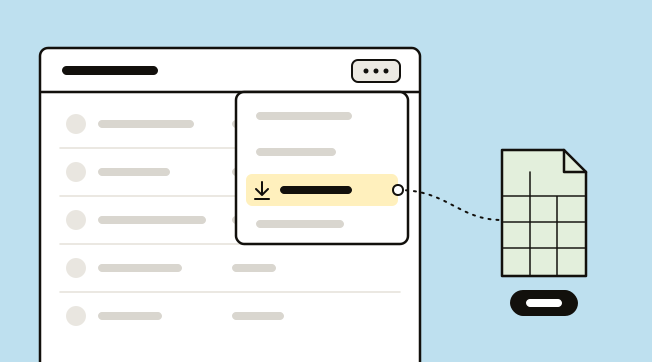
- 1Export deals, contacts and companiesIn its CRM, open Deals, switch to List view, then open Settings and pick CSV or Excel. Each pipeline exports on its own. Only contacts marked Included in export come out, so set that first with a group action.
- 2Export estimates and productsEstimates and invoices export from their own lists the same way. Tick Export detailed SKUs to keep the products on each deal.
- 3Import into PromptLabClick Import on our Accounts, Contacts or Deals list and upload the file, or pick it from Google Drive. Match the columns to our fields and run it.
- 4Reconnect your channelsConnect Gmail or Outlook, your WhatsApp number and your Telegram bot, so new conversations land in our Inbox on the right contact.
Frequently asked questions
Why do people switch from Bitrix24?
Usually because they only need the sales part. Bitrix24 is a company workspace, and it has no sample tracking or price list per customer. Estimates also start on the $99 plan.
What is the best Bitrix24 alternative for small teams?
For a team selling products, PromptLab at $11.99 a user a month. For a team that wants the lowest price, Zoho CRM is free for up to three users.
Is there a Bitrix24 alternative with WhatsApp and Telegram?
PromptLab supports both in a shared Inbox, on every plan, and so does Bitrix24. None of the others here has Telegram. Close and Zoho CRM include WhatsApp, Pipedrive adds it on Growth at $39, and HubSpot and Salesforce sell it as an add-on.
Can I import my Bitrix24 deals into PromptLab?
Yes. Export each list from Bitrix24 as CSV or Excel, then select Import on the matching PromptLab list and map the columns.
Is PromptLab cheaper than Bitrix24?
For a small team, yes. Bitrix24's Standard plan is $99 a month for the organisation, billed annually, or $1,188 a year. Our Basic plan is $99 a seat a year billed yearly, which is less for up to 11 sellers, or $11.99 a seat billed monthly, which is less for up to eight. Above that, Bitrix24's flat price is lower.
Sources
Prices and features of other CRMs come from each vendor's own pages, on the dates below.
- Bitrix24, checked on 3 November 2026: Pricing, Plan comparison, MCP server, CoPilot call processing, Exporting CRM data
- Zoho CRM, checked on 30 September 2026: Pricing, Features, WhatsApp integration, MCP
- HubSpot, checked on 30 September 2026: Sales Hub pricing, Revenue Hub quote software, WhatsApp integration, MCP servers, Single sign-on (SSO)
- Pipedrive, checked on 30 September 2026: Pricing, MCP server, Nova, Exporting data
- monday CRM, checked on 30 September 2026: Pricing, CRM overview, monday.com for Enterprise
- Close, checked on 30 September 2026: Pricing, Facts for AI agents, Security, Developer platform, Exporting data
- Salesforce, checked on 30 September 2026: Sales Cloud pricing, Sales Engagement pricing, Agentforce MCP support